
lifeplanner
mellen9999/lifeplanner
a local, private life dashboard — calendar, appointments, achievements, todos — that an llm can read and write via mcp. vanilla, stdlib-only, no cloud.
Instalação
npx convez-ai mellen9999/lifeplanner1 comando no terminal: detecta o formato do repositório (marketplace ou plugin avulso) e instala via Claude Code. Requer Node 18+ e o Claude Code instalado.
Métricas
README
A tradução para o português deste README ainda está na fila.
lifeplanner
a local, private life dashboard — calendar · appointments · achievements · todos — that an llm can read and write too. one set of plain json files on your disk, two doors into them: a vanilla web ui for you, and an mcp server for an assistant like claude. no accounts, no cloud, no tracking. your data never leaves your machine.

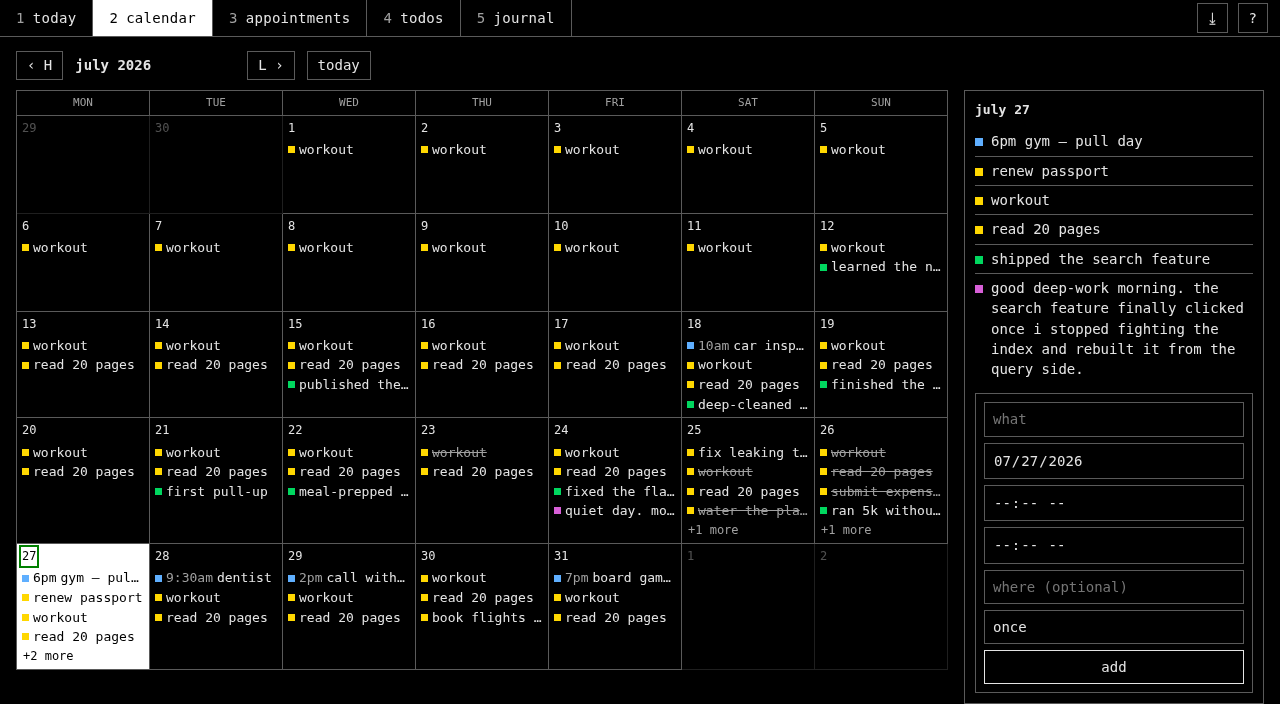
- stdlib-only web app — python 3.8+, no dependencies. clone and run.
- square, terminal-styled ui — light + dark, eight accent colors, keyboard-first (vim keys).
- routines — todos can repeat (daily/weekly); a routine like "workout" shows every day and is ticked off per-day, so it's back tomorrow.
- works on your phone — installable PWA over your private network; optional
.ics/ caldav export if you'd rather see appointments in a native calendar app. - mcp server — let an assistant log your wins, add todos, flag what's slipping, and review your week (one optional dep).
- it reaches out — optional push that nudges you: a daily standup + weekly review, with overdue alerts that escalate the longer you ignore them. as phone and desktop notifications, tap-to-open.
- crash-safe storage — atomic writes, cross-process lock, corrupt-file-safe.
quick start
git clone https://github.com/mellen9999/lifeplanner.git && cd lifeplanner
./launch.sh            # or: python3 app.pyw
opens http://127.0.0.1:8765. bound to localhost only — nothing is exposed to your network.
launching again just focuses the running window (only one server runs at a time).
no build step, no npm, no dependencies for the app itself.
how to use it
five sections (number keys switch them):
- today — your daily glance. up top, needs attention (overdue + stale todos and how long it's been since your last win) and a this week recap (completion rate, wins, busiest day); then appointments today, todos due/overdue, today's wins with a one-field win logger, the next 7 days, and a streak ribbon. open this first each day.
- calendar — month grid; click a day to see what's on it and add an appointment with the full controls right there (time, place, repeat, end-date) — no jumping to another page. colored marks: green = a win, blue = an appointment, yellow = a due todo.
- appointments — your agenda. add with a date (+ optional time) and place; set repeat (daily / weekly / every-other-week / monthly, with an optional end date) to make it recur. the list is grouped upcoming (soonest first, recurring series resolved to their next occurrence) and past — the calendar marks every occurrence and your phone gets it as a standard repeating event.
- achievements — your wins log, with a contribution heatmap + an honest, arcade-style streak. each logged day extends it and every 7th banks a shield (max 3); a missed day spends a shield to keep the run alive, but miss with no shields left and the streak resets to 0 — the shields are shown so the grace is never hidden. log small wins often; watching the streak grow is the point.
- todos — things to do; give one a due date and it becomes a reminder on the calendar + phone. each todo carries a colour by deadline pressure: red = due today / overdue, yellow = due soon (within ~3 days), calm green = plenty of time or no date — so the most urgent thing is obvious at a glance, and the top of the list is literally what to do next. today shows only what's actionable now (a far-future deadline stays parked off today until it nears); the todos page shows everything, urgency-sorted. set repeat to make a todo a daily/weekly routine (eat lunch, workout, meds) — it shows up every day in "todos due", ticked off per-day so it's back tomorrow; routines never count as "overdue" (a missed day is just a day).
every item can be edited in place (e or double-click) or deleted (× / d d, undo with u).
nothing needs saving — it's written to disk the moment you add it.
keys
| keys | action | keys | action | |
|---|---|---|---|---|
1 … 5 | switch section | h j k l | calendar: move day in grid | |
n | new item | H / L | calendar: jump month | |
j / k | move selection (lists) | e / dbl-click | edit selected | |
x | toggle todo done | enter | save edit / open day | |
X | todos: show / hide done | d d | delete selected | |
/ | filter the current list | u | undo last delete | |
t · r · ? | theme · refresh · help | esc | cancel / close |
theme and accent are saved with your data.
let an assistant in (optional mcp)
./install.sh # linux/mac — or install.bat on windows
it creates .venv, installs the mcp sdk, and prints a ready claude mcp add … line (the windows
script prints the \.venv\Scripts\python.exe path). run it, restart claude, and check /mcp. the assistant
then has these tools, all writing to the same local files the web app reads:
partner: whats_slipping (what needs attention now) · review_period (how the last N days went)
read: get_overview · get_day · get_week · get_range · list_achievements ·
list_todos · list_appointments
write: add_achievement · add_todo · complete_todo · add_appointment ·
update_achievement · update_todo · update_appointment · delete_item
writes from the assistant appear in your open ui within a few seconds; your edits are visible to it immediately. (works with any mcp client — claude desktop, claude code, etc.)
run it as a service (optional)
to keep it always reachable (for your phone, below), run the web app under your init system
instead of a terminal. a systemd user unit — pair it with loginctl enable-linger $USER so it
keeps running after you log out:
# ~/.config/systemd/user/lifeplanner.service
[Unit]
Description=lifeplanner web app
[Service]
WorkingDirectory=%h/projects/lifeplanner
ExecStart=/usr/bin/python3 %h/projects/lifeplanner/app.pyw
Environment=LIFEPLANNER_HOST=0.0.0.0
Environment=LIFEPLANNER_NO_BROWSER=1
Restart=on-failure
[Install]
WantedBy=default.target
systemctl --user enable --now lifeplanner. set LIFEPLANNER_HOST to your LAN/tailnet address (or
0.0.0.0) so the phone can reach it — keep it on a private network, never the public internet.
trust boundary, once it leaves localhost. the token only blocks cross-origin web attacks — it does not stop a same-network device, which can load the page and read the token straight from it. so everyone on the network effectively has full access. on a tailnet that's fine (every device is individually authenticated — that's the recommended setup). on a shared LAN (guest wifi, an office) it is not — put it behind a reverse proxy with HTTP Basic auth, or stick to tailscale.
to update later: git pull then systemctl --user restart lifeplanner. want it hands-off? add a
5-minute .timer that runs git pull --ff-only in the clone and restarts on change — then a push
deploys itself.
use it from your phone
the simplest way — no second calendar, nothing to sync: run lifeplanner on a machine that's reachable, and open it in your phone's browser over your private network (a LAN, or a mesh vpn like tailscale). it's the same app — an appointment you add on your phone goes straight into the one store and shows up on your desktop instantly. it's an installable PWA — "add to home screen" and it opens full-screen with its own icon, like a native app. keep it private: a LAN or tailnet, never the public internet.
most people stop here — the installed PWA is your calendar on the phone, and the nudges (below) push what matters. the two options below only matter if you want lifeplanner's appointments to show up inside another calendar app you already live in (a work/shared/family calendar you don't control). if the app itself is your calendar, skip them.
phone calendar (one-way, read-only)
appointments and due-dated todos are written to data/lifeplanner.ics on every change. to see them
on your phone:
- sync the file to your phone (e.g. syncthing), or set
ics_sync_pathindata/settings.jsonto a synced folder. - install a calendar-subscription app — ICSx5 (foss) on android.
- subscribe to the synced
lifeplanner.ics. it refreshes on a schedule.
read-only by design: you edit in the app, the phone just shows it. no always-on server, no network exposure, survives reboots.
two-way phone sync (optional, self-hosted)
want appointments you create on your phone to show up here too (and vice versa)? back the appointments entity with a caldav server instead of local json. achievements, todos and wins stay local — only appointments sync.
- run a caldav server you control — radicale is tiny and foss. create a collection (calendar) and a user/password.
pip install icalendar defusedxml(into the same venv as the app).- copy
.caldav.json.exampleto.caldav.jsonand fill in your server url, user, password. it's gitignored — your credentials never get committed. - restart the app. appointments now live on your server; on your phone, point a caldav client (DAVx5, foss) at the same collection.
it's a single source of truth — no two-store merge — so a change on either side appears on the other.
the desktop keeps a local cache and tells you (a banner) when the server is unreachable, rather than
silently showing stale data. with no .caldav.json, appointments stay local json and none of this
applies — the zero-infra default is unchanged.
keep the server private (a LAN or a mesh vpn like tailscale); don't expose caldav to the public internet.
reminders (optional)
get a notification 1 day and 1 hour before each appointment, pushed from wherever lifeplanner runs — no calendar app, no background-sync fragility. it uses ntfy (foss push, self-hostable so your data stays private).
- run an ntfy server (or use ntfy.sh) and pick a hard-to-guess topic.
- on a timer, run
reminders.pywith:
(a systemdLIFEPLANNER_NTFY_SERVER=http://your-ntfy:2587 \ LIFEPLANNER_NTFY_TOPIC=your-secret-topic \ LIFEPLANNER_REMINDERS=1440,60 \ python3 reminders.py.timerevery 5 min is ideal; offsets are minutes-before for timed appointments — all-day ones get an evening-before + morning-of nudge.) - install the ntfy app and subscribe to the same server + topic.
it's stateful (each reminder fires once) and does nothing without the env vars, so it's fully optional.
nudges — the forcing function (optional)
a planner you have to remember to open is just a todo list. nudge.py reaches out instead: a
daily standup ("2 overdue · 3d since a win") and a weekly review pushed to your phone, with
overdue alerts that escalate the longer you ignore them — 1-2 days normal, 3-6 high priority,
7+ days urgent (bypasses do-not-disturb, your phone rings). ignoring becomes expensive.
it rides the same ntfy setup as reminders. run it on a timer (every ~15 min):
LIFEPLANNER_NTFY_SERVER=http://your-ntfy:2587 \
LIFEPLANNER_NTFY_TOPIC=your-secret-topic \
LIFEPLANNER_URL=http://your-host:8765 \
python3 nudge.py
it only pushes when something's actually slipping (no nagging on a clean day), fires each nudge at
most once per day / per week, and does nothing without the env vars — fully optional. tune the timing
with LIFEPLANNER_STANDUP_HOUR (default 8), LIFEPLANNER_REVIEW_DOW (mon=0, default 6=sun),
LIFEPLANNER_REVIEW_HOUR (default 18); set LIFEPLANNER_NUDGE=off to silence it.
set LIFEPLANNER_URL (your app's address) and tapping a notification opens lifeplanner. ntfy
isn't just phones — subscribe to the same server + topic from the ntfy web app or desktop client
and the nudges arrive as desktop notifications too (handy if you live at a computer). a minimal
always-on bridge is just ntfy subscribe <server>/<topic> 'notify-send "$title" "$message"' under a
user service.
configuration
all optional, via environment variables:
| var | default | purpose |
|---|---|---|
LIFEPLANNER_HOST | 127.0.0.1 | bind address (keep localhost unless you know why) |
LIFEPLANNER_PORT | 8765 | http port |
LIFEPLANNER_DATA | ./data | where your json + .ics live (point at a synced/XDG dir) |
LIFEPLANNER_NO_BROWSER | unset | set to 1 to never auto-open a browser (e.g. when run as a service) |
LIFEPLANNER_NTFY_SERVER · _TOPIC | unset | ntfy server + topic for reminders/nudges (both required to push) |
LIFEPLANNER_URL | unset | your app's address; makes notifications tap-to-open |
LIFEPLANNER_REMINDERS | 1440,60 | reminder offsets in minutes before a timed appointment |
LIFEPLANNER_STANDUP_HOUR | 8 | hour the daily standup nudge may fire |
LIFEPLANNER_REVIEW_DOW · _HOUR | 6 · 18 | weekly review day (mon=0) + hour |
LIFEPLANNER_NUDGE | unset | set to off to disable nudges entirely |
LIFEPLANNER_CALDAV | unset | set to off to force local-only appointments (ignore .caldav.json) |
layout
app.pyw          web server + rest api (stdlib only)
store.py         shared data layer — atomic writes, file lock, .ics generation
mcp_server.py    mcp server (assistant's door; needs the mcp sdk)
caldav_store.py  optional caldav backend for two-way phone sync (needs icalendar/defusedxml)
reminders.py     optional ntfy push reminders (run on a timer)
nudge.py         optional daily standup + weekly review pushes (the forcing function)
notify.py        shared ntfy push helper (reminders + nudge publish through it)
review.py        planning-partner derivations (what's slipping / how a period went)
web/             ui — vanilla html / css / js
tests/           test suite (python3 -m unittest discover -s tests)
launch.sh        linux/mac launcher        launch.bat   windows launcher
install.sh       optional mcp setup        install.bat  windows mcp setup
data/            your data (created on first run, gitignored — never committed)
data + safety
plain json in data/. back it up with the ⤓ export button (downloads the whole vault as a
dated zip) or just copy the folder; restore by unzipping back into data/. files fail safe to empty
rather than crashing, writes are atomic (temp + rename), and the ui and assistant are serialized by a
lockfile so concurrent writes can't corrupt anything. your data dir is gitignored — it will never
end up in a commit.
tests
python3 -m unittest discover -s tests -v
license
MIT.