
App Store Localization — Skill Claude Code
mazen-salah/appstore-localization
Localiza app stores iOS em múltiplos idiomas com screenshots pixel-perfeitos
Ver no GitHubAutomatiza a localização completa de apps iOS para a App Store, traduzindo metadados, legendas em screenshots e otimizando palavras-chave com dados reais de popularidade por país. Orquestra Gemini (tradução), Astro ASO (validação de keywords) e Python (composição de imagens) para gerar outputs prontos para fastlane.
Instalação
npx convez-ai mazen-salah/appstore-localization1 comando no terminal: detecta o formato do repositório (marketplace ou plugin avulso) e instala via Claude Code. Requer Node 18+ e o Claude Code instalado.
Métricas
Casos de uso
- Publicar apps em múltiplas lojas internacionais automaticamente
- Traduzir screenshots mantendo UI original nítida e legível
- Otimizar keywords com dados de popularidade por região/idioma
Veredito

Skill robusto e production-ready que resolve um problema real complexo: localização visual + textual de apps com qualidade profissional. Duas apps já lançadas com 114+ screenshots localizados em < 10 min cada — prova de conceito sólida, arquitetura modular (Gemini + ASO + Pillow), outputs validados contra limites Apple.
README
A tradução para o português deste README ainda está na fila.
App Store Localization — a Claude Code skill



Localize an iOS app's App Store listing — metadata and screenshots — into many locales at maximum quality, then ship it the way you prefer.
It orchestrates three things:
- Gemini MCP — translates the marketing copy, and translates the caption text inside each screenshot.
- Astro ASO MCP — discovers and validates keywords against real per-storefront popularity/difficulty data (so the keyword field is optimized, not just translated).
- Python (Pillow + numpy) — composites the translated caption back onto the pristine screenshot so the in-phone app UI stays pixel-sharp, and lints metadata against Apple's field limits.
Output lands in the standard fastlane layout (metadata/<locale>/*.txt,
screenshots/<locale>/*.png), ready to upload — by hand or with fastlane deliver.
Real results
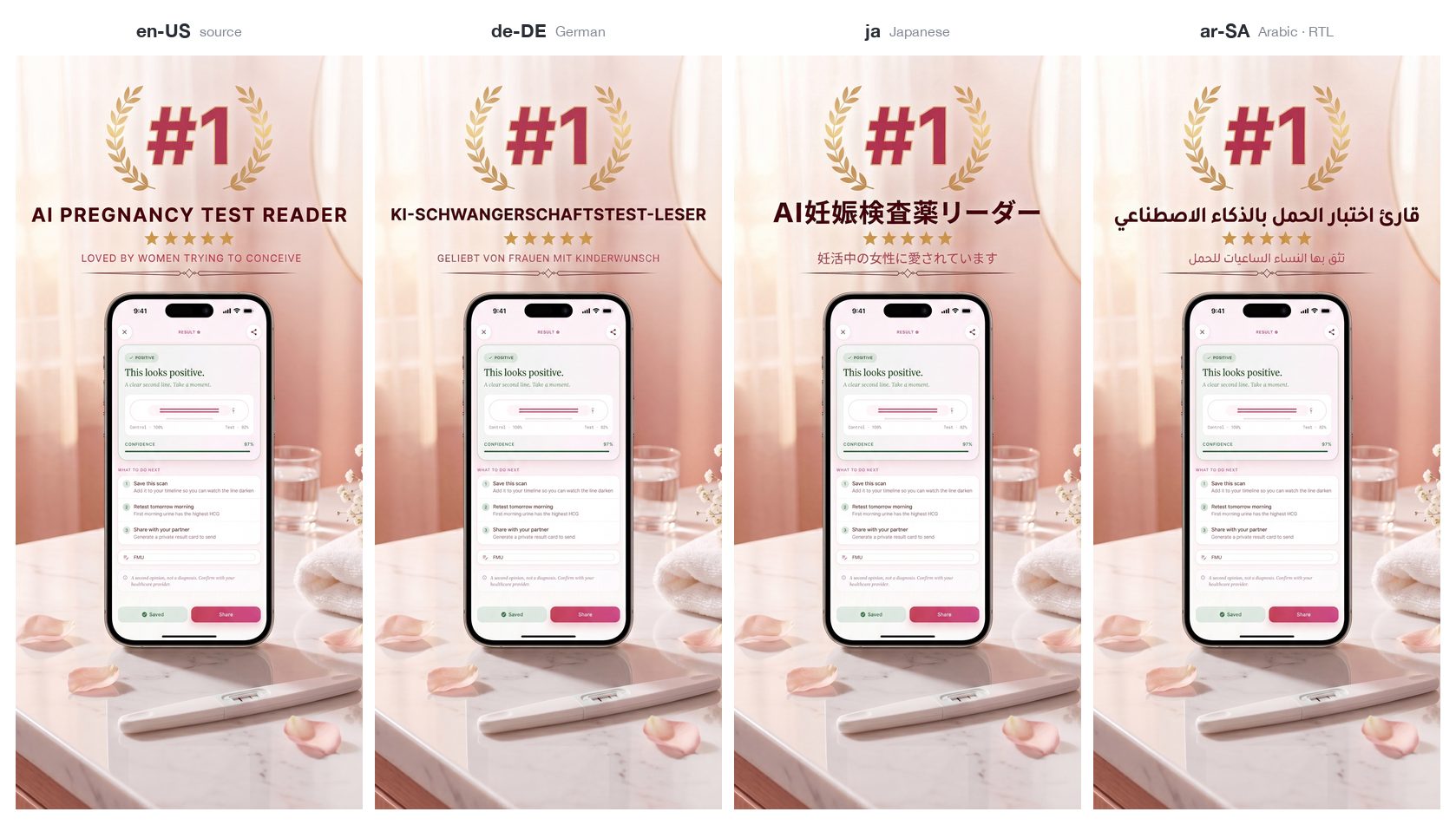
Two production apps shipped their App Store presence through this skill — 24 localized metadata sets and 114 localized screenshots between them, each app localized end-to-end in under 10 minutes. Everything below is unedited output: one English source screenshot in, a localized set out, the in-phone app UI bit-identical across every locale.
AI Pregnancy Test Checker — metadata in 12 languages
Antique Identifier — metadata + screenshots in 13 languages
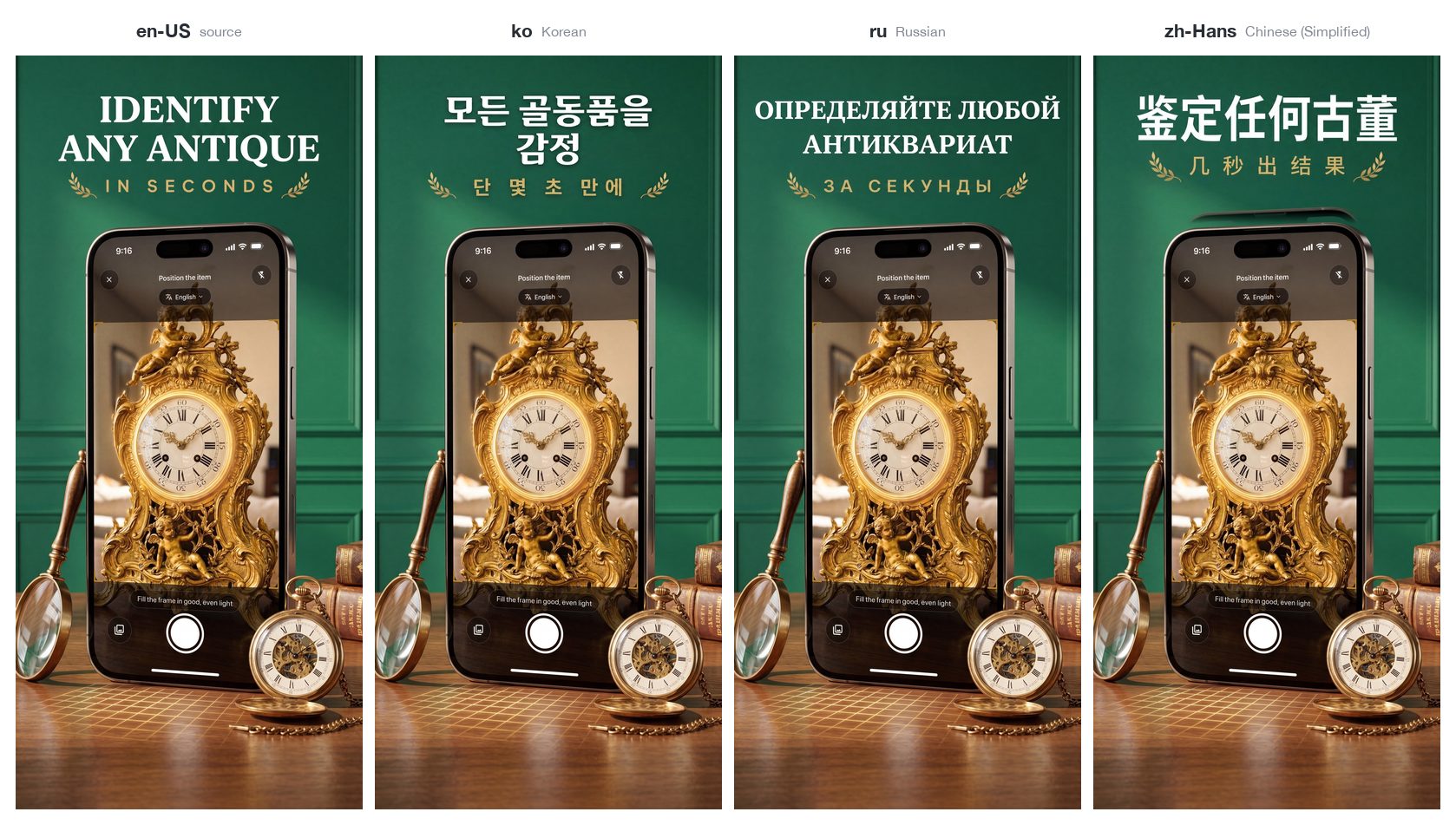
Note the Arabic panel: right-to-left script, correct diacritics, same layout — and the phone UI under it never went through an image model, so it stays pixel-sharp. The decorative laurels, stars and dividers survive untouched thanks to the glyph + colour diff mask.
The metadata reads native, and it all fits
Subtitles from the shipped fastlane metadata (Apple's limit is 30 characters):
| Locale | AI Pregnancy Test Checker | Antique Identifier |
|---|---|---|
🇩🇪 de-DE | Schwangerschaftstest KI-App | Antiquitäten per Foto schätzen |
🇯🇵 ja | うっすら陽性も写真でAI判定 | 写真でお宝を鑑定・価値査定 |
🇰🇷 ko | 희미한 선 AI 판독·양성 음성 임신테스트 | 사진으로 빈티지·수집품 가치 감정 |
🇷🇺 ru | ИИ сканер: слабая полоска | Оценка винтажа по фото |
🇸🇦 ar-SA | حاسبة و ماسح الحمل بالذكاء | صوّر التحف والمقتنيات وقيّمها |
🇨🇳 zh-Hans | AI拍照秒读 浅线置信分析 | 拍照鉴定古董收藏品 估价更轻松 |
Running scripts/check_metadata.py over both apps' full metadata trees:
no errors across all 25 locale sets — every subtitle ≤ 30, every keyword
field ≤ 100, every description ≤ 4000.
Keywords are researched, not translated
A few things a literal translation of the English keyword list could never produce — these came out of Astro's per-storefront popularity data:
- Japanese (pregnancy): targets ドゥーテスト — Rohto's Do-Test, a test brand that only exists in Japan — plus 妊活 ("ninkatsu", the Japanese trying-to-conceive culture word) and 基礎体温 / 高温期, the BBT-charting terms Japanese users actually search.
- Korean (antiques): 청자 and 백자 — Goryeo celadon and Joseon white porcelain, the categories Korean collectors search for.
- Turkish (antiques): mezat (auction) and çini (İznik tilework).
- Russian (antiques): клеймо (maker's hallmark) and барахолка (flea market).
- German (pregnancy): Kinderwunsch and Frühtest — the vocabulary of the German TTC community, not dictionary translations of "pregnancy test".
Why this exists
Screenshots. Image models cap their output around a ~1500px long edge. Feed a whole 1290×2796 store screenshot in and you get a smaller image back that has to be upscaled — blurry text and a soft phone UI. This skill instead translates only the caption band (short → the model's output is a downscale to the screenshot width = crisp) and composites it back onto the untouched original. A glyph + colour diff mask means highlight blobs, curved shapes, arrows and squiggles stay pristine while only the letterforms change. (deep dive)
Keywords. Search demand differs by language and country, so literally translating your English keywords leaves ranking on the table. This skill pulls real popularity/difficulty numbers from Astro and validates the candidate set per storefront before committing it. (deep dive)
Requirements
| What | Needed for | |
|---|---|---|
| Required | Python 3.9+ with numpy + Pillow (pip install -r requirements.txt) | screenshot compositing + metadata linting (metadata-only runs don't need numpy) |
| Required | Gemini MCP server exposing gemini_chat + edit_image (model gemini-3-pro-image-preview) | translating copy and in-image captions |
| Recommended | Astro ASO MCP server | discovering + validating localized keywords |
| Optional (to ship) | fastlane | uploading via fastlane deliver — skip it entirely if you upload manually |
No credentials live in this repo. The scripts do local image maths and write text files; all API access is through your separately-configured MCP servers and fastlane. App Store Connect API keys, service accounts and analytics tokens must never be committed —
.gitignoreblocks the common ones.
Installation
Install as a Claude Code skill by cloning into your skills directory:
git clone https://github.com/mazen-salah/appstore-localization \
  ~/.claude/skills/appstore-localization
pip install -r ~/.claude/skills/appstore-localization/requirements.txt
Then make sure your Gemini MCP (and ideally Astro ASO MCP) servers are configured in Claude Code. Invoke it with:
/appstore-localization
or just describe the task ("localize my App Store listing into German, French and Japanese") and Claude will pick up the skill.
You can also use the scripts directly, with or without Claude Code (see below).
Scripts
scripts/compose.py — screenshot caption pipeline
# 1. suggest the caption band rows for a screenshot
python scripts/compose.py detect screenshot.png

# 2. crop the caption band to send to your image model for translation
python scripts/compose.py crop screenshot.png --y0 0 --y1 700 -o band.png

# 3. composite the translated band back onto the pristine screenshot
python scripts/compose.py composite screenshot.png --y0 0 --y1 700 \
       --band band_translated.png -o out/de-DE/1.png
Tunables on composite: --thresh (colour-diff, default 45), --feather
(default 2), --guard (inner-edge guard rows, default 28). See
references/screenshot-pipeline.md.
scripts/check_metadata.py — Apple field-limit linter
python scripts/check_metadata.py ios/fastlane/metadata
python scripts/check_metadata.py ios/fastlane/metadata --locale en-US
Flags name/subtitle/keywords/promo/description/release-notes over Apple's limits, plus wasted spaces, duplicate keywords, and keywords already in name/subtitle. Pure standard library, no dependencies. Exit code is non-zero if any hard limit is exceeded (handy in CI).
Repository layout
.
├── SKILL.md                          # the Claude Code skill (workflow + frontmatter)
├── README.md
├── LICENSE
├── requirements.txt
├── scripts/
│   ├── compose.py                    # screenshot band-translate + composite
│   └── check_metadata.py             # App Store field-limit linter
├── references/
│   ├── screenshot-pipeline.md        # compose.py internals + tuning
│   ├── prompt-templates.md           # ready-to-use Gemini prompts (incl. RTL/CJK)
│   └── keyword-research.md           # Astro discover → validate → pack
└── docs/
    └── results/                      # real output from two shipped apps (see "Real results")
Shipping
The skill asks how you want to ship — it never uploads on its own:
- Manual — it prints each locale's fields ready to paste into App Store Connect and points to the screenshot folder to drag in. You're the final gate.
- fastlane —
fastlane deliver(metadata and/or screenshots), scoped to the locales that actually exist on App Store Connect. Uploading needs an ASC API key you provide; it's never stored here.
Uploading metadata/screenshots does not submit for review or change the app version — that stays an explicit, separate decision.
Limitations
- Designed for the App Store (fastlane
deliverlayout). The screenshot technique is store-agnostic, but the metadata/keyword rules are Apple's. - Band detection (
detect) is a heuristic starting point — always eyeball the crop and adjust--y0/--y1. - Translation quality is the image/text model's; always review returned bands for spelling and fit, especially RTL and CJK.
- The skill produces files and hands off; it does not manage certificates, provisioning, or App Review submission.
License
MIT © 2026 Mazen Tamer Salah
Acknowledgements
Built as a reusable Claude Code skill for shipping indie iOS apps to a global audience. Pairs well with a screenshot-generation skill (to create the English base screenshots) and an App Store review pre-flight skill.