
Robot Framework MCP Server
Matthew-M-King/robot-framework-mcp-server
Análise inteligente e triage automático de falhas do Robot Framework
Ver no GitHubServidor MCP local que analisa resultados do Robot Framework (output.xml) e expõe dados estruturados de falhas ao Claude Desktop e Claude Code. Agrupa falhas por causa raiz, prioriza por impacto e gera relatórios HTML interativos com gráficos de distribuição.
Instalação
npx convez-ai Matthew-M-King/robot-framework-mcp-server1 comando no terminal: detecta o formato do repositório (marketplace ou plugin avulso) e instala via Claude Code. Requer Node 18+ e o Claude Code instalado.
Métricas
Casos de uso
- Triage rápido de centenas de falhas em suites de testes grandes
- Agrupamento automático de falhas por causa raiz comum
- Geração de relatórios HTML interativos com priorização por severidade
- Debugging de testes automatizados com contexto de keyword trace completo
Veredito

Ferramenta sólida para equipes que rodam suites grandes de Robot Framework e precisam diagnosticar falhas rapidamente. A integração MCP com Claude torna a análise muito mais ágil que revisar XML manualmente, com clustering inteligente e scoring multidimensional.
README
A tradução para o português deste README ainda está na fila.
Robot Framework MCP Server




A local Python MCP server for analysing Robot Framework output.xml results and exposing structured failure data to Claude Desktop and Claude Code.
Why?
Large Robot Framework suites often produce hundreds of failures across dozens of areas.
Instead of manually reading output.xml files, this MCP server:
- groups failures by shared root cause
- prioritises by business impact and severity tags
- escalates API/server errors automatically (5xx → 92, 4xx → 87, 403 → 80)
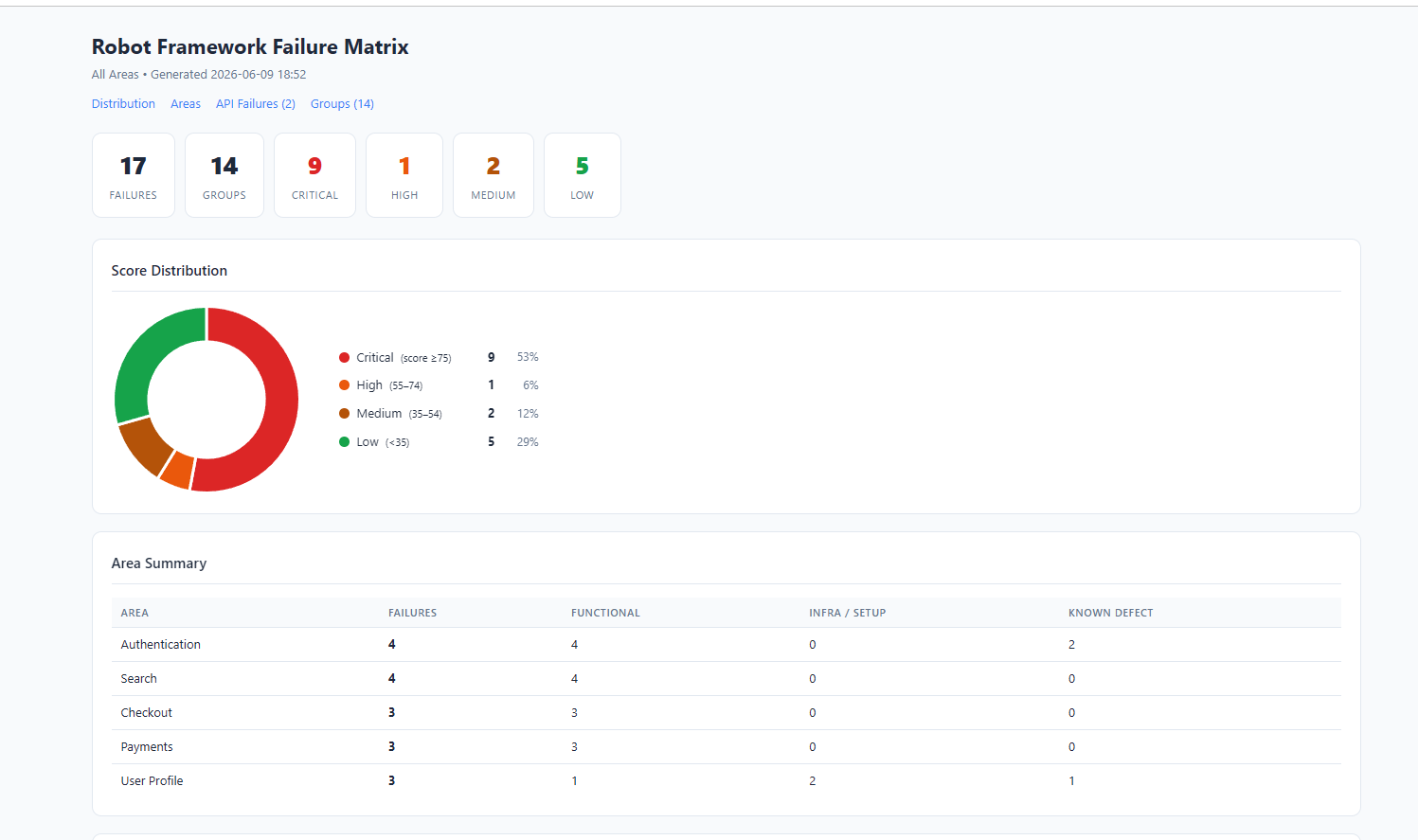
- generates interactive HTML reports with score-distribution charts
- provides Claude with full keyword traces for rapid debugging
The result: a triage session that takes minutes instead of hours.
Quick Start
# 1. Install
pip install -r requirements.txt
pip install mcp

# 2. Start the server
python -m uvicorn robot_mcp_server.http_server:app --host 127.0.0.1 --port 8000

# 3. In Claude — ingest your results, then triage
ingest_results(results_dir="/path/to/results")
generate_failure_matrix(output_path="/path/to/report.html")
get_triage_queue()
API docs available at http://127.0.0.1:8000/docs once the server is running.
Demo
Interactive HTML Report
Why not just inspect output.xml manually?
| Manual review | Robot Framework MCP Server |
|---|---|
| Hundreds of unranked failures | Ranked triage queue — highest impact first |
| Manual root-cause grouping | Automatic fingerprint clustering |
| Raw XML | Interactive HTML with doughnut chart |
| Ctrl+F through log files | SQL queries against a structured database |
| Status code only | Actual API error message extracted from response body |
| Separate tool per task | Single MCP interface for Claude Desktop and Claude Code |
Features
| Feature | Status |
|---|---|
| Root cause grouping via fingerprinting | ✅ |
| Failure scoring (0–100, multidimensional) | ✅ |
| API error escalation + message extraction | ✅ |
| Interactive HTML reports | ✅ |
| Claude Desktop support | ✅ |
| Claude Code support | ✅ |
| SQLite persistence | ✅ |
| Idempotent ingestion | ✅ |
| Ad-hoc SQL querying | ✅ |
| Per-test keyword trace for debug context | ✅ |
Installation
python -m pip install -r requirements.txt
pip install mcp
Connecting to Claude Desktop
Add to %APPDATA%\Claude\claude_desktop_config.json:
{
  "mcpServers": {
    "robot-framework-failure-review": {
      "command": "python",
      "args": ["C:\\path\\to\\robot-framework-mcp-server\\examples\\mcp_stdio_wrapper.py"],
      "env": {
        "BASE_URL": "http://127.0.0.1:8000"
      }
    }
  }
}
Then restart Claude Desktop. The server appears under the + → Connectors menu.
Connecting to Claude Code
The .claude/settings.json in this repo configures the MCP server automatically for Claude Code when working in this directory.
Documentation
- Architecture and design decisions
- Configuration — results layout, database initialisation, area categories
- MCP tools reference and typical workflow
- Failure scoring rubric
- SQL query examples
Tests
pytest