
claw-crm
MagneticStudio/claw-crm
AI-native personal CRM for solo operators. Notebook-style pipeline view powered by Claude via MCP.
Instalação
npx convez-ai MagneticStudio/claw-crm1 comando no terminal: detecta o formato do repositório (marketplace ou plugin avulso) e instala via Claude Code. Requer Node 18+ e o Claude Code instalado.
Métricas
README
A tradução para o português deste README ainda está na fila.
Claw CRM
AI-native personal CRM for solo operators. One scrollable notebook view of your entire pipeline — contacts, interactions, follow-ups, meetings, and rule violations in a single stream. AI agents do the data entry; you make the decisions.
Why Claw
Most CRMs are built for sales teams. Claw is built for one person managing 10-50 high-touch relationships — advisors, investors, founders, partners. No dashboards, no charts, no seat licenses. Just a notebook you scroll through every morning.
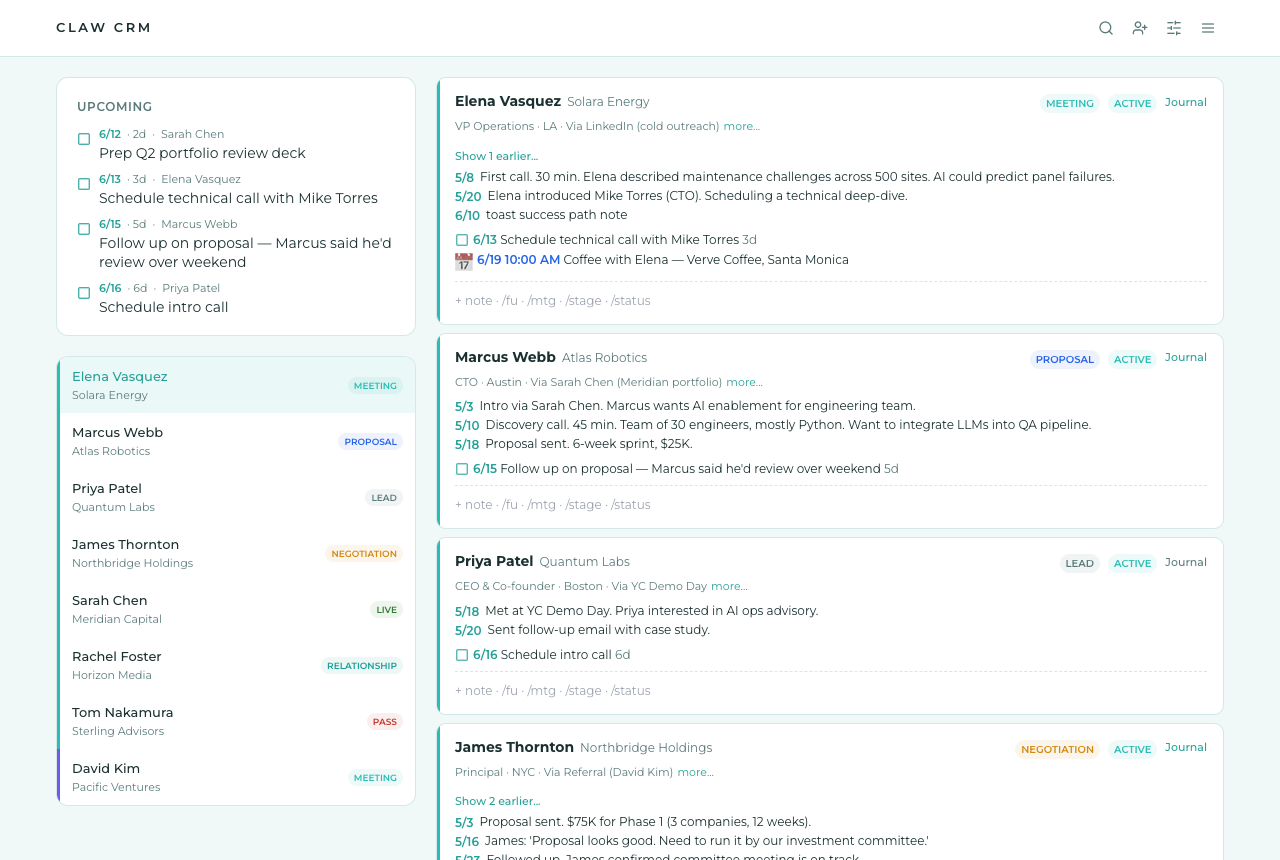
- Notebook view — your entire pipeline in one scrollable feed, sorted by urgency
- Slash commands —
/fu 4/15 check on proposal,/mtg 4/3 2pm Coffee @ Verve,/stage PROPOSAL - AI agents write, you verify — Claude connects via MCP and manages your CRM through 27+ tools
- Relationship journal — a per-contact markdown document that's the durable home for the narrative of the relationship: Key People, Wins / Case Study Material, Engagement History, and dated Entries. Absolute-dates-only validator, full revision history with diff view, verbatim blockquote escape for preserving emails and transcripts.
- Rules engine — business logic stored as data, not code. "Flag contacts with no interaction for 14 days." Agents can create, modify, and delete rules.
- Real-time — SSE pushes every change to the UI instantly, whether you or an agent made it
- Privacy-first — PIN-locked, teal privacy screen on window blur, pricing and deal terms confined to the journal (never in tasks, interactions, briefings, or contact fields), no cross-client references anywhere
Quick Start
Docker (recommended — one command, ~2 minutes)
git clone https://github.com/MagneticStudio/claw-crm.git
cd claw-crm
docker compose up
Open http://localhost:3000 — the first visit walks you through choosing a PIN and hands you your API key + MCP token. No env files, no manual schema push; the schema is applied automatically on first boot. Data persists in a Docker volume across restarts.
To connect your AI agent, grab the MCP URL from Settings inside the app (see AI Agent Integration below).
Railway (hosted, ~5 minutes)
- Create a new Railway project → Deploy from GitHub repo → pick your fork of this repo.
- In the service settings, set Root Directory to
app. - Add a PostgreSQL database to the project, then set on the app service:
DATABASE_URL→ reference the PostgresDATABASE_URLvariableSESSION_SECRET→ any long random string
- Generate a domain for the service. Open it, set your PIN, done. Railway auto-deploys on every push to main.
Local development
cd app
cp .env.example .env   # set DATABASE_URL and SESSION_SECRET
npm install
npm run db:push        # push schema to Postgres
npm run db:seed        # seed with demo data (PIN: 1234)
npm run dev            # http://localhost:3000
AI Agent Integration
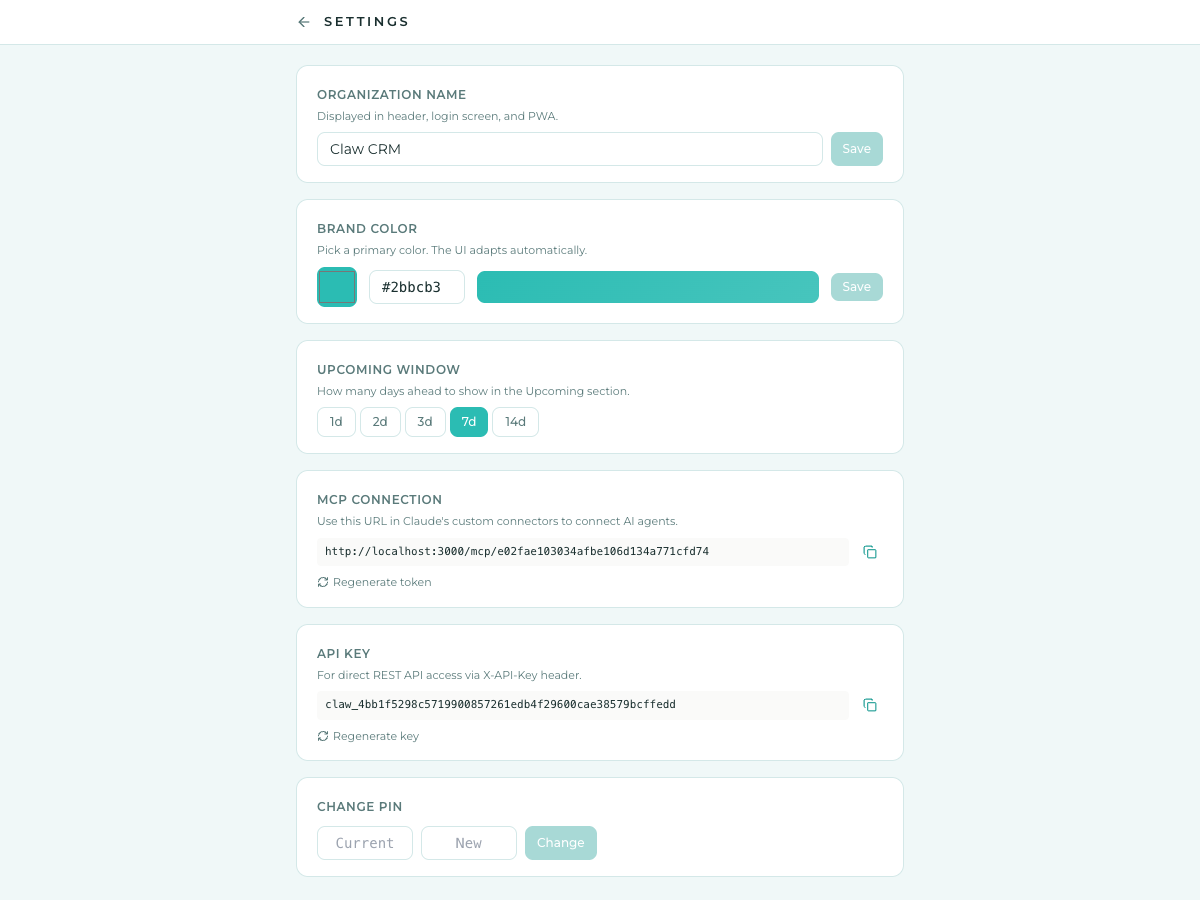
Claw exposes a full Model Context Protocol (MCP) server so Claude (or any MCP-compatible agent) can manage your CRM autonomously.
Remote MCP (Claude Web, Desktop, Mobile)
URL: https://your-domain.com/mcp/<TOKEN>
Set up in Claude: Settings > Custom Connectors > Add > paste the MCP URL > leave OAuth blank > Add.
Local MCP (Claude Desktop, Claude Code)
Uses mcp-client.ts which calls the REST API over HTTP:
{
  "mcpServers": {
    "claw-crm": {
      "command": "npx",
      "args": ["tsx", "/path/to/claw-crm/app/server/mcp-client.ts"],
      "env": {
        "CRM_URL": "http://localhost:3000",
        "CRM_API_KEY": "<your-api-key>"
      }
    }
  }
}
Skills (optional but recommended)
Three skills ship with the repo:
skills/crm/SKILL.md— a lightweight "when to use the CRM" guide that loads proactively. Claude sees the mental model (data-partition rule, five-layer structure, pre-write checklist, strategic-vs-operational meetings) before any tool call. The detailed writing contract, stage enums, and validation rules stay inget_crm_guideand load on-demand.skills/crm-migrate/SKILL.md— one-time bulk import. Paste your existing client notes (Apple Notes, Notion, Google Docs, a spreadsheet — wherever they live today) and the agent maps every person, proposes a migration plan for your approval, then builds contacts, journals, interactions, and tasks in one pass. Nobody starts from zero; this is how your history comes across.skills/crm-management/SKILL.md— a scheduled sync agent that reconciles the CRM with your inbox and calendar: logs material interactions, curates the Meetings layer, builds briefings for strategic meetings in the next 24h, and ends every run with an action-first summary (DECIDE:/FLAG:/AT RISK:). Pair it with an email + calendar MCP connector and a daily schedule ("run my CRM agent"). It depends on thecrmskill for the data-model contract.
Install paths:
- Claude Code: copy the files into your personal skills directory.
Claude Code auto-loads on session start.for s in crm crm-migrate crm-management; do mkdir -p ~/.claude/skills/$s && cp skills/$s/SKILL.md ~/.claude/skills/$s/ done - Claude Desktop / Claude.ai personal: open a Project → Custom Instructions → paste the SKILL.md body. (Native plugin/skill install for claude.ai consumer isn't available yet; manual paste is the current path.)
The skill assumes the MCP connector has already been registered. If tools are missing it tells Claude to prompt you to add the connector; it doesn't install anything itself.
Agent prompts
Reference prompts for scheduled agents that operate on your behalf live in docs/agent-prompts/. Paste the prompt body into the agent's instructions (e.g. a Claude Cowork or OpenClaw scheduled agent) and point it at the relevant data source plus the CRM MCP connector.
- CRM Inbox Agent — daily scan of your inbox (received + sent) to keep the CRM aligned. Logs new interactions, updates stages, completes stale follow-ups, builds briefings when a meeting is imminent, flags anything that needs your decision.
MCP Tools
| Tool | Description |
|---|---|
get_crm_guide | Agent usage guide + live CRM snapshot. Recommended first call. |
get_dashboard | Contacts by stage, overdue tasks, upcoming meetings, violations. |
get_contact | Full contact with all related data. May exceed 150 KB on LIVE clients — for heavy reads use the paginated tools below. |
list_interactions | Paginated interactions for one contact (newest first) with since / until / type filters. |
list_followups | Paginated follow-ups for one contact with type / completed / since / until filters. |
create_contact | Add a new contact. |
update_contact | Modify contact fields. |
delete_contact | Permanently delete a contact and all related data. |
add_interaction | Log a note, email, meeting, or call. |
delete_interaction | Remove a timeline entry. |
create_task | Create a follow-up task or meeting. |
complete_followup | Mark done + log outcome to timeline. |
delete_followup | Remove a task or meeting. |
list_rules / create_rule / update_rule / delete_rule | Manage business rules. |
list_violations | Active rule violations with contact names. |
get_upcoming_meetings / cancel_meeting | Meeting management. |
prepare_briefing | Gather everything an agent needs before writing a briefing: contact record (with linkedinUrl), interactions, followups, journal, any previous briefing (with ageDays + stale flag), canonical 8-section template, and the research protocol. First call in every briefing workflow. |
save_briefing / get_briefing | Upsert / read the briefing. save_briefing validates the 8-section structure and rejects missing or out-of-order sections. get_briefing returns content + ageDays + stale (true after 7 days). |
list_stale_briefings / cleanup_stale_briefings / delete_briefing | Sweep tools for the stale-briefing lifecycle. list_stale_briefings returns every stale briefing with staleReason (age / meeting_completed / wrong_meeting) so a periodic skill can refresh or delete each. cleanup_stale_briefings bulk-deletes the meeting_completed-plus-age subset. delete_briefing removes a single one. |
read_journal / peek_last_journal_entry | Read the full relationship_journal (optional section scope) or just the most recent dated Entry + doc hash. |
edit_journal / append_journal / batch_append_journal | Modify the journal. Absolute-dates-only validator, verbatim blockquote escape, destructive edits gated behind confirmed_with_user. batch_append_journal writes many dated entries transactionally — the bulk-migration path. |
Tools follow Anthropic's best practices: enum validation, actionable errors, pagination, enriched responses.
Architecture
[Browser UI] <--REST/SSE--> [Express API + Postgres] <--eval--> [Rules Engine]
                                      ^
                                      |
                              [MCP Server (remote)]
                              (primary write path — agents)
Single write path: all mutations flow through server/storage.ts > SSE broadcast > rules evaluation > activity log. Whether a human types a slash command or an agent calls an MCP tool, the same pipeline runs.
Rules Engine
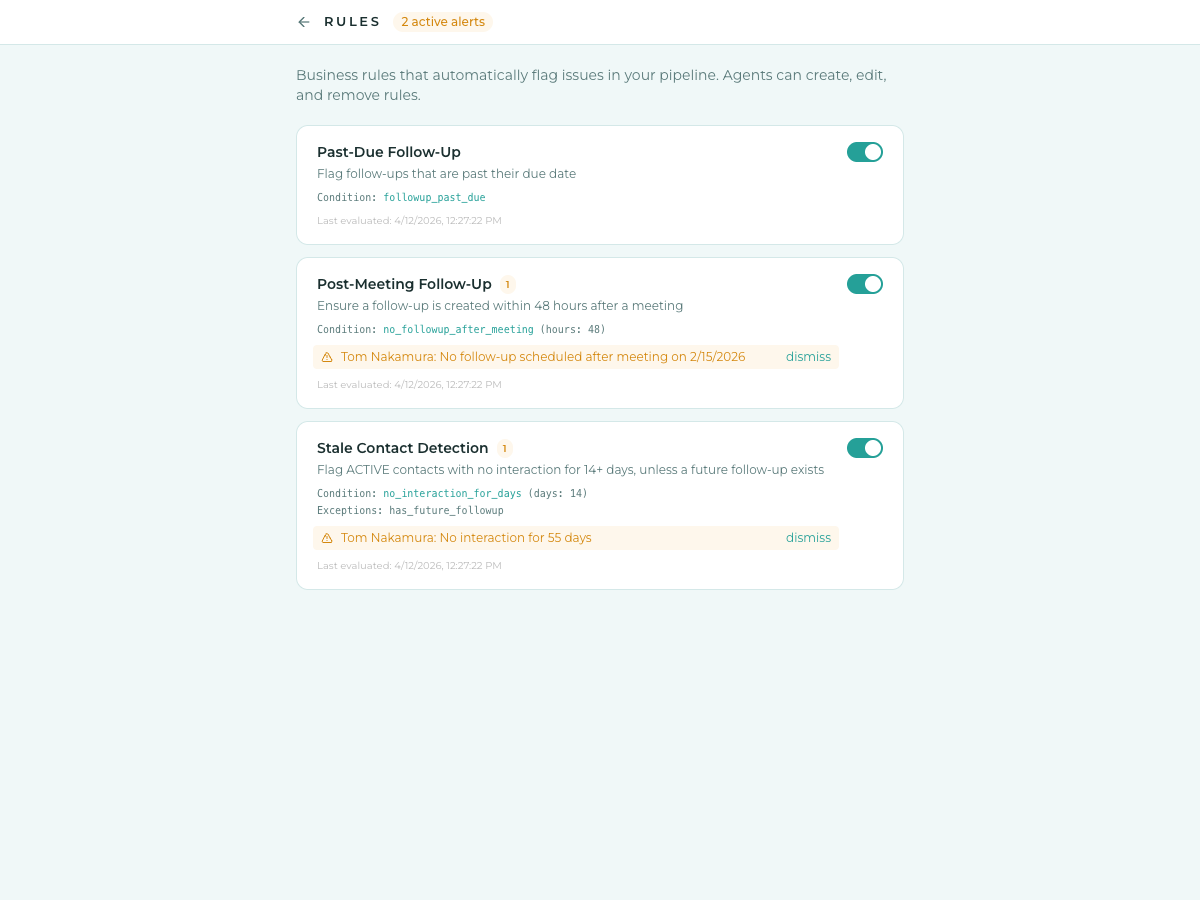
Rules are business logic stored as data (JSONB), not code. Agents can create and modify them via MCP.
- Reactive: evaluated after any write to contacts, interactions, or follow-ups
- Scheduled: runs every 15 minutes for time-based conditions
- Output: creates/clears violation records, pushed to UI via SSE
| Condition | Description |
|---|---|
no_interaction_for_days | No interaction for N days |
followup_past_due | Uncompleted follow-up past due date |
no_followup_after_meeting | No follow-up within N hours of a meeting |
meeting_within_hours | Meeting within N hours |
status_is / stage_is | Contact has specific status or stage |
Exceptions: has_future_followup, stage_in (exclude specific stages from rules).
Data Model
Pipeline
LEAD > MEETING > PROPOSAL > NEGOTIATION > LIVE > PASS, plus RELATIONSHIP
HOLD is a status, not a stage. A contact can be stage PROPOSAL + status HOLD.
Entities
| Entity | Description |
|---|---|
| Contacts | People you track. One person per record. |
| Companies | Linked to contacts via companyId. |
| Interactions | Timeline entries — what happened (past tense). |
| Follow-ups | Action items with due dates. |
| Meetings | Future scheduled events. |
| Briefings | Per-contact prep for the next specific meeting. Canonical 8-section structure (TL;DR, About them, About the company, Shared ground, Our history, What to discuss, Offers / asks, Watch-outs) enforced by the server. Stale after 7 days — old briefings stop surfacing on contact cards but remain readable on the briefing page. |
| Journal | Per-contact markdown narrative — Key People, Wins / Case Study Material, Engagement History, dated Entries. Full revision history. |
| Rules | Business logic — conditions + actions as JSONB. |
| Violations | Alerts created by rules, auto-cleared when resolved. |
Slash Commands
| Command | Example |
|---|---|
/fu M/D text | /fu 4/15 check on proposal |
/mtg M/D time text @ location | /mtg 4/3 2pm Coffee @ Verve |
/stage STAGE | /stage PROPOSAL |
/status STATUS | /status HOLD |
| plain text + Enter | Had coffee with Idan (logs as note) |
Keyboard Shortcuts
| Shortcut | Action |
|---|---|
⌘K / Ctrl+K | Open full-text search (MiniSearch / BM25) over contacts, interactions, follow-ups, meetings, briefings. Prefix + fuzzy matching, name and company boosted. ↑/↓ move the highlight, Esc closes. |
Tech Stack
React, Express, PostgreSQL, Drizzle ORM, Vite, Tailwind CSS, MCP SDK, Playwright E2E, GitHub Actions CI, Railway deploy, PWA (iOS), Pake (Mac desktop).
License
AGPL-3.0 — see LICENSE.