
Wardn
lynuxis2026-pixel/wardn
Veja e bloqueie o código arriscado que seus agentes IA executam
Ver no GitHubMCP control plane local-first que descobre, pontua e intercepta chamadas de servidores MCP antes que sejam executadas. Permite auditar riscos de segurança, sandboxear servidores perigosos e bloquear código malicioso que agentes IA tentam rodar, tudo sem sair da sua máquina.
Instalação
npx convez-ai lynuxis2026-pixel/wardn1 comando no terminal: detecta o formato do repositório (marketplace ou plugin avulso) e instala via Claude Code. Requer Node 18+ e o Claude Code instalado.
Métricas
Casos de uso
- Auditar segurança de MCP servers instalados
- Bloquear execução de código malicioso em agentes
- Sandboxear servidores não confiáveis
Veredito

Ferramenta essencial para devs usando MCP servers com Claude Desktop, Cursor ou agentes customizados. Oferece visibilidade real sobre riscos de segurança e controle granular de execução, sem telemetria ou dependências cloud.
README
A tradução para o português deste README ainda está na fila.
⛨ wardn
See and stop the risky code your AI agents run.
A local-first MCP control plane for developers using Claude Desktop, Cursor, VS Code, Codex, or custom agents. One command discovers every MCP server you have, scores it for risk, routes every tool-call through a local gateway, and lets you sandbox the dangerous ones.


A live
wardn shieldis served by your local gateway — drophttp://127.0.0.1:7331/api/badge.svginto any README and your readers see your trust state.
Quickstart · How it works · Trust signals · Commands · Architecture · Security
wardn demoruns a bundled malicious MCP server through the gateway and blocks every attack before the server sees the call. The demo is reproducible — see examples/evil-mcp.
Install once, type short — the package is published as
@ludicolijn/wardn, but the binary it installs is justwardn. Two options:# one-off, no install: npx -y @ludicolijn/wardn scan # install once, then type `wardn` forever: npm i -g @ludicolijn/wardn wardn scanAll examples below use the short
wardnform for readability — prefix withnpx -y @ludicolijn/if you haven't done the global install.
Why wardn
You're running MCP servers in Claude Desktop, Cursor, or your own agent. Each one is code with real permissions: filesystem access, network, shell, your API tokens. There are thousands of MCP servers in the wild and no easy way to see what's actually running, what it can touch, or whether to trust it.
wardn is the local, developer-first answer. No cloud account. No telemetry. No enterprise console.
npx -y @ludicolijn/wardn scan
Found 5 MCP servers across 2 clients

  ● RISKY    filesystem           (claude_desktop)
             ↳ Broad filesystem access granted: "/"
  ○ REVIEW   remote-notion        (cursor)
             ↳ Remote server — data leaves your machine
  ○ REVIEW   scraper              (cursor)
             ↳ Unpinned package version (cool-scraper-mcp) — supply-chain risk
  ○ REVIEW   weird                (cursor)
             ↳ Unrecognized launcher: "/usr/local/bin/custom-mcp"
  ✓ TRUSTED  github               (claude_desktop)

  5 servers · 1 risky · 3 review · 1 trusted
Exits non-zero if anything risky is found — drop it into CI and you have a regression test for "what's installed on my dev machine."
How it works
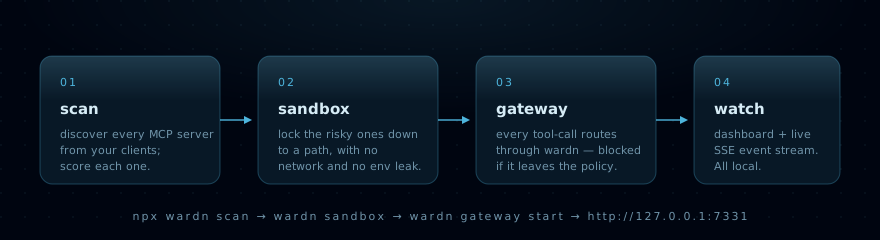
Four small commands and the work is done.
| Command | What happens | |
|---|---|---|
| 01 | wardn scan | Reads Claude Desktop / Cursor / VS Code MCP configs and scores every server with explainable signals. |
| 02 | wardn sandbox enable <name> | Writes a per-server policy: filesystem whitelist, network on/off, env-whitelist. Stored at ~/.wardn/policy.json. |
| 03 | wardn gateway start | Local Fastify daemon + stdio proxy. Every tools/call is vetted before the MCP server sees it. |
| 04 | open the dashboard | Lynuxis-styled console at http://127.0.0.1:7331, with live tool-call log over SSE. |
Optional fifth step: wardn rewrite apply rewrites your client configs so every server you've
ever installed routes through the gateway from now on. Backed up byte-for-byte; one command undoes it.
The picture
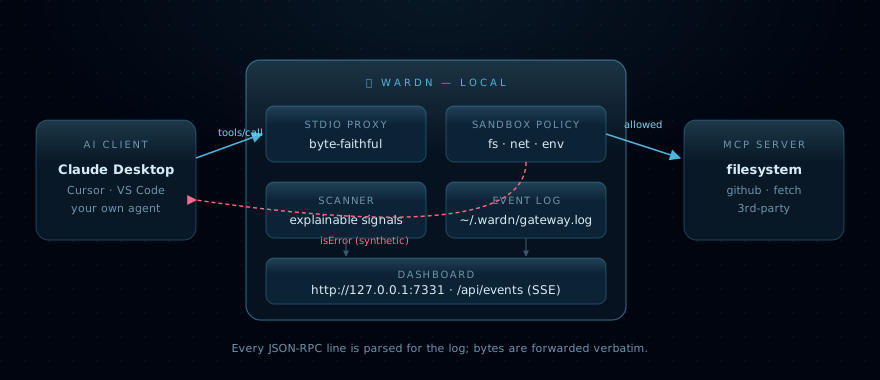
The gateway sits between the client and the server. Bytes are forwarded verbatim — the wire
format stays identical. Every JSON-RPC message is parsed alongside the wire to drive the log and the
sandbox enforcer. A blocked tools/call is returned to the client as a synthetic JSON-RPC result
with isError: true — no server contact, no surprise side effect.
For a deeper walkthrough see docs/ARCHITECTURE.md.
Trust signals
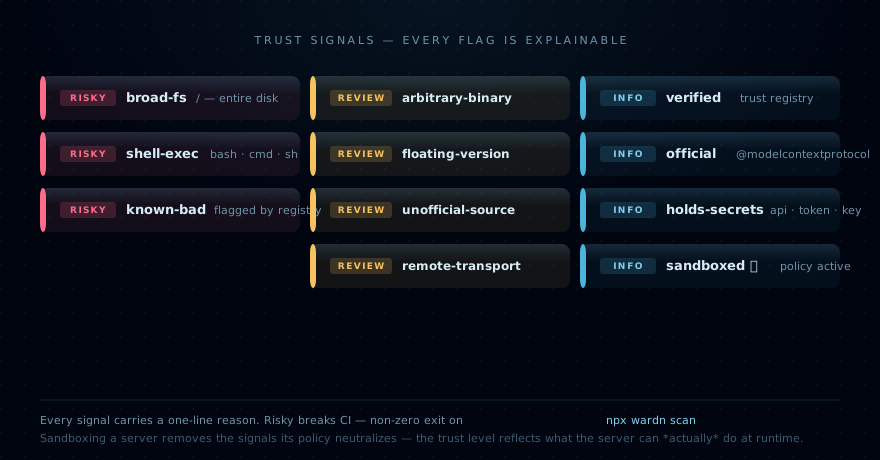
Every flag has a one-line reason. No black box.
| Signal | Severity | Triggered when |
|---|---|---|
broad-fs | risky | A server arg is /, ~, or a top-level system directory |
shell-exec | risky | The launcher is bash, cmd, sh, or another raw shell |
known-bad | risky | The package is flagged in data/trust.json |
arbitrary-binary | review | The launcher is an unrecognized executable |
floating-version | review | A community package is run unpinned (supply-chain risk) |
unofficial-source | review | The package is not from a verified publisher |
remote-transport | review | The server is url: based — data leaves your machine |
verified | info | The package matches a verified publisher in the trust registry |
official | info | The package is @modelcontextprotocol/* |
holds-secrets | info | Env keys look like API/TOKEN/KEY/PASSWORD |
sandboxed | info | A wardn policy is active for this server |
⛨ Sandboxing a server removes the signals the policy neutralizes — a
broad-fsserver pinned to~/safe-workspacedrops out ofRISKYbecause that broad access can no longer happen at runtime.
Quickstart
1. Scan
wardn scan
Reads the config of every MCP-capable client installed locally; scores each server.
2. Sandbox the risky one
wardn sandbox enable filesystem --path ~/safe-workspace
✓ Sandbox enabled for filesystem

  filesystem  /Users/you/safe-workspace
  network     off
  env         (baseline only)
  isolation   policy-only (Docker not detected)

  Run wardn gateway run filesystem to spawn the server inside the sandbox.
Re-scan:
✓ TRUSTED  filesystem           (claude_desktop)  ⛨ sandboxed
           ⛨ fs=[/Users/you/safe-workspace], network=off, env-whitelist=0
3. Start the gateway + dashboard
wardn gateway start
wardn gateway — daemon up

  dashboard  http://127.0.0.1:7331/
  status     http://127.0.0.1:7331/api/status
  events     http://127.0.0.1:7331/api/events  (SSE)
  log        ~/.wardn/gateway.log
The dashboard shows every server, its trust level, the policy in effect, and a live stream of JSON-RPC tool-calls. One click sandboxes a server.
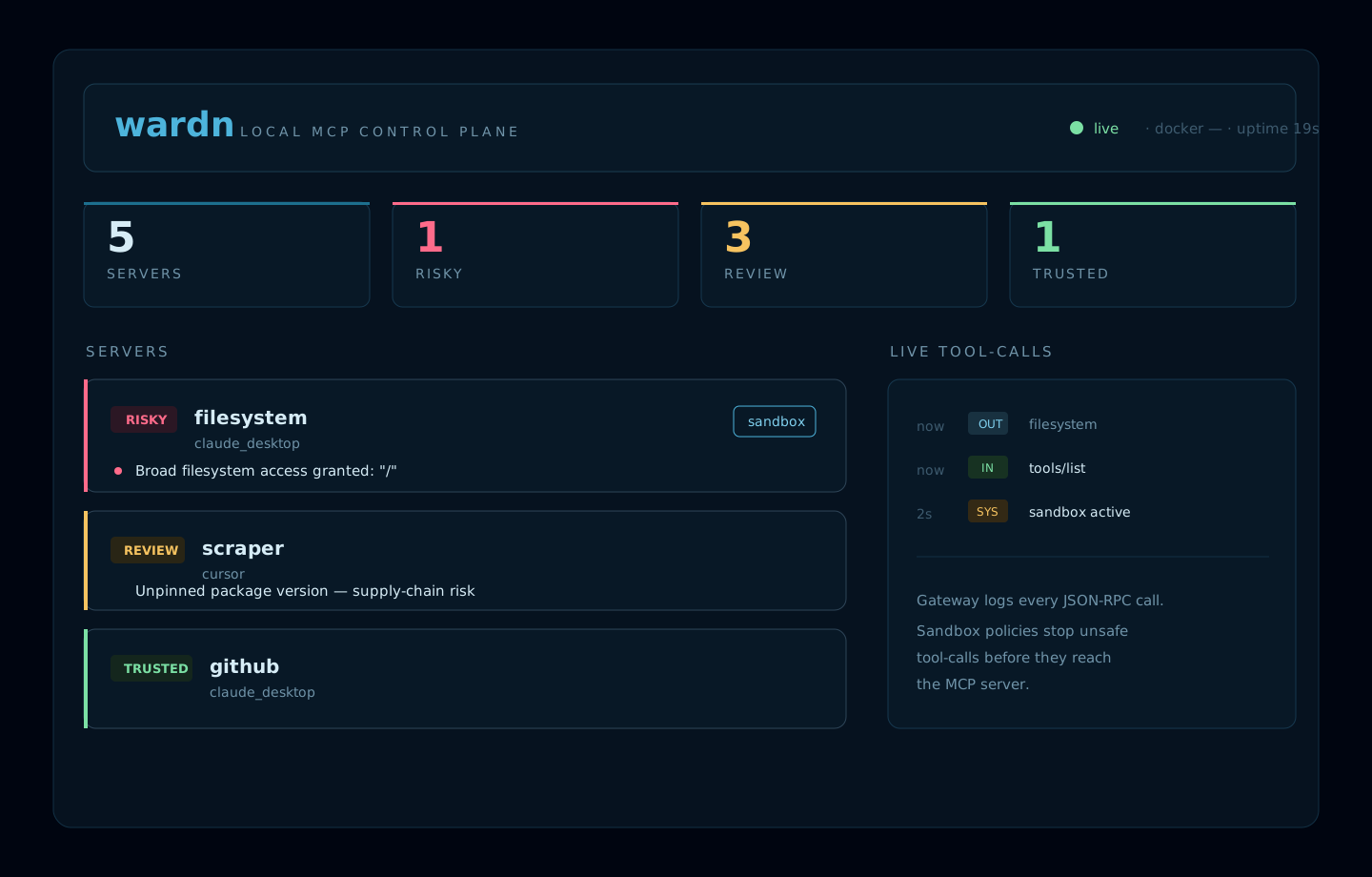
4. Route existing clients through wardn
wardn rewrite apply       # rewrites Claude Desktop / Cursor / VS Code configs (with backup)
wardn rewrite restore     # undo, byte-for-byte
wardn rewrite status      # see what's active
Restart your client; every MCP tool-call now flows through the local gateway.
5. Prove it works
wardn demo
Spawns the bundled evil-mcp through the gateway under a tight sandbox, fires four attack vectors (path traversal, exfiltration, destructive command, shell injection), and shows each one rejected before the server is reached.
6. Keep it healthy
wardn doctor                                 # diagnose the local setup
wardn watch --once                           # CI mode: exits non-zero on a new risky finding
wardn report --stdout > trust.md             # markdown trust report for stakeholders
wardn registry update                        # pull the latest curated trust data
wardn watch keeps a snapshot at ~/.wardn/scan-snapshot.json so it can show diffs — + new risky server, ~ X went from RISKY to TRUSTED, - Y removed. wardn registry update writes a live
override at ~/.wardn/trust-registry.json that the scanner prefers over the bundled data.
Shield badge
The gateway exposes a deterministic SVG badge at /api/badge.svg. Same input → same bytes, so it
caches cleanly. Two query params, both whitelisted enums:
GET /api/badge.svg                       # default: dark, summary
GET /api/badge.svg?theme=light           # for light READMEs
GET /api/badge.svg?show=trust            # drops the total, shows just the trust label
Render examples:
| State | Looks like |
|---|---|
summary 5 servers, 1 risky | ⛨ wardn · 5 · 1 risky (right segment red) |
summary 5 servers, 0 risky | ⛨ wardn · 5 · trusted (right segment green) |
trust 5 review | ⛨ wardn · 5 review (right segment amber) |
The badge is a read endpoint — no auth needed, but it never reveals server names, paths, or env vars, only the aggregate trust counts.
Trust registry — the community layer
wardn ships a curated data/trust.json mapping known MCP packages to a verified
publisher (Anthropic, Microsoft Playwright, Notion, Upstash, Cloudflare, …). The scanner uses it on
top of the heuristics — an official server shows Verified publisher: Anthropic, a knownBad: true
entry is treated as RISKY regardless of how innocent the config looks.
Spot a server we should add — or one we should flag? Open a Trust registry entry. Every entry is a one-screen YAML form, and good ones land within a release.
How sandboxing actually works
When a policy is enabled, wardn enforces it in two layers:
- Spawn-time policy. Known servers like
@modelcontextprotocol/server-filesystemare spawned with restricted positional path arguments. Env vars are filtered down to a baseline set plus your explicitenvWhitelist. When Docker is available the process additionally runs in a container with--network noneand read-only mounts. - Runtime tool-call policy. Outgoing
tools/callJSON-RPC messages are inspected. wardn rejects:- any path argument that falls outside
policy.filesystem.paths - any URL anywhere in the arguments while
policy.network: false - any tool whose name tokenizes to a dangerous keyword (
shell,exec,run,spawn,eval,command,cmd,process,system) —runQuery,shellExec,shell_execall match. Opt back in for specific tools viapolicy.allowedTools.
- any path argument that falls outside
All policy state lives at:
~/.wardn/policy.json      sandbox policies
~/.wardn/gateway.log      JSON-RPC event log (NDJSON)
~/.wardn/backups/         client config backups
~/.wardn/rewrites.json    active rewrite index
~/.wardn/sandboxes/<name>/  per-server default sandbox roots
WARDN_HOME=/tmp/wardn-test overrides the root, used by every test to keep the real user state
untouched.
Commands
wardn scan                           [--from <dir>] [--json]
wardn sandbox enable <name>          [--path <dir>]... [--allow-network] [--allow-env <key>]...
wardn sandbox disable <name>
wardn sandbox status                 [<name>]
wardn gateway run <name>             [--from <dir>]
wardn gateway start                  [--port <n>] [--host <h>] [--from <dir>]
wardn rewrite apply                  [--client <c>] [--invoke <tpl>] [--from <dir>] [--dry-run]
wardn rewrite restore                [--client <c>] [--from <dir>]
wardn rewrite status
wardn demo                           [--fast]
wardn doctor
wardn watch                          [--once] [--interval <sec>] [--from <dir>]
wardn report                         [--stdout] [--out <file>] [--from <dir>]
wardn registry update                [--url <url>]
wardn registry status
Every command exits non-zero when something risky is found or a policy is breached — wardn fits cleanly into CI.
Tested
$ npm run test:coverage

ℹ tests 142
ℹ pass 142
ℹ fail 0

File                 | % Stmts | % Branch | % Funcs | % Lines |
---------------------|---------|----------|---------|---------|
All files            |     100 |    91.91 |     100 |     100 |
Every executable statement, function and line is covered. The remaining ~8% branch gap is
nullish-coalescing defaults (process.env.WARDN_HOME ?? os.homedir()) — those branches would
only flip if a real user's environment is exactly the production shape, which tests deliberately
avoid touching.
CI matrix runs on Node 18 / 20 / 22 across Ubuntu, macOS, and Windows; the Ubuntu-Node-20 leg gates coverage at lines / functions / statements = 100% and branches ≥ 90%.
Validation covers:
- gateway proxying a real
@modelcontextprotocol/server-filesystem - sandbox rejection before server execution (path / network / dangerous-name)
- policy store CRUD and scanner downgrade behaviour
- rewrite apply/restore with byte-identical rollback
- daemon HTTP API + SSE
- dashboard build and
npm pack --dry-run
Develop
git clone https://github.com/lynuxis2026-pixel/wardn.git
cd wardn
npm install
npm test
npm run scan -- --from fixtures
npm run dashboard:build
Requires Node ≥ 18. TypeScript, ESM, NodeNext imports with .js extensions. Five runtime deps
(commander, fastify, @fastify/cors, @fastify/static, picocolors). Lean by design.
Roadmap
The local control plane is complete. What's still on the table:
- team / hosted tier with shared policies, audit trails, and cross-machine visibility — the paid layer; explicitly out of scope for the local OSS core.
- marketplace signals (npm download counts, CVE / GH advisories) merged into the trust registry.
- model / router integrations if there's demand from operators wanting one console for both AI agents and the MCP servers they call.
Everything in v0 of the roadmap shipped:
- ✅ richer Linux-native isolation (
bubblewrapdetection + spawn wrap) - ✅ daemon auth token + loopback
/api/token - ✅
wardn doctor/watch/report/rewrite --dry-run - ✅ live trust-registry override via
wardn registry update
See CHANGELOG.md for the full release history.
Contributing & security
- CONTRIBUTING.md — the highest-leverage PR today is a trust-registry entry.
- SECURITY.md — threat model + responsible disclosure mailbox. Security bugs go there first, not the public tracker.
A Lynuxis project. MIT licensed.