
AgentMux
lout33/agentmux
Supervisão e coordenação de agentes IA em tmux com SQLite
Ver no GitHubPlano de controle local para agentes de IA em terminal, usando tmux + SQLite como camada de supervisão. Coordena múltiplos agentes (Claude Code, OpenCode, Codex, shell) em padrão manager/worker, permitindo rastrear estado, enviar prompts e gerenciar projetos multi-agente de um único ponto.
Instalação
npx convez-ai lout33/agentmux1 comando no terminal: detecta o formato do repositório (marketplace ou plugin avulso) e instala via Claude Code. Requer Node 18+ e o Claude Code instalado.
Métricas
Casos de uso
- Coordenar múltiplos agentes IA em tarefas de desenvolvimento
- Manter agentes rodando localmente com histórico e monitoramento
- Padrão manager/worker para projetos autônomos de exploração
Veredito

Ferramenta robusta para quem precisa orquestrar múltiplos agentes IA em ambiente local. Bem pensada para padrões complexos (manager/worker), mas requer familiaridade com tmux e terminal.
README
A tradução para o português deste README ainda está na fila.
agentmux
Local control plane for terminal AI agents — tmux + SQLite supervision for Claude Code, OpenCode, Codex, and shell workers
Keep runtimes alive, supervise workers, manage projects — all from one terminal.
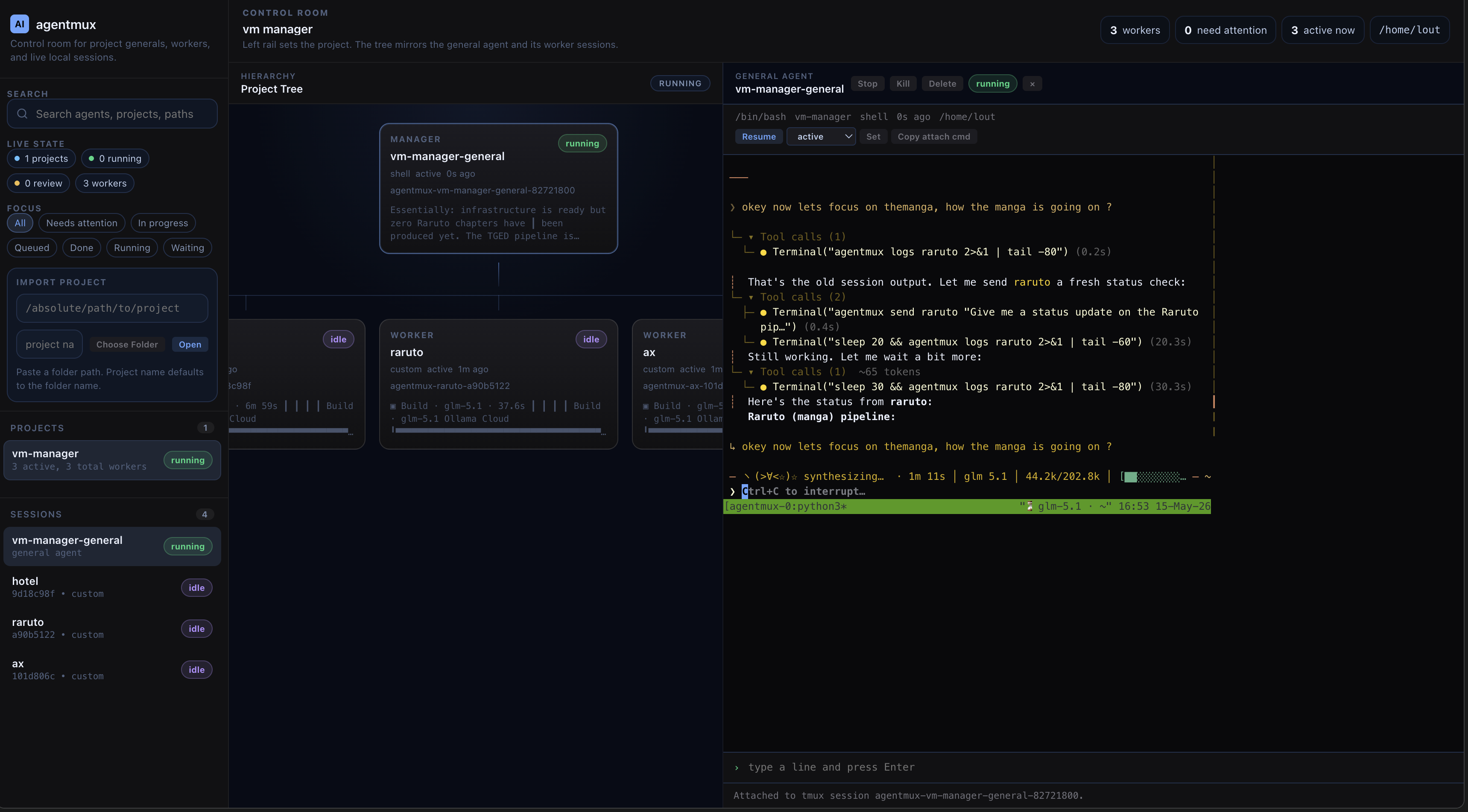
Why
tmux keeps processes alive. But it doesn't tell you what is running, why, or whether it needs attention.
agentmux layers supervision on top of tmux so you can:
- Name agents, not sessions — give each worker a durable identity
- Track state — know which agents are active, idle, finished, or failed
- Send prompts — direct commands to any agent without switching terminals
- Group by project — see all workers for a repo in one view
- Watch everything — live dashboard for all running agents
Core model:
tmuxis the runtime substrateagentmuxis the supervision layer- one agent = one durable worker identity
- one runtime = one tmux-backed terminal session for that agent
Real-world pattern: manager + workers
The most powerful way to use agentmux is with a manager agent that spawns and coordinates worker agents across different AI CLIs.
hermes (manager, shell harness)
├── researcher (worker, shell harness)
├── coder (worker, claude harness)
├── reviewer (worker, opencode harness)
└── ops (worker, codex harness)
The manager (in this case called "hermes") runs in a shell harness and delegates work to specialized workers. Each worker uses whatever CLI fits the task — Claude Code for coding, OpenCode for research, Codex for ops, or plain shell for anything else.
# Set up a project with a manager
./agentmux project-sync myproj --workdir /path/to/myproj --harness shell

# Spawn workers with different harnesses
./agentmux worker myproj researcher --harness shell --prompt "research the codebase"
./agentmux worker myproj coder --harness claude
./agentmux worker myproj reviewer --harness opencode

# Watch the whole project from one view
./agentmux watch --project myproj

# Or open the web dashboard
./agentmux web --open
The manager can use the agentmux skill to send prompts to workers, check their state, and coordinate — all from one terminal.
Autonomous explorer projects
An "autonomous explorer" project gives an agent an open-ended goal and lets it self-direct. The manager monitors progress, unblocks when the agent needs human action, and updates the project tracker.
Pattern:
- Create the project with a manager shell
- Add workers for each autonomous agent
- Send the agent its contract as the initial prompt
- Monitor via
agentmux logs— intervene only when stuck or needing human steps - Kill and delete workers when the project is paused or killed
# Create project manager
./agentmux project-sync my-project --workdir /path/to/project --harness shell

# Add autonomous explorer workers
./agentmux worker my-project explorer-1 --workdir /path/to/repo1 --harness opencode
./agentmux worker my-project explorer-2 --workdir /path/to/repo2 --harness codex

# Send initial mission
./agentmux send explorer-1 "Read AGENTS.md. Start working toward the goal. Ask the human when you need external steps."

# Monitor
./agentmux watch --project my-project
./agentmux logs explorer-1
Requirements
python3tmux
Quick start
# Install globally
./agentmux install

# Create an agent
./agentmux new --harness shell --agent demo --prompt "echo hello"

# See what's running
./agentmux ls

# Open the web dashboard
./agentmux web --open
Install the OpenCode skill so any agent can use agentmux:
./agentmux install-skill
Three surfaces
| Surface | What it does |
|---|---|
| CLI | Create, supervise, and control agents from the terminal |
| Skill | OpenCode integration so agents know how to use agentmux |
| Web UI | Browser dashboard for project boards and terminal supervision |
Commands
Create and import
./agentmux new --harness shell --agent demo
./agentmux new --harness shell --agent demo --prompt "echo hello"
./agentmux new --harness opencode --agent demo
./agentmux new --harness opencode --agent demo --session ses_abc123
./agentmux new --harness custom --agent demo --cmd python3 --arg -m --arg http.server
./agentmux discover                                    # find untracked tmux sessions
./agentmux import --agent imported --tmux-session ses --harness shell
Inspect
./agentmux ls                                          # list all agents
./agentmux ls --project myproj                         # list agents in a project
./agentmux show demo                                   # agent details
./agentmux logs demo                                   # recent output
./agentmux events --session demo                       # event stream
Control
./agentmux send demo "pwd"                              # send a command
./agentmux send demo "continue" --no-enter              # type without pressing enter
./agentmux attach demo                                  # attach to terminal
./agentmux stop demo                                    # stop the runtime
./agentmux kill demo                                    # kill the agent
./agentmux resume demo                                  # restart a stopped agent
./agentmux resume demo --prompt "continue"              # resume with a command
./agentmux state demo finished                          # set agent state manually
./agentmux delete demo                                  # remove agent record
Projects
./agentmux project-sync myproj --workdir /path/to/myproj --harness shell
./agentmux worker myproj researcher --workdir /path/to/myproj --harness shell
./agentmux worker myproj reviewer --harness shell --prompt "inspect and report"
./agentmux watch --project myproj                       # live view of all project agents
./agentmux console --project myproj                     # interactive console
Web UI
./agentmux web                                          # start the dashboard
./agentmux web --open                                   # start and open browser
./agentmux web --host 127.0.0.1 --port 8421            # custom host/port
Recommended flow:
- Run
agentmux web --open - Import or open a project
- Start the project general agent with the default
shellharness - Open worker terminals or send prompts from the project panel
- Use the side panel for logs, events, stop, kill, resume, and state updates
Harnesses
| Harness | Use for |
|---|---|
shell | Default. General-purpose terminal agents |
claude | Claude Code sessions |
codex | OpenAI Codex sessions |
pi | Pi AI sessions |
opencode | OpenCode sessions |
custom | Any command — pass --cmd and --arg |
For opencode sessions, agentmux injects a default model:
- default:
ollama-cloud/glm-5.1 - override per session:
--model provider/model - override globally:
export AGENTMUX_OPENCODE_MODEL=provider/model
The opencode harness supports --session to resume an existing OpenCode session:
./agentmux new --harness opencode --agent foo --session ses_abc123
This passes -s ses_abc123 to the opencode binary.
Install
CLI
./agentmux install                              # installs to ~/.local/bin
./agentmux install --bin-dir /usr/local/bin      # custom location
Add to your shell profile if needed:
export PATH="$HOME/.local/bin:$PATH"
Skill
./agentmux install-skill                         # global OpenCode skill
./agentmux install-skill --target-dir ~/.agents/skills/agentmux
./agentmux install-skill --force
Restart OpenCode after updating the skill.
Environment variables
AGENTMUX_HOME=/custom/path                       # custom state directory
AGENTMUX_OPENCODE_MODEL=provider/model           # default model for opencode
AGENTMUX_INSTALL_DIR=/usr/local/bin              # custom install directory
State
Runtime state is auto-detected heuristically.
Agent state is manual in v1:
| State | Meaning |
|---|---|
active | Currently working |
idle | Waiting for input |
finished | Task complete |
failed | Something went wrong |
archived | No longer needed |
Local state lives in .agentmux/agentmux.db.
License
MIT
Keywords: ai agent supervisor, tmux agent manager, multi-agent orchestration, terminal agent control plane, claude code manager, opencode manager, codex manager, agentmux, ai agent cluster, terminal ai workers, multi-ai workflow, agent process manager