
Spralingua - Tutor de Idiomas com IA
LouisZCode/Spralingua_Language_AIAgents
Tutor de idiomas imersivo com IA que simula conversas reais
Ver no GitHubPlataforma de aprendizado de idiomas que simula conversas reais usando Claude AI e TTS para treinar fluência em tempo real. Resolve o problema de ansiedade em conversação que apps tradicionais não cobrem, oferecendo feedback imediato e adaptativo por nível CEFR.
Instalação
npx convez-ai LouisZCode/Spralingua_Language_AIAgents1 comando no terminal: detecta o formato do repositório (marketplace ou plugin avulso) e instala via Claude Code. Requer Node 18+ e o Claude Code instalado.
Métricas
Casos de uso
- Treinar conversação em cenários reais (pedir café, entrevistas, bate-papo)
- Praticar pronúncia e listening com feedback instantâneo
- Análise de emails em idioma estrangeiro para tom e apropriação cultural
Veredito

Solução técnica bem arquitetada que resolve um problema real (ansiedade em conversação). A implementação com Claude + TTS de baixa latência e sessões persistidas em banco é sólida, embora o escopo seja específico para educação de idiomas.
README
A tradução para o português deste README ainda está na fila.
Spralingua: AI-Powered Language Learning Platform



The Problem
Traditional language learning apps (like Duolingo) are excellent for vocabulary, but they often fail to prepare learners for real-time conversation anxiety. Students know the words but freeze when they have to speak.
The Solution
Spralingua is an immersive AI tutor that simulates real-world scenarios (ordering coffee, job interviews, casual chat). It uses LLMs (Anthropic Claude) for reasoning and cultural context, and ultra-low latency TTS (Text-to-Speech) to create a fluid conversational loop.
Tech Stack & Architecture
Backend
- Core: Python 3.12 + Flask
- AI Engine: Anthropic Claude 3.5 Sonnet (via API)
- Database: PostgreSQL (SQLAlchemy ORM)
- Authentication: Flask-Login + Bcrypt
- TTS: Minimax API
Frontend
- UI: HTML5, CSS3, Vanilla JavaScript
- Audio: Web Speech API (Input) + Minimax TTS (Output)
- Animations: Lottie for character avatars
Infrastructure
- Deployment: Railway (CI/CD with Gunicorn)
- Session Management: Server-side Flask sessions
System Architecture
The application is designed to minimize latency for a "real-time" feel:
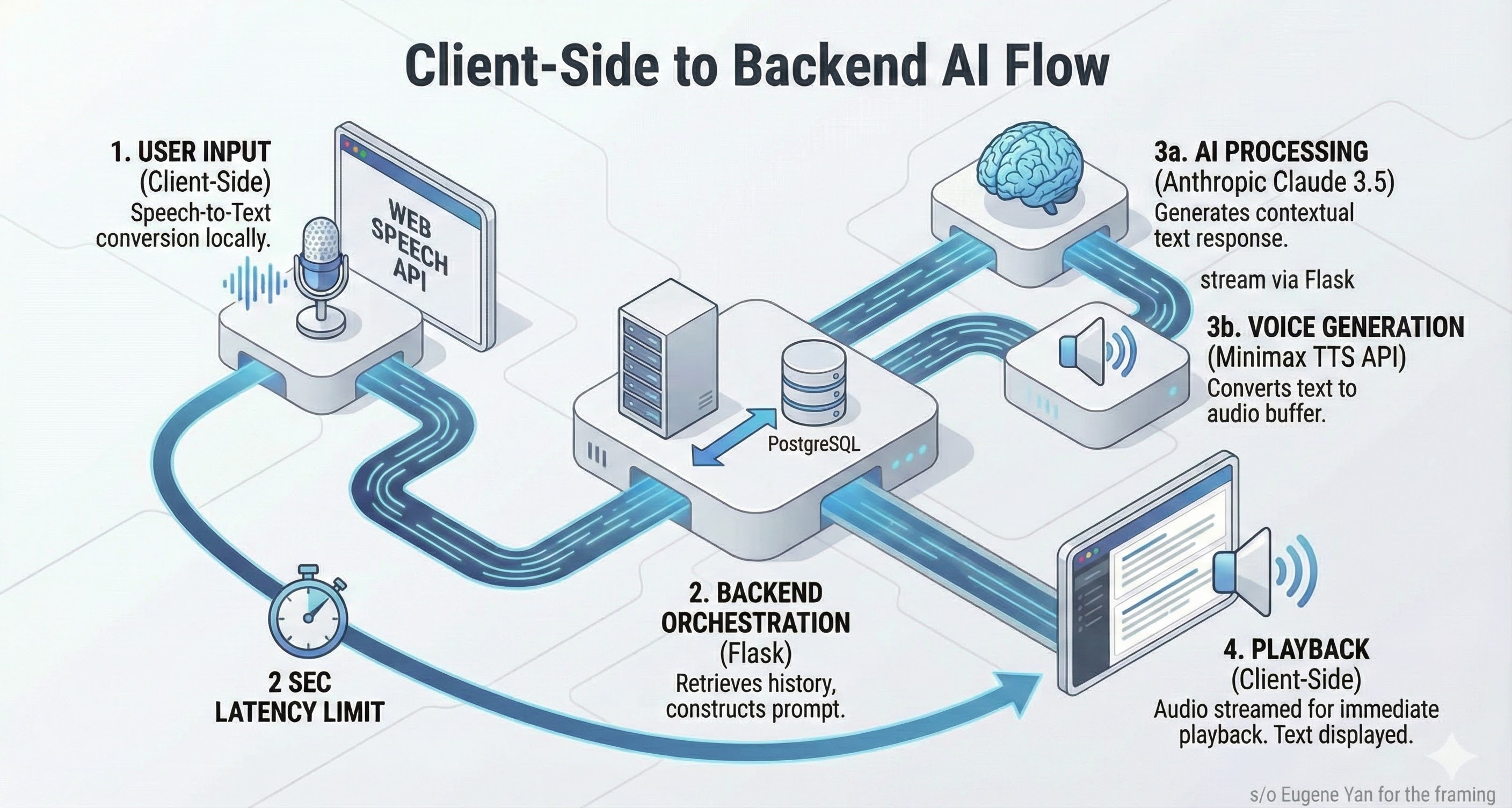
Key Technical Challenges Solved
1. Multi-Worker Session "Bleeding"
The Challenge: In production (deployed on Railway with Gunicorn), requests were load-balanced across multiple workers. A user would start a conversation on Worker A, but their next message would hit Worker B, which had no memory of the conversation context.
The Solution: Implemented database-backed conversation history. Every turn is serialized and stored in the Flask session immediately. The context manager retrieves the full conversation history before sending the prompt to Claude, ensuring continuity regardless of which worker handles the request.
2. Latency Optimization (<2s)
The Challenge: A standard LLM loop (Transcribe -> Generate -> TTS) can take 5-8 seconds, killing immersion.
The Solution:
- Moved Speech-to-Text (STT) to the client-side (Web Speech API) to eliminate upload latency
- Optimized prompt token usage to reduce Claude's "Time to First Token"
- Asynchronous TTS fetching while the UI updates
Features
- Real-time Conversation: Speak naturally; the AI responds contextually with character personalities
- Email Writing Coach: AI analyzes your draft emails for tone, grammar, and cultural appropriateness
- Adaptive CEFR Levels: Content adjusts automatically from A1 (Beginner) to B2 (Upper Intermediate)
- Dual-Feedback System:
- Instant: Subtle hints during chat (color-coded feedback)
- Deep Dive: Post-conversation grammar breakdown
- Voice Input/Output: Practice speaking and listening with speech recognition and TTS
- Progress Tracking: Track advancement through 16 topics per level
Local Development Setup
Prerequisites
- Python 3.12+
- PostgreSQL 17
- UV package manager
- Anthropic API key
- Minimax API credentials (optional, for TTS)
1. Clone the repository
git clone https://github.com/LouisZCode/spralingua.git
cd spralingua
2. Install dependencies with UV
# Install UV if you haven't already
pip install uv

# Install project dependencies
uv sync
3. Configure environment variables
Create a .env file in the project root:
# Database
DATABASE_URL=postgresql://dev:devpass@localhost:5432/spralingua_dev

# Flask
FLASK_SECRET_KEY=your_secret_key_here

# AI APIs
ANTHROPIC_API_KEY=sk-ant-your-key-here
MINIMAX_API_KEY=your_minimax_key
MINIMAX_GROUP_ID=your_group_id
MINIMAX_VOICE_ID=female-shaonv
4. Database Setup
Option A: Local PostgreSQL
# Start PostgreSQL (macOS)
brew services start postgresql

# Create database
psql -U postgres -c "CREATE DATABASE spralingua_dev;"
psql -U postgres -c "CREATE USER dev WITH PASSWORD 'devpass';"
psql -U postgres -c "GRANT ALL PRIVILEGES ON DATABASE spralingua_dev TO dev;"
Option B: Use Railway Production DB (for testing)
export DATABASE_URL="your_railway_database_url"
5. Run database migrations
uv run python migrations/create_user_progress_table.py
uv run python migrations/create_topic_system_tables.py
uv run python migrations/populate_a1_topics.py
# ... additional migrations as needed
6. Start the application
uv run python app.py
Access at http://localhost:5000
Project Structure
spralingua/
├── app.py                  # Main Flask application (factory pattern)
├── config.py               # Centralized configuration
├── database.py             # Database initialization
│
├── routes/                 # Flask Blueprints
│   ├── core.py             # Landing page
│   ├── auth.py             # Login, register, dashboard
│   ├── exercises.py        # Exercise pages
│   └── api.py              # All /api/* endpoints
│
├── services/               # External service clients
│   ├── claude_client.py    # Anthropic API integration
│   ├── minimax_client.py   # Minimax TTS integration
│   └── feedback.py         # Feedback generation
│
├── auth/                   # Authentication system
│   ├── auth_manager.py     # Auth logic
│   ├── forms.py            # WTForms classes
│   └── decorators.py       # @login_required
│
├── models/                 # SQLAlchemy database models
├── prompts/                # AI prompt templates and personalities
├── progress/               # Progress tracking system
├── topics/                 # Topic progression management
├── scenarios/              # Dynamic scenario generation
├── email_writing/          # Email writing exercise module
│
├── static/                 # CSS, JavaScript, and assets
│   ├── css/                # Stylesheets
│   ├── js/                 # Frontend JavaScript
│   └── animations/         # Lottie animation files
│
└── templates/              # Jinja2 HTML templates
API Endpoints
Progress Management
POST /api/save-progress- Save language/level selectionGET /api/user-progress- Get user progress with exercise completion
Casual Chat
POST /api/casual-chat/chat- Submit message and receive AI responsePOST /api/casual-chat/tts- Generate text-to-speech audioPOST /api/casual-chat/clear- Clear conversation historyGET /api/casual-chat/scenario- Get conversation scenario
Email Writing
POST /api/writing-practice/generate- Generate culturally-adapted lettersPOST /api/writing-practice/submit- Submit and evaluate responses
Development Guidelines
Windows Compatibility
CRITICAL: Never use emoji characters in console output due to Windows encoding limitations. Use text markers instead:
[SUCCESS]instead of checkmarks[ERROR]instead of X marks[WARNING]instead of warning signs
Emojis ARE allowed in HTML templates for user-facing UI.
Package Management
Always use UV for package management:
uv add package_name     # Add new dependency
uv sync                 # Install all dependencies
uv run python script.py # Run Python scripts
Contributing
- Fork the Project
- Create your Feature Branch (
git checkout -b feature/AmazingFeature) - Commit your Changes (
git commit -m 'Add some AmazingFeature') - Push to the Branch (
git push origin feature/AmazingFeature) - Open a Pull Request
License
Distributed under the MIT License. See LICENSE for more information.
Built by Luis Zermeno - Bridging Talent Acquisition & Software Engineering.