
MCP Security Scanner
lorbeere711/mcp-security-scanner
Auditoria de segurança para MCP servers: permissões, injeção e exfiltração
Ver no GitHubScanner de segurança especializado em analisar MCP servers antes da instalação, detectando permissões perigosas, riscos de injeção de prompt e caminhos de exfiltração de dados. Funciona como um npm-audit para o ecossistema MCP, integrável em pipelines CI/CD com saída em múltiplos formatos (JSON, SARIF, Markdown).
Instalação
npx convez-ai lorbeere711/mcp-security-scanner1 comando no terminal: detecta o formato do repositório (marketplace ou plugin avulso) e instala via Claude Code. Requer Node 18+ e o Claude Code instalado.
Métricas
Casos de uso
- Validar segurança de MCP servers antes de conectar ao Claude ou outros agentes IA
- Integrar verificações de segurança em pipelines CI/CD
- Gerar relatórios de conformidade em formato SARIF para ferramentas de scanning
Veredito

Ferramenta essencial para adoção segura de MCP servers em ambientes produtivos. Preenche uma lacuna crítica ao oferecer verificações práticas e determinísticas em tempo de instalação, com output acionável e integração nativa em CI/CD.
README
A tradução para o português deste README ainda está na fila.
MCP Security Scanner
The npm-audit for MCP servers.
Before installing an MCP server, run one command and see what it can actually do.
Scan MCP servers for dangerous tools, prompt-injection risks, excessive permissions, and unsafe agent capabilities before you connect them to Claude, Codex, Cursor, or other AI agents.
Quick Start
npx mcp-security-scanner scan ./mcp-server-config.json
Add it to CI:
- uses: lorbeere711/mcp-security-scanner@v0
  with:
    target: ./mcp.json
    format: sarif
    fail-on: high
Positioning
mcp-security-scanner focuses on fast, explainable, install-time risk checks for MCP servers.
This project is intentionally different from runtime sandboxing and broad research efforts:
- It is a lightweight CLI you can run in CI and pre-install workflows.
- It reports concrete, explainable findings with actionable remediation text.
- It produces machine-readable output (
json,sarif) for security tooling.
What It Scans (MVP 0.1)
- Dangerous permissions
- Prompt injection indicators
- Unsafe tool descriptions
- Potential data exfiltration paths
- Missing metadata signals (name/license)
- Broad filesystem/network permissions without allowlists
- Risk score (
0-100) with severity-oriented report output
Why
MCP adoption is growing quickly, while security checks are often ad hoc. This scanner provides a practical baseline for CI pipelines and local hardening reviews.
Install
Use with npx:
npx mcp-security-scanner scan ./mcp-server-config.json
Or install locally for development:
npm install
npm run build
Usage
mcp-security-scanner scan ./mcp-server-config.json
mcp-security-scanner scan ./mcp-server-config.yaml
mcp-security-scanner scan --server @modelcontextprotocol/server-filesystem
mcp-security-scanner audit ./mcp-server-config.json --format sarif
mcp-security-scanner scan ./mcp-server-config.json --format json
mcp-security-scanner scan ./mcp-server-config.json --format markdown
mcp-security-scanner scan ./mcp-server-config.json --format sarif --output report.sarif
mcp-security-scanner scan ./mcp-server-config.json --fail-on critical
mcp-security-scanner scan ./mcp-server-config.json --fail-on none
mcp-security-scanner scan ./mcp-server-config.json --ai-review
Formats:
text: human-readable report (default)json: machine-readable full scan result (see JSON Schema)markdown: paste-ready report for PR comments, issue notes, and audit summariessarif: SARIF 2.1.0 report for code scanning tools
CI failure threshold:
--fail-on critical: fail only on critical findings--fail-on high: fail on high or critical findings (default)--fail-on medium: fail on medium, high, or critical findings--fail-on low: fail on any finding--fail-on none: report-only mode, never fail because of findings
Experimental local AI review:
--ai-review: run optional semantic review with a local model--ai-provider ollama: use Ollama athttp://localhost:11434--ai-model qwen3:1.7b: default local model
AI review is local-first, opt-in, and never runs during default scans. The scanner does not bundle a model or require an API key; users run their own local Ollama model.
ollama serve
ollama pull qwen3:1.7b
mcp-security-scanner scan ./mcp-server-config.json --ai-review
For slower machines or CI smoke tests, use qwen3:0.6b. See docs/AI_REVIEW.md.
JSON Schema
The JSON report includes a schemaVersion field so consumers can validate compatibility.
{
  "schemaVersion": "1.0.0",
  "target": "examples/insecure.json",
  "scannedAt": "2026-06-13T00:00:00.000Z",
  "findings": [
    {
      "id": "PERM-001",
      "severity": "high",
      "title": "Dangerous permission detected",
      "description": "Permission shell can enable high-impact actions.",
      "recommendation": "Apply least-privilege.",
      "path": "permissions"
    }
  ]
}
Fields:
| Field | Type | Description |
|---|---|---|
schemaVersion | string | Semantic version of the report schema (e.g. "1.0.0") |
target | string | Path or package name of the scanned MCP config |
scannedAt | string | ISO 8601 timestamp of the scan |
findings | Finding[] | Array of detected security findings |
Each Finding object:
| Field | Type | Description |
|---|---|---|
id | string | Unique finding identifier (e.g. PERM-001) |
severity | "low" | "medium" | "high" | "critical" | Risk level |
title | string | Short description of the finding |
description | string | Detailed explanation |
recommendation | string | Actionable remediation text |
path | string | undefined | Optional JSON path to the risky config key |
source | "deterministic" | "ai" | undefined | Finding source, present for AI findings |
confidence | "low" | "medium" | "high" | undefined | Confidence level for AI findings |
evidence | string[] | undefined | Evidence snippets for AI findings |
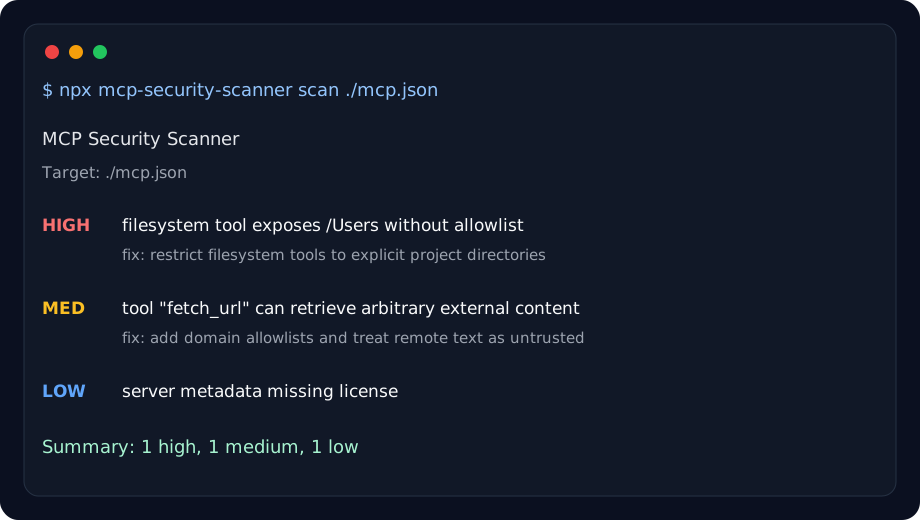
Example output:
HIGH  filesystem tool exposes /Users without allowlist
MED   tool "fetch_url" can retrieve arbitrary external content
LOW   missing server metadata / license
Exit codes:
0: no findings at or above the configured--fail-onthreshold1: scanner/runtime error2: findings detected at or above the configured--fail-onthreshold
Development
npm run dev -- scan ./examples/insecure.json
npm run lint
npm run test
npm run build
npm run pack:check
Adversarial Fixture Benchmarks
This repository includes adversarial benchmark fixtures under examples/fixtures/ to make deterministic scanner behavior explicit.
- Safe fixtures live in examples/fixtures/safe/
- Unsafe fixtures live in examples/fixtures/unsafe/
- Expected outcomes are tracked in examples/fixtures/manifest.json
Each manifest entry includes:
expectedFindingIds: findings that must be present for the fixturemustMissFindingIds: findings intentionally expected to be absent (known false negatives)notes: rationale for why the fixture exists
Run fixture benchmarks with:
npm run test
Known Limitation: Natural-Language Exfiltration Intent
The scanner is deterministic and keyword-driven in several rules. This means natural-language descriptions can imply risky behavior without matching current keyword patterns.
Example: a tool description that says it will "share diagnostics with a configured service endpoint" may represent exfiltration intent but may not currently trigger EXFIL-001.
This limitation is tracked explicitly in the adversarial fixture suite as a known false negative, so misses are visible and regression-tested instead of hidden.
Adding New Benchmark Fixtures
- Add the fixture JSON file to the appropriate folder under examples/fixtures/.
- Add or update the corresponding entry in examples/fixtures/manifest.json.
- Keep fixture metadata focused on finding IDs (
expectedFindingIdsandmustMissFindingIds) to avoid brittle tests. - Run
npm run testand confirm behavior is explicit for both expected detections and known misses.
GitHub Action
Full pull request workflow:
name: MCP Security Scan

on:
  pull_request:
  push:
    branches: [main]

permissions:
  contents: read
  pull-requests: write

jobs:
  mcp-security:
    runs-on: ubuntu-latest
    steps:
      - uses: actions/checkout@v4
      - uses: lorbeere711/mcp-security-scanner@v0
        with:
          target: ./mcp.json
          format: sarif
          fail-on: high
          comment-pr: true
- uses: lorbeere711/mcp-security-scanner@v0
  with:
    target: ./mcp.json
    format: sarif
    fail-on: high
Or scan a server package:
- uses: lorbeere711/mcp-security-scanner@v0
  with:
    server: @modelcontextprotocol/server-filesystem
    format: sarif
    fail-on: critical
Post or update a PR summary comment:
permissions:
  contents: read
  pull-requests: write

steps:
  - uses: actions/checkout@v4
  - uses: lorbeere711/mcp-security-scanner@v0
    with:
      target: ./mcp.json
      format: sarif
      fail-on: high
      comment-pr: true
Upload SARIF to GitHub code scanning:
permissions:
  contents: read
  security-events: write
  pull-requests: write

steps:
  - uses: actions/checkout@v4
  - uses: lorbeere711/mcp-security-scanner@v0
    with:
      target: ./mcp.json
      format: sarif
      output: mcp-security.sarif
      fail-on: high
      comment-pr: true
  - uses: github/codeql-action/upload-sarif@v3
    if: always()
    with:
      sarif_file: mcp-security.sarif
Publish Preparation
npm run prepublishOnly
npm run pack:check
If checks pass, publish from a trusted environment with npm credentials configured.
Contribution Ideas
- good first issue: add detector for filesystem over-permission
- good first issue: add JSON output enhancements and stable schema docs
- help wanted: improve SARIF mapping for GitHub code scanning UX
- help wanted: add MCP server registry scanner support
- research: map known MCP vulnerabilities to detector rules
- published 20-server report: docs/SECURITY_PATTERNS_REPORT.md
See docs/ROADMAP.md for planned work and evaluation ideas.
Roadmap
- Rule config and suppressions
- CI integration helpers
- Expanded MCP schema awareness
License
MIT