
MCP-HUB-LITE
LoopOuroboros/mcp-hub-lite
Gateway MCP com gerenciamento, busca e interface unificada para múltiplos servidores
Ver no GitHubPlataforma leve de gerenciamento de servidores MCP projetada para desenvolvedores independentes. Funciona como gateway unificado entre frontend e múltiplos servidores MCP backend, oferecendo busca fuzzy, agrupamento por tags, interface web e CLI para descoberta e invocação de ferramentas.
Instalação
npx convez-ai LoopOuroboros/mcp-hub-lite1 comando no terminal: detecta o formato do repositório (marketplace ou plugin avulso) e instala via Claude Code. Requer Node 18+ e o Claude Code instalado.
Métricas
Casos de uso
- Gerenciar múltiplos servidores MCP através de uma interface central
- Descobrir e invocar ferramentas MCP distribuídas via busca integrada
- Organizar servidores MCP por ambiente, categoria e função com sistema de tags
- Executar e monitorar processos MCP localmente com balanceamento de carga
Veredito

MCP-HUB-LITE é uma solução sólida para quem precisa orquestrar múltiplos servidores MCP em ambiente local. A abordagem de gateway com busca agregada, gerenciamento de tags e suporte a persistência de sessão resolve problemas reais de descoberta e invocação em arquiteturas MCP distribuídas, embora requeira familiaridade com Node.js e arquitetura MCP.
README
A tradução para o português deste README ainda está na fila.
MCP-HUB-LITE


A lightweight MCP management platform designed for independent developers, providing MCP server gateway, grouping, fuzzy search, and MCP HttpStream protocol interface.
Overview
MCP-HUB-LITE is an MCP server gateway designed specifically for independent developers. It acts as a proxy between your frontend and multiple backend MCP servers, providing a unified access interface with support for the MCP JSON-RPC 2.0 protocol.
Core Features
- MCP Gateway Service: Unified proxy interface for multiple backend MCP servers
- MCP CLI Tool: Command-line tool for listing and calling MCP tools across servers
- Server Management: Manage multiple MCP servers through a web interface
- Tool Search: Search and tool discovery across all servers with aggregation
- Process Management: Launch and manage MCP server processes via npx/uvx
- Dual-Mode Session: Stateful (session persistence, SSE, notifications) and stateless (per-request) modes, with UA / header / config priority switching
- MCP Notification Push: Push
notifications/tools/list_changedandnotifications/resources/list_changedto connected clients - Multi-Instance Support: Run multiple instances of the same MCP server with load balancing
- Instance Selection Strategies: Support random, round-robin, and unique-by-tag selection
- Tag System: Organize multiple MCP servers by environment, category, function, etc.
- Fault Tolerance: System continues to operate when individual servers fail
- Bilingual Interface: Support for Chinese/English interface switching
- Configuration Management: Support for hot-reloading and maintenance of
.mcp-hub.json - MCP Native Resources: Forward resource calls to backend MCP servers
- Security: Mask sensitive values in config change logs
Quick Start
System Requirements
- Node.js 22.x or higher
- npm or yarn
- Windows, macOS, or Linux
Installation
Install from npm
# Install from npm
npm install -g @loop_ouroboros/mcp-hub-lite

# Start the service
mcp-hub-lite start

# Open UI
mcp-hub-lite ui
Build from source
# Install dependencies
npm install

# Run in development mode (frontend and backend hot reload)
npm run dev

# Build production version
npm run build

# Full check (build + tests + code check)
npm run full:check

# Run production version
npm start

# Check status
mcp-hub-lite status

# Open UI interface
mcp-hub-lite ui
The server will start at http://localhost:7788.
Server Management
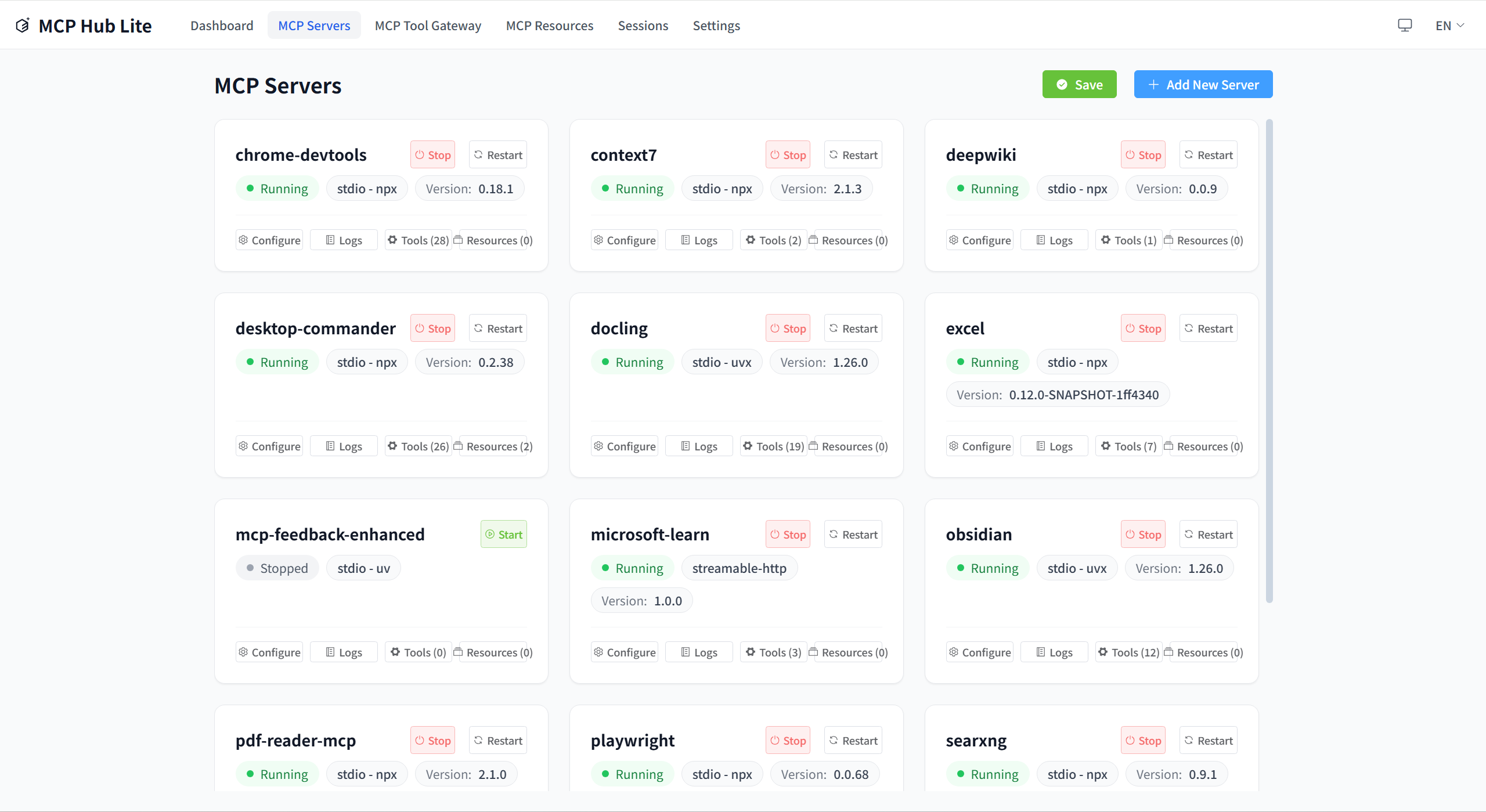
Manage all your MCP servers in one place. Add, edit, delete, connect, and disconnect servers through the intuitive web interface.
Gateway & Tools
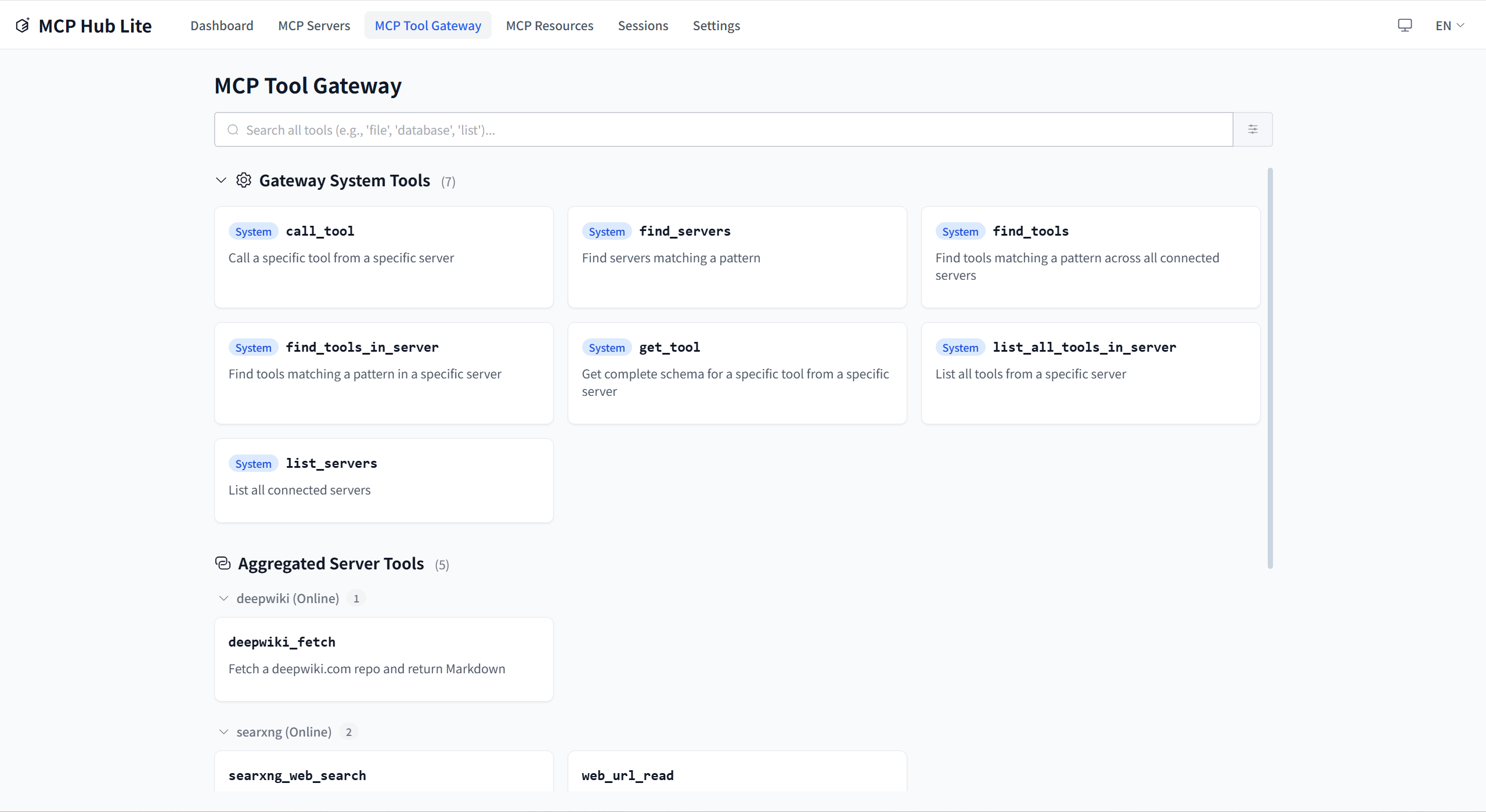
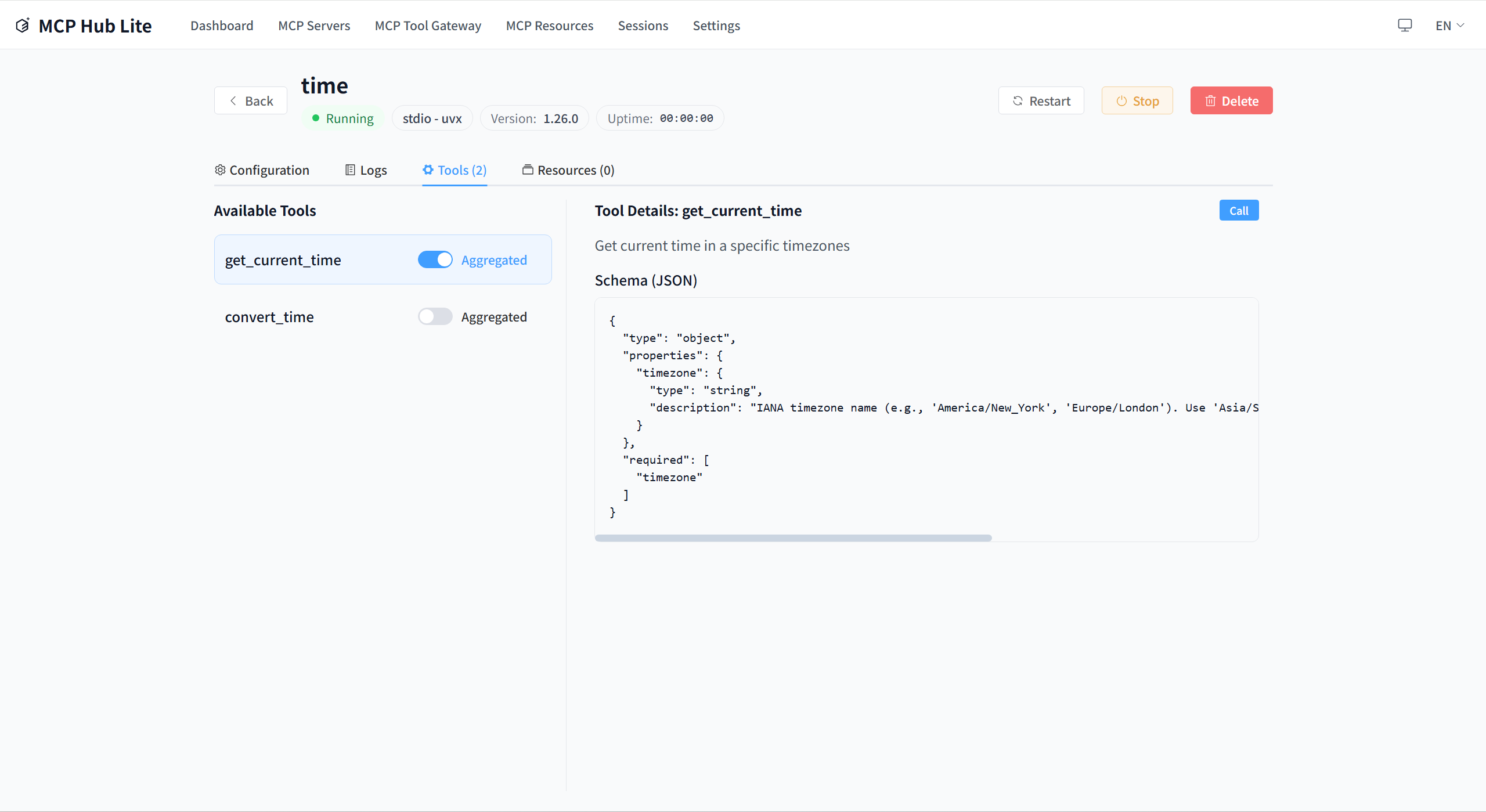
Discover and call tools from all connected MCP servers through the unified gateway interface. The aggregated tools view provides a single place to search and use all available tools.
Resources
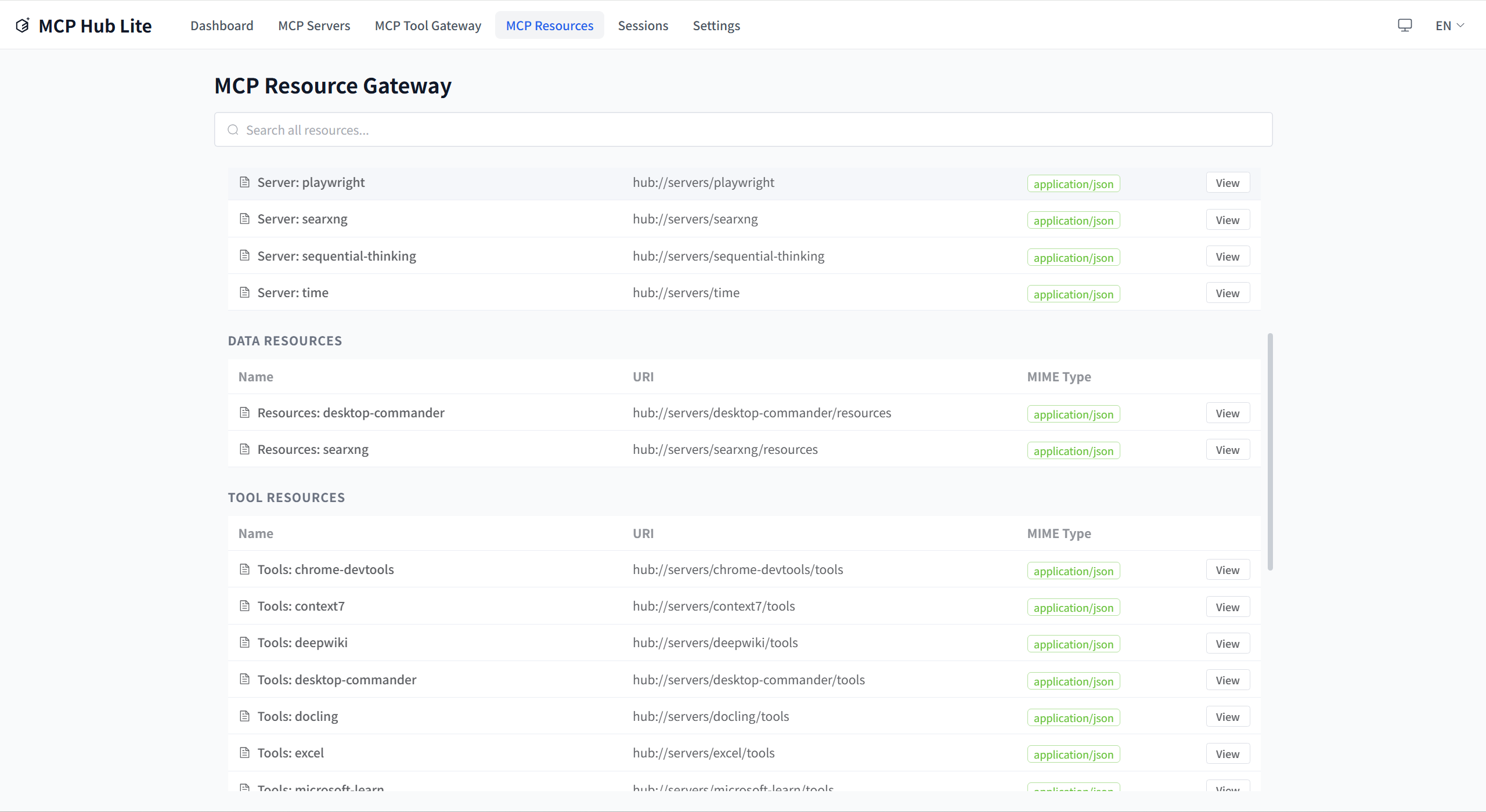
Browse and manage MCP resources from all connected servers.
Testing
# Run all tests
npm test

# Backend tests
npm run test:backend

# Frontend tests
npm run test:frontend
CLI Commands
MCP-HUB-LITE provides a command-line interface for managing the service.
# Start the service
npm start
# or
mcp-hub-lite start

# Check status
mcp-hub-lite status

# List all servers
mcp-hub-lite list

# Open web interface
mcp-hub-lite ui

# Help
mcp-hub-lite --help
Tool Use Command
The tool-use command provides MCP server tool operations:
# List system tools (default server: mcp-hub-lite)
mcp-hub-lite tool-use list-tools

# List tools from a specific server
mcp-hub-lite tool-use list-tools --server baidu-search

# Get tool schema
mcp-hub-lite tool-use get-tool --tool list_tools

# Call a system tool
mcp-hub-lite tool-use call-tool --tool list_tools --args '{}'

# Call a server tool
mcp-hub-lite tool-use call-tool --server baidu-search --tool search --args '{"query":"hello"}'
Configuration
MCP-HUB-LITE uses a .mcp-hub.json file for configuration. Configuration lookup priority:
- Environment variable
MCP_HUB_CONFIG_PATH ~/.mcp-hub-lite/config/.mcp-hub.json(hidden folder in user home directory)
Configuration Example
{
  "version": "1.1.0",
  "servers": [
    {
      "id": "server-1",
      "name": "My MCP Server",
      "description": "Example server",
      "transport": "streamable-http",
      "endpoint": "http://localhost:8080",
      "tags": {
        "env": "development",
        "category": "api-server",
        "function": "http-api",
        "priority": "medium"
      },
      "allowedTools": [],
      "instances": [
        {
          "index": 0,
          "displayName": "Instance 1",
          "enabled": true,
          "env": {}
        }
      ],
      "managedProcess": {
        "command": "npx my-mcp-server",
        "managedMode": "npx",
        "processType": "streamable-http"
      }
    }
  ],
  "settings": {
    "language": {
      "current": "en-US",
      "autoDetect": true,
      "fallback": "en-US"
    },
    "logging": {
      "level": "info"
    }
  },
  "system": {
    "session": {
      "defaultSessionMode": "stateful",
      "sessionModeRules": {
        "stateful": ["Claude"],
        "stateless": ["CherryStudio"]
      }
    }
  },
  "gateway": {
    "proxyTimeout": 30000,
    "rateLimit": {
      "enabled": true,
      "maxRequests": 100,
      "windowMs": 60000
    }
  }
}
Client Configuration
To connect your MCP client to MCP-HUB-LITE, add the following to your client's MCP configuration:
{
  "mcpServers": {
    "mcp-hub-lite": {
      "type": "http",
      "url": "http://localhost:7788/mcp"
    }
  }
}
Stateful mode provides session persistence, SSE streaming, and real-time notifications. UA matching is NOT automatic — it requires manually adding "ClaudeCode" to system.session.sessionModeRules.stateful in .mcp-hub.json. Standard MCP clients like Claude Code work with the default stateful mode without extra configuration.
{
  "mcpServers": {
    "mcp-hub-lite": {
      "type": "http",
      "url": "http://localhost:7788/mcp",
      "headers": {
        "x-mcp-session-mode": "stateless"
      }
    }
  }
}
CherryStudio requires the x-mcp-session-mode: stateless header to use stateless mode. UA matching is NOT automatic — it requires manually adding "CherryStudio" to system.session.sessionModeRules.stateless in .mcp-hub.json. The header approach is the recommended way and takes highest priority.
Stateless mode uses per-request transport — each POST creates an independent transport, no session persistence, GET returns 405.
Add the x-mcp-session-mode header to force a specific mode:
{
  "mcpServers": {
    "mcp-hub-lite": {
      "type": "http",
      "url": "http://localhost:7788/mcp",
      "headers": {
        "x-mcp-session-mode": "stateful"
      }
    }
  }
}
Valid values: "stateful" or "stateless". Header takes highest priority over UA matching and config defaults.
Usage Guide
Adding MCP Servers
Through the web interface:
- Open http://localhost:7788
- Navigate to the "Servers" page
- Click "Add Server"
- Fill in server details and save
Process Management
MCP-HUB-LITE supports launching and managing MCP servers using your local environment:
Supported Launch Methods
- Node.js (npx):
npx package-name - Python (uvx):
uvx package-name - Direct Command: Custom startup command
Process Management Features
- Start/stop/restart MCP servers
- Monitor CPU and memory usage
- Crash detection and automatic restart
- PID tracking and health checks
Development Guide
Project Structure
src/
├── api/              # API implementations
│   ├── mcp/          # MCP protocol handlers
│   ├── web/          # Web API routes (includes sessions.ts)
│   └── ws/           # WebSocket routes
├── models/           # Data models
├── services/         # Core business logic
│   ├── gateway/      # MCP gateway service
│   ├── connection/   # Connection management
│   └── hub-tools/    # Hub tools service
├── utils/            # Utility functions
│   ├── logger/       # Logging utilities
│   └── transports/   # MCP transport implementations
├── config/           # Configuration
├── cli/              # CLI commands
│   └── commands/     # CLI command implementations
├── pid/              # Process ID management
└── server/           # Server runtime

frontend/
├── src/
│   ├── components/   # Reusable UI components
│   ├── views/        # Page view components
│   ├── stores/       # Pinia state management
│   ├── composables/  # Vue composables
│   ├── router/       # Vue Router configuration
│   ├── i18n/         # Internationalization
│   └── types/        # Frontend type definitions

shared/
├── models/           # Shared models
└── types/           # Shared types

tests/
├── unit/            # Unit tests
├── integration/     # Integration tests
├── contract/        # Contract tests
├── helpers/         # Test helpers
└── types/          # Test types
Adding New Features
- Create models (models/)
- Implement services (services/)
- Add API routes (api/)
- Write tests (tests/)
- Update configuration files
Detailed Technical Documentation
Complete project architecture, constraints, and design decisions can be found in:
- CLAUDE.md - Project AI context and module documentation
License
MIT
Contributing
Pull Requests and Issues are welcome!
Community
Thanks to the LinuxDo (linux.do) community for the discussions, sharing, and feedback.