
Modmixer
lebek/modmixer
Crie mods para RimWorld conversando com IA, sem código
Ver no GitHubDesktop app que permite criar mods para RimWorld sem escrever código. Funciona como um agent de IA que descompila o jogo, indexa seus arquivos e fornece ao LLM (Claude, ChatGPT, etc) ferramentas para construir, testar e publicar mods através de conversa em linguagem natural.
Instalação
npx convez-ai lebek/modmixer1 comando no terminal: detecta o formato do repositório (marketplace ou plugin avulso) e instala via Claude Code. Requer Node 18+ e o Claude Code instalado.
Métricas
Casos de uso
- Criar mods para RimWorld sem conhecimento de programação
- Acelerar desenvolvimento de mods automatizando scaffolding e testes
- Gerenciar assets (sprites, texturas, áudio) e publicar no Steam Workshop
Veredito

Ferramenta inovadora que democratiza a criação de mods ao eliminar barreira técnica de programação. Bem executada para RimWorld, embora ainda limitada a esse jogo específico.
README
A tradução para o português deste README ainda está na fila.


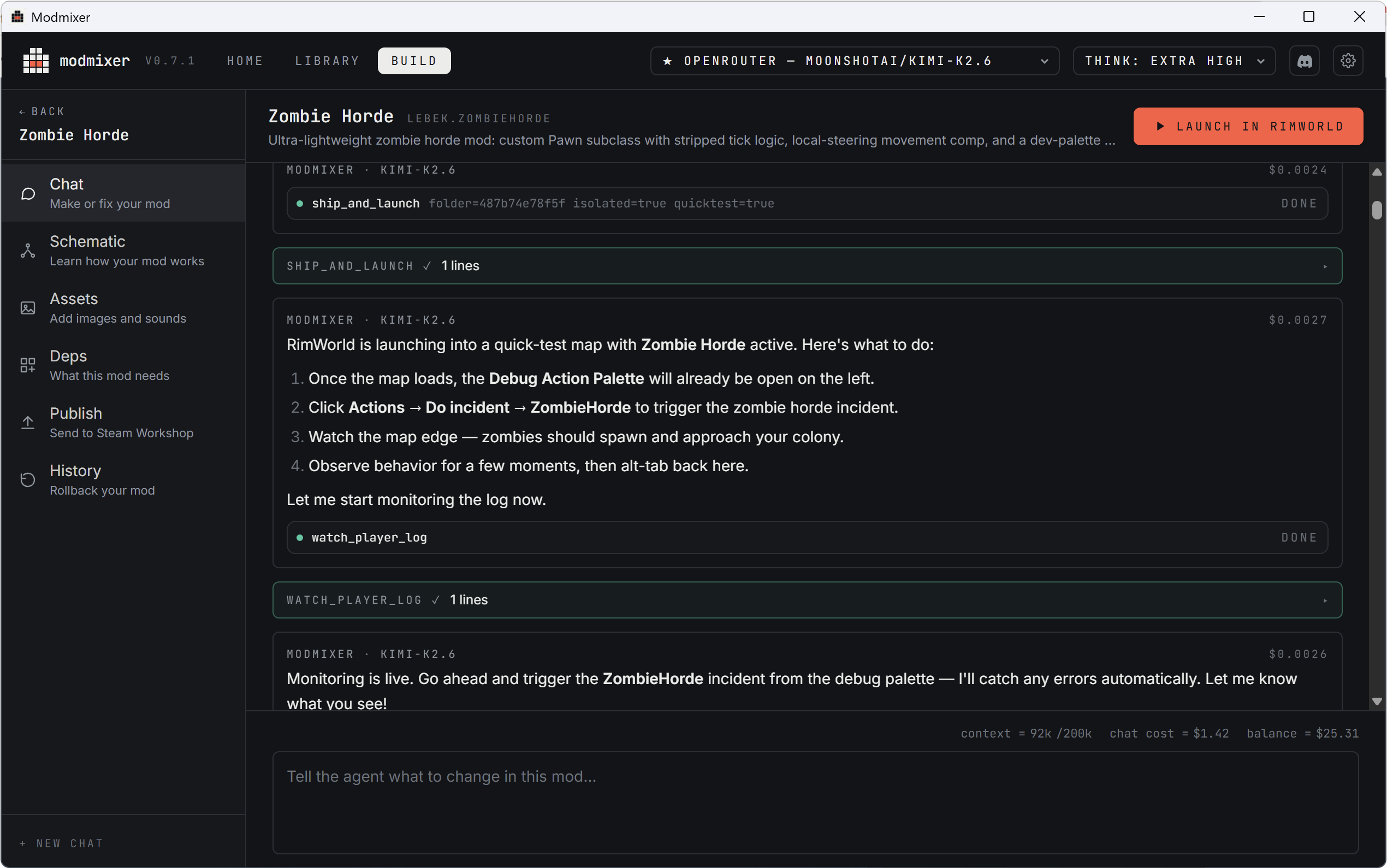
Build RimWorld mods without writing code.
Modmixer is a desktop app that lets you describe a mod in plain English and have an AI agent build it for you. You chat, it edits the XML and C# files in your Mods folder, manages your art and audio assets, launches the game to test, watches the logs for errors, and helps you publish to the Steam Workshop when you're happy.
Mods aren't just code. Modmixer also helps you import sprites, textures, and audio, and lays them out inside your mod folder the way RimWorld expects.
It's also useful if you do write code — the agent does the boring parts (scaffolding, def-graph lookups, log triage) so you can focus on the interesting design decisions.
Getting started
- Install Modmixer from modmixer.com.
- Run Modmixer. It walks you through setup, including connecting an AI model. Modmixer needs a model such as ChatGPT or Claude to build your mods. See Choosing an AI Provider.
- Once you're set up, read on.
Building your first mod
Create a new project
- Launch Modmixer
- From the Home screen click "+ New Mod"
Once your new project opens, Modmixer starts the conversation.
Chat with Modmixer
Chat is the heart of Modmixer. Building a mod is a lot like talking to ChatGPT, except Modmixer can also write code and control RimWorld to help you build and test mods.
When you first create a mod, Modmixer will ask you "What's your mod idea?". Your answer to this can be something simple, like "Add a new type of sword to RimWorld". Modmixer will ask questions about your idea until it has enough detail to turn it into a working mod. It will usually present a plan for you to approve before moving forward. Read it carefully and check you're happy with everything before saying yes. The next step takes a few minutes, so it's better to get the plan right from the start.
Watch Modmixer build your mod
After you approve the plan, Modmixer gets to work building your mod! Usually this takes a few minutes. During this time you'll see a message in the chat every time Modmixer reads a file or writes some code. All of this is automatic and you don't need to do anything. It's ok if these messages look a bit confusing. You'll start to understand what they mean as you get more experienced with Modmixer.
Just like a person, sometimes Modmixer makes a mistake, and you'll see it try to recover. This is a normal part of the process and nothing to worry about.
Eventually Modmixer will finish, and ask if you're ready to test. When you say "yes", it will automatically launch RimWorld, with your new mod installed. It's time to test!
Test your mod
Testing is the most important part of building a mod. Modmixer can write code, it can fix bugs, it can even launch your mod in RimWorld, but it can't test it. Only you can check the mod does what it's supposed to. When you're testing you might find:
- It doesn't do exactly what you imagined
- It works but you have an idea to make it even better
- It has a bug
- RimWorld is running slower
Come back to the Modmixer chat and explain the issue or what you want to change. Just like before, Modmixer will work for a few minutes to make changes, and eventually ask you to retest.
Modmixer also monitors RimWorld for errors while you're testing. It does this using a special "Modmixer Bridge" mod (so don't be concerned if you see this in the modlist). When Modmixer detects an error, it will send you a notification and start fixing it automatically. When it's done it will ask if it can relaunch RimWorld for you.
Keep building
At this point you've built a mod with chat, tested it, and made changes. This is how you'll spend the vast majority of your time in Modmixer. As you get more experienced you'll learn how to talk to Modmixer to get even better results.
When you're ready to share your mod on Steam Workshop, head over to Publishing Your Mod.
Learn more
Full documentation lives at modmixer.com/docs, including:
- Choosing an AI provider
- Adding images & sounds
- Publishing your mod
- Adding dependencies & mod compatibility
- Pro tips and FAQ