
Logs Locally Plugin
Laotree/logs-locally-plugin
Histórico automático de sessões de IA em SQLite com UI web local
Ver no GitHubAgent que captura automaticamente sessões de Claude Code, Pi e Codex em banco SQLite local com interface web para busca e análise. Funciona sem configuração, sem daemon e sem enviar dados para a nuvem — tudo fica na sua máquina.
Instalação
npx convez-ai Laotree/logs-locally-plugin1 comando no terminal: detecta o formato do repositório (marketplace ou plugin avulso) e instala via Claude Code. Requer Node 18+ e o Claude Code instalado.
Métricas
Casos de uso
- Revisar e pesquisar histórico completo de sessões de coding
- Analisar qualidade de sessões com scoring automático (7 dimensões)
- Auditar sessões para segurança (scrubbing automático de credenciais)
Veredito

Solução robusta e bem pensada para quem usa Claude Code frequentemente. A abordagem zero-config com SQLite local e UI web é prática; o scrubbing automático de credenciais é um diferencial de segurança. Recomendado para desenvolvedores que querem auditoria local de sessões de IA sem overhead.
README
A tradução para o português deste README ainda está na fila.


llp — zero-config session history for AI coding agents
Claude Code, Pi agent, Codex CLI, and opencode sessions vanish the moment you close the terminal. llp saves every one of them to a local SQLite database and gives you a searchable web UI — automatically, after every session. Zero config. No daemon. No cloud. No API key.
Homepage · Installation · GitHub
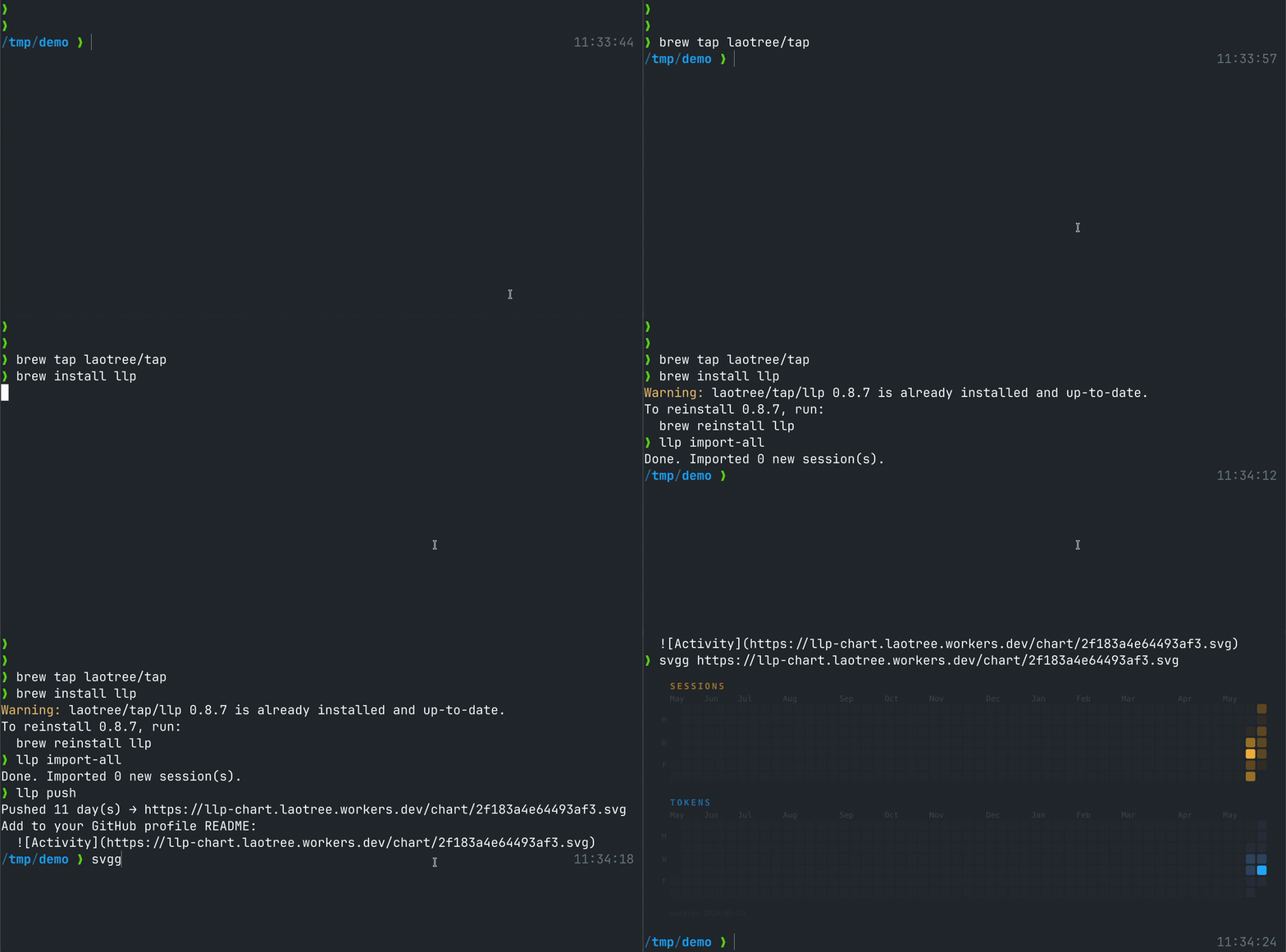
# Install (macOS / Linux)
brew tap Laotree/tap && brew install llp

# Save your latest session right now
llp import

# Browse all sessions at http://127.0.0.1:8484
llp serve
Then add one line to ~/.claude/settings.json so it runs automatically on every session exit:
{
  "hooks": {
    "Stop": [{ "hooks": [{ "type": "command", "command": "llp import" }] }]
  }
}
That's it. No daemon, no cloud, no API key.
What is "plugin"? The name reflects that
llpintegrates with Claude Code'sStophook — but it's a plain CLI binary. No marketplace or plugin runtime required. Install with Homebrew orcargo installand it works.
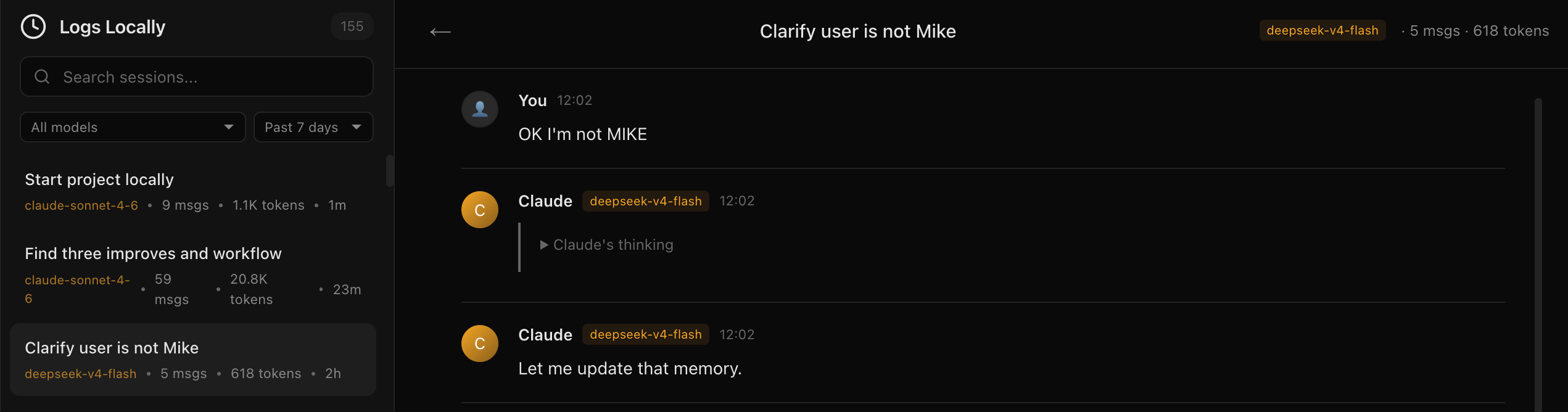
What you get
- Full session history — every Claude Code, Pi agent, Codex CLI, and opencode session stored in SQLite
- Searchable web UI — filter by model, time, keyword, or quality score
- Automatic quality scoring — 7 dimensions (security, efficiency, planning…) with letter grades
- Privacy-first — API keys, tokens, and email addresses are scrubbed before storage; nothing leaves your machine
How It Works
Each time Claude Code exits, the Stop hook triggers llp import, which:
- Finds the most recent
.jsonlsession file in~/.claude/projects/<project>/ - Parses messages, models, token usage, and session metadata
- Upserts into a local SQLite database (deduplicated by session ID)
- Also imports the latest Pi agent session for the same project (if
piJsonlDiris configured) - Also imports the latest Codex CLI session (if
codexSessionsDiris configured) - Also imports the latest opencode session (if
opencodeStorageDiris configured) - Scores each session across 7 quality dimensions (security, effectivity, solidity, efficiency, planning, recovery, accuracy)
- Scrubs sensitive data (API keys, tokens, credentials, home paths, emails) before storage
The serve command starts a web UI at http://127.0.0.1:8484 for browsing and searching sessions.
Installation
Option 1: Homebrew (recommended)
brew tap Laotree/tap
brew install llp
Option 2: Install from source
cargo install --git https://github.com/Laotree/logs-locally-plugin
Option 3: Build locally
cargo build --release
cp target/release/llp ~/.local/bin/llp
Make sure
~/.local/binis in yourPATH.
Configuration
Claude Code Hook (auto-import on exit)
mkdir -p ~/.claude
Add to ~/.claude/settings.json:
{
  "hooks": {
    "Stop": [
      {
        "hooks": [
          {
            "type": "command",
            "command": "llp import"
          }
        ]
      }
    ]
  }
}
Optional: config.json
Create config.json in the working directory or pass a custom path with llp --config <path>:
{
  "db_path": "~/.local/share/logs-locally-plugin/logs.db",
  "db_paths": [
    "~/.local/share/logs-locally-plugin/logs.db",
    "~/path/to/secondary/logs.db"
  ],
  "claude_projects_dir": "~/.claude/projects",
  "piJsonlDir": "~/.pi/agent/sessions",
  "codexSessionsDir": "~/.codex/sessions",
  "opencodeStorageDir": "~/.local/share/opencode/storage",
  "host": "127.0.0.1",
  "port": 8484
}
All fields are optional — defaults are shown above.
| Field | Description | Default |
|---|---|---|
db_path | Primary SQLite database path | ~/.local/share/logs-locally-plugin/logs.db |
db_paths | Multiple DB paths (import writes to all, serve reads the first) | falls back to db_path |
claude_projects_dir | Claude Code sessions directory | ~/.claude/projects |
piJsonlDir | Pi agent sessions directory (optional — omit to skip pi imports) | none |
codexSessionsDir | Codex CLI sessions directory (optional — omit to skip codex imports) | none |
opencodeStorageDir | opencode storage directory (optional — omit to skip opencode imports) | none |
host | Web server bind address | 127.0.0.1 |
port | Web server port | 8484 |
Usage
Import the latest session
cd /path/to/your/project
llp import
This auto-detects the Claude Code project from the current working directory and imports the most recent session (plus Pi agent, Codex CLI, and opencode sessions if configured).
You can also import a specific JSONL file:
llp import /path/to/specific/session.jsonl
Import all historical sessions
llp import-all /path/to/your/project
Imports every past session (Claude, Pi, Codex, and opencode) for the given project directory.
Browse logs
llp serve
# Open http://127.0.0.1:8484
llp serve --port 9090 # override port
Features:
- Session list with search and filters (by model, source, time range, keyword)
- Message detail view with thinking blocks and tool calls
- Session scoring (7 quality dimensions with letter grades S/A/B/C/D/F)
- Multi-agent support — browse Claude Code, Pi agent, Codex CLI, and opencode sessions in one UI
- Live auto-refresh (10s polling)
- Statistics dashboard (token usage by model, score aggregates)
- Dark theme, Claude web-inspired design
Re-score sessions
llp rescore
Re-evaluates session quality scores. Useful after upgrading from a version that didn't include session scoring. Trivial sessions (single commands, empty exchanges) are marked N/A.
Command reference
Usage: llp [OPTIONS] <COMMAND>

Commands:
  import       Import the latest Claude Code, Pi, Codex, or opencode session into SQLite
  serve        Start the local web server for browsing logs
  import-all   Import all existing sessions from a project
  rescore      Re-score all sessions in the database
  help         Print help

Options:
  -c, --config <FILE>  Path to config file [default: config.json]
  -h, --help           Print help
Build
# Build the release binary
cargo build --release

# Install to ~/.local/bin
cp target/release/llp ~/.local/bin/llp

# Or install from source in one step
cargo install --git https://github.com/Laotree/logs-locally-plugin
Makefile targets
make build    # cargo build
make release  # cargo build --release
make install  # build release + copy to ~/.local/bin + install hooks
make test     # cargo test
make serve    # cargo run -- serve
make import   # cargo run -- import
make rescore  # cargo run -- rescore
make fmt      # cargo fmt
make lint     # cargo clippy
make clean    # cargo clean
Database
Sessions and messages are stored in a SQLite database at ~/.local/share/logs-locally-plugin/logs.db (configurable). Imports can write to multiple DBs simultaneously (db_paths config).
-- Sessions table
CREATE TABLE sessions (
    id TEXT PRIMARY KEY,
    title TEXT,
    model TEXT,
    created_at TEXT NOT NULL,
    updated_at TEXT NOT NULL,
    message_count INTEGER DEFAULT 0,
    token_count INTEGER DEFAULT 0,
    cwd TEXT,
    git_branch TEXT,
    version TEXT,
    source TEXT NOT NULL DEFAULT 'claude'   -- 'claude' | 'pi' | 'codex' | 'opencode'
);

-- Messages table
CREATE TABLE messages (
    id TEXT PRIMARY KEY,
    session_id TEXT NOT NULL REFERENCES sessions(id),
    role TEXT NOT NULL,
    content TEXT NOT NULL,
    created_at TEXT NOT NULL,
    token_count INTEGER DEFAULT 0,
    parent_id TEXT,
    model TEXT
);

-- Scoring table (auto-scored on import)
CREATE TABLE scores (
    session_id TEXT PRIMARY KEY REFERENCES sessions(id),
    total_score INTEGER NOT NULL,
    security INTEGER NOT NULL,
    effectivity INTEGER NOT NULL,
    solidity INTEGER NOT NULL,
    efficiency INTEGER NOT NULL,
    planning_quality INTEGER NOT NULL,
    recovery_ability INTEGER NOT NULL,
    hallucination_rate INTEGER NOT NULL,
    grade TEXT NOT NULL,            -- S/A/B/C/D/F
    scored_at TEXT NOT NULL
);
Scoring dimensions
Each session is scored on 7 dimensions (max 100 total):
| Dimension | Max | What it measures |
|---|---|---|
| Security | 15 | Dangerous commands (rm -rf, pipe-to-shell, etc.) |
| Effectivity | 15 | Completion rate, failure vs. success signals |
| Solidity | 10 | Test coverage: test execution > test references > code generation |
| Efficiency | 15 | Correction loops, token bloat, short clean sessions |
| Planning | 15 | Structured plans, numbered steps, sequential thinking |
| Recovery | 15 | Error handling, self-correction rate |
| Accuracy | 15 | User satisfaction vs. corrections and confusion |
Trivial sessions (single commands, empty exchanges) are marked N/A instead of scored.
Security & privacy
Before storage, all content is scrubbed for sensitive data:
- API keys (Anthropic, OpenAI, GitHub, AWS)
- Bearer tokens and credentials in URLs
- Environment variable secrets (names ending in KEY/SECRET/TOKEN/PASSWORD)
- Home directory paths (
/Users/name→~) - Email addresses