
MCP Apache Spark History Server
kubeflow/mcp-apache-spark-history-server
Integre agentes IA ao Spark History Server para análise inteligente de jobs
Ver no GitHubServidor MCP e CLI para consultar Apache Spark History Server, permitindo que agentes de IA e engenheiros analisem, monitorem e investiguem aplicações Spark com inteligência. Oferece duas interfaces: um servidor MCP para agentes IA e um CLI standalone (shs) para engenheiros e scripts.
Instalação
npx convez-ai kubeflow/mcp-apache-spark-history-server1 comando no terminal: detecta o formato do repositório (marketplace ou plugin avulso) e instala via Claude Code. Requer Node 18+ e o Claude Code instalado.
Métricas
Casos de uso
- Investigar falhas em aplicações Spark através de agentes IA
- Monitorar performance de jobs Spark em produção e staging
- Consultar histórico de execução Spark via CLI em scripts e CI/CD
- Debugar aplicações Spark com coding agents (Claude Code, Kiro)
Veredito

Ferramenta oficial Kubeflow que democratiza acesso a dados Spark para agentes IA e engenheiros. Bem arquitetada com duas interfaces complementares (MCP + CLI), suporte robusto e documentação clara — essencial para times com infraestrutura Spark em escala.
README
A tradução para o português deste README ainda está na fila.
Kubeflow Spark AI Toolkit


Connect AI agents and engineers to Apache Spark History Server for intelligent job analysis, performance monitoring, and investigation
[!IMPORTANT]
✨ NEW — Spark History Server CLI is now available
A standalone Go binary that queries Spark History Server directly from your terminal — no MCP, no AI framework, no daemon process. Inspect jobs, compare runs, investigate failures, and script against the Spark REST API.

This project provides two interfaces to your Spark History Server data:
🛠️ SHS CLI (shs) | ⚡ MCP Server | |
|---|---|---|
| For | Engineers, shell scripts, CI/CD, coding agents | AI agents and MCP-compatible clients |
| Mental model | "I know the command I want to run" | "Agent, investigate this Spark app" |
| Install | Single static binary — no dependencies | Python 3.12+, uv |
| Get started | CLI docs → | MCP docs → |
📺 See it in action:

🏗️ Architecture
graph TB
subgraph Clients
A[🤖 AI Agent / LLM]
B[👩💻 Engineer / Script / CI]
C[🔧 Coding Agent - Claude Code / Kiro]
end
subgraph "Kubeflow Spark AI Toolkit"
D[⚡ MCP Server]
E[🛠️ CLI - shs]
end
subgraph "Spark History Servers"
F[🔥 Production]
G[🔥 Staging / Dev]
end
A -->|MCP Protocol| D
B -->|Terminal commands| E
C -->|shs skill file| E
D -->|REST API| F
D -->|REST API| G
E -->|REST API| F
E -->|REST API| G
🛠️ SHS CLI (shs) — For Engineers & Scripts
A standalone Go binary. Query your Spark History Server directly from the terminal, shell scripts, or CI/CD pipelines. Also works as a skill for coding agents like Claude Code and Kiro.
Install
# Auto-detect latest version, OS, and architecture
VERSION=$(curl -s https://api.github.com/repos/kubeflow/mcp-apache-spark-history-server/releases | grep -m1 '"tag_name": "cli/' | cut -d'"' -f4 | sed 's|cli/||')
OS=$(uname -s | tr '[:upper:]' '[:lower:]')
ARCH=$(uname -m)
[ "$ARCH" = "x86_64" ] && ARCH="amd64"
[ "$ARCH" = "aarch64" ] && ARCH="arm64"

curl -sSL "https://github.com/kubeflow/mcp-apache-spark-history-server/releases/download/cli%2F${VERSION}/shs-${VERSION}-${OS}-${ARCH}.tar.gz" | tar xz
sudo mv shs /usr/local/bin/
Quick Start
# Generate a config file
shs setup config > config.yaml   # then set your Spark History Server URL

# Explore applications
shs apps
shs jobs -a APP_ID --status failed
shs stages -a APP_ID --sort duration
shs compare apps --app-a APP1 --app-b APP2

# Use as a skill with Claude Code or Kiro
shs setup skill > ~/.claude/skills/spark-history.md
CLI documentation for full usage, or check out a real-world example of Claude Code comparing two TPC-DS 3TB benchmark runs.
⚡ MCP Server — For AI Agents
An MCP (Model Context Protocol) server that exposes Spark History Server data as tools for AI agents. Agents query your Spark infrastructure using natural language — the server handles tool selection, multi-server routing, and structured data retrieval.
Use the MCP server when you want an AI agent to conduct multi-step investigations, synthesize findings across tools, or answer natural-language questions about your Spark applications.
Install
# Run directly with uvx (no install needed)
uvx --from mcp-apache-spark-history-server spark-mcp

# Or install with pip
uv tool install mcp-apache-spark-history-server
spark-mcp
The package is published to PyPI.
Configure
Basic configuration below. Create a file named config.yaml:
servers:
  local:
    default: true
    url: "http://your-spark-history-server:18080"
    auth:            # optional
      username: "user"
      password: "pass"
    include_plan_description: false   # include SQL plans by default (default: false)
mcp:
  transports:
    - streamable-http   # or: stdio
  port: "18888"
  debug: false
Configurations can be overriden with environment variables.
SHS_MCP_PORT          Port for MCP server (default: 18888)
SHS_MCP_TRANSPORT     Transport mode: streamable-http or stdio
SHS_MCP_DEBUG         Enable debug mode (default: false)
SHS_MCP_ADDRESS       Bind address (default: localhost)
SHS_SERVERS_*_URL     URL for a specific server
SHS_SERVERS_*_AUTH_USERNAME
SHS_SERVERS_*_AUTH_PASSWORD
SHS_SERVERS_*_AUTH_TOKEN
SHS_SERVERS_*_VERIFY_SSL
SHS_SERVERS_*_TIMEOUT
SHS_SERVERS_*_EMR_CLUSTER_ARN
SHS_SERVERS_*_INCLUDE_PLAN_DESCRIPTION
Multi-Server Setup
Configure multiple Spark History Servers and route queries to specific ones:
servers:
  production:
    default: true
    url: "http://prod-spark-history:18080"
    auth:
      username: "user"
      password: "pass"
  staging:
    url: "http://staging-spark-history:18080"
Agents can target a specific server per query:
"Get application
<app_id>from the production server"
Connect an AI Agent
| Agent | Transport | Guide |
|---|---|---|
| Claude Desktop | stdio | Setup → |
| Claude Code | stdio or streamable-http | Setup → |
| Kiro | streamable-http | Setup → |
| LangGraph | streamable-http | Setup → |
| Strands Agents | streamable-http | Setup → |
| Local / Inspector | streamable-http | Setup → |
Available Tools (21)
Application Information
| Tool | Description |
|---|---|
list_applications | List applications with optional status, date, and limit filters |
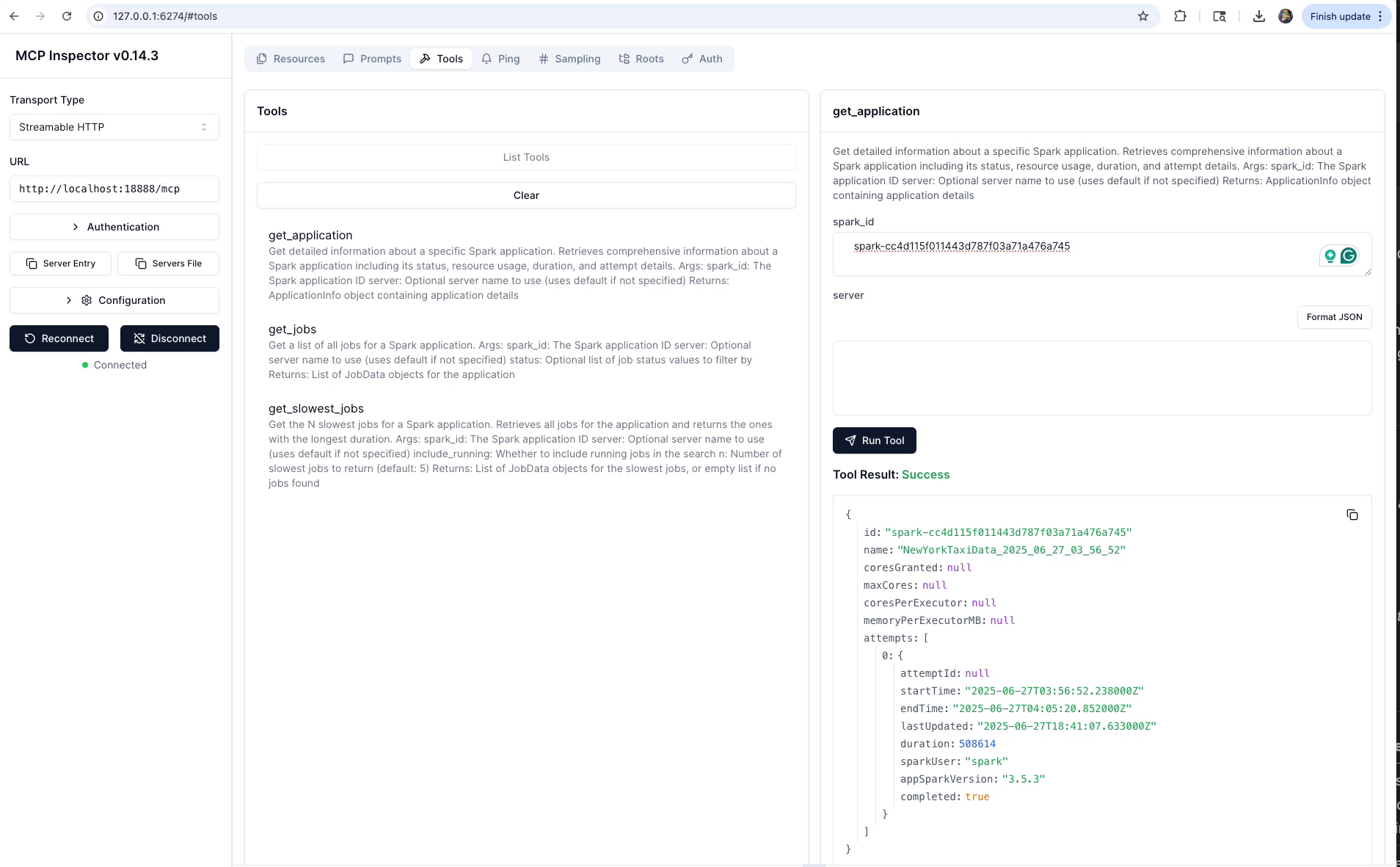
get_application | Get application detail: status, resources, duration, attempts |
Job Analysis
| Tool | Description |
|---|---|
list_jobs | List jobs with status filtering |
list_slowest_jobs | Top N slowest jobs |
Stage Analysis
| Tool | Description |
|---|---|
list_stages | List stages with status filtering |
list_slowest_stages | Top N slowest stages |
get_stage | Stage detail with attempt and summary metrics |
get_stage_task_summary | Task metric distributions (execution time, memory, I/O, spill) |
Executor & Resource Analysis
| Tool | Description |
|---|---|
list_executors | List executors (active and optionally inactive) |
get_executor | Executor detail: resources, task stats, performance |
get_executor_summary | Aggregate metrics across all executors |
get_resource_usage_timeline | Chronological executor add/remove with resource totals |
Configuration & Environment
| Tool | Description |
|---|---|
get_environment | Spark config, JVM info, system properties, classpath |
SQL & Query Analysis
| Tool | Description |
|---|---|
list_slowest_sql_queries | Top N slowest SQL executions with metrics |
get_sql_execution | SQL execution detail with optional plan and node metrics |
compare_sql_execution_plans | Compare SQL plans and metrics between two jobs |
Performance & Bottleneck Analysis
| Tool | Description |
|---|---|
get_job_bottlenecks | Identify bottlenecks across stages, tasks, and executors |
Comparative Analysis
| Tool | Description |
|---|---|
compare_job_environments | Diff Spark configs between two applications |
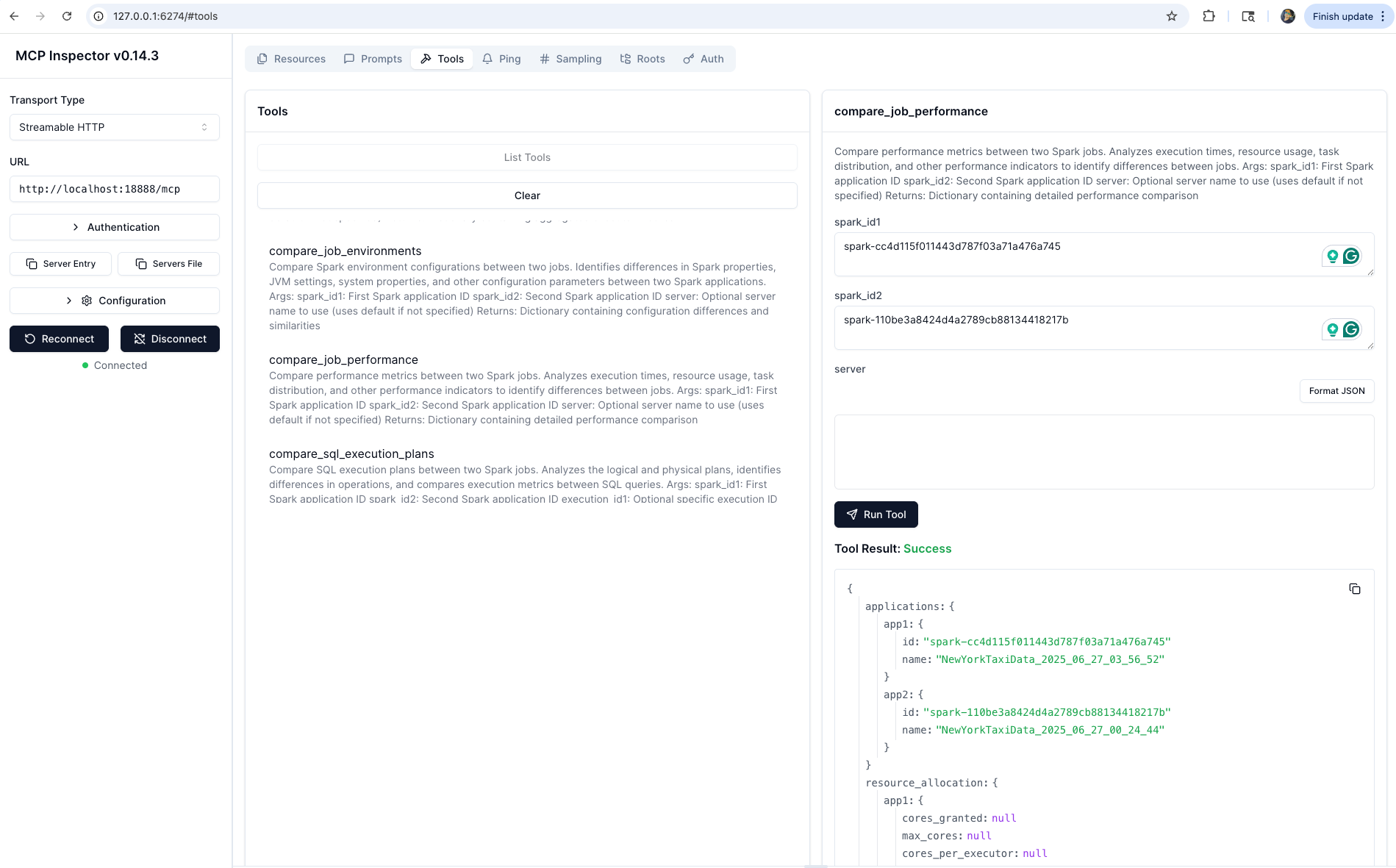
compare_job_performance | Diff performance metrics between two applications |
AWS Spark Troubleshooting (opt-in)
| Tool | Description |
|---|---|
aws_analyze_spark_workload | One-shot root cause analysis of failed/slow Spark workloads |
aws_spark_code_recommendation | Code fix recommendations for identified Spark issues |
Automatically available when AWS credentials and region are configured. See IAM setup guide.
Example Agent Queries
- "Why is my ETL job running slower than yesterday?" →
get_job_bottlenecks+list_slowest_stages+compare_job_performance - "What caused job 42 to fail?" →
list_jobs+get_stage+get_stage_task_summary - "Compare today's batch with yesterday's run" →
compare_job_performance+compare_job_environments - "Find my slowest SQL queries and explain why" →
list_slowest_sql_queries+get_sql_execution+compare_sql_execution_plans
📸 Screenshots
🔍 Get Spark Application
⚡ Job Performance Comparison
🚀 Kubernetes Deployment
Deploy the MCP server using Helm:
helm install spark-history-mcp ./deploy/kubernetes/helm/mcp-apache-spark-history-server/

# Production configuration
helm install spark-history-mcp ./deploy/kubernetes/helm/mcp-apache-spark-history-server/ \
  --set replicaCount=3 \
  --set autoscaling.enabled=true
See deploy/kubernetes/helm/ for full configuration options.
When deployed in Kubernetes, connect Claude Desktop via mcp-remote:
kubectl port-forward svc/mcp-apache-spark-history-server 18888:18888
📔 AWS Integration
- AWS Glue — Connect to Glue Spark History Server
- Amazon EMR — Use EMR Persistent UI for Spark analysis
- AWS Spark Troubleshooting — One-shot root cause analysis and code fix recommendations for failed Spark workloads (EMR EC2, EMR Serverless). Automatically available when AWS credentials and region are configured. See IAM setup guide for required permissions.
🔧 Development Setup
git clone https://github.com/kubeflow/mcp-apache-spark-history-server.git
cd mcp-apache-spark-history-server

# Install Task runner
brew install go-task   # macOS; see https://taskfile.dev/installation/ for others

# MCP Server
task install           # install Python dependencies
task start-spark-bg    # start Spark History Server with sample data
task start-mcp-bg      # start MCP server
task start-inspector-bg  # open MCP Inspector at http://localhost:6274
task stop-all

# CLI
cd skills/cli
task build             # build ./bin/shs
task test              # unit tests
task test-e2e          # e2e tests (starts/stops Docker SHS automatically)
task start-shs         # start SHS with CLI e2e sample data
🌍 Adopters
Using this project? Add your organization to ADOPTERS.md and help grow the community.
🤝 Contributing
See CONTRIBUTING.md for guidelines.
📄 License
Apache License 2.0 — see LICENSE.
📝 Trademark Notice
Built for use with Apache Spark™ History Server. Not affiliated with or endorsed by the Apache Software Foundation.
Connect your Spark infrastructure to AI agents and engineers
🛠️ SHS CLI · ⚡ MCP Server · 🧪 Test · 🤝 Contribute
Built by the community, for the community 💙