
Ollama MCP Server
ksktechai/ollama-mcp-server
Bridge MCP → Ollama em Quarkus para controlar LLMs remotos
Ver no GitHubServidor MCP construído em Quarkus que funciona como ponte entre clientes MCP (Claude Desktop, Cline, Postman) e instâncias remotas de Ollama. Expõe seis ferramentas bem documentadas que encaminham requisições para a API REST do Ollama, permitindo que qualquer cliente MCP controle modelos rodando em máquinas separadas sem banco de dados ou overhead desnecessário.
Instalação
npx convez-ai ksktechai/ollama-mcp-server1 comando no terminal: detecta o formato do repositório (marketplace ou plugin avulso) e instala via Claude Code. Requer Node 18+ e o Claude Code instalado.
Métricas
Casos de uso
- Integrar Claude Desktop ou Cline com Ollama rodando em servidor remoto
- Expor modelos locais via MCP para múltiplos clientes
- Automatizar tarefas de completação e chat via MCP tools
Veredito

MCP server bem arquitetado e leve, ideal para quem quer conectar clientes MCP a Ollama remoto sem complexidade desnecessária. Código limpo, documentação clara e implementação minimalista em Quarkus.
README
A tradução para o português deste README ainda está na fila.
ollama-mcp-server

A thin, well-documented MCP → Ollama bridge built on Quarkus. It exposes a small set of MCP tools that forward to a remote Ollama instance's REST API, so any MCP client (Postman, Claude Desktop, Cline, another Quarkus app) can drive models running on a separate machine. No database, no streaming reassembly, no passthrough REST surface — one REST client and six tools you can read in ten minutes.
- Java: OpenJDK 25 (
maven.compiler.release=25) - Quarkus: 3.33.2 (LTS),
io.quarkus.platformBOM - MCP:
io.quarkiverse.mcp:quarkus-mcp-server-http1.12.1 (HTTP transport, not stdio) - Group / Artifact:
nz.co.ksktech/ollama-mcp-server - Package root:
nz.co.ksktech.ollamamcp
This server speaks only the MCP protocol. There are no debug/passthrough REST endpoints — clients consume it via their MCP connection feature (see Connecting clients).
Architecture
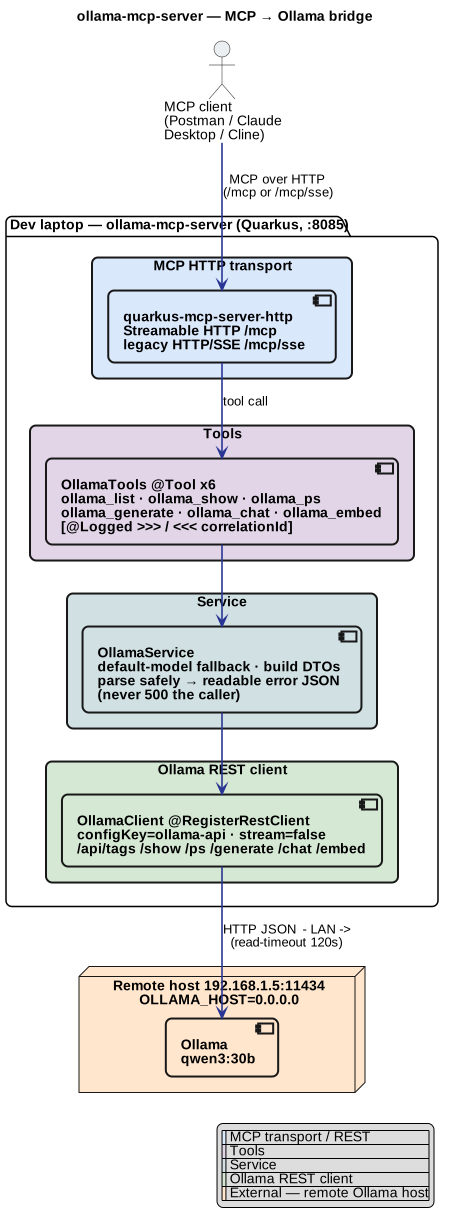
Editable source: docs/architecture.puml — re-render with
plantuml -tsvg -o . docs/architecture.puml (brew install plantuml).
Colour key: blue = MCP transport / REST, purple = tools, cyan = service, green = Ollama REST client, orange = external remote Ollama host.
The flow is deliberately linear:
OllamaTools— one CDI bean with six@Toolmethods (names mirror the well-knownrawveg/ollama-mcpsurface). Thin pass-throughs;@ToolArgdescriptions are what clients show.OllamaService— default-model fallback, builds request DTOs, calls the client, and parses safely / never 500s the caller: any failure becomes a readable JSON error that names the base URL.OllamaClient— a@RegisterRestClient(configKey = "ollama-api")typed client. Every call sends"stream": falseso responses are a single JSON object.InvocationLoggingInterceptor—@Loggedon the tools logs every call with the>>> / <<<convention and a per-callcorrelationId(UUID in the MDC), bodies truncated toapp.logging.max-body.
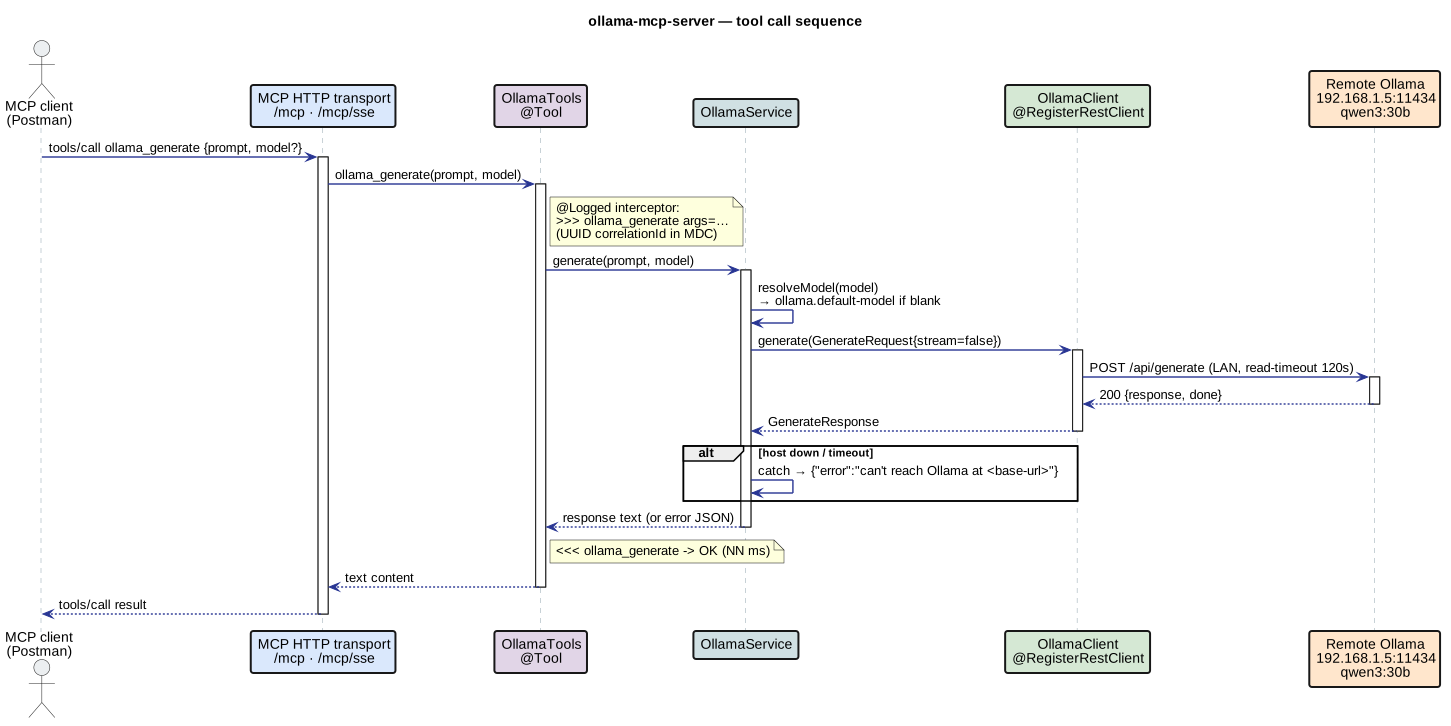
Source: docs/sequence/tool-call.puml — re-render with
plantuml -tsvg -o rendered docs/sequence/tool-call.puml.
Tools
| Tool | Arguments | Does |
|---|---|---|
ollama_list | — | List models on the remote host (GET /api/tags) → JSON array of names. Call this first. |
ollama_show | model? | Model details (POST /api/show): license, parameters, template, info. |
ollama_ps | — | Models currently loaded in memory (GET /api/ps). |
ollama_generate | prompt, model? | One-shot completion (POST /api/generate). Returns the text. |
ollama_chat | messagesJson, model? | Chat (POST /api/chat). messagesJson is a JSON array of {role, content}; malformed input returns a readable error, not a 500. |
ollama_embed | input, model? | Embeddings (POST /api/embed). input is a string or JSON array of strings. Returns the vector(s). |
run_postman_collection | collectionPath?, analyze?, analysisModel? | Ops tool (not Ollama): runs a Postman collection with Newman and returns a parsed pass/fail summary (iterations, requests, assertions, failures). Lets an MCP client trigger a collection run, which it otherwise can't do. With analyze=true it also adds a local-LLM analysis of the run. |
model is always optional — blank falls back to ollama.default-model (qwen3:30b by default).
run_postman_collection — running collections from an MCP client
MCP clients (Postman Agent Mode, Claude Desktop, Cline) can drive an LLM but have no built-in
"run a Postman collection" capability. This tool fills that gap: it shells out to
Newman (no global install — npx --yes newman by
default) and returns a compact JSON summary instead of raw CLI output. It targets the API the
collection points at, so that API must be running.
collectionPath(optional) — absolute path to a.jsoncollection; blank usesapp.newman.collection.analyze(optional, default false) — if true, the result also carries ananalysisfield: a short natural-language summary/triage from the local Ollama model. The run + analysis happen in a single tool call, so an MCP client (or agent) gets both at once.analysisModel(optional) — model used for the analysis (only whenanalyze=true); blank uses the default model. A smaller model (e.g.qwen3:8b) is faster.- Config (override via env):
app.newman.collection,app.newman.command(set to an absolute path ifnpxisn't on the server's PATH),app.newman.request-timeout-ms,app.newman.run-timeout-seconds,app.newman.report-path.
The deterministic result stays the source of truth; analyze is an advisory layer (the model is
fed a compact, ground-truth digest and told to use only that data) and adds a model call, so it's
slower. The bundled script's ANALYZE=1 flag does the same thing client-side by chaining two
tools — use whichever fits: one tool call (this), or composable steps (the script).
Where to see the result. The tool's return value is the result — a JSON summary returned to
the MCP client (e.g. expand the tool call in Postman Agent Mode). It mirrors the Postman Runner
view: top-level {passed, exitCode, durationMs, stats} plus a requests[] array grouped like the
Runner (folder, name, method, url, code/status, timeMs, sizeB, and per-assertion
result = PASS/FAIL/SKIP). The agent renders this as a table — but note it is text in the agent
panel, not Postman's native "Run results" GUI (that view is only produced when Postman itself
runs the collection). The >>> / <<< access log only traces timing, not the body — but the server
also logs a one-line outcome:
run_postman_collection result: passed=true exitCode=0 stats={"assertions":{"total":35,"failed":0},...}
To keep the full Newman JSON report, set app.newman.report-path (e.g.
NEWMAN_REPORT_PATH=target/newman/last-report.json); it's overwritten each run and its path is
echoed back in the result as reportPath. Left blank, the report goes to a temp file and is
deleted after summarising.
The tool never throws — a missing collection, missing Newman, or a run timeout all come back as a readable error payload. Note it runs a local process on the server's host; it's intended as a dev/automation convenience.
Triggering it without Postman AI. Postman's Agent Mode spends AI credits because an LLM picks the tool. You don't need that — the MCP server is plain JSON-RPC, so you can invoke the tool manually with the bundled script (no AI credits):
scripts/run-collection-via-mcp.sh                       # default collection on http://localhost:8085
MCP_URL=http://localhost:8085/mcp scripts/run-collection-via-mcp.sh
scripts/run-collection-via-mcp.sh /path/to/other.postman_collection.json
It does the MCP handshake and tools/call, then prints a Runner-style breakdown.
Add ANALYZE=1 to also get a natural-language summary/triage from the local Ollama model (it
chains the result into the ollama_generate tool on the same MCP session — still no Postman AI
credits):
ANALYZE=1 scripts/run-collection-via-mcp.sh                  # uses qwen3:8b (fast)
ANALYZE=1 ANALYZE_MODEL=qwen3:30b scripts/run-collection-via-mcp.sh
Best practice: the deterministic breakdown (counts + per-assertion PASS/FAIL) is the source of truth — keep it. Treat the model output as advisory interpretation, most useful for triaging failures and flagging slow endpoints, not for deciding pass/fail. The summary fed to the model is a compact, ground-truth digest (not the raw report), and the prompt constrains it to the provided data to limit hallucination.
(Equivalent paths:
add a tools/call request for run_postman_collection to
docs/postman/ollama-mcp-server-mcp.postman_collection.json,
or invoke the tool directly from Postman's MCP Request panel — both avoid Agent Mode / AI
credits.)
Prerequisites
- JDK 25 (
java -version→ 25.x). - A reachable Ollama at
http://192.168.1.5:11434withqwen3:30bpulled (ollama pull qwen3:30bon that host).
Remote Ollama (read this first)
Ollama runs on a separate machine so the dev laptop isn't overloaded. By default Ollama binds to loopback only, which the LAN can't reach. On the Ollama host, bind it to all interfaces:
# macOS
launchctl setenv OLLAMA_HOST 0.0.0.0:11434
# then restart Ollama

# Linux (systemd): add  Environment="OLLAMA_HOST=0.0.0.0:11434"  to the service, then
# sudo systemctl restart ollama
Verify from this machine before starting the server:
curl http://192.168.1.5:11434/api/tags
If that fails, no tool will work — fix connectivity first.
Run
cp .env.example .env          # adjust OLLAMA_BASE_URL / OLLAMA_DEFAULT_MODEL if needed
./mvnw quarkus:dev            # http://localhost:8085
Port: this server listens on 8085 by default (not 8080), so it won't clash with other apps or Postman collections running on 8080. Override with
MCP_HTTP_PORT(env /.env) or./mvnw quarkus:dev -Dquarkus.http.port=9090.
Quarkus auto-loads .env in dev. Everything is config-driven; nothing hard-codes the host:
ollama.base-url=${OLLAMA_BASE_URL:http://192.168.1.5:11434}
ollama.default-model=${OLLAMA_DEFAULT_MODEL:qwen3:30b}
ollama.timeout=${OLLAMA_TIMEOUT:120s}
quarkus.rest-client.ollama-api.url=${ollama.base-url}
quarkus.rest-client.ollama-api.read-timeout=120000
app.logging.max-body=2000
The MCP server exposes both transports (pick whichever your client expects):
| Transport | Endpoint |
|---|---|
| Streamable HTTP | http://localhost:8085/mcp |
| Legacy HTTP/SSE | http://localhost:8085/mcp/sse |
Health check: http://localhost:8085/q/health. (Replace 8085 with your MCP_HTTP_PORT if you
changed it.)
Connecting clients
Postman (the headline path)
Postman connects via New → MCP Request (a config-based connection), not a saved HTTP collection.
./mvnw quarkus:dev.- New → MCP Request.
- Transport: HTTP with URL
http://localhost:8085/mcp, or SSE with URLhttp://localhost:8085/mcp/sse. - Connect → the six
ollama_*tools appear. - Invoke
ollama_listfirst (confirms the remote host is reachable), thenollama_generate.
Tools list empty? Check the server is running and that
curl http://192.168.1.5:11434/api/tagssucceeds from this machine.
Running automated tests from a Postman collection
The MCP Request panel above is interactive — it does not run pm.test assertions. To run
automated tests (Collection Runner / Newman), use the ready-made collection
docs/postman/ollama-mcp-server-mcp.postman_collection.json.
It speaks MCP's JSON-RPC protocol directly over /mcp (Streamable HTTP): initialize →
notifications/initialized → tools/list → tools/call, asserting on each step.
- Import: Postman → Import → select the JSON file.
- Check variables (collection → Variables):
baseUrl=http://localhost:8085,model=qwen3:8b.sessionId/protocolVersionfill in automatically. - Run: open the collection → Run (Collection Runner). Keep the requests in order —
request 1 captures the
Mcp-Session-Idevery later request needs.
Headless / CI with Newman:
npx newman run docs/postman/ollama-mcp-server-mcp.postman_collection.json --timeout-request 120000
# override the target, e.g. a different port:
# npx newman run ... --env-var baseUrl=http://localhost:9090 --env-var model=qwen3:30b
This collection calls the real remote Ollama, so requests 4–5 need
192.168.1.5reachable and the model pulled. (The offline, mocked tests are the JUnit suite — see Tests.)
Other clients
Copy-pasteable config snippets for each, all pointing at /mcp (Streamable HTTP) or /mcp/sse
(SSE):
Tests
./mvnw verify
Tests are offline and deterministic — they never call the real 192.168.1.5 host, and
./mvnw verify enforces a JaCoCo 90% line-coverage gate (excluding the REST-client interface,
DTO records and the @Logged annotation — data/no-logic). Current line coverage is ~91%.
Fast plain-JUnit unit tests carry the coverage (the logic-bearing classes), with @QuarkusTest
tests for framework wiring:
OllamaServiceTest— Mockito-mocked client; covers default-model fallback, the defensivemessagesJson/embedparsing (both branches), and the "never 500 the caller" error payloads.PostmanToolsTest— runs the fullrun_postman_collectionflow against a stub-newman script that emits a canned report, covering the Runner-style parsing,analyze(with a mocked model), and the validation/launch-failure branches — no real Newman or API.OllamaToolsTest/InvocationLoggingInterceptorTest— tool delegation and the>>> / <<<logger (success/error, arg formatting, truncation).McpToolsListTest(@QuarkusTest, McpAssured) — asserts all seven tools and their arg schemas.OllamaToolCallTest(@InjectMock) — tools end-to-end with the client mocked.OllamaClientWireMockTest(@QuarkusTest+ WireMock) — exercises the real typed REST client and DTO ↔ Ollama-JSON (de)serialisation over HTTP, offline.
Layout
src/main/java/nz/co/ksktech/ollamamcp/
  client/OllamaClient.java          @RegisterRestClient typed client (configKey=ollama-api)
  client/dto/OllamaDtos.java        request/response records (stream=false, ignoreUnknown)
  service/OllamaService.java        default-model fallback, safe parsing, readable errors
  tools/OllamaTools.java            six @Tool methods (the MCP surface)
  logging/Logged.java               interceptor binding
  logging/InvocationLoggingInterceptor.java   >>> / <<< + correlationId tracing
docs/architecture.puml|.svg         architecture diagram
docs/sequence/tool-call.puml        sequence diagram (rendered/ has the SVG)
docs/mcp-clients/                   Postman / Claude Desktop / Cline / Quarkus client snippets