
Claude Subagent
kolt-mcb/claude-subagent
Subagentes isolados e workflows determinísticos para pi com model Claude
Ver no GitHubAgent (Task) tool para pi que permite criar subagentes propósito-específicos, desde helpers one-shot até teammates nomeados e workflows determinísticos multi-agente. Funciona com sistema prompt mínimo e isolado, sem herdar contexto da sessão pai, executando em processos pi separados com controle em tempo real.
Instalação
npx convez-ai kolt-mcb/claude-subagent1 comando no terminal: detecta o formato do repositório (marketplace ou plugin avulso) e instala via Claude Code. Requer Node 18+ e o Claude Code instalado.
Métricas
Casos de uso
- Orquestração de múltiplos agentes para tarefas complexas
- Criar assistentes especializados reutilizáveis e nomeados
- Executar workers em background mantendo contexto separado
- Workflows paralelos e sequenciais com verificação e síntese
Veredito

Ferramenta madura e bem-documentada para quem trabalha com pi e precisa de orquestração multi-agente determinística. Espelha o modelo do Claude Code, oferecendo isolamento real entre agentes e workflows robustos — excelente para systems engineering e pipelines complexos.
README
A tradução para o português deste README ainda está na fila.
claude-subagent
A Claude Code–style Agent (Task) tool for pi, the interactive CLI coding agent. It lets a pi session spawn purpose-built subagents — one-shot helpers, long-lived named teammates, and background workers — plus a deterministic multi-agent workflow runner.
The design deliberately mirrors Claude Code's subagent model rather than pi's built-in one:
- Subagents run with a minimal, purpose-built system prompt (base + agent definition + environment). They do not inherit the parent's system prompt, project context, skills, or conversation history.
- The task prompt is passed verbatim as the user message.
- Subagents cannot nest — children run with
--no-extensions. - The subagent's final assistant text is returned as the tool result.
Demo
Spawning two background teammates from a single prompt — each runs in its own long-lived pi process, reports back inline when done, and is tracked live in the bottom widget:
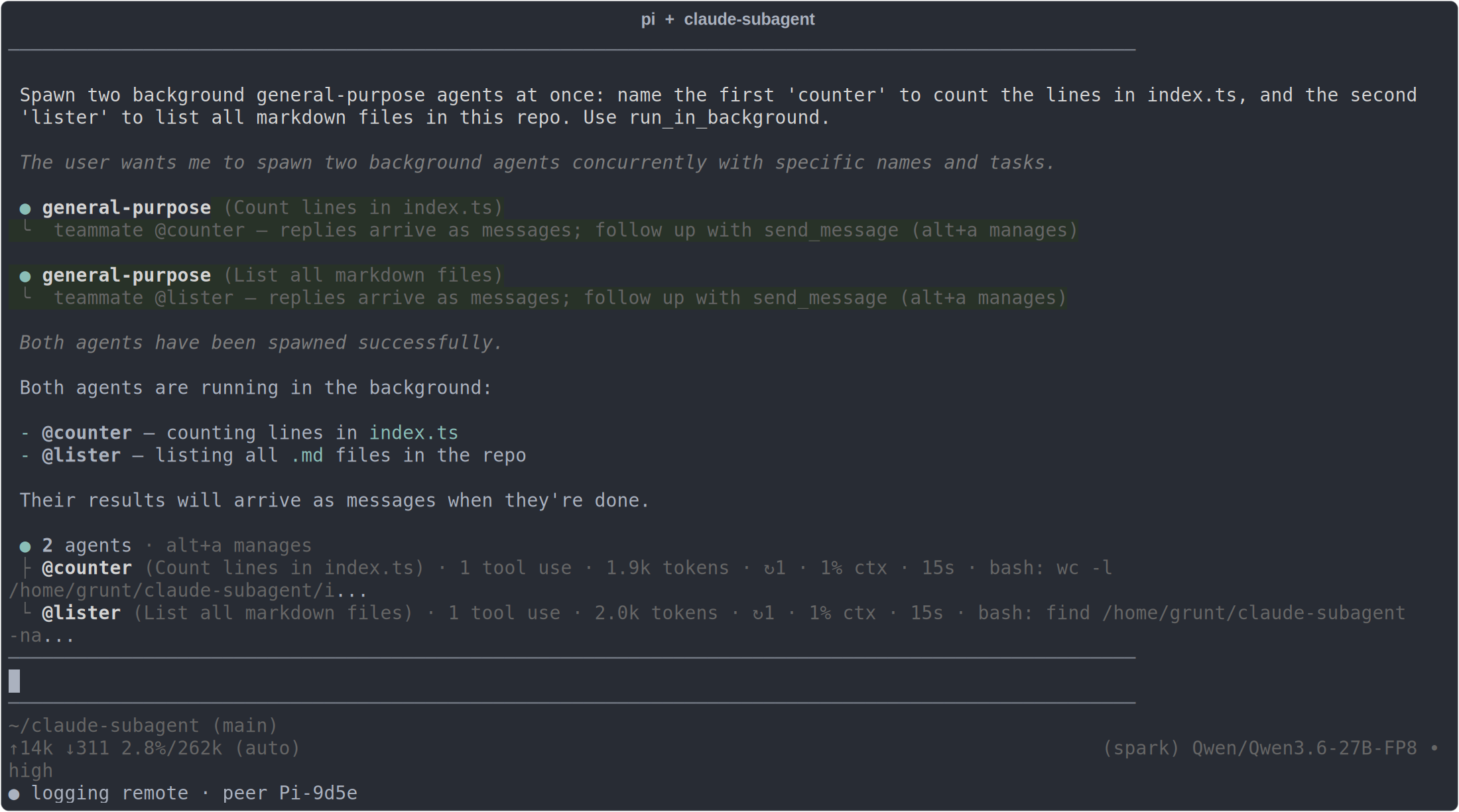
alt+a opens the agent manager to dispatch, watch, or kill agents. When both finish, their
reports land inline and the roster shows each one idle:
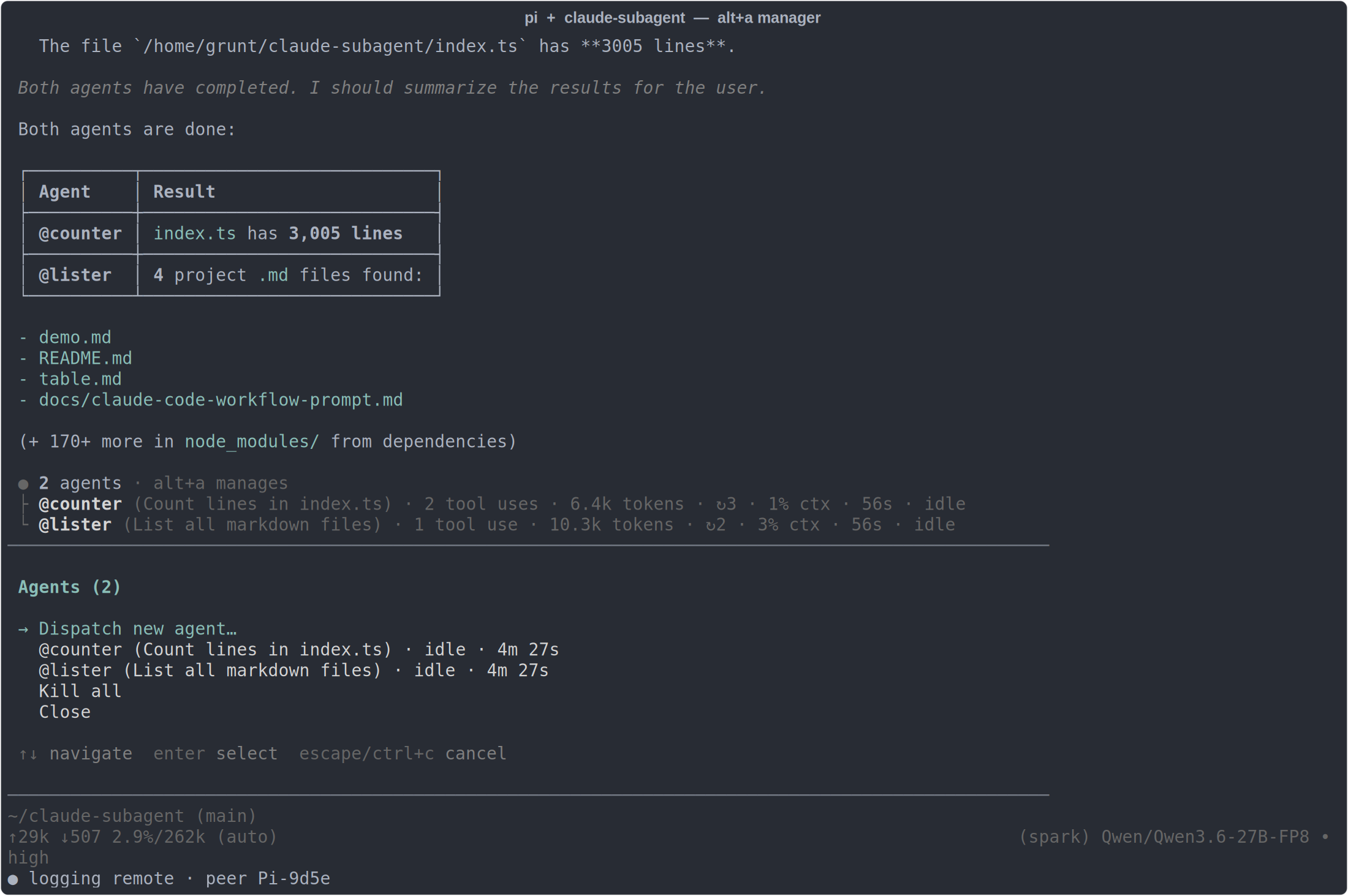
Captured from a live
pisession running this extension (model: a local Qwen3.6-27B).
How it works
Children run as long-lived pi --mode rpc processes: JSONL commands on stdin, events on stdout. One prompt() is one run, but the process survives between runs, so background agents and teammates keep their context and accept follow-ups via send_message without resuming session files.
- One-shot subagent — the
agenttool blocks and returns the child's report. - Background agent (
run_in_background: true) — returns immediately; the report is delivered back into the session as a message when the child finishes. Running agents render in a bottom widget; you can watch any agent's live transcript and read its context utilization. - Teammate (
agentwith aname) — a persistent, named worker whose replies arrive as@namemessages and that you steer over time withsend_message. - Workflow — a deterministic JavaScript orchestration script (
parallel/pipeline/agent) for fan-out, verification, and synthesis across many agents.
Steering a running agent
send_message to a busy agent steers its current turn by default — the message is injected mid-run (pi's steer) and the agent folds it in at its next step without losing context. Pass interrupt: true to instead hard-stop the turn (abort any running command) and run the message as a fresh prompt.
Custom agent types
Built-in general-purpose, plus custom agents auto-discovered from Claude Code's own locations:
<cwd>/.claude/agents/*.md
~/.claude/agents/*.md
Each is a markdown file with frontmatter (name, description, tools, model, color) and a body that becomes the agent's system prompt.
Install
This is a pi extension — a single index.ts. Point pi at it:
pi -e /path/to/claude-subagent/index.ts
or add it to your pi extension config (see package.json's pi.extensions).
Note: runtime dependencies are provided by your pi installation rather than pinned in
package.json; install/run against a matching pi version.
License
MIT — see LICENSE.