
coding-agent-configs
kimgoetzke/coding-agent-configs
My personal skills, agents, and other configuration files for agentic coding.
Instalação
npx convez-ai kimgoetzke/coding-agent-configs1 comando no terminal: detecta o formato do repositório (marketplace ou plugin avulso) e instala via Claude Code. Requer Node 18+ e o Claude Code instalado.
Métricas
README
A tradução para o português deste README ainda está na fila.
My Personal Coding Agent Config Files
This repository contains a collection of configuration files for coding agents. Where a skill or agent hasn't been created by myself, an Attribution.txt in the same folder indicates the source and any modification I made to the original.
[!NOTE] Once you have copied over the skills in this repository, you can always use
/update-skillsto fetch the latest skills from this repository, iterate through each new or changes one (ignoring local-only skills), showing you the change and asking you if you wish to update it.
How to set up
Quick setup
Run one of the commands below for your coding agent. The script will ask if you want to install skills, agents, and/or config files - and even if you choose config files, it'll check before overwriting an existing file. Skills and agents with the same names will be replaced though, if you choose to install skills or agents respectively. For Pi, the script also offers the starter extensions and themes from .pi/agent/, because the Pi starter config in this repository depends on them.
Pi
Bash:
curl -fsSL https://raw.githubusercontent.com/kimgoetzke/coding-agent-configs/main/update-pi.sh | bash
PowerShell:
& ([scriptblock]::Create((iwr -useb 'https://raw.githubusercontent.com/kimgoetzke/coding-agent-configs/main/setup.ps1').Content)) -Agent pi
If using PowerShell, after running the above, you'll have to run npm install in some of the extension folders (~/.pi/agent/extensions/{extension name}):
cd ~/.pi/agent/extensions/web-tools
npm install
cd ~/.pi/agent/extensions/command-policy
npm install
Claude Code
Bash:
curl -fsSL https://raw.githubusercontent.com/kimgoetzke/coding-agent-configs/main/setup.sh | bash -s -- --claude
PowerShell:
& ([scriptblock]::Create((iwr -useb 'https://raw.githubusercontent.com/kimgoetzke/coding-agent-configs/main/setup.ps1').Content)) -Agent claude
This will not install any hooks for you though. Pick and choose from the /hooks directory. Each hook contains setup instructions.
GitHub Copilot
Bash:
curl -fsSL https://raw.githubusercontent.com/kimgoetzke/coding-agent-configs/main/setup.sh | bash -s -- --copilot
PowerShell:
& ([scriptblock]::Create((iwr -useb 'https://raw.githubusercontent.com/kimgoetzke/coding-agent-configs/main/setup.ps1').Content)) -Agent copilot
This will not install any hooks for you though. Pick and choose from the /hooks directory. Each hook contains setup instructions.
Manual setup
If you prefer to set things up by hand:
- If you're just getting started, copy the files relevant for your agent from the root of this repository to your home folder
- Example:
.copilot->~/.copilot - Example:
.pi->~/.pi
- Example:
- Copy the entire
skillsfolder from the root of this repository into your agent config folder- Example:
skills->~/.copilot/skills - Example:
skills->~/.pi/agent/skills - Agents pick up skills automatically on startup or when prompted to reload them
- Example:
- If you're using Pi: the skills in this repo expect several extensions to be present, e.g.
subagent-supportandactive-mode - If you're using Claude Code or GitHub Copilot: Review the
hooksfolder from the root of this repository and pick any hooks you like- The files inside the
hooksfolder have comments explaining how to use them - The scripts from the
hooksfolder should be copied into~/{agent}/hooks - Pi does support the concept of hooks
- The files inside the
- Start your coding agent and confirm the changes are being recognised
- Every supported coding agent displays the name or number of skills loaded on start
- Pi users can run
/reloadafter copying files manually instead of restarting - Claude Code has a
/hookscommand to show loaded hooks
How to use
Skills
Each skill is somewhat opinionated, but there is no prescribed workflow - they were built to complement one another and can be composed however fits your process. One possible arrangement:
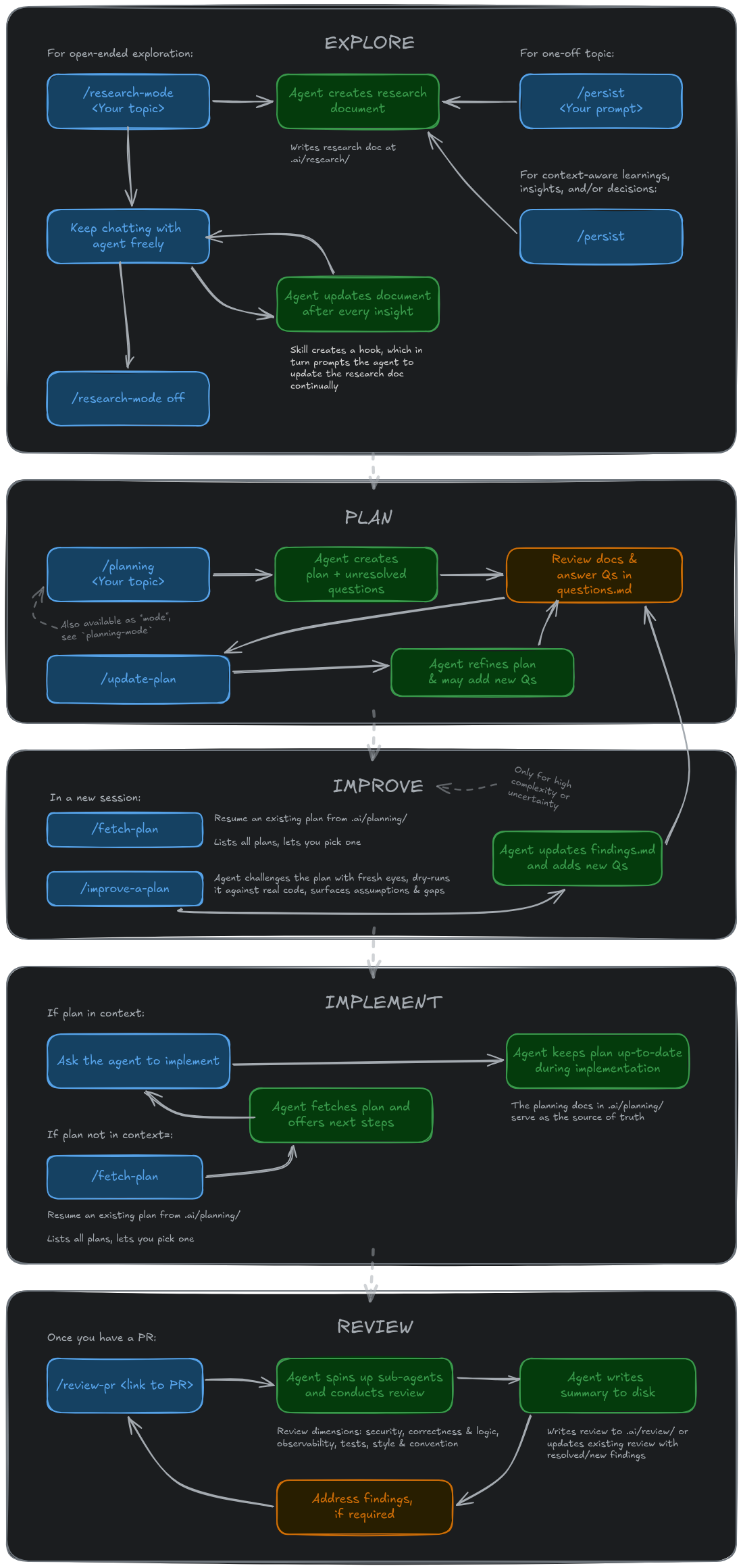
Project folder structure
Skills that persist work to disk all write under a .ai/ directory at your project root. A project that uses these skills will accumulate a structure like this:
your-project/
├── .ai/
│   ├── docs/
│   │   └── adr/                          # /grill-me, /improve-codebase
│   │       ├── 0001-my-decision-1.md
│   │       └── 0002-my-decision-2.md
│   ├── insight/                          # /aha
│   │   ├── 2026-06-02 my-insight-1.md
│   │   └── 2026-06-06 my-insight-2.md
│   ├── planning/                         # /planning, /planning-mode
│   │   └── 2026-04-01 my-task/
│   │       ├── 2026-04-02 my-topic.md    # /research-mode, /persist within plan context
│   │       ├── plan.md                   # - Work breakdown and decisions
│   │       ├── findings.md               # - Research and discoveries
│   │       ├── questions.md              # - Questions and responses
│   │       └── progress.md               # - Session log (multi-phase plans only)
│   ├── research/                         # /research-mode, /persist
│   │   └── 2026-04-01 my-topic.md
│   ├── review/                           # /review-pr
│   │   └── 2026-04-01 42 my-pr-title.md
│   └── .active-mode                      # Temporary flag file (auto-cleared on session start)
└── context.md                            # /grill-me, /improve-codebase
Pi extensions
If you use Pi, the starter extensions included in this repo are:
| Extension | Purpose |
|---|---|
active-mode | Support for *-mode skills: lifecycle behaviours and visual mode indicator |
command-policy | Configurable allow/deny list for shell commands the agent may run |
conversation-statusline | Shows session info in the Pi status line |
footer-statusline | Improves the footer status line |
message-timestamps | Annotates messages with timestamps |
subagent-support | Delegates work to isolated Pi subprocesses, each with its own context window |
usage-statistics | Tracks and displays token usage across sessions, accessible via /usage |
web-tools | web_search and fetch_content tools — structured, token-efficient web access, no API key required |
welcome-hero | Themed welcome widget on startup showing the Pi logo, active model, and a summary of loaded config |
Attribution
See Attribution.txt in skill folders or at the root of the agent folder.
- Matt Pocock: https://github.com/mattpocock/skills
- Ahmad Othman Ammar Adi: https://github.com/OthmanAdi/planning-with-files
- HumanLayer: https://github.com/humanlayer/humanlayer