
PDF Fill Studio
KevinDoremy/pdf-fill-studio
Preencha PDFs localmente com editor visual, sem cloud
Ver no GitHubFerramenta local para preencher formulários PDF com editor visual no navegador. Detecta automaticamente o tipo de PDF (flat, AcroForm ou XFA) e permite arrastar valores precisamente sobre o formulário. Nenhum dado sai da sua máquina — ideal para documentos sensíveis como impostos e seguros.
Instalação
npx convez-ai KevinDoremy/pdf-fill-studio1 comando no terminal: detecta o formato do repositório (marketplace ou plugin avulso) e instala via Claude Code. Requer Node 18+ e o Claude Code instalado.
Métricas
Casos de uso
- Preencher formulários de impostos e seguros de forma segura
- Ajustar posicionamento de texto em PDFs sem campos nativos
- Automatizar preenchimento de formulários governamentais (XFA/LiveCycle)
- Integrar preenchimento de PDFs em fluxos de IA com MCP
Veredito

Solução prática e privada para um problema real: formulários PDF que exigem posicionamento manual. A execução local, suporte a múltiplos tipos de PDF e integração com Claude via MCP a tornam útil para automação de documentos sensíveis. Implementação madura com bom suporte a casos complexos (XFA, comb fields).
README
A tradução para o português deste README ainda está na fila.
pdf-fill-studio
Fill any PDF on your machine, then drag every value into place.
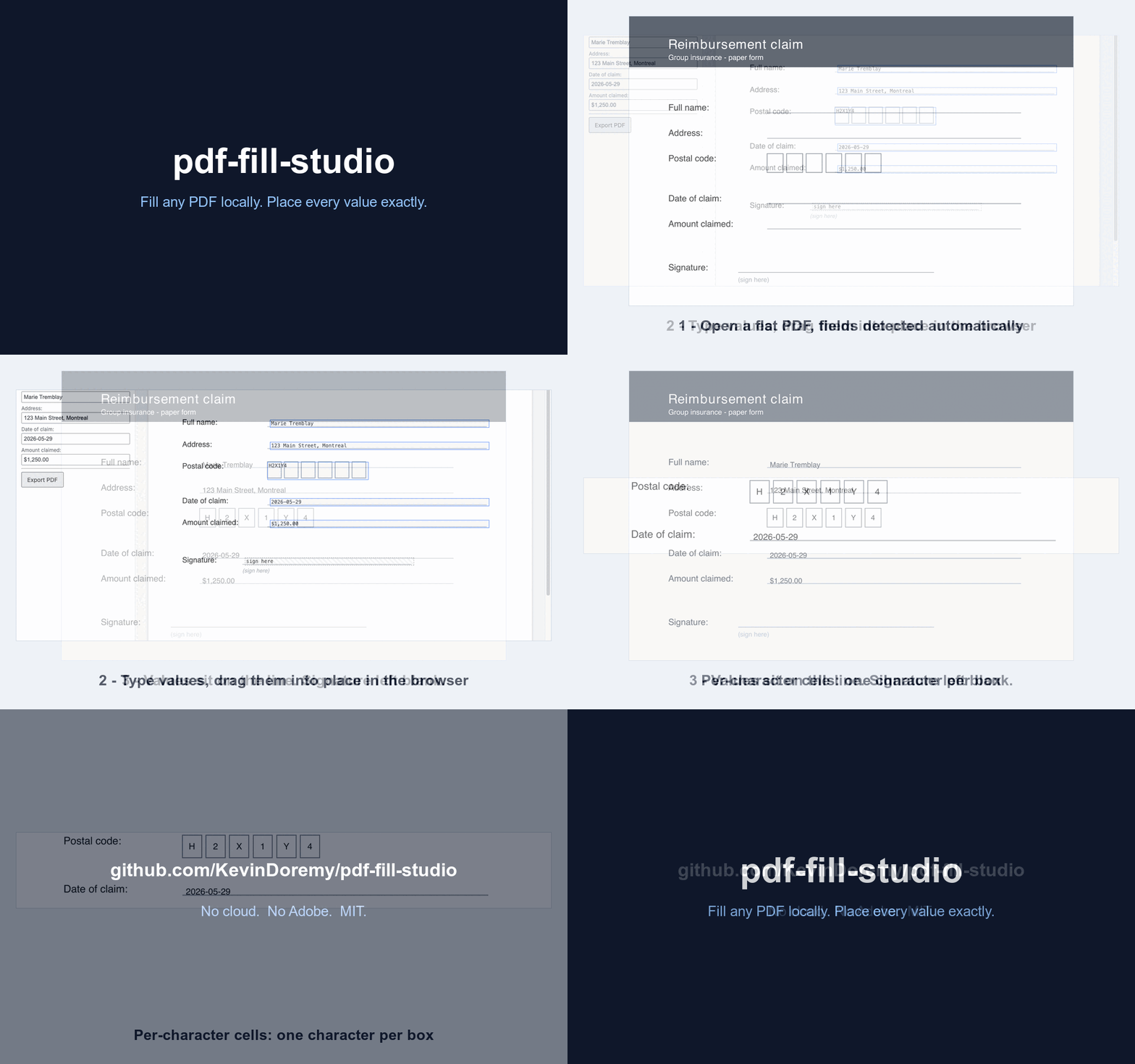
pdf-fill-studio fills PDF forms locally and hands you a visual editor to fix the placement. It detects how a PDF is built and fills it the right way. The filled values show up over a browser preview of the real page. You drag them into the boxes, nudge with the arrow keys, and export. Nothing leaves your machine. The signature line stays empty so you sign it yourself.
Why
Most forms you actually have to fill have no form fields. The text is right, it just has to sit on the correct line, and getting there by typing coordinates is slow. The hosted tools that do this upload your document to a server, which you don't want for tax or insurance paperwork. This keeps everything local and gives you a real editor instead.
What it does today
- Fills flat PDFs (no form fields) by overlaying text where it belongs, snapped to the line.
- Per-character (comb) fields: one character centered per cell (postal codes, SINs, dates).
- Browser editor: drag values over the rendered page, 1px nudges with the arrow keys, signature left blank.
- AcroForm (native fields) fill, with profile autofill from a private JSON. A SIN or bank number is never stored.
- XFA forms (LiveCycle / many government forms): best-effort fill by injecting the XFA datasets, with a free Adobe Reader fallback for dynamic forms that defeat headless tools.
- Runs as a Claude Code skill. MIT licensed, and it never touches the network at runtime.
Profile
Copy profile.example.json to profile.json, fill in your own data, and pass it with --profile profile.json. The CLI fills every matched field automatically and prints what still needs manual input. Keep profile.json out of git (it is already in .gitignore by convention; add it if needed). A SIN, bank account, or card number in the profile file is silently skipped and never written to any PDF.
Install
With pip (gives the pdf-fill-studio command):
pip install pdf-fill-studio
pdf-fill-studio path/to/form.pdf
As a Claude Code plugin:
/plugin marketplace add KevinDoremy/pdf-fill-studio
/plugin install pdf-fill-studio@pdf-fill-studio
From source:
git clone https://github.com/KevinDoremy/pdf-fill-studio
cd pdf-fill-studio
python3 -m venv .venv && source .venv/bin/activate
pip install -e .
pdf-fill-studio path/to/form.pdf
As an MCP server (optional)
Expose the fill tools over the Model Context Protocol:
pip install "pdf-fill-studio[mcp]"
pdf-fill-studio-mcp        # stdio MCP server: detect_pdf_type, list_fields, fill_acroform_fields, fill_flat_text