
Stitch MCP
Kargatharaakash/stitch-mcp
Design UI/UX alimentado por IA integrado ao seu editor favorito
Ver no GitHubServidor MCP universal para Google Stitch, ferramenta de design UI/UX alimentada por IA. Integra-se nativamente com Claude, Cursor, Antigravity e qualquer editor compatível com MCP, permitindo gerar, editar e extrair designs diretamente via IA.
Instalação
npx convez-ai Kargatharaakash/stitch-mcp1 comando no terminal: detecta o formato do repositório (marketplace ou plugin avulso) e instala via Claude Code. Requer Node 18+ e o Claude Code instalado.
Métricas
Casos de uso
- Gerar novas telas de UI a partir de prompts em linguagem natural
- Extrair contexto de design (fontes, cores, layouts) para manter consistência visual
- Baixar código HTML/CSS e screenshots de projetos Stitch
- Acelerar prototipagem de interfaces com IA
Veredito

MCP bem implementado que democratiza design assistido por IA. Requer setup inicial com Google Cloud, mas oferece fluxo zero-config após autenticação. Ideal para designers e devs que querem acelerar prototipagem com geração de UI consistente.
README
A tradução para o português deste README ainda está na fila.
Stitch MCP


Universal MCP Server for Google Stitch
Build amazing UI/UX designs instantly with AI. Works seamlessly with Cursor, Claude, Antigravity, and any MCP-compatible editor.
Created by Aakash Kargathara.
🚀 How It Works
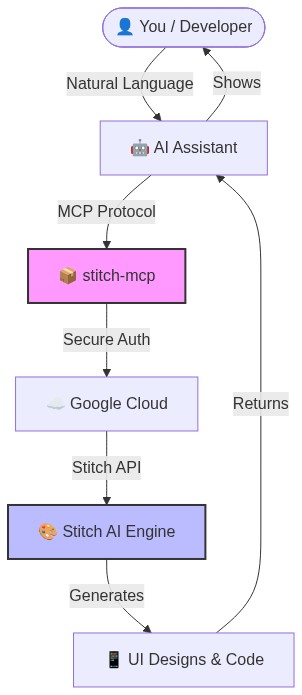
✨ Why this is cool
- Zero Config: Just login once and it works everywhere.
- Universal: Works on Windows, Mac, and Linux.
- Free: Google Stitch API is free to use.
�️ Quick Setup (2 Minutes)
1. Prerequisite: Google Cloud
You need a Google Cloud project with the Stitch API enabled.
# Login to your Google Cloud
gcloud auth login

# Set your project (replace with your actual project ID)
gcloud config set project YOUR_PROJECT_ID
gcloud auth application-default set-quota-project YOUR_PROJECT_ID

# Enable the magic
gcloud beta services mcp enable stitch.googleapis.com
2. Install the Credentials
This gives stitch-mcp permission to talk to Google on your behalf.
gcloud auth application-default login
3. Add to Your AI Editor
Copy and paste this into your MCP config file:
For Claude Desktop:
~/Library/Application Support/Claude/claude_desktop_config.json
For Cursor: Settings > MCP > Add New Server
{
  "mcpServers": {
    "stitch": {
      "command": "npx",
      "args": ["-y", "stitch-mcp"],
      "env": {
         "GOOGLE_CLOUD_PROJECT": "YOUR_PROJECT_ID"
      }
    }
  }
}
🛠️ Available Tools
| Tool Name | What it does |
|---|---|
extract_design_context | 🧠 Scans a screen to extract "Design DNA" (Fonts, Colors, Layouts). Use this to keep style consistent. |
fetch_screen_code | 💾 Downloads the raw HTML/Frontend code of a screen. |
fetch_screen_image | 🖼️ Downloads the high-res screenshot of a screen. |
generate_screen_from_text | ✨ Generates a NEW screen based on your prompt (and context). |
create_project | 📁 Creates a new workspace/project folder. |
list_projects | 📋 Lists all your available Stitch projects. |
list_screens | 📱 Lists all screens within a specific project. |
get_project | 🔍 Retrieves details of a specific project. |
get_screen | ℹ️ Gets metadata for a specific screen. |
💡 Pro Tip: The "Designer Flow"
To generate consistent UI, use this 2-step flow:
- Extract: "Get design context from the Home Screen..."
- Generate: "Using that context, generate a Chat Screen..."
This ensures your new screen matches your existing design system perfectly.
📄 License
Apache 2.0 - Open source and free to use.
Star History
Built with ❤️ by Aakash Kargathara