
FlowMux
JSUYA/flowmux
Terminal multiplexador para agentes IA com navegador integrado
Ver no GitHubTerminal multiplexador para fluxos de trabalho com agentes IA, oferecendo controle integrado de navegador, abas divididas em painéis e notificações nativas de eventos de agentes. Reimplantação em Rust/GTK4 inspirada no cmux, com suporte out-of-the-box para Claude Code, Codex e OpenCode.
Instalação
npx convez-ai JSUYA/flowmux1 comando no terminal: detecta o formato do repositório (marketplace ou plugin avulso) e instala via Claude Code. Requer Node 18+ e o Claude Code instalado.
Métricas
Casos de uso
- Orquestração de workflows com múltiplos agentes IA lado a lado
- Controle de páginas web por agentes via IPC sem Chromium externo
- Monitoramento de tarefas IA com notificações nativas do workspace
Veredito

FlowMux é uma ferramenta especializada para desenvolvedores que orquestram agentes IA complexos. Excelente para ambiente Linux/GTK4 com suporte robusto a Claude, mas requer familiaridade com terminal e arquitetura de agentes.
README
A tradução para o português deste README ainda está na fila.
FlowMux

Agent Workflow Multiplexer Terminal — Go with the agents' flow.
<img src=resources/screenshot/screenshot_1.png width="850"/>
A terminal for AI agent workflows, browser control, and task signals.
flowmux is a Linux/GTK4 terminal for AI coding agents. The terminal pane uses
libghostty-vt for VT state, flowmux-owned PTYs, and an application-owned GTK
renderer.
Unofficial GPL-3.0-or-later reimplementation inspired by cmux, a macOS/AppKit app. Not affiliated with cmux.
Control internal browser
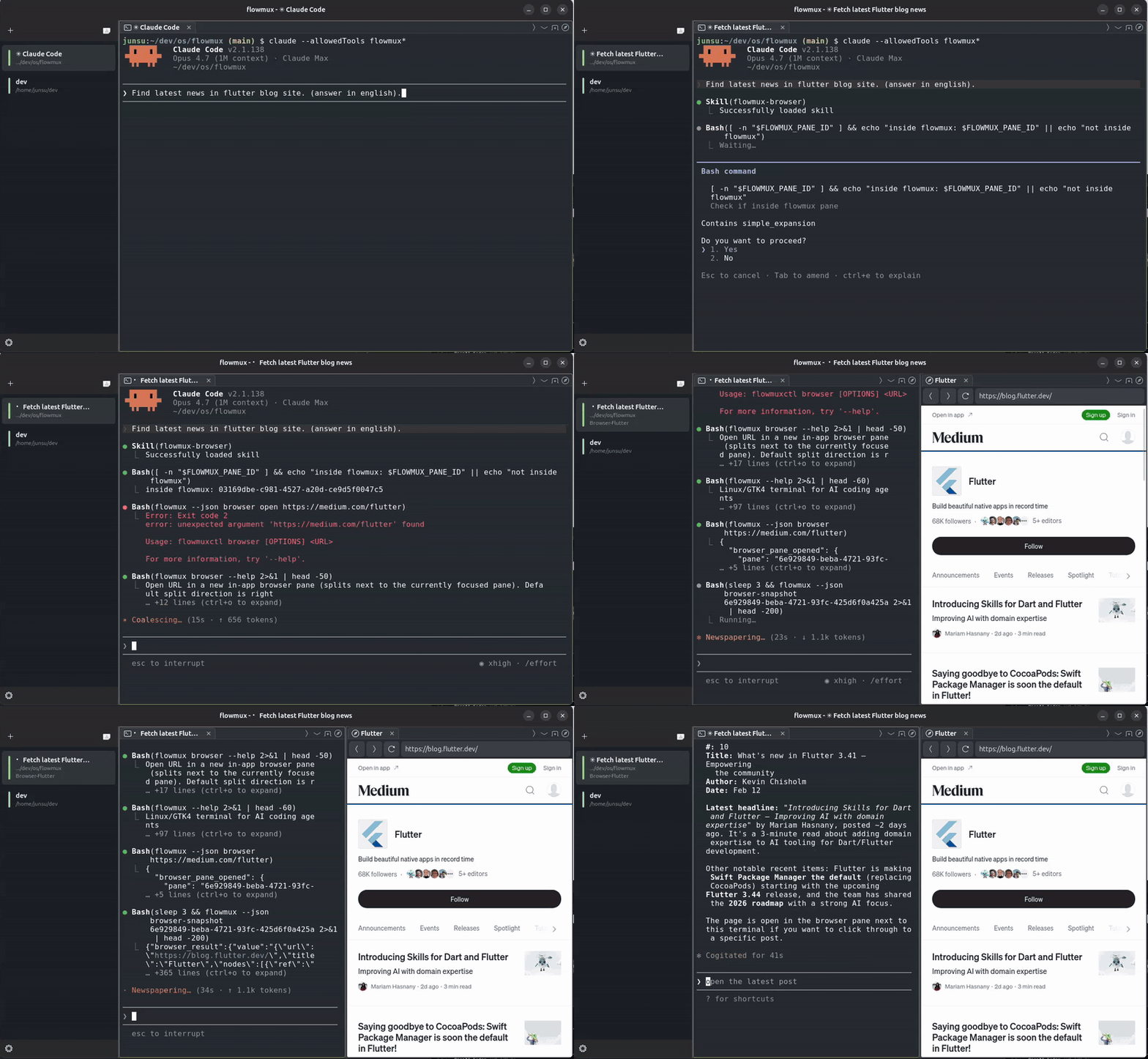
A WebKitGTK 6.0 browser tab lives next to terminal tabs in the same pane tree. The clip shows an AI agent driving the page over flowmux's IPC socket — snapshot the DOM, click, type, read state back — with no system Chromium and no separate driver.
AI Agent notification (Claude, Codex, OpenCode)
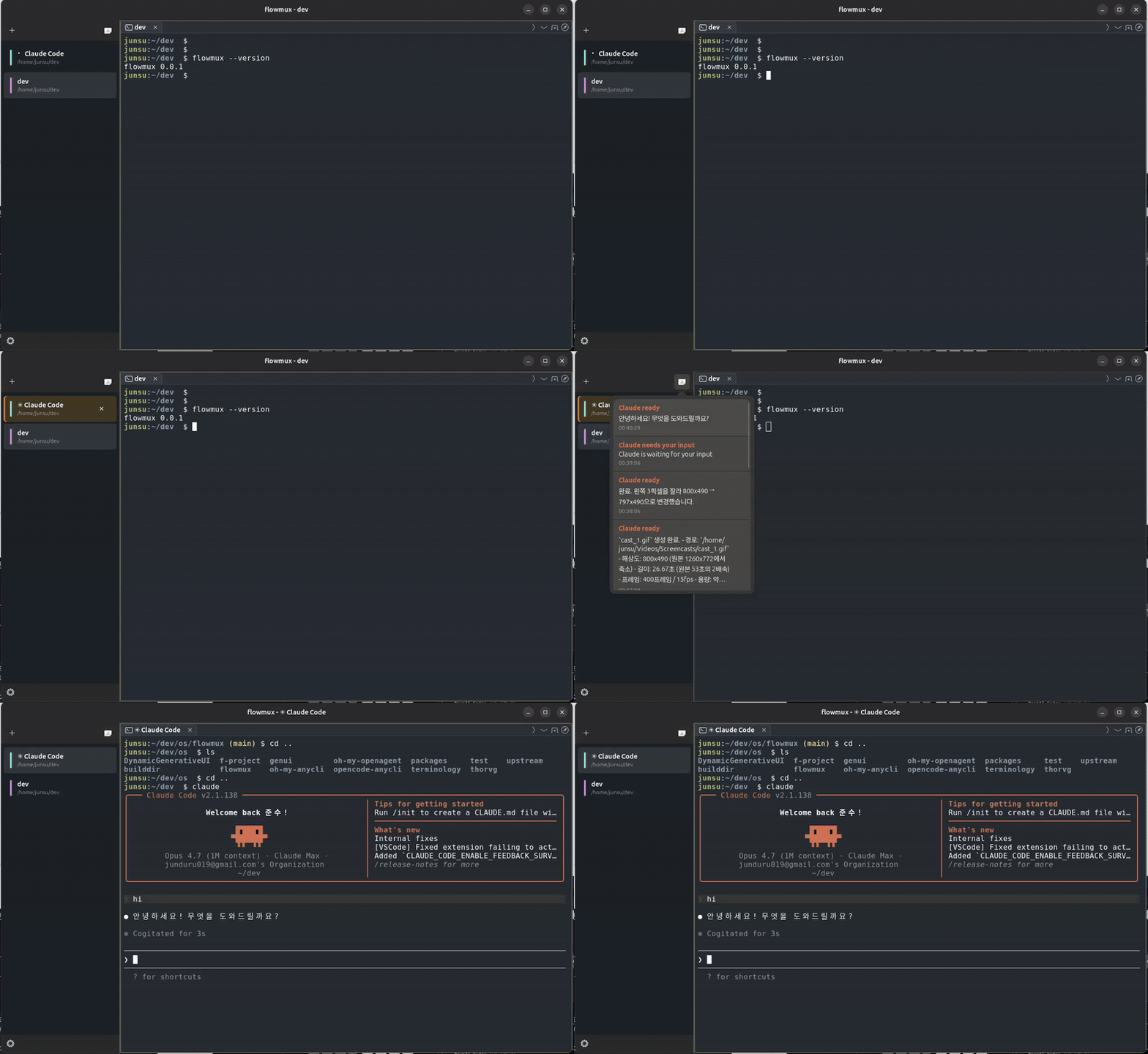
flowmux installs lifecycle hooks into Claude Code, Codex, and OpenCode so task complete, needs approval, and error events surface as native desktop notifications — routed to the workspace that fired them, suppressed while that surface is focused, and isolated per window.
Features
- Workspaces & panes — side-panel workspaces hold tasks side by side, each
split into multiple keyboard-navigable panes mixing terminal and browser
tabs.
Ctrl+Shift+Kcopies the focused cwd; right-click for Copy path / URL. - In-app browser — a WebKitGTK tab next to your terminals, drivable by agents in a neighbouring pane (snapshot, click, type, read state). Import a session from Firefox / Chrome / Chromium / Brave / Edge / Arc; Web Inspector opens WebKit dev tools.
- Notifications — terminal "task complete" / "needs attention" signals become desktop notifications, routed to the firing workspace and quiet while focused. Bell popover All Clear clears all entries and toasts at once.
- AI agent integration — Claude Code, Codex, OpenCode work out of the box;
sessions persist across restarts.
claude-teamsopens a workspace pre-split into per-Claude panes.flowmux doctor/fixaudit and repair wiring. - Customizable keybindings — Options → Keybindings rebinds any shortcut
(applies on OK, no restart), saved to
$XDG_CONFIG_HOME/flowmux/options.json. IME/scroll terminal shortcuts (Shift+Enter Hangul flush, smart PgUp/PgDn) are fixed and not editable.
Layout
flowmux/
├── crates/
│   ├── flowmux-core/       Domain types: Workspace, Surface, Pane, Notification
│   ├── flowmux-config/     cmux.json + ~/.config/ghostty/config readers
│   ├── flowmux-state/      Persistent workspace/session state on disk
│   ├── flowmux-terminal/   libghostty-oriented terminal backend + PTY env helpers
│   ├── flowmux-browser/    WebKitGTK 6.0 browser surface + scriptable refs
│   ├── flowmux-cookies/    Browser cookie/session import (libsecret + sqlite)
│   ├── flowmux-notify/     OSC 9/99/777 parser + libnotify D-Bus sender
│   ├── flowmux-ipc/        Unix-socket IPC (cmux socket-API compatible)
│   ├── flowmux-daemon/     Background daemon orchestrating IPC and panes
│   ├── flowmux-procmon/    PID-tree process / listening-port monitor
│   ├── flowmux-ssh/        SSH workspaces via russh
│   ├── flowmux-vcs/        Git/PR sidebar integration
│   ├── flowmux-cli/        `flowmuxctl` helper for CLI subcommands
│   └── flowmux/            GTK4 + libadwaita main app and public `flowmux` binary
├── packaging/{debian,flatpak}/  Distro packaging metadata
├── resources/             .desktop file, icons, screenshots, themes
├── LICENSE                GPL-3.0-or-later (verbatim from gnu.org)
├── THIRD_PARTY_LICENSES.md  Third-party dependency license inventory
└── NOTICE                 Copyright + attribution
Build prerequisites (Ubuntu 24.04 native)
sudo apt install \
    build-essential pkg-config \
    libgtk-4-dev libadwaita-1-dev \
    libwebkitgtk-6.0-dev libssl-dev \
    libssh2-1-dev libdbus-1-dev
# For the patched VTE build (see "Patched VTE" below) — meson/ninja plus the
# VTE source-build dependencies not already pulled in by libgtk-4-dev:
sudo apt install \
    meson ninja-build \
    liblz4-dev libpcre2-dev libfribidi-dev libicu-dev libgnutls28-dev
# rustup (Rust 1.93+) and Zig 0.15.x required; Zig builds the vendored
# libghostty-vt used by the terminal pane.
curl --proto '=https' --tlsv1.2 -sSf https://sh.rustup.rs | sh
Optional — full media playback in tab browser
WebKitGTK decodes media via GStreamer. Without these plugins pages still load,
but YouTube / Twitch / <video> may stall, miss subtitles, or fail on DRM:
sudo apt install \
    gstreamer1.0-plugins-good \
    gstreamer1.0-plugins-bad \
    gstreamer1.0-plugins-ugly \
    gstreamer1.0-libav
Build
cargo build --release --workspace
Produces two binaries under target/release/:
flowmux— GTK4 GUI; also forwards CLI subcommands toflowmuxctl.flowmuxctl— CLI helper invoked by the GUI and by agent hooks.
For development:
cargo run -p flowmux           # debug GUI
cargo check --workspace        # type-check everything
Patched VTE (drag-selection in agent TUIs)
Upstream VTE drops a text selection the instant the foreground application
rewrites the cells under it. TUIs such as Codex and Claude Code repaint their
UI continuously, so a drag-selection in their pane vanishes on the next frame —
and VTE exposes no public API to disable that behaviour. flowmux therefore
links a small patched copy of VTE (packaging/vte-patches/) that keeps the
selection anchored across output. The system libvte other apps use is left
untouched.
For a native install, build the patched VTE and link flowmux against it in one
step (needs the meson/ninja/liblz4-dev/… packages listed in the
prerequisites):
scripts/install-host.sh # builds patched VTE → builds flowmux → installs
This installs the patched VTE to ~/.local/flowmux-vte and the binaries to
~/.local/bin and ~/.cargo/bin, baking a RUNPATH so the GUI loads the
patched library at runtime. The Flatpak build (Ubuntu 22.04) applies the same
patch automatically. A plain cargo build --release --workspace still works
but links the system VTE, so drag-selection will not survive a repaint.
Verify & repair
flowmux wires into host pieces: agent SKILL files, agent hooks, the browser data dir, host browsers for the cookie importer, and the daemon socket.
flowmux doctor   # read-only audit; non-zero exit if anything needs fixing
flowmux fix      # re-install / refresh what doctor flagged
doctor prints one row per check with a status badge (ok / fix / warn /
info); NO_COLOR=1 or piping disables colour. Run it after a flowmux
install/upgrade and after installing a new agent. fix is idempotent and
never clobbers hand-edited entries lacking the flowmux marker. Add --json to
either for machine-readable output.
Ubuntu 22.04 (jammy)
22.04 lacks the GTK/WebKit versions for a native build, so ship via Flatpak
(GNOME 48 runtime). Host tools stay visible through flatpak-spawn --host,
and GStreamer plugins are bundled, so no extra host packages are needed.
sudo apt install flatpak flatpak-builder
flatpak remote-add --if-not-exists --user flathub https://flathub.org/repo/flathub.flatpakrepo
flatpak install -y --user flathub org.gnome.Platform//48 org.gnome.Sdk//48
flatpak-builder --user --install --force-clean build-flatpak packaging/flatpak/com.flowmux.App.yml
flatpak run com.flowmux.App
Blank browser tabs (EGL_BAD_PARAMETER) mean the host GL stack is too old for
the sandbox Mesa — disable WebKit's GPU path:
flatpak override --user --env=FLOWMUX_WEBKIT_HW_ACCEL=never com.flowmux.App.
License
GPL-3.0-or-later. See LICENSE and NOTICE.
Contributions accepted under the same license; see
CONTRIBUTING.md.