
Legal Tools — Extração e Verificação de Citações Jurídicas
jslandau/legal-tools
Extrai, verifica e rastreia citações jurídicas com suporte a CourtListener
Ver no GitHubSkill do Claude com três ferramentas para análise de documentos jurídicos: extração de Tabela de Autoridades, verificação de citações contra fontes originais, e rastreamento da linhagem de citações. A extração de citações roda localmente via eyecite; a verificação consulta CourtListener ou APIs de jurisprudência quando disponível, sem expor o texto do documento.
Instalação
npx convez-ai jslandau/legal-tools1 comando no terminal: detecta o formato do repositório (marketplace ou plugin avulso) e instala via Claude Code. Requer Node 18+ e o Claude Code instalado.
Métricas
Casos de uso
- Gerar e auditar Tabela de Autoridades em petições recursais
- Verificar se cada citação em um briefing é corretamente atribuída à fonte
- Rastrear a origem histórica de uma proposição jurídica através da cadeia de citações
Veredito

Ferramenta especializada e bem-arquiteturada para o fluxo jurídico americano (case law e CourtListener). A extração local de citações é um diferencial de segurança. A verificação via CourtListener é robusta, mas o chain-cite ainda está experimental. Recomendado para escritórios que trabalham com briefing e necessitam auditoria de citações.
README
A tradução para o português deste README ainda está na fila.
legal-tools
A Claude Code plugin with three skills for legal document work: extracting a Table of Authorities, verifying citations, and tracing a citation's lineage.
Citation extraction runs locally via eyecite. Document text never leaves your machine — important for privileged work product like draft briefs. US case-law verification goes through the claude.ai CourtListener MCP server when available, but only via components-only lookups (volume/reporter/page) and ID-based fetches — never the document text. A scripted REST-API fallback is supported for environments without the MCP.
MCP support appears to work but hasn't been extensively tested, please double-check (and please file any bugs you encounter as issues).
You will get some permissions requests, including sed and python processing documents in /tmp. This is normal.
Skills
table-of-authorities
Scans a brief and produces a formatted Table of Authorities. Reads every page of the substantive content, identifies all legal citations (cases, statutes, constitutional provisions, legislative materials, secondary sources), resolves short forms (Id., supra, reporter-only cites) back to their full citations, and outputs both JSON and formatted TOA text with page references.
Use when: You need to build or audit the TOA for an appellate brief.
cite-checking
Checks every citation in a document against the actual source. For each citation it:
- Looks up the source online (CourtListener, eCFR, Cornell LII, SSRN, etc.)
- Extracts the text at the pincite
- Writes a neutral précis of what the source actually says
- Assigns a support quality label: Strong / Adequate / Weak / Misleading / Unable to assess
- Dispatches a separate Opus-tier critic subagent to independently review the analysis
Output is multi-format, including Markdown, structured JSON data, and a default UI for exploring the structured JSON.
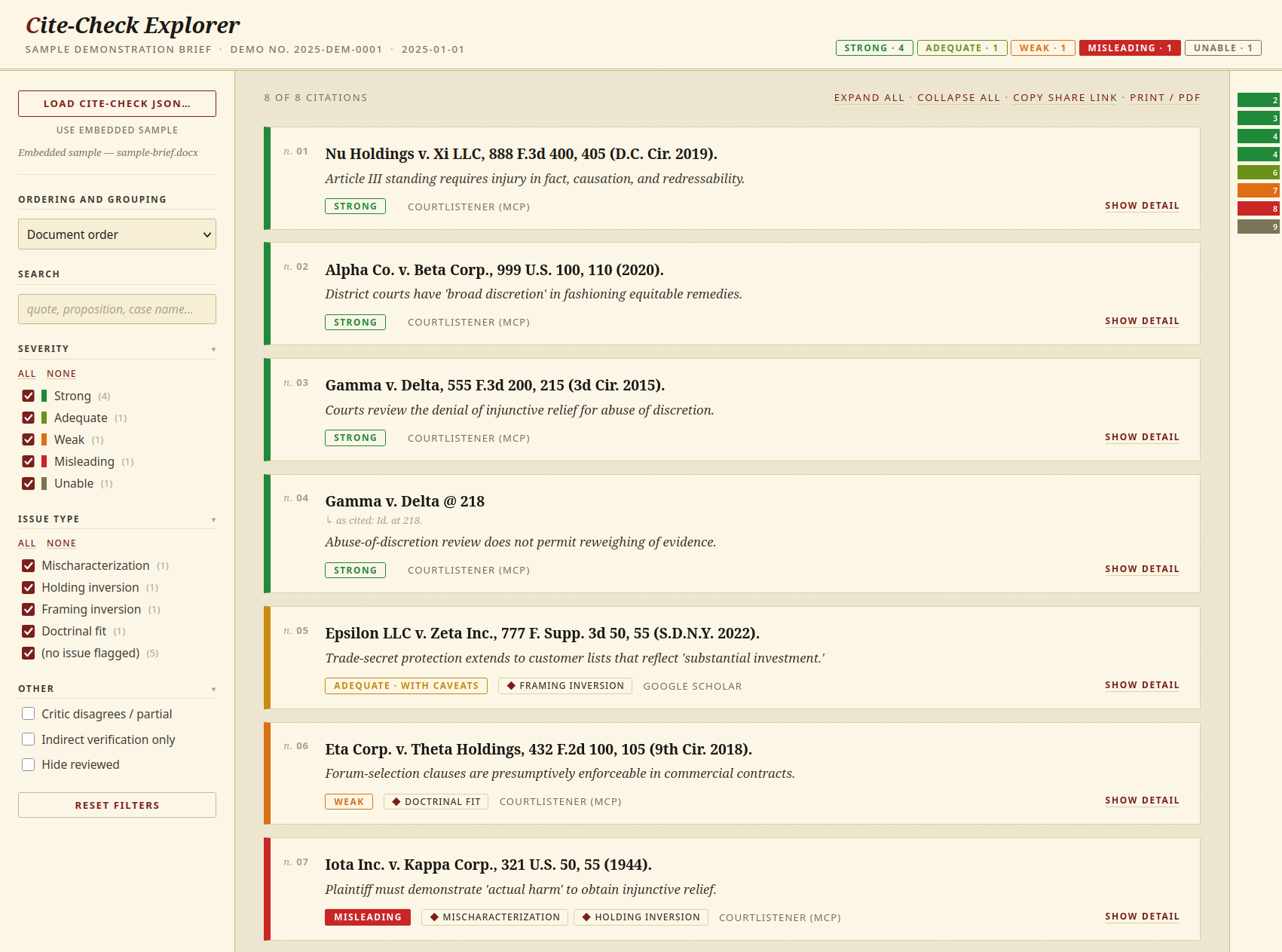
Use when: You want to verify that citations hold up — that the source actually says what the brief says it says.
chain-cite ⚠️ experimental
Traces a single legal proposition backward through its citation graph to find the original source. Takes one proposition and one seed citation, walks hop by hop through CourtListener's opinion citations, annotates the relationship at each hop (quoting / paraphrasing / holding) and any semantic drift (broadens / narrows / rephrases), and terminates when the chain hits a natural end: a non-case source, a case CourtListener doesn't cover, an opinion that states the rule without citing a predecessor, or a cycle.
Output is a JSON chain and a Markdown report (summary first, full lineage second).
Use when: You want to know where a proposition actually comes from — not just what case a brief cites, but what that case cited, and what that case cited, all the way back.
Status: This skill is under active development and may produce incomplete or incorrect chains. Results should be verified manually.
citation-toolkit (internal)
Shared vocabulary used by all three skills above: citation taxonomy, short-form resolution rules, structured component schemas, flag vocabulary, CourtListener API patterns, and model-tier guidance for subagents. Not intended to be invoked directly.
Installation
First, add the marketplace.
/plugin marketplace add jslandau/legal-tools
Then install the plugin, either via the /plugin TUI or via the following command.
/plugin install legal-tools@legal-tools
Requirements
Local citation extraction (all skills)
All three skills extract citations from documents using eyecite, running locally on your machine. Install it once:
pip install eyecite
On systems where pip refuses to install into the system Python (PEP 668 — recent Linux distros, Homebrew Python on macOS), use a venv:
python3 -m venv ~/.legal-tools-venv
~/.legal-tools-venv/bin/pip install eyecite
The skills will tell you what Python to invoke. The extraction script lives at plugins/legal-tools/skills/citation-toolkit/eyecite_extract.py and is invoked automatically.
Why local: legal documents are routinely privileged or work-product protected. Running extraction on-machine keeps the document text off the network entirely. The skills enforce this as a bright-line rule — they never call the CourtListener MCP's extract_citations or analyze_citations tools, both of which would upload the document.
CourtListener access (for cite-checking and chain-cite)
US case-law verification (looking up a citation by volume/reporter/page and fetching the opinion text) goes through CourtListener. Two paths, in order of preference:
- CourtListener MCP server (preferred) — when the
claude.ai CourtListenerMCP server is installed and connected, no token is needed. The skills use the components-onlycall_endpoint("citation-lookup", ...),get_endpoint_item, andsearchtools. Auth and rate limiting are handled by the MCP. Only public citation strings and IDs cross the wire. - CourtListener REST API (fallback) — when the MCP is not available, a free CourtListener API token is required. Get one at courtlistener.com/sign-in. The skills will ask for the token at the start of a run when they detect the MCP is absent.
table-of-authorities does not need CourtListener at all — it only needs the local eyecite extraction.
Supported document formats
PDF, plain text / Markdown, DOCX (including Word with tracked changes).