
Agent Workflow Template
jsiovn/workflow-template
Workflow planner→executor para agentes de IA coding com Beads e skills compartilhadas
Ver no GitHubScaffold que instala um workflow planner→executor consistente para agentes de IA em codificação (Claude Code e Codex) em qualquer repositório. Fornece skills compartilhadas, subagents e rastreamento de tarefas via Beads, permitindo que Claude execute o mesmo playbook em todos os projetos.
Instalação
npx convez-ai jsiovn/workflow-template1 comando no terminal: detecta o formato do repositório (marketplace ou plugin avulso) e instala via Claude Code. Requer Node 18+ e o Claude Code instalado.
Métricas
Casos de uso
- Standardizar fluxo de trabalho de agentes IA em múltiplos repositórios
- Gerenciar tarefas e PRs com rastreamento Beads integrado
- Compartilhar skills e agents entre projetos de forma consistente
Veredito

Ferramenta especializada para equipes que usam Claude Code/Codex em escala, automatizando setup e padronizando fluxos. Curva de aprendizado moderada (requer Beads, Dolt, Python), mas retorno alto para workflows de multi-repositório.
README
A tradução para o português deste README ainda está na fila.
Agent Workflow Template
A scaffold that installs a consistent planner → executor workflow for AI coding agents into any repo — a shared set of skills, subagents, and Beads-backed task tracking so that Claude Code (the primary AI) follows the same playbook in every project, with Codex as an optional opt-in. You plan once, execute one bead per PR, and ship.
This repo runs nothing itself — it's developer tooling for AI coding agents, not a CI/CD or GitHub Actions "workflow." You install it once on your machine, then run one script per project to scaffold (or refresh) the workflow inside that project.
Preinstall
You need three machine-wide tools before bootstrapping any project:
| Tool | What for | Verify |
|---|---|---|
bd | Beads CLI (issue tracking) | bd version |
dolt | Storage backend used by bd | dolt version |
python3 | Template's scaffold scripts (run from the template checkout, not downstream) | python3 --version |
Per-OS install instructions:
- macOS — docs/INSTALL-MACOS.md
- Ubuntu / Linux — docs/INSTALL-UBUNTU.md
- Windows — docs/INSTALL-WINDOWS.md
To verify everything is in place in one shot:
bash ./scripts/posix/check-prereqs.sh
# Windows:
pwsh -File .\scripts\windows\check-prereqs.ps1
How to install
1. Clone this template to a stable path on your machine
git clone https://github.com/jsiovn/workflow-template.git ~/www/workflow-template
Pick any path you like — just keep it stable, because your shell aliases (next section) and downstream update-skills invocations will point at it.
2. Bootstrap a project
Run this once per repo you want to use the workflow in:
bash ~/www/workflow-template/scripts/posix/bootstrap-new-repo.sh /path/to/your-repo myprefix
Windows:
pwsh -File "$HOME\www\workflow-template\scripts\windows\bootstrap-new-repo.ps1" -RepoPath D:\path\to\repo -Prefix myprefix
myprefix is the short tag Beads uses for issue IDs in that repo (e.g. acme → acme-1, acme-2). The bootstrap script initializes git if needed, runs bd init and bd setup claude (and bd setup codex only with --with-codex), and copies the shared skills and agents into the project — Claude Code's .claude/ surface always, and Codex's .codex/ surface only when you opt in via --with-codex.
Claude Code is the default, primary AI. To also set up Codex, add --with-codex (POSIX) or -WithCodex (PowerShell), which scaffolds the .codex/ skills+agents and the AGENTS.md instruction file alongside the Claude surface. The flag is accepted by both bootstrap-new-repo and update-skills (so you can adopt Codex later). If a .codex/ directory already exists in the downstream, it is detected and refreshed automatically.
For web/UI projects, add --with-screenshots (POSIX) or -WithScreenshots (PowerShell) to also install the attach-web-screenshots skill and its companion .github/workflows/cleanup-screenshots.yml. Omit for backend, CLI, or library repos. The flag is also accepted by update-skills if you adopt screenshots later.
3. Refresh later
When this template gets updates, refresh any downstream repo with:
bash ~/www/workflow-template/scripts/posix/update-skills.sh /path/to/your-repo
For a guided walkthrough of a brand-new project, see docs/SETUP-NEW-REPO.md.
How to setup aliases
Typing the full path every time is annoying. Add aliases to your shell:
bash / zsh (~/.bashrc or ~/.zshrc):
alias w-bootstrap='bash ~/www/workflow-template/scripts/posix/bootstrap-new-repo.sh'
alias w-update='bash ~/www/workflow-template/scripts/posix/update-skills.sh'
PowerShell ($PROFILE):
function w-bootstrap { pwsh -File "$HOME\www\workflow-template\scripts\windows\bootstrap-new-repo.ps1" @args }
function w-update    { pwsh -File "$HOME\www\workflow-template\scripts\windows\update-skills.ps1" @args }
Reload the shell, then:
w-bootstrap /path/to/your-repo myprefix
w-update    /path/to/your-repo
How to use skills and agents
Once a repo is bootstrapped, your AI tool — Claude Code by default, or Codex if you opted in with --with-codex — sees two kinds of building blocks:
- Skills — runnable workflows. You invoke a skill by name (e.g.
plan-beads,executor-task) and the model executes the whole workflow end-to-end. - Agents — focused single-purpose roles (PM, architect, reviewer, …). You invoke an agent when you want that specific perspective on the current work.
The two flows you'll run most often
Planning — turn an idea into Beads tasks:
plan-beads → brainstorming → (planner-research, optional) → beads-planner → validate-beads
Execution — pick up one bead, ship one PR:
executor-task                # default: PR into main
executor-task-worktree       # same, in an isolated worktree (parallel-safe)
executor-epic-task           # bead belongs to an epic — PR into the epic branch
executor-epic-sequential <epic-id>   # run a WHOLE epic on one branch, fresh session per bead, one PR
executor-rework-in-place <bead-id>   # bead was reopened, amend the existing PR
Other useful skills you'll reach for:
address-pr-comments— when a reviewer left comments on your PRfinishing-a-development-branch— push and open the PRaudit-backlog-rules— re-check the backlog after editing project rulesrequesting-code-review— get a review of the current change before merging
Full skills catalog
| Skill | What it does | When to use |
|---|---|---|
plan-beads | Full planner-only session: brainstorm → confirm → create beads → stop | You have a problem and want to convert it into Beads tasks |
brainstorming | Explores user intent, requirements, and design before any coding | Before any creative work — required by plan-beads and good as a standalone |
planner-research | Resolves factual unknowns after brainstorming | Only when uncertainty would weaken the plan |
beads-planner | Turns a settled plan into Beads epics + tasks with explicit dependencies | After brainstorming/research, when ready to materialize the plan |
validate-beads | Quality-gates an epic (size, contracts, fresh-session safety) | After beads-planner, before claiming any of its beads for execution |
writing-plans | Produces a per-bead execution plan with explicit ## Verification | Inside an executor session, after a bead is claimed — never in a planner session |
audit-backlog-rules | Audits ready/blocked beads for drift after CLAUDE.md or AGENTS.md rules change | Right after editing project rules / conventions |
| Skill | What it does | When to use |
|---|---|---|
beads-claim | Finds and claims a ready bead at the start of an executor session | Start of an executor session |
executor-task | Full cycle for one bead on a fresh feat/<bead-id> branch off main + opens a PR into main | One-bead-per-PR delivery rhythm |
executor-task-worktree | Same as executor-task but runs in an isolated git worktree | When you need to run multiple beads in parallel without branch interference |
executor-epic-task | Same as executor-task but branches off (and PRs into) the bead's parent epic branch | Epic delivered as one merge to main; each child bead ships as its own PR into the epic |
executor-epic-task-worktree | Same as executor-epic-task but runs in an isolated git worktree | Epic flow + parallel beads + main tree must stay untouched |
executor-epic-sequential | Runs every ready bead of one epic sequentially on a single epic/<epic-bead-id> branch — each bead in a fresh headless claude -p session (clean context per task); blocked beads are skipped; ends with one PR to the default branch | Deliver a whole epic unattended as one branch + one PR, instead of one bead at a time |
executor-rework-in-place | Re-execute a reopened bead on the current feature branch; push commits into the existing open PR (no new branch, no new PR); requires bead_id | Bead was already executed but the task was wrong — user reopened the bead, updated its requirements, and wants to amend the existing PR |
beads-close | Closes the bead, creates follow-ups, commits .beads/ state | Final step of an executor cycle |
| Skill | What it does | When to use |
|---|---|---|
systematic-debugging | Structured root-cause investigation before proposing a fix | Any bug, test failure, or unexpected behavior |
verification-before-completion | Forces real verification commands before claiming "done" | Before committing, opening a PR, or asserting success |
build-and-test | Runs the literal ## Verification section of the current execution plan | After implementing changes; specialize per repo in stage 2 |
| Skill | What it does | When to use |
|---|---|---|
requesting-code-review | Dispatches the code-reviewer subagent against the current change | After implementing a major task, before merging |
address-pr-comments | Pulls unresolved PR threads → fixes via pr-comment-fixer → verifies → push → reply | When new review comments arrive on the current PR |
attach-web-screenshots | Takes screenshots of a running web app and attaches them to the open PR | After implementing a UI feature, before or alongside review |
finishing-a-development-branch | Pushes the branch and opens a PR | When all work on a feature branch is done and verified |
attach-web-screenshotsis opt-in — pass--with-screenshotstobootstrap-new-repo(orupdate-skillsto adopt later). It ships a companion CI workflow (.github/workflows/cleanup-screenshots.yml) that prunes stale screenshot folders for merged branches.
| Skill | What it does | When to use |
|---|---|---|
project-auditor | Full-repo audit: naming, folder layout, tech-stack consistency, light architecture | Project health check (not per-PR — use requesting-code-review for diffs) |
prune-local-branches | Removes stale local branches whose PRs are merged or closed | Periodic cleanup |
| Agent | What it does | When to use |
|---|---|---|
product-manager | Produces acceptance criteria + done checklist | Early planning, when "done" is fuzzy |
engineering-manager | Critically reviews the PM's spec for feasibility, scope creep, hidden cost | Right after product-manager, before engineering commits |
solution-design | High-level solution design — components, contracts, data flow, alternatives | After acceptance criteria are pinned, before implementation plan |
junior-engineer | Asks clarifying questions until nothing is ambiguous; returns a numbered list | Before starting work on cross-cutting / under-specified tasks |
backend-architect | Reviews plans + diffs for backend work against opinionated standards | Plan touches APIs, services, persistence, queues, jobs |
frontend-architect | Reviews plans + diffs for frontend work against opinionated standards | Plan touches UI, components, styling, client state |
testing-strategist | Produces the test list required to ship a plan/diff with confidence | After a plan is settled, before coding — or before opening a PR |
| Agent | What it does | Called by |
|---|---|---|
code-reviewer | Reviews a completed change against its plan/requirements, reports by severity | requesting-code-review |
project-auditor | Full-repo audit (naming, folders, tech stack, architecture hotspots, dead code) | project-auditor skill |
pr-comment-fixer | Reads unresolved PR threads, applies fixes, returns reply plan (does not push/post) | address-pr-comments |
For the internal "who calls whom" graph view of the skills, see docs/SKILLS_RELATIONSHIPS.md.
Browse beads visually with bdtui
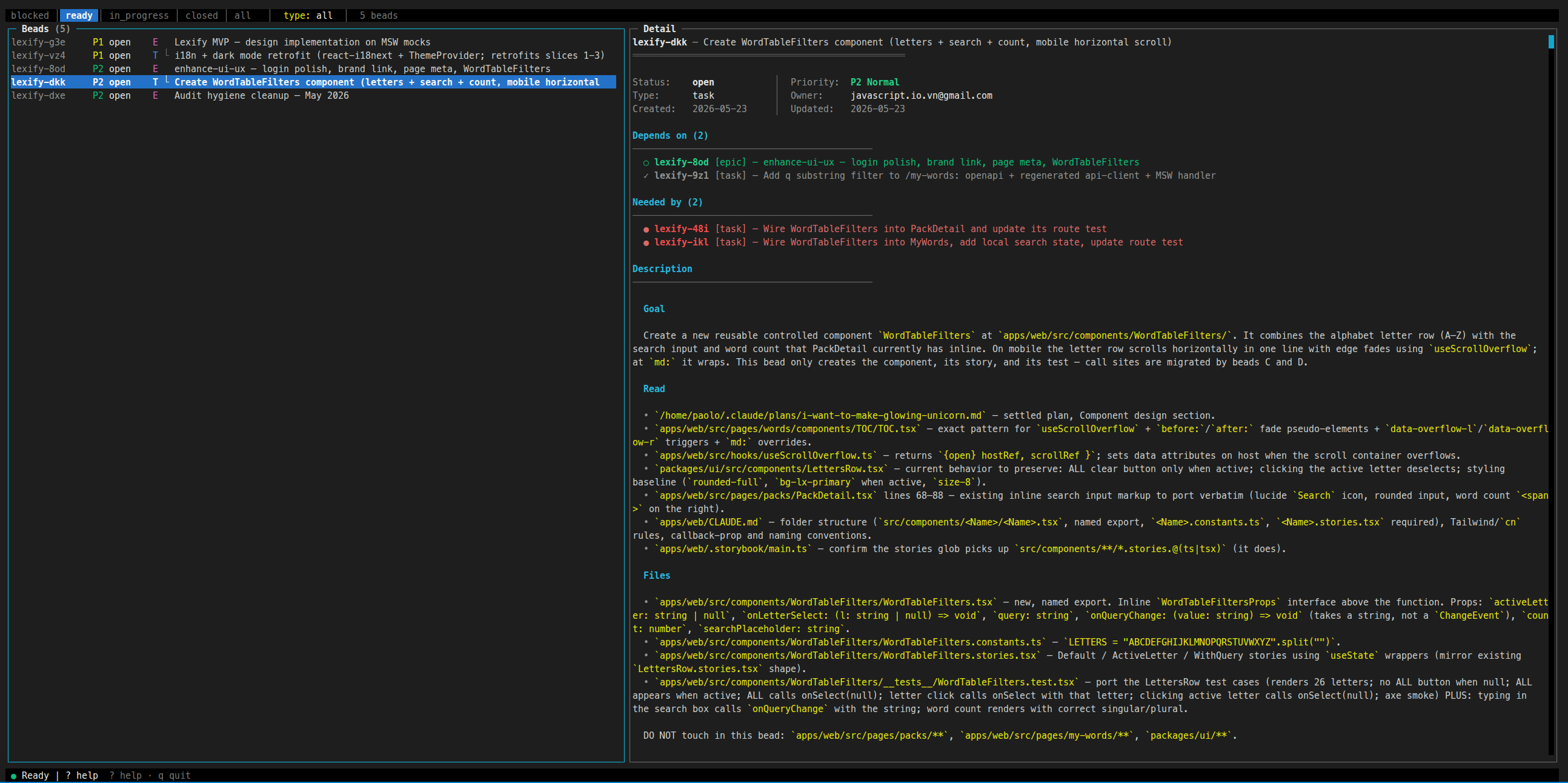
bdtui is a terminal UI for browsing the Beads backlog — ready vs. blocked beads, dependencies, status, the lot. Install once:
npm install -g bdtui
Then run bdtui from inside any bootstrapped repo.
Command reference
| Purpose | POSIX | Windows |
|---|---|---|
| Bootstrap a new downstream repo | scripts/posix/bootstrap-new-repo.sh <repo> <prefix> [--with-codex] | scripts/windows/bootstrap-new-repo.ps1 [-WithCodex] |
| Refresh shared workflow surface | scripts/posix/update-skills.sh <repo> [--with-codex] | scripts/windows/update-skills.ps1 [-WithCodex] |
| Prerequisite check | scripts/posix/check-prereqs.sh | scripts/windows/check-prereqs.ps1 |
More docs
- docs/INSTALL-MACOS.md — macOS install
- docs/INSTALL-UBUNTU.md — Ubuntu / Linux install
- docs/INSTALL-WINDOWS.md — Windows install
- docs/SETUP-NEW-REPO.md — guided new-repo walkthrough
- docs/SKILLS_RELATIONSHIPS.md — internal skill graph
- docs/TROUBLESHOOTING.md — common issues
Attribution
The bundled execution-quality skills are curated copies derived from obra/superpowers, adapted to a Beads-native planning/execution flow with selected ideas from GSD and Khuym. See ATTRIBUTION.md.