
ThermoWorks Tools
jongio/thermoworks
Monitor temperaturas ThermoWorks via IA, CLI, VS Code e web
Ver no GitHubMCP server para monitorar dispositivos ThermoWorks Cloud em tempo real, integrando-se com assistentes de IA como Claude e GitHub Copilot. Oferece CLI com statusline ao vivo, extensão VS Code, dashboard web interativo e SDK Node.js para automações customizadas.
Instalação
npx convez-ai jongio/thermoworks1 comando no terminal: detecta o formato do repositório (marketplace ou plugin avulso) e instala via Claude Code. Requer Node 18+ e o Claude Code instalado.
Métricas
Casos de uso
- Integrar leitura de sensores ThermoWorks em workflows de IA
- Monitorar temperaturas em tempo real via GitHub Copilot CLI
- Criar dashboards customizados e automações de alarmes
- Acessar dados históricos e calibração programaticamente
Veredito

Solução bem arquitetada para integração de dados IoT (termômetros) com ecossistema Claude/Copilot. Codebase maduro (TypeScript, CI/CD, múltiplas interfaces) para quem precisa conectar hardware ThermoWorks a assistentes de IA ou automações backend.
README
A tradução para o português deste README ainda está na fila.
🔥 ThermoWorks Tools


Disclaimer: This project is not affiliated with, endorsed by, or connected to ThermoWorks in any way. It is an unofficial, community-built tool created by ThermoWorks customers for personal use.
See live temperatures from your ThermoWorks Cloud devices in the terminal, GitHub Copilot CLI statusline, VS Code status bar, or a full device panel — with color-coded alarm alerts and firmware update notifications.
Products
🔥 VS Code Extension
Full sidebar device panel + status bar integration. See all your devices, channels, battery, firmware status, and alarm states embedded in your editor.
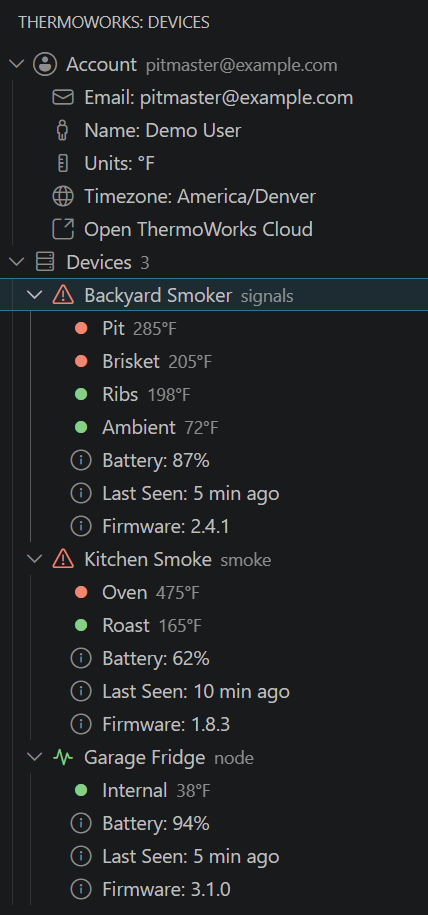
Install: Search "ThermoWorks" in VS Code Extensions, or get it from the Marketplace.
⌨️ CLI + Copilot Statusline
Live temperatures in your terminal footer while you code. Interactive wizard to pick devices and channels. 14 commands for device monitoring, alarms, sessions, data export, and more.
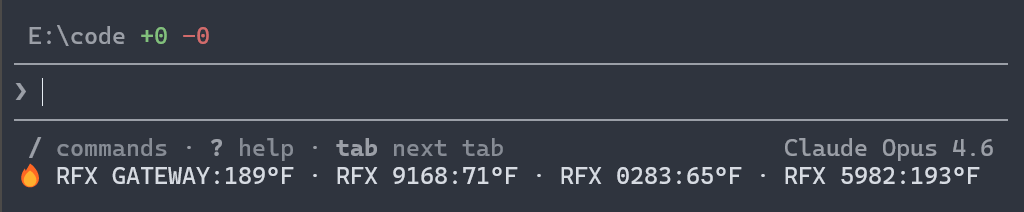
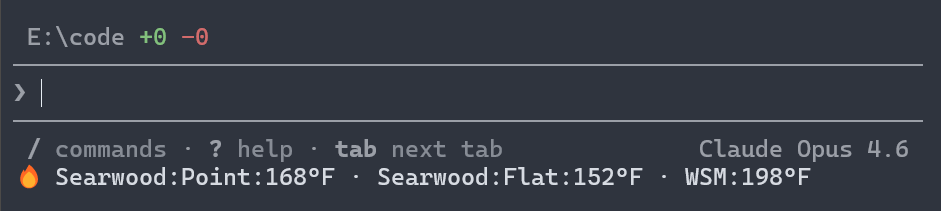
Install: npx thermoworks
🌐 Web Dashboard
Real-time temperature dashboard with Recharts history graphs, alarm color coding, light/dark theme, and public share viewer — all in the browser. Built with React 19, Vite, and Tailwind CSS.
Live: jongio.github.io/thermoworks
Run locally:
# Clone and start the dev server
git clone https://github.com/jongio/thermoworks.git
cd thermoworks && pnpm install
pnpm --filter thermoworks-web dev
🛠️ SDK
Node.js SDK for programmatic access — build your own dashboards, alerts, or automations with full access to devices, channels, events, archives, calibration data, and more.
Install: npm install thermoworks-sdk
🤖 MCP Server
Model Context Protocol server that exposes your ThermoWorks device data to AI assistants like GitHub Copilot, Claude, and ChatGPT.
Start:
# Via npx (no install needed)
npx thermoworks mcp start

# Or if installed globally
thermoworks mcp start
Quick Start
# Sign in to ThermoWorks Cloud
npx thermoworks auth login

# List your devices with channel readings
npx thermoworks devices

# Watch temperatures live (auto-refresh)
npx thermoworks watch

# Run the Copilot statusline setup wizard
npx thermoworks copilot setup
For command details, see the CLI reference.
Feature Highlights
🚨 Temperature Alerts
Instant visual alarms when temperatures cross thresholds — red for too high, blue for too low. VS Code blinks the status bar; the CLI uses ANSI color codes.
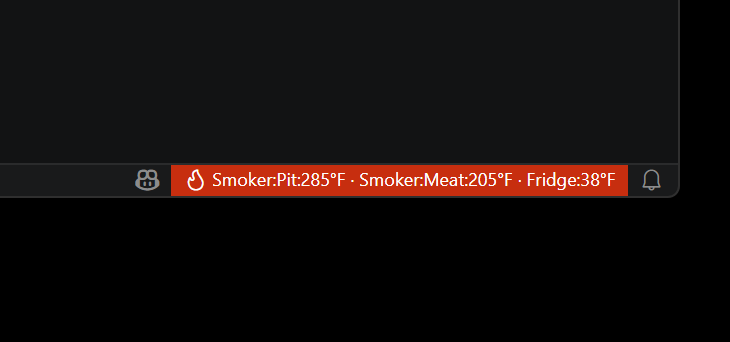
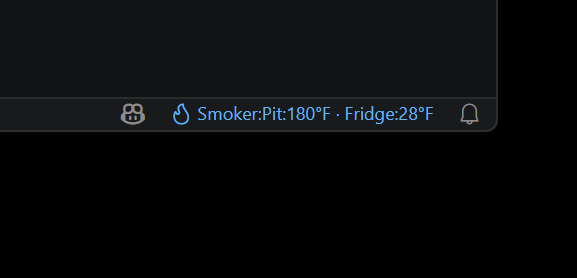
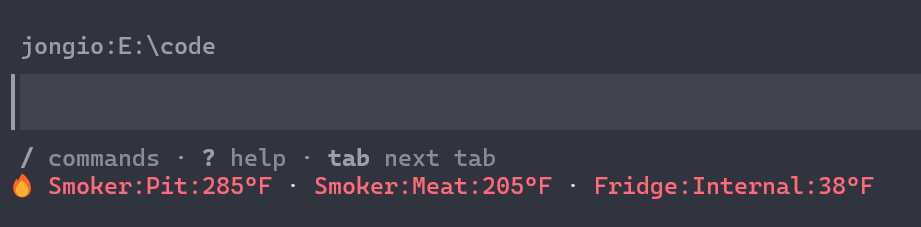
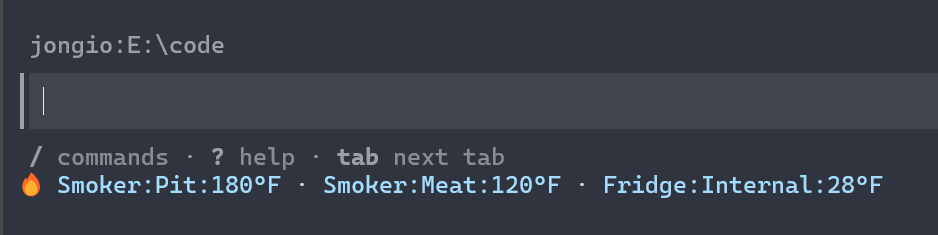
⬆️ Firmware Update Alerts
Automatically detects outdated device firmware by comparing against the latest version from ThermoWorks Cloud. Orange warning visible at every tree level — device folder, device node, and expanded details.
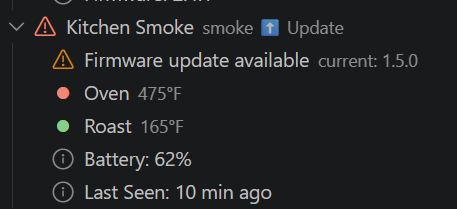
📊 Per-Channel Selection
Pick averages or individual channels for multi-probe devices like the Signals 4-channel or Smoke 2-channel.
🔐 Secure Credential Storage
Credentials stored in the OS keychain (macOS Keychain, Windows Credential Vault, libsecret). Sign in once — CLI and VS Code share access. Environment variables (THERMOWORKS_EMAIL / THERMOWORKS_PASSWORD) supported for headless environments.
🔔 Activity Bar Badge
The fire icon in the VS Code Activity Bar shows a badge count of devices with active alarms — you'll know something needs attention without even opening the panel.
🔗 Cloud Dashboard Link
One-click link to cloud.thermoworks.com from within the VS Code panel.
🎬 Demo Mode
Test alarm styling and take screenshots without real credentials:
# CLI one-shot demo
npx thermoworks demo high    # red text
npx thermoworks demo low     # blue text
npx thermoworks demo normal  # no color

# Auto-cycling statusline demo
npx thermoworks copilot setup --demo
In VS Code: Command Palette → ThermoWorks: Demo (Simulate Alarm) — populates the full panel and status bar with fake devices.
Packages
| Package | Description |
|---|---|
thermoworks | CLI for authentication, Copilot statusline setup, device listing, MCP server, and demo mode |
thermoworks-sdk | Node.js SDK for programmatic access to ThermoWorks Cloud |
thermoworks-mcp | MCP server exposing device data to AI assistants (GitHub Copilot, Claude, ChatGPT) |
thermoworks-web | Local web dashboard with real-time temperature display, history charts, and public share viewer |
| ThermoWorks for VS Code | Extension with status bar, device panel, alarm indicators, and firmware alerts |
Documentation
- CLI Reference - all commands, flags, and options
- SDK Examples - real-world usage cookbook
- API Reference - ThermoWorks Cloud Firestore REST API
- MCP Server - MCP server for AI assistants
- VS Code Extension - panel, status bar, alarms, firmware detection
- Web Dashboard - local web app with real-time temps and charts
Development
This repository uses pnpm workspaces.
# Install dependencies
pnpm install

# Lint the monorepo
pnpm lint

# Run tests
pnpm test

# Build all packages
pnpm build

# Type-check all packages
pnpm typecheck
Agent Skills
This project includes GitHub Copilot agent skills in .github/skills/ that help AI coding assistants work with the codebase:
| Skill | Description |
|---|---|
thermoworks | Integration guide for reading temperatures, monitoring alarms, and using the CLI |
thermoworks-dev | Development guide for adding features, understanding conventions, and building |
Skills are auto-discovered by GitHub Copilot and activated when relevant to your task.
Skill Evaluation (Vally)
Eval suites in evals/ validate that agent skills produce correct guidance, powered by @microsoft/vally:
# Validate eval specs (fast, no execution)
pnpm eval:lint

# Run smoke suite
pnpm eval:smoke

# Run full evaluation
pnpm eval:full
License
MIT