
diagram
jmoiv/diagram
Claude skill for making diagrams
Instalação
npx convez-ai jmoiv/diagram1 comando no terminal: detecta o formato do repositório (marketplace ou plugin avulso) e instala via Claude Code. Requer Node 18+ e o Claude Code instalado.
Métricas
README
A tradução para o português deste README ainda está na fila.
diagram
Have you ever wished that Claude could show instead of tell.
A Claude skill plus a companion command-line tool for
drawing diagrams. You (or Claude) describe a diagram in a small, commented YAML language;
diagram lays it out automatically and renders it to PNG, SVG, or PDF.
- Designed with AI interaction in mind. With a library of symbols that it can use to communicate with you, or to illustrate your documentation.
- Box-model auto-layout (
vbox/hbox/box) so you rarely place raw coordinates. - Variables + expressions, including inline text measurement, so sizes aren't hand-computed.
- A plugin system for symbol libraries — ships with schematic (electronic), dataflow / DFD, and shapes (generic colored rectangles, circles, ovals, explosion callouts, and block arrows) symbols, including a generic IC with named pins.
- Mixes semantic symbols with raw draw primitives for fine-grained control.
- A single self-contained binary, no runtime dependencies.
Installation
Install the executable
On Linux or macOS, paste this into a terminal — uname picks the right file automatically:
curl -fsSL "https://github.com/jmoiv/diagram/releases/latest/download/diagram_$(uname -s)-$(uname -m).gz" \
  | gunzip > /usr/local/bin/diagram && chmod +x /usr/local/bin/diagram
If
/usr/local/binis owned by root, prefix withsudo sh -c '...'.
On Windows, use the same command in Git Bash or WSL — both include curl and
gunzip. Or download windows-x86_64.gz
and decompress it manually.
Direct links: diagram_Linux-x86_64.gz · diagram_Linux-aarch64.gz · diagram_Darwin-x86_64.gz · diagram_Darwin-arm64.gz · diagram_windows-x86_64.gz
To build from source instead, see DEVELOPMENT.md.
Keeping diagram up to date
diagram update
This checks the latest release and, if a newer
version is available, downloads and replaces the running binary automatically. It then
refreshes the companion Claude skill (the equivalent of diagram install) so the two never
drift out of sync.
If diagram lives in a system directory, the self-replace needs root. Run the update as root
and the skill refresh as yourself, in one pipeline:
sudo diagram update && diagram install
Under sudo, diagram update deliberately skips the skill refresh — installing it as root
would leave files in your .claude that you couldn't later overwrite — so the trailing
diagram install (run as you) is what updates it.
Install the Claude skill
diagram includes a companion Claude skill (named diagram) so Claude can draw diagrams for
you. The skill is embedded in the binary — install it with one command:
diagram install
This finds the right .claude directory and writes the skill to .claude/skills/diagram/.
It chooses the location by searching upward from the current directory:
- if a
.claudedirectory already exists (here or in a parent), the skill goes there; - otherwise, a new
.claudeis created next to the nearest.git(your repo root); - otherwise, it's created in the current directory.
Run it from inside a project to install the skill for that project, or from your home
directory (which typically already has ~/.claude) to install it globally. After installing,
Claude will discover symbols and fonts via the CLI, author the commented YAML, measure text
when needed, and render diagrams for you on request.
Usage
Render a diagram — the output format is inferred from the file extension (or set with
--format):
diagram render diagram.yaml -o diagram.svg
diagram render diagram.yaml -o diagram.png --scale 2   # higher-resolution PNG
diagram render diagram.yaml -o diagram.pdf
Discover the available symbols and their properties:
diagram symbols list
diagram symbols describe schematic.resistor
Measure text up front (when you want exact sizes). Text is read from a file, never the command line, so quotes, newlines, and shell metacharacters are never a problem:
diagram measure --text-file label.txt --size 14                   # single line
diagram measure --text-file paragraph.txt --size 14 --width 200   # wrapped paragraph
Query the fonts available on your system (diagram uses your system fonts):
diagram fonts list
diagram fonts query --family "DejaVu Sans"
Examples
Each example below is a commented .yaml file in examples/, rendered with
diagram render.
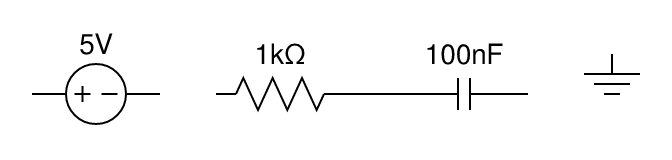
Schematic — an RC low-pass filter
A horizontal row of two-terminal components with value labels and a wire connection. (rc_filter.yaml)
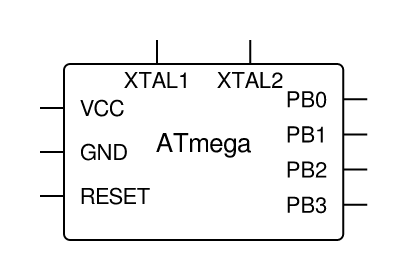
Generic IC with named pins
The schematic.ic symbol auto-sizes to fit the chip name and pin labels; each pin becomes a
connectable port. (ic_atmega.yaml)
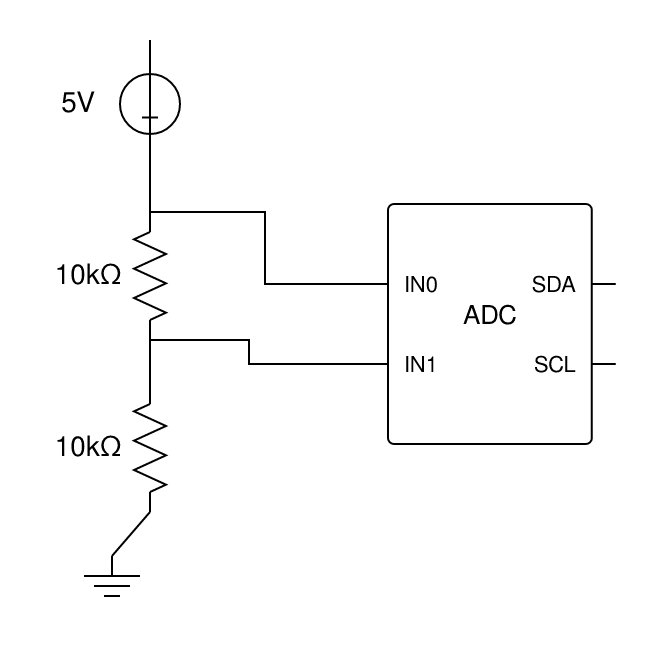
Orientation and IC pin spacing
Schematic parts take an orientation (axis parts horizontal/vertical; polarized parts
right/left/up/down), and the IC's per-side *_spacing spreads its pins out.
(orientation.yaml)
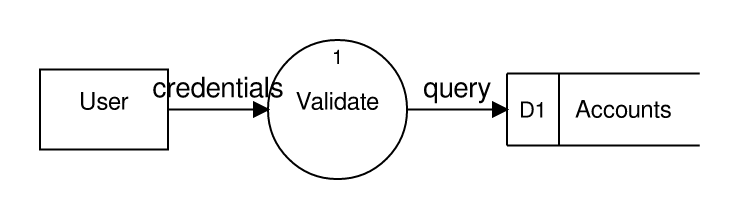
Data-flow diagram
DFD symbols (external entity, process, data store) connected with labeled, arrow-headed flows. (dfd_login.yaml)
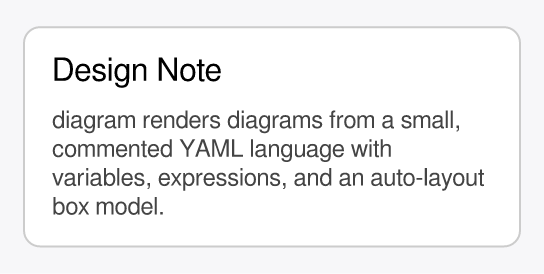
Auto-sized note card
Variables, inline text measurement (para_height), a box stack, and wrapped paragraph text
— the card's height is computed from its content. (note_card.yaml)
Generic shapes
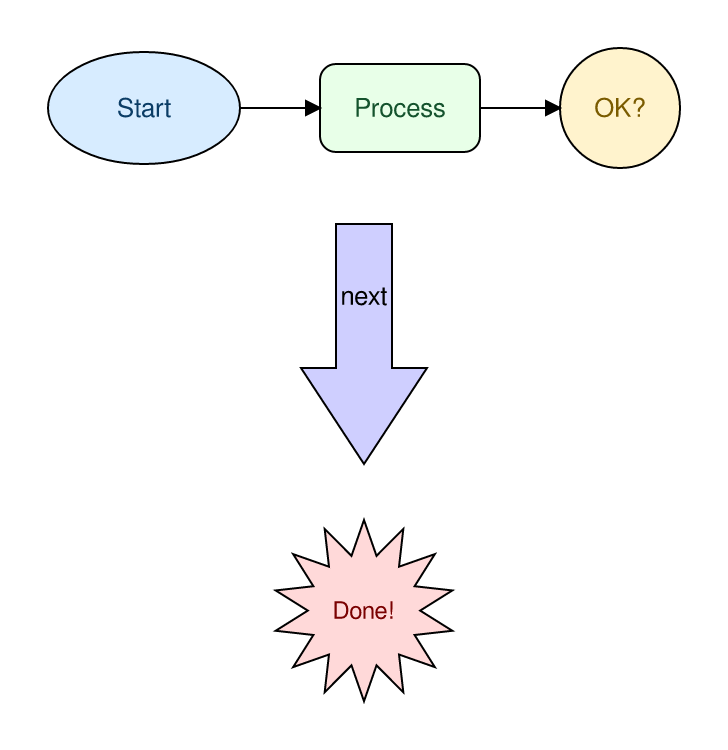
The shapes plugin — colored rectangles, circles, ovals, an explosion callout, and a block
arrow, each with fill and text_color. (shapes_flowchart.yaml)
The diagram language
Diagrams are a tree of auto-laid-out nodes (vbox/hbox/box containers, symbols, text,
raw shapes) plus connections, with a vars/${expression} system that includes inline text
measurement. For example:
# A box whose width fits its title.
vars:
  title: "Hello"
  pad: 12
canvas: { padding: 10, background: white }
root:
  box:
    - rect: { rx: 6 }
      width: ${text_width(title, 16) + pad * 2}
      height: 40
      fill: "#eef"
      stroke: "#88a"
    - text: ${title}
      font_size: 16
The full language reference and symbol catalog live in
skill/reference/. The built-in symbol plugins are schematic
(resistor, capacitor, inductor, diode, voltage source, switch, ground, junction, and a generic
IC with named pins), dataflow (process, external entity, data store, flow, trust
boundary), and shapes (rectangle, circle, oval, explosion callout, block arrow).
Tip: inside YAML flow mappings (
{ ... }), quote expressions —{ width: "${w}" }— because the}would otherwise close the mapping. Block style needs no quoting.
Development
Building from source, the project layout, and the contributor workflow are documented in DEVELOPMENT.md.
License
Licensed under the Apache License, Version 2.0.