
File Safety Guard
jitangupta/file-safety-guard
Proteção contra deleção acidental e sobrescrita de arquivos em Claude
Ver no GitHubPlugin que adiciona camada de proteção contra operações destrutivas de arquivo em Claude Code e Cowork. Implementa aprovações antes de deletar/sobrescrever, backups automáticos com timestamp, planejamento em dry-run e log de atividades completo.
Instalação
npx convez-ai jitangupta/file-safety-guard1 comando no terminal: detecta o formato do repositório (marketplace ou plugin avulso) e instala via Claude Code. Requer Node 18+ e o Claude Code instalado.
Métricas
Casos de uso
- Evitar deleção acidental de arquivos durante sessões de coding
- Criar backups automáticos antes de modificações em massa
- Planejar operações complexas com dry-run antes de executar
- Auditar todas as operações de arquivo com logging detalhado
Veredito

Solução robusta e bem-pensada para um problema real em ambientes de código assistido — operações destrutivas acidentais. Ativa automaticamente em Claude Code, requer habilitação manual em Cowork, com bom suporte a backup e auditoria.
README
A tradução para o português deste README ainda está na fila.
File Safety Guard
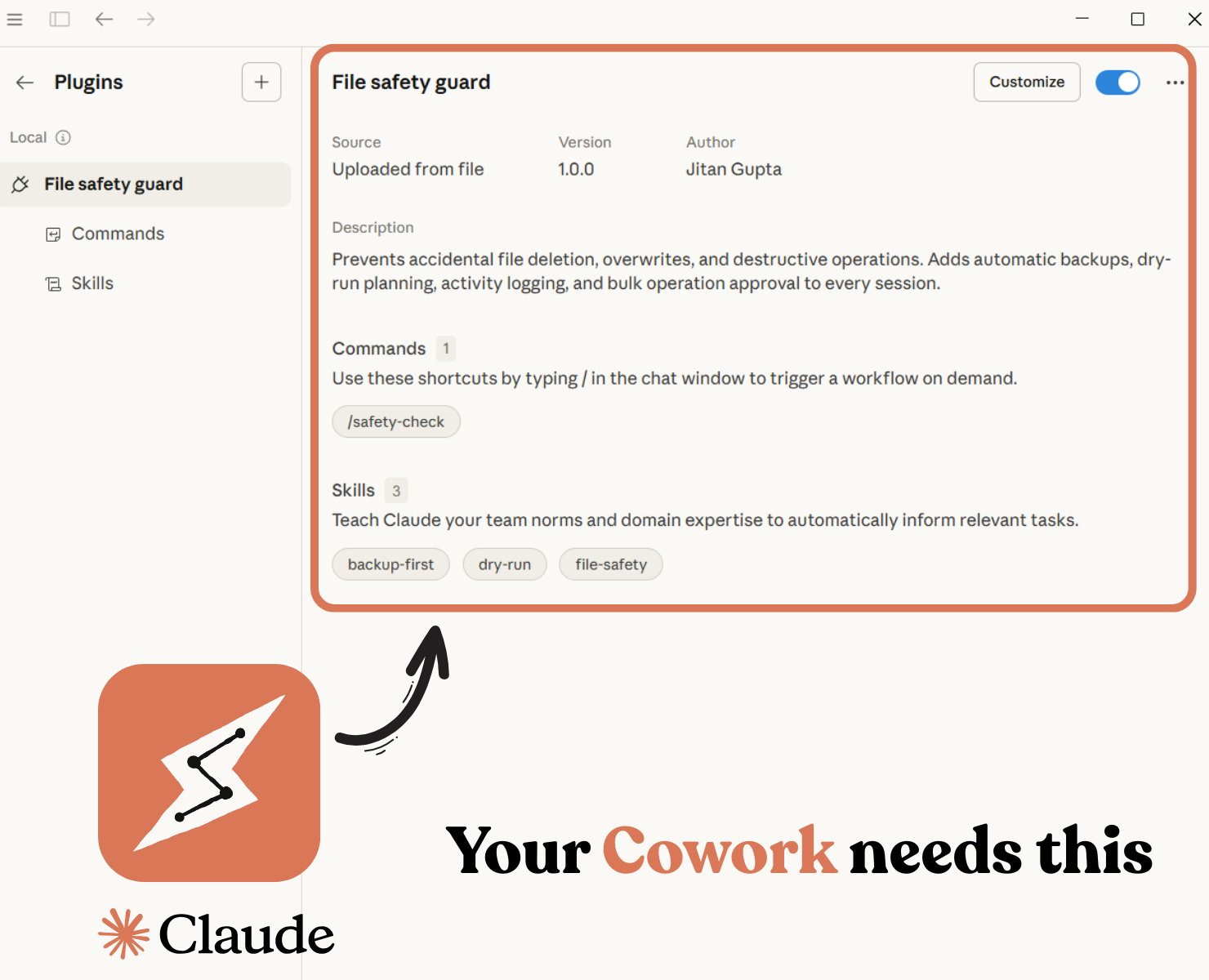
Prevents accidental file deletion, overwrites, and destructive operations in Claude Code and Cowork sessions. Adds automatic backups, dry-run planning, activity logging, and bulk operation approval.
Why
Claude Code and Cowork can read and write files directly. There are no built-in guardrails preventing accidental deletion, overwriting, or bulk changes to your files. This plugin adds a safety layer that asks before destructive operations, backs up files before modifications, and plans before complex tasks.
Installation
Claude Code
claude plugin marketplace add jitangupta/file-safety-guard
claude plugin install file-safety-guard@file-safety-guard
Cowork
- Download the latest release zip file
- Open Cowork → Plugins → Upload Plugin
- Select the zip file
The plugin is installed globally — one-time setup, works across all folders and sessions.
Usage
Claude Code
Skills auto-activate based on task context. No extra steps needed — just work normally and the guardrails apply automatically.
Cowork
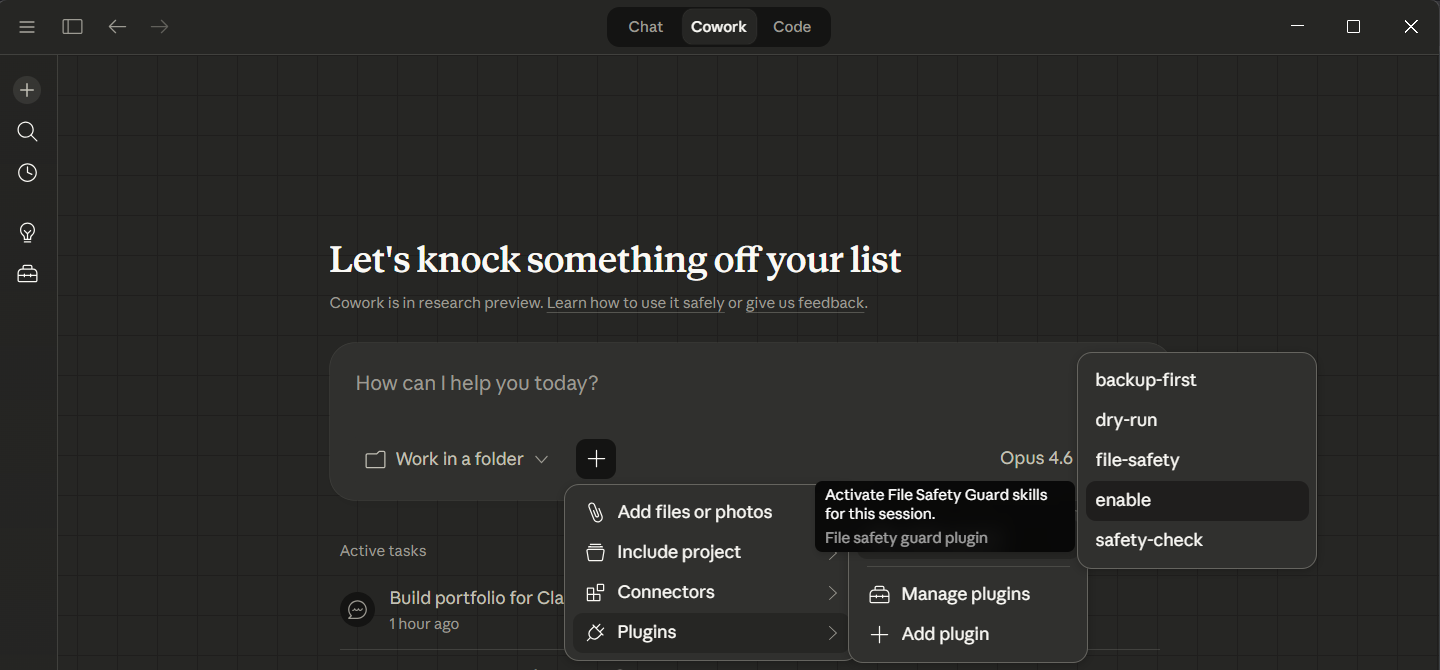
Cowork does not auto-activate skills based on task context. At the start of each session, run the enable command to activate all safety skills:
file-safety-guard:enable
Once activated, the skills remain active for the entire session. You do not need to repeat this for follow-up tasks within the same session.
Why manual? Cowork does not yet support automatic skill activation based on task context. This is a platform limitation, not a plugin issue. Once activated, skills remain active for the entire session.
Fallback: If the
/enablecommand is unavailable, you can activate skills manually:Use file-safety-guard:file-safety, file-safety-guard:backup-first, and file-safety-guard:dry-run skills for all file operations in this session.
What It Does
Skills
file-safety — Core protection rules that apply to every file operation:
- No file deletion without explicit approval (shows file name, path, and reason)
- No direct overwrites — backup created first with timestamp
- Operations restricted to granted working directory
- Bulk operations (3+ files) require a numbered list approval
- Defaults to read-only when intent is uncertain
- Hidden and system files are never touched
- Every operation logged to
_cowork_activity_log.md
backup-first — Automatic backup before any file modification:
- Creates timestamped backups in
_backups/folder - Format:
originalname_backup_YYYYMMDD_HHMM.ext - Each modification creates a new backup with a unique timestamp — previous backups are preserved
- Keeps maximum 3 backups per file, rotates oldest
- Post-task summary showing files modified and backups created
dry-run — Plan-first approach for complex operations:
- Creates
plan.mdlisting all planned changes before execution - Waits for explicit user approval
- Updates plan with actual results after completion
- Deletion section defaults to NONE unless explicitly requested
Commands
/enable — Activate all safety skills for the current session in one command. No need to remember skill names or copy activation text.
Note: In Cowork, use the full command name:
file-safety-guard:enable
/safety-check — Quick health report on your working folder:
- Total file and folder count
- Last 10 activity log entries
- Backup folder status and backup count
- Files modified in current session
Note: In Cowork, use the full command name:
file-safety-guard:safety-check
Files Created During Use
| File/Folder | Purpose |
|---|---|
_cowork_activity_log.md | Log of all file operations with timestamps |
_backups/ | Timestamped backup copies of modified files |
plan.md | Operation plan for complex tasks (temporary) |
All generated files use an underscore prefix so they sort to the top and are easy to identify.
Configuration
The plugin works with sensible defaults. To customize:
| Setting | File | Default | What to Change |
|---|---|---|---|
| Max backups per file | skills/backup-first/SKILL.md | 3 | Change "maximum of 3 backups" |
| Bulk approval threshold | skills/file-safety/SKILL.md | 3 files | Change "more than 3 files" |
| Dry run threshold | skills/dry-run/SKILL.md | 2 operations | Change "more than 2 file operations" |
| Protected file patterns | skills/file-safety/SKILL.md | Hidden files (.) | Add patterns to "Hands Off" section |
Plugin Structure
file-safety-guard/
├── .claude-plugin/
│   ├── marketplace.json
│   └── plugin.json
├── skills/
│   ├── file-safety/
│   │   └── SKILL.md
│   ├── backup-first/
│   │   └── SKILL.md
│   └── dry-run/
│       └── SKILL.md
├── commands/
│   ├── enable.md
│   └── safety-check.md
├── LICENSE
└── README.md
License
MIT