
Claude Code Nix Sandbox
jhhuh/claude-code-nix-sandbox
Executa Claude Code em sandboxes isolados com Nix — bubblewrap, container ou VM
Ver no GitHubPlugin que executa sessões do Claude Code em ambientes isolados usando Nix, com três níveis de sandboxing: bubblewrap (sem privilégios), systemd-nspawn (container) e QEMU VM (máxima isolação). Inclui dashboard web para monitoramento de sandboxes, métricas ao vivo e navegador Chromium integrado.
Instalação
npx convez-ai jhhuh/claude-code-nix-sandbox1 comando no terminal: detecta o formato do repositório (marketplace ou plugin avulso) e instala via Claude Code. Requer Node 18+ e o Claude Code instalado.
Métricas
Casos de uso
- Executar Claude Code em ambientes isolados para maior segurança
- Testar código sem risco ao sistema host com diferentes níveis de isolação
- Monitorar múltiplas sessões do Claude Code via dashboard web em tempo real
Veredito

Ferramenta técnica robusta para quem trabalha com Nix e precisa de isolamento seguro ao executar Claude Code. Projeto em desenvolvimento ativo com aviso de instabilidade — recomendado para usuários experientes em containerização e infraestrutura.
README
A tradução para o português deste README ainda está na fila.
claude-code-nix-sandbox
Warning: This project is under active development and should be considered unstable. Features may be incomplete, broken, or change without notice. If you choose to run it, you do so at your own risk. There are no guarantees of correctness, security, or fitness for any particular purpose.
Launch sandboxed Claude Code sessions with Chromium using Nix.
Claude Code (from sadjow/claude-code-nix) runs inside an isolated sandbox with filesystem isolation, display forwarding, and a Chromium browser. Three backends available with increasing isolation: bubblewrap (unprivileged), systemd-nspawn (root), and QEMU VM (strongest).
Web Dashboard
Quick Start
Install (both sandboxed and un-sandboxed)
# Install both claude-sandbox and claude-code
nix profile install github:jhhuh/claude-code-nix-sandbox

# Update to latest
nix profile upgrade claude-code-nix-sandbox --refresh
This gives you both claude-sandbox (bubblewrap isolation) and claude (un-sandboxed) on your PATH, pinned to the same version.
Bubblewrap (unprivileged)
# Run Claude Code in a sandbox
nix run github:jhhuh/claude-code-nix-sandbox#sandbox -- /path/to/project

# Run inside tmux (needed for agent teams)
nix run github:jhhuh/claude-code-nix-sandbox#sandbox -- --tmux /path/to/project

# Drop into a shell inside the sandbox
nix run github:jhhuh/claude-code-nix-sandbox#sandbox -- --shell /path/to/project
systemd-nspawn container (requires sudo)
# Build the container package
nix build github:jhhuh/claude-code-nix-sandbox#container

# Run Claude Code in an nspawn container
sudo ./result/bin/claude-sandbox-container /path/to/project

# Shell mode
sudo ./result/bin/claude-sandbox-container --shell /path/to/project
QEMU VM (strongest isolation)
# Build the VM package
nix build github:jhhuh/claude-code-nix-sandbox#vm

# Run Claude Code in a VM (serial console in terminal, Chromium in QEMU window)
./result/bin/claude-sandbox-vm /path/to/project

# Shell mode
./result/bin/claude-sandbox-vm --shell /path/to/project
Requires ANTHROPIC_API_KEY in your environment, or an existing ~/.claude login (auto-mounted).
Git push/pull works inside all sandboxes — ~/.gitconfig, ~/.config/git/, ~/.ssh/, and SSH_AUTH_SOCK are forwarded read-only. Nix commands work too (NIX_REMOTE=daemon).
What's Sandboxed
| Resource | Bubblewrap | Container | VM |
|---|---|---|---|
| Project directory | Read-write (bind-mount) | Read-write (bind-mount) | Read-write (9p) |
~/.claude | Read-write (bind-mount) | Read-write (bind-mount) | Read-write (9p) |
~/.gitconfig, ~/.ssh | Read-only (bind-mount) | Read-only (bind-mount) | Read-only (9p) |
/nix/store | Read-only | Read-only | Shared from host |
/home | Isolated (tmpfs) | Isolated | Separate filesystem |
| Network | Shared by default | Shared by default | NAT by default |
| Display | Host X11/Wayland | Host X11/Wayland | QEMU window (Xorg) |
| Audio | PipeWire/PulseAudio | PipeWire/PulseAudio | Isolated |
| GPU (DRI) | Forwarded | Forwarded | Virtio VGA |
| D-Bus | Forwarded | Forwarded | Isolated |
| SSH agent | Forwarded | Forwarded | Isolated |
| Nix commands | Via daemon | Via daemon | Local store |
| Locale | Forwarded | Forwarded | NixOS default |
| Kernel | Shared | Shared | Separate |
Packages
| Package | Description | Requires |
|---|---|---|
default | Bubblewrap sandbox + un-sandboxed claude-code (bundled) | User namespaces |
sandbox | Bubblewrap sandbox only | User namespaces |
no-network | Bubblewrap sandbox (no network) | User namespaces |
container | systemd-nspawn (network) | root (sudo) |
container-no-network | systemd-nspawn (isolated) | root (sudo) |
vm | QEMU VM (NAT) | KVM recommended |
vm-no-network | QEMU VM (isolated) | KVM recommended |
manager | Remote sandbox manager daemon | — |
cli | claude-remote CLI | SSH access to server |
Remote Sandbox Manager
Run sandboxes on a remote server and manage them from your laptop via a web dashboard or CLI.
laptop                              remote server
  │                                   │
  │  claude-remote create ...         │ manager daemon (127.0.0.1:3000)
  │ ─────────────────────────────────>│   ├── starts Xvfb display
  │                                   │   ├── starts tmux session
  │  claude-remote attach <id>        │   ├── runs sandbox backend
  │ ─────────────────────────────────>│   ├── captures screenshots
  │                                   │   └── collects metrics
  │  claude-remote ui                 │
  │  open http://localhost:3000       │ web dashboard (htmx, live refresh)
  │ ─────────────────────────────────>│
Running the Manager
# Build and run locally
nix build .#manager
MANAGER_LISTEN=127.0.0.1:3000 ./result/bin/claude-sandbox-manager

# Or deploy via NixOS module (see below)
The manager listens on 127.0.0.1:3000 by default. Environment variables:
| Variable | Default | Description |
|---|---|---|
MANAGER_LISTEN | 127.0.0.1:3000 | Listen address |
MANAGER_STATE_DIR | . | Directory for state.json |
MANAGER_STATIC_DIR | (set by wrapper) | Path to static assets |
CLI (claude-remote)
Available in the devShell or via nix build .#cli. All commands run over SSH — no direct HTTP from your laptop.
export CLAUDE_REMOTE_HOST=myserver  # required
export CLAUDE_REMOTE_PORT=3000      # optional, default 3000

claude-remote create my-project bubblewrap /home/user/project
claude-remote create isolated bubblewrap /tmp/test --no-network
claude-remote list
claude-remote attach <id>           # SSH + tmux attach
claude-remote stop <id>
claude-remote delete <id>
claude-remote metrics               # system metrics
claude-remote metrics <id>          # system + sandbox Claude metrics
claude-remote ui                    # SSH tunnel, then open http://localhost:3000
Web Dashboard
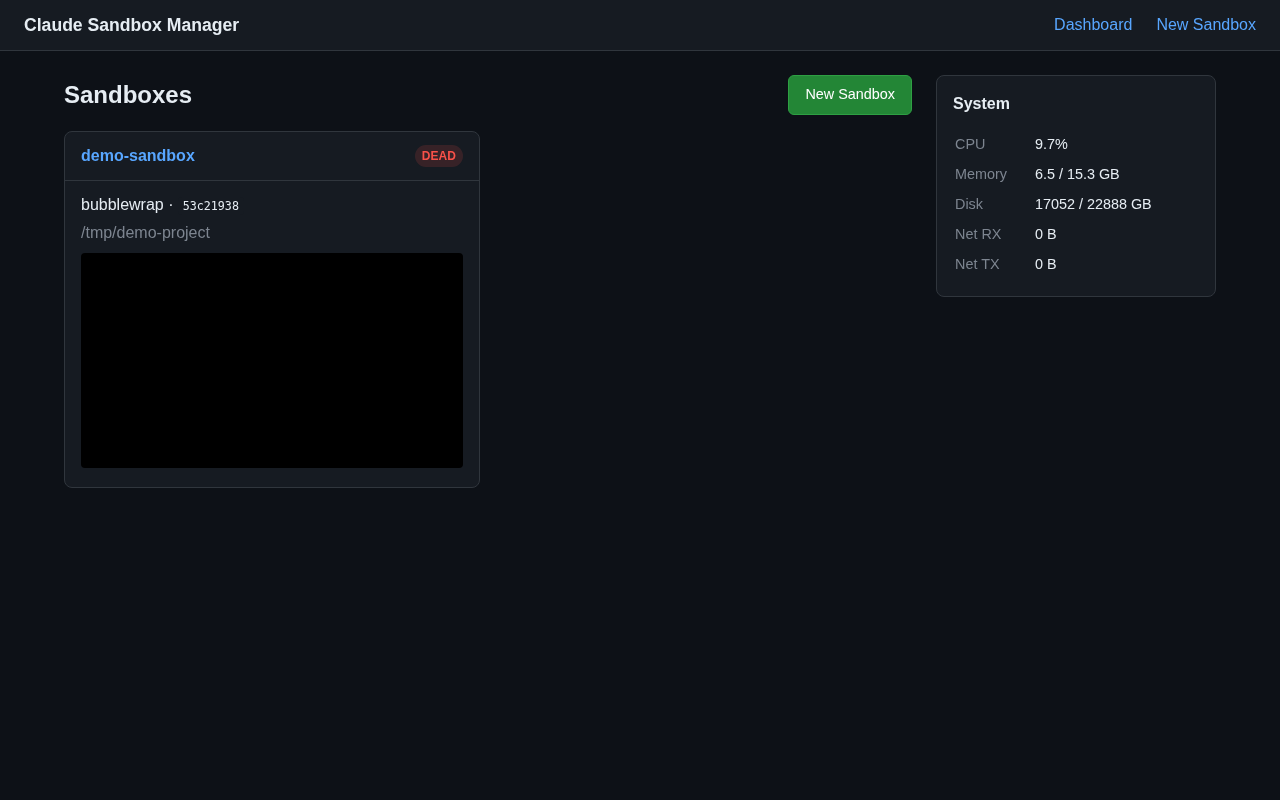
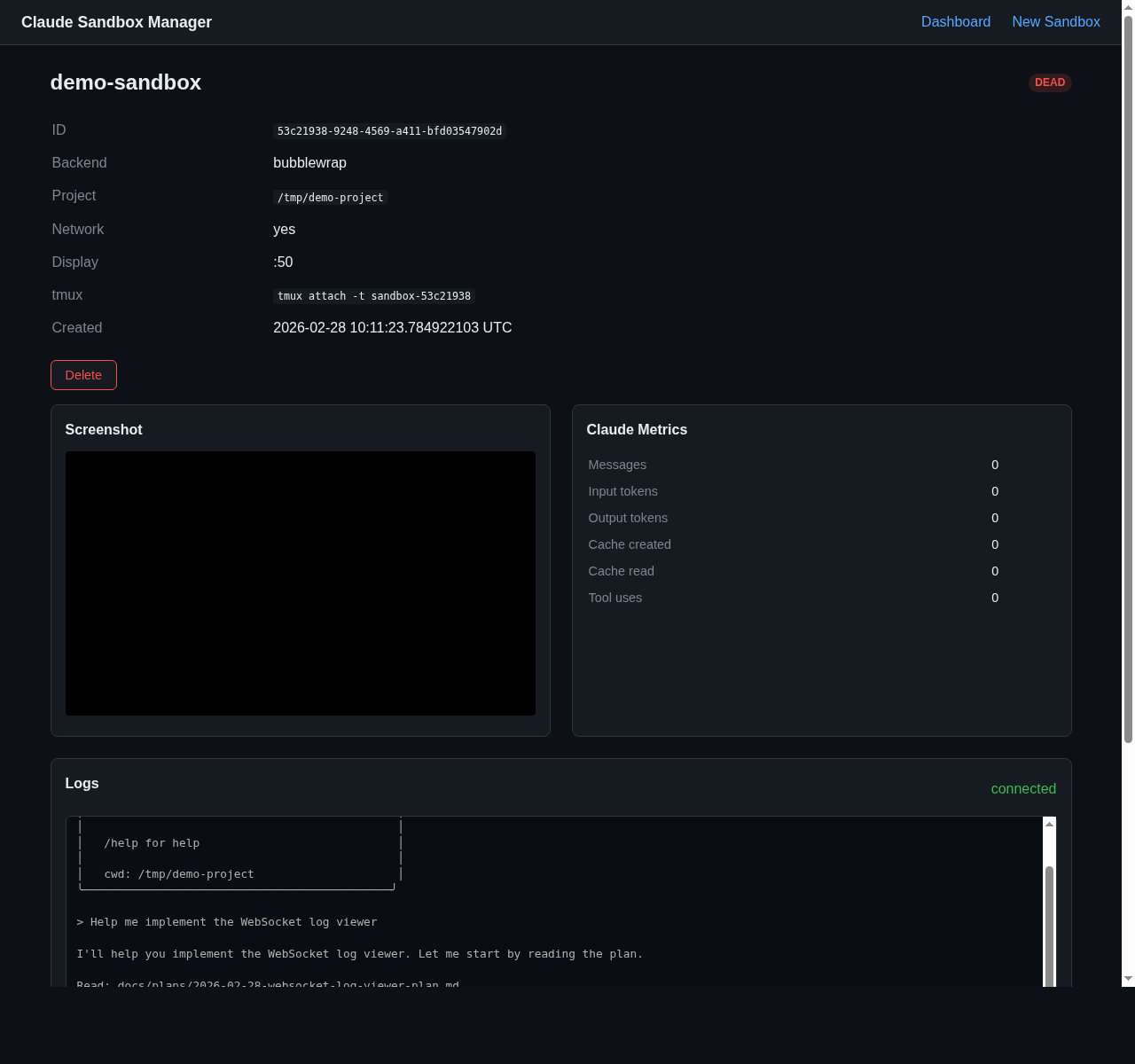
The dashboard shows all sandboxes with live screenshots, status badges, and system metrics. Sandbox detail pages include Claude session metrics (tokens, tool uses, message count), a live screenshot feed, and a real-time log viewer that streams tmux output via WebSocket.
Auto-refreshes via htmx (no JavaScript build step). Access it by running claude-remote ui to set up an SSH tunnel, then open http://localhost:3000.
REST API
All endpoints are also available as JSON:
# Create sandbox
curl -X POST localhost:3000/api/sandboxes \
  -H 'Content-Type: application/json' \
  -d '{"name":"test","backend":"bubblewrap","project_dir":"/tmp/test","network":true}'

# List / get / stop / delete
curl localhost:3000/api/sandboxes
curl localhost:3000/api/sandboxes/<id>
curl -X POST localhost:3000/api/sandboxes/<id>/stop
curl -X DELETE localhost:3000/api/sandboxes/<id>

# Screenshots, logs, and metrics
curl localhost:3000/api/sandboxes/<id>/screenshot -o screenshot.png
curl localhost:3000/api/sandboxes/<id>/logs          # full log as text/plain
curl localhost:3000/api/sandboxes/<id>/metrics
curl localhost:3000/api/metrics/system

# WebSocket log streaming (real-time)
# ws://localhost:3000/ws/sandboxes/<id>/logs
NixOS Modules
Sandbox backends
For NixOS users, a declarative module is available:
# flake.nix
{
  inputs.claude-sandbox.url = "github:jhhuh/claude-code-nix-sandbox";

  outputs = { nixpkgs, claude-sandbox, ... }: {
    nixosConfigurations.myhost = nixpkgs.lib.nixosSystem {
      modules = [
        claude-sandbox.nixosModules.default
        {
          services.claude-sandbox = {
            enable = true;           # Install bubblewrap backend (default)
            container.enable = true; # Also install container backend
            vm.enable = true;        # Also install VM backend
            network = true;          # Allow network access (default)
            # Extra packages inside bubblewrap sandbox:
            # bubblewrap.extraPackages = with pkgs; [ python3 nodejs ];
            # Extra NixOS modules for container/VM:
            # container.extraModules = [{ environment.systemPackages = with pkgs; [ python3 ]; }];
            # vm.extraModules = [{ environment.systemPackages = with pkgs; [ python3 ]; }];
          };
        }
      ];
    };
  };
}
Manager service
Deploy the remote sandbox manager as a systemd service:
# flake.nix
{
  inputs.claude-sandbox.url = "github:jhhuh/claude-code-nix-sandbox";

  outputs = { nixpkgs, claude-sandbox, ... }: {
    nixosConfigurations.myhost = nixpkgs.lib.nixosSystem {
      modules = [
        claude-sandbox.nixosModules.manager
        {
          services.claude-sandbox-manager = {
            enable = true;
            listenAddress = "127.0.0.1:3000";  # default
            stateDir = "/var/lib/claude-manager";  # default
            # Put sandbox backends on the manager's PATH:
            sandboxPackages = [
              claude-sandbox.packages.x86_64-linux.default
            ];
            # Allow passwordless sudo for the container backend:
            # containerSudoers = true;
          };
        }
      ];
    };
  };
}
Customization
Add extra packages inside the sandbox via extraPackages (bubblewrap) or extraModules (container/VM):
# Add python3 and nodejs to the bubblewrap sandbox
packages.default = pkgs.callPackage ./nix/backends/bubblewrap.nix {
  extraPackages = [ pkgs.python3 pkgs.nodejs ];
};

# Add extra NixOS config to the container
packages.container = pkgs.callPackage ./nix/backends/container.nix {
  nixos = args: nixpkgs.lib.nixosSystem { system = "x86_64-linux"; modules = args.imports; };
  extraModules = [{ environment.systemPackages = [ pkgs.python3 ]; }];
};
Requirements
- NixOS or Nix with flakes enabled
- Linux (bubblewrap requires user namespaces)
- X11 or Wayland display server (bubblewrap/container)
- KVM recommended for VM backend (
/dev/kvm)