
Tempest Trading MCP
jayteelabs/tempest-trading-mcp
Análise técnica e backtesting para crypto via MCP
Ver no GitHubServidor MCP para análise de mercado e dados de criptmoedas. Fornece 21 ferramentas para indicadores técnicos, backtesting de estratégias, screening de ativos e análise de sentimento. NÃO executa trades — é puramente analítico.
Instalação
npx convez-ai jayteelabs/tempest-trading-mcp1 comando no terminal: detecta o formato do repositório (marketplace ou plugin avulso) e instala via Claude Code. Requer Node 18+ e o Claude Code instalado.
Métricas
Casos de uso
- Backtesting de estratégias (RSI, EMA, VWAP, Elliott Wave, Order Blocks)
- Screening de ativos com detecção de breakout de sessão
- Análise de sentimento combinado (Reddit + RSS)
- Cálculo de indicadores técnicos e estrutura de mercado
Veredito

Ferramenta sólida para traders quantitativos que precisam integrar análise técnica avançada com Claude. A clareza sobre o escopo (análise, não execução) e os 21 tools bem documentados fazem dela um MCP maduro. Recomendado para quem quer automação de pesquisa e backtesting em crypto.
README
A tradução para o português deste README ainda está na fila.
tempest-trading-mcp
Market data & analytics MCP server — provides technical indicators, backtesting, screening, and sentiment analysis for crypto markets via the Model Context Protocol.
NOT a trading bot. No order execution, no position management, no trade placement.
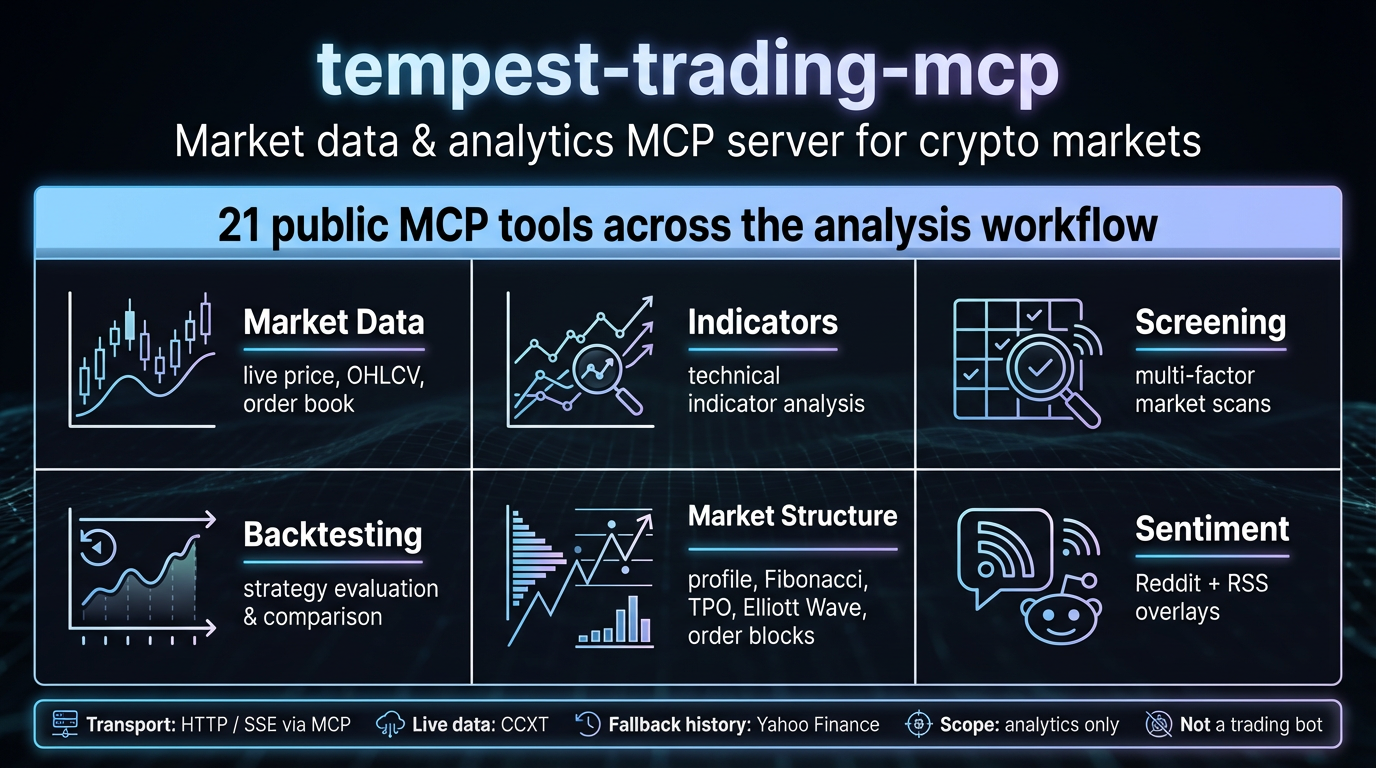
Capability overview: 21 public MCP tools spanning market data, indicators, screening, backtesting, market structure analysis, and sentiment overlays.
Public MCP Tools
The server exposes 21 public MCP tools:
Market Data
| Tool | Description |
|---|---|
fetch_ticker | Real-time ticker price + 24h volume for a crypto symbol |
fetch_klines | OHLCV klines with timeframe, limit, and exchange selection |
fetch_orderbook | Order book depth for a symbol |
Technical Indicators
| Tool | Description |
|---|---|
indicator_rsi | RSI oscillator (0–100: <30 oversold, >70 overbought) |
Backtesting
| Tool | Description |
|---|---|
backtest_pdh_session | PDH/PDL + Session Levels strategy |
backtest_rsi | RSI Mean Reversion (long oversold, short overbought) |
backtest_vwap | VWAP Anchored trend-following with EMA confirmation |
backtest_ema_stack | Multi-EMA trend-following with risk management |
backtest_order_blocks | Institutional order block detection with retest confirmation |
backtest_elliot_wave | Elliott Wave counting with trend confirmation |
compare_strategies | Compare 2+ strategies on a single OHLCV dataset, ranked by total_return descending, then sharpe_ratio descending, then strategy_id ascending |
Screening
| Tool | Description |
|---|---|
screener_scan | Multi-factor crypto screener with session breakout detection |
session_breakout_scan | Session breakout/proximity patterns against PDH/PDL |
order_block_screener_scan | Active order-block zones across 1h/1d and 4h/7d horizons |
Analysis (Internal Engine)
| Tool | Description |
|---|---|
calculate_volume_profile | Volume profile with POC, VAH, VAL, and shape classification |
detect_order_blocks | Active order-block zone detection (read-only) |
calculate_fibonacci | Fibonacci retracement/extension levels |
calculate_tpo | TPO (Time-Price Opportunity) chart for a session |
detect_elliot_wave | Elliott Wave pattern detection from OHLCV data |
get_market_structure | Deterministic market structure summary |
Sentiment (Internal Engine)
| Tool | Description |
|---|---|
get_combined_sentiment_dashboard | Combined Reddit + RSS sentiment (40% Reddit / 60% RSS weighted) with cross-signal detection |
Note: Tools under "Internal Engine" categories represent analytical capabilities exposed via the MCP interface. The indicator breadth (30+ indicators) is an internal engine capability, not a direct 1:1 mapping to public MCP tool count.
For practical usage examples for all 21 public tools, see EXAMPLES.md.
Quick Start
# 1. Clone the repository
git clone https://github.com/jayteelabs/tempest-trading-mcp.git
cd tempest-trading-mcp

# 2. Install uv (fast Python package manager)
curl -LsSf https://astral.sh/uv/install.sh | sh

# 3. Create virtual environment and install dependencies
uv venv
source .venv/bin/activate
uv pip install -e .

# 4. Configure environment (optional — defaults work out of the box)
cp .env.example .env

# 5. Run the MCP server (HTTP/SSE transport on :9001)
uv run python -m tempest_mcp.server
Configuration
Configuration is loaded from environment variables with the TEMPEST_ prefix:
| Variable | Description | Default |
|---|---|---|
TEMPEST_LOG_LEVEL | Logging level (DEBUG, INFO, WARNING, ERROR, CRITICAL) | INFO |
TEMPEST_YF_CACHE_TTL | Yahoo Finance cache TTL (seconds) | 300 |
TEMPEST_CCXT_DEFAULT_EXCHANGE | Default exchange for real-time quotes | binance |
Copy .env.example to .env and adjust as needed:
cp .env.example .env
No API keys required — the active data sources use public endpoints.
Note: TradingView is not an active market-data provider in the current architecture. Legacy TradingView compatibility code is retained only to avoid breaking older imports. Yahoo Finance remains the fallback/historical adapter; CCXT is the primary live-market-data path.
Deployment
Docker
# Build the image
sg docker -c "docker build -t tempest-trading-mcp ."

# Run the container with the MCP port published on host loopback
sg docker -c "docker run --rm -p 127.0.0.1:9001:9001 tempest-trading-mcp"
Notes:
- The MCP server must bind to
0.0.0.0inside the container for Docker port publishing to work. - Binding to
127.0.0.1inside the container makes/ssereachable only from inside the container and breaks host-side MCP clients. - Publishing
127.0.0.1:9001:9001on the host keeps the unauthenticated SSE +/messagessurface local by default. - If you need remote access, expose intentionally behind a reverse proxy, Tailscale, firewall rules, or equivalent trusted-network controls.
- The image includes a Dockerfile-level HEALTHCHECK that probes the SSE surface via a HEAD request to
/sse.
Docker Compose
# First time: create the runtime env file used by docker-compose.yml
cp .env.example .env

# Build and start the service
sg docker -c "docker compose up -d --build"

# View logs
sg docker -c "docker compose logs -f"

# Stop the service
sg docker -c "docker compose down"
For fresh-clone validation without creating .env, override the runtime env-file path explicitly:
sg docker -c "TEMPEST_ENV_FILE=.env.example docker compose config"
The compose stack starts the MCP server on port 9001 with the HTTP/SSE transport (/sse for SSE connections, /messages for POST requests) and publishes it on host loopback by default (127.0.0.1:9001:9001).
Compose uses its default project-scoped container naming so repeated docker compose up runs do not collide with an older standalone docker run --name tempest-trading-mcp ... container.
Health check: The image includes a Dockerfile-level HEALTHCHECK that verifies the SSE endpoint is reachable via a HEAD request to http://localhost:9001/sse. The healthcheck exits 0 (healthy) when the endpoint exists (2xx-4xx response) and exits 1 (unhealthy) on 5xx or connection failure. Use sg docker -c "docker compose ps" to see the health status.
Note: The MCP server must bind to 0.0.0.0 inside the container for Docker port publishing to work. The Dockerfile is pre-configured to run the server on 0.0.0.0:9001, but the repo-owned Docker examples keep host publishing on loopback by default. Intentionally widen exposure only with compensating controls such as a reverse proxy, Tailscale, and/or firewall rules.
Architecture
For a detailed architecture deep-dive, see ARCHITECTURE.md.
┌─────────────┐     ┌──────────────────┐     ┌─────────────────────────────┐
│ MCP Client  │────▶│  HTTP/SSE        │     │  Starlette + MCP Server    │
│ (optional)  │     │  /sse  /messages │────▶│  Tool Dispatch             │
└─────────────┘     └──────────────────┘     │  ├── Market Data           │
                                              │  ├── Backtest Engine       │
                                              │  ├── Screener              │
                                              │  ├── Analysis              │
                                              │  └── Sentiment             │
                                              └────────────┬──────────────┘
                                                           │
                                              ┌────────────▼──────────────┐
                                              │  Data Layer               │
                                              │  ├── CCXT (live, primary) │
                                              │  └── Yahoo Finance        │
                                              │      (historical fallback)│
                                              └────────────────────────────┘
Runtime boundary: MCP client(s) connect via HTTP/SSE to the Starlette/MCP server on port 9001. The server dispatches to internal engines (market data, backtest, screener, analysis, sentiment). External data dependencies are CCXT (live primary) and Yahoo Finance (historical fallback).
Kurisu and tempest-mesh are optional upstream callers in the broader ecosystem — they are not mandatory runtime dependencies of this repository.
Directory Structure
tempest-trading-mcp/
├── src/tempest_mcp/          # Main package
│   ├── __init__.py
│   ├── server.py             # MCP server entry point (HTTP/SSE on :9001)
│   ├── config.py             # Environment config loader (TEMPEST_* vars)
│   ├── logging_config.py     # Structured logging setup
│   ├── errors.py             # Error definitions
│   ├── time_utils.py         # Time utilities
│   ├── data/                 # Data layer
│   │   ├── yf_adapter.py     # Yahoo Finance adapter (historical fallback)
│   │   └── ccxt_adapter.py   # CCXT adapter (live primary, no keys)
│   ├── indicators/           # Technical indicator engine
│   │   ├── ta_wrapper.py     # ta-lib C extension wrapper (internal)
│   │   ├── session_levels.py # Asia/London/NY PDH/PDL
│   │   ├── trend/            # Trend indicators (EMA module today)
│   │   ├── momentum/         # RSI, MACD, Stochastic, CCI modules
│   │   ├── volatility/       # ATR and volatility modules
│   │   ├── volume/           # VWAP, TPO, and volume-profile modules
│   │   └── structure.py      # Fibonacci, Pivots, HH/HL
│   ├── backtest/             # Backtesting engine
│   ├── strategies/           # Strategy definitions
│   ├── screener/             # Multi-factor crypto screener
│   ├── sentiment/            # Sentiment analysis (Reddit + RSS)
│   ├── formatters/           # Output formatters (Discord)
│   ├── charting/             # mplfinance (debug only)
│   ├── models/               # Dataclass models
│   │   ├── backtest.py       # Backtest results
│   │   ├── indicator.py      # Indicator results
│   │   └── market.py         # Ticker, kline, orderbook
│   └── tools/                # MCP tool handlers
│       ├── __init__.py
│       ├── analysis_tools.py
│       ├── analytical_tools.py
│       ├── backtest_tools.py
│       ├── backtest_window.py
│       ├── indicator_tools.py
│       ├── market_tools.py
│       ├── screener_tools.py
│       └── sentiment_tools.py
├── tests/                    # Test suite
│   ├── conftest.py           # Pytest fixtures and integration markers
│   └── ...
├── docs/                     # Repository documentation
│   ├── backtest-mcp-tools-phase2.md
│   └── error-envelope-contract.md
├── pyproject.toml
├── Dockerfile
├── docker-compose.yml
├── .env.example
└── README.md
Development
# Install development dependencies
uv pip install -e ".[dev]"

# Run tests from this worktree's repo-local environment
# (avoids picking up a sibling editable checkout from a shared shell session)
uv run pytest

# Linting
uv run ruff check src/

# Format
uv run ruff format src/
Live-Data Integration Tests
# Run Phase 2 backtest live-data integration suite
# Fetches real BTCUSDT OHLCV via CCXT and validates strategy contracts
# across both 1h and 4h timeframes
uv run pytest --run-integration tests/test_phase2_backtest_live_integration.py -v
Error Codes
| Range | Category |
|---|---|
| 1xxx | Validation errors |
| 3xxx | Data source errors (Yahoo Finance, CCXT) |
| 5xxx | Indicator/calculation errors |
| 9xxx | Internal/unexpected errors |
Specific codes:
1000— Validation error1001— Invalid symbol1002— Invalid timeframe1003— Invalid exchange1004— Invalid parameter1005— Missing parameter3000— Data source error3001— Yahoo Finance error3002— CCXT error3003— Data not found3004— Rate limit error3005— Network error5000— Indicator error5001— Insufficient data5002— Calculation error9000— Internal error9001— Unexpected error
License
MIT License