
Skills Migration
Jackeyhate9/skills-migration
Migre skills e configs de AI Agents entre máquinas com backup e rollback
Ver no GitHubFerramenta de migração de skills, prompts e configurações entre máquinas para agentes IA (Codex, Claude Code, Hermes, opencode e outros). Exporta e restaura arquivos com suporte a backup, rollback e detecção de conflitos, com interface CLI e WebUI.
Instalação
npx convez-ai Jackeyhate9/skills-migration1 comando no terminal: detecta o formato do repositório (marketplace ou plugin avulso) e instala via Claude Code. Requer Node 18+ e o Claude Code instalado.
Métricas
Casos de uso
- Transferir skills customizadas entre computadores
- Fazer backup de configurações de agentes IA antes de atualizar
- Restaurar ambiente completo de desenvolvimento em nova máquina
Veredito

Solução prática e bem-estruturada para quem trabalha com múltiplos agentes IA e precisa sincronizar ambientes. Oferece segurança com backup automático e estratégia inteligente de conflitos, embora o suporte ainda se concentre em Windows.
README
A tradução para o português deste README ainda está na fila.
Skills Migration
Skills Migration 是一个 Windows 优先、跨平台可扩展的 AI Agent Skills 迁移工具。它聚焦跨机器迁移闭环:在源机器扫描并导出迁移 zip,在目标机器导入、生成恢复计划、处理冲突、创建备份快照,并支持 rollback。
English summary: Skills Migration exports and restores AI coding agent skills, prompts, commands, settings, and related config files across machines.
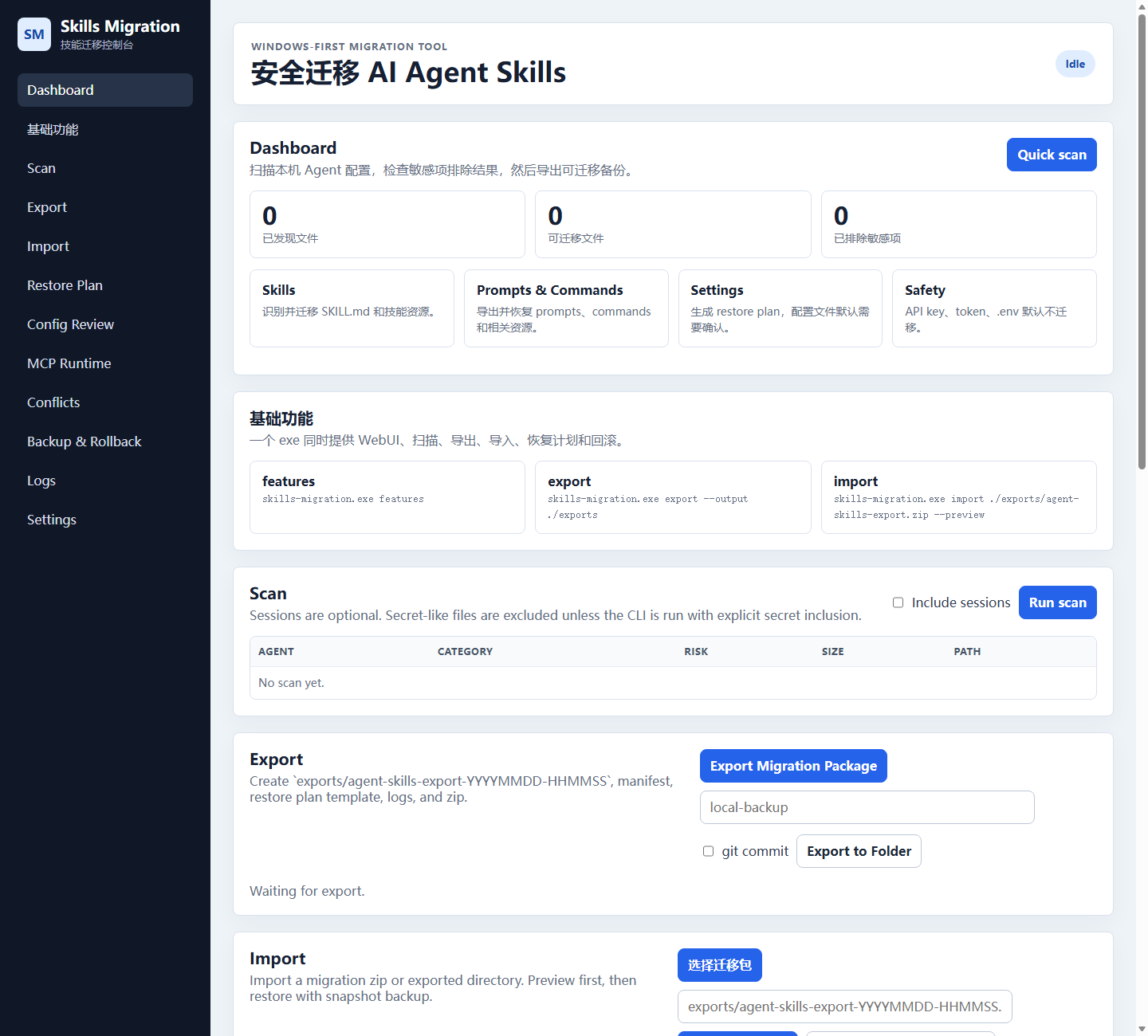
当前目标
- 扫描 opencode、Hermes、Claude Code、Codex、OpenClaw、Cursor、Gemini CLI 的本地配置目录。
- 导出 skills、prompts、commands、settings、memories,以及普通配置文件类别。
- 默认跳过 secrets:
.env、*.pem、*.key、credentials.json、token.json、secrets.json、含API_KEY/TOKEN/SECRET/PASSWORD的配置项。 - 生成可复制到另一台电脑的 zip 迁移包。
- 导入时校验 manifest 和 checksums。
- 导入前创建
backups/YYYYMMDD-HHMMSS-before-restore/。 - 生成
restore_plan.json和restore_report.md。 - 冲突文件默认 rename 为
*_imported。 - 支持 rollback 恢复导入前状态。
支持的 Agent
| Agent / Tool | Windows 扫描路径 | macOS / Linux 扫描路径 | 状态 |
|---|---|---|---|
| Codex | %USERPROFILE%\.codex | ~/.codex | 已支持 |
OpenClaw / .agents skills | %USERPROFILE%\.agents | ~/.agents | 已支持 |
| Claude Code | %USERPROFILE%\.claude | ~/.claude | 已支持 |
| opencode | %APPDATA%\opencode, %LOCALAPPDATA%\opencode, %USERPROFILE%\.config\opencode | ~/.config/opencode | 已支持 |
| Hermes | %USERPROFILE%\.hermes | ~/.hermes | 已支持 |
| Cursor | %USERPROFILE%\.cursor | ~/.cursor | 已支持 |
| Gemini CLI | %USERPROFILE%\.gemini | ~/.gemini | 已支持 |
识别类别:
skillsagentscommandspromptsmcp_configs,仅作为普通配置文件类别参与导出/导入,不做 MCP 产品级迁移或机器绑定settingsmemoriessessions,默认不迁移,可选开启secrets,默认跳过
一键跨机器迁移
源机器导出:
skills-migration.exe export --output ./exports
会生成:
exports/agent-skills-export-YYYYMMDD-HHMMSS/
├─ manifest.json
├─ restore_plan.template.json
├─ agents/
│  ├─ opencode/
│  ├─ hermes/
│  ├─ claude/
│  └─ codex/
└─ logs/
   └─ export_report.md

exports/agent-skills-export-YYYYMMDD-HHMMSS.zip
把 zip 复制到目标机器,先预览:
skills-migration.exe import ./agent-skills-export-YYYYMMDD-HHMMSS.zip --preview
确认后导入:
skills-migration.exe import ./agent-skills-export-YYYYMMDD-HHMMSS.zip
回滚:
skills-migration.exe rollback --snapshot backups/YYYYMMDD-HHMMSS-before-restore
兼容 npm bin 名:
agent-migrator export --output ./exports
agent-migrator import ./agent-skills-export-YYYYMMDD-HHMMSS.zip
agent-migrator rollback --snapshot backups/YYYYMMDD-HHMMSS-before-restore
导入冲突策略
skills/prompts/commands/agents/memories:默认 merge 到目标 agent 目录;同名文件冲突时写成*_imported。settings/unknown config:默认不直接覆盖,写入 restore plan,标记为需要确认。mcp_configs:作为普通 JSON 配置文件处理;JSON 文件冲突时做 JSON merge,不做整文件覆盖。secrets:默认 skip。
Windows 可运行包
构建:
npm install
npm run package:win
输出:
outputs\win-x64\skills-migration.exe
启动 WebUI:
outputs\win-x64\skills-migration.exe web
查看基础功能:
outputs\win-x64\skills-migration.exe features
本地开发
npm install
npm run smoke
npm run typecheck
npm run dev
WebUI:
http://localhost:5174
WebUI 页面
- Scan
- Export
- Import
- Restore Plan
- Conflicts
- Backup & Rollback
- Logs
Manifest
schema 文件:
docs/manifest.schema.json
manifest.json 包含:
export_versioncreated_atsource_ossource_hostnamedetected_agentscategoriesfile_counttotal_sizechecksumsfiles[].original_pathfiles[].portable_target_pathskipped_sensitive_files
v0.2 Status / v0.2 状态
- WebUI now has a migration package picker. In Tauri it can choose a
.zippackage or an extracted export directory path; in browser fallback it uploads.zipfiles and keeps Advanced manual path input for directories. - Config Review is implemented for settings/config files. Users can choose
skip,backup_then_overwrite,merge, orrename_imported; choices are written intorestore_plan.json. - JSON config files get structured diff summaries. TOML/YAML/text files get text diff summaries.
- MCP Runtime Check is implemented as a checker only. It parses MCP config, checks known runtimes and local paths, generates
mcp_runtime_report.md, and never installs dependencies. - Export to Folder is implemented:
latest.zip,manifest-latest.json,exports/*.zip, andhistory.json. If the folder is already a git repo, optional--git-commitcreates a local commit. It never pushes.
Current remaining limitations:
- Browser fallback cannot safely expose arbitrary local directory paths, so extracted-directory import is best in Tauri or via Advanced manual path.
- Config Review UI is functional but intentionally simple; richer side-by-side diff rendering is still future work.
- MCP Runtime Check reports missing dependencies and paths but does not install or fix them.
- GitHub/cloud sync remains explicit user responsibility; use a private repo or private sync tool.
v0.3 Practical Release / 实用版定位
AI Agent Skills Migrator is a desktop tool for safely moving AI coding agent workflows between computers. The practical release narrows the product scope:
- Tauri desktop is the intended full migration tool.
- Browser fallback is preview-only: upload a zip, preview
manifest.json, and previewrestore_plan.json. - Secrets/API keys are not migrated by default.
- MCP configs are checked, but MCP server runtimes are not installed automatically.
- GitHub/cloud sync is not enabled by default; local git backup remains optional.
支持的 Agent:
- opencode
- Hermes
- Claude Code
- Codex
- OpenClaw /
.agents - Cursor
- Gemini CLI
核心能力:
- scan local agent homes
- export migration zip
- import migration zip
- backup before restore
- config review with practical diff summary
- MCP runtime check with fix suggestions
- rollback
- local git backup
Migration Wizard flow:
Old computer:
- Scan local agents.
- Select agents/categories.
- Review sensitive files skipped by default.
- Export zip.
- Copy this zip to the new computer.
New computer:
- Select migration zip.
- Preview manifest.
- Create backup snapshot.
- Preview restore plan.
- Review settings/config actions.
- Check MCP runtime status and suggestions.
- Restore.
- Review result summary and rollback option.
Commands:
skills-migration.exe scan
skills-migration.exe export --output ./exports
skills-migration.exe import ./exports/agent-skills-export-YYYYMMDD-HHMMSS.zip --preview
skills-migration.exe import ./exports/agent-skills-export-YYYYMMDD-HHMMSS.zip
skills-migration.exe rollback --snapshot backups/YYYYMMDD-HHMMSS-before-restore
skills-migration.exe self-check
skills-migration.exe web
Windows packaging:
npm run package:win
npm run tauri:build
npm run package:win is the verified Windows executable-folder package. npm run tauri:build is provided for the desktop direction and requires a complete src-tauri scaffold. See PACKAGING_WINDOWS.md.
Smoke Test
npm run smoke
测试覆盖:
- 创建 fake opencode/hermes/claude/codex 配置目录。
- 写入 fake skills/prompts/settings。
- 执行 scan。
- 执行 export。
- 清空目标测试目录。
- 执行 import。
- 验证文件恢复成功。
- 验证
.env/ token / secret 文件被跳过。 - 验证冲突文件被 rename。
- 验证 rollback 可恢复导入前状态。
已知限制
- WebUI 的导入路径目前需要手动输入 zip 或导出目录路径,还没有系统文件选择器。
- settings/config 默认不覆盖,需要后续增加逐项确认 UI。
- MCP configs 只按普通配置文件处理,不负责安装 MCP server runtime、不做机器码绑定。
- GitHub 同步不是默认功能;建议只把已审计迁移包放到 private repo。