
Claude Codex Bridge
jackcongmac/claude-codex-bridge
Ponte MCP bidirecional: Claude Code e Codex colaboram com memória persistente
Ver no GitHubServidor MCP que cria uma ponte bidirecional entre Claude Code e Codex, permitindo que os dois agentes se chamem como ferramentas e compartilhem memória persistente de projeto. Implementa um quadro colaborativo com arquivo de sinalização de mudanças para coordenação eficiente entre os dois modelos.
Instalação
npx convez-ai jackcongmac/claude-codex-bridge1 comando no terminal: detecta o formato do repositório (marketplace ou plugin avulso) e instala via Claude Code. Requer Node 18+ e o Claude Code instalado.
Métricas
Casos de uso
- Pedindo a Claude para revisar código Codex sem sair do agente
- Coordenando loops de review → execute → re-review entre os dois agentes
- Mantendo colega Claude persistente e consciente do projeto por diretório
Veredito

Projeto sofisticado que habilita fluxos colaborativos genuínos entre dois agentes através de MCP, com memória compartilhada e roteamento ciente de recursos. Excelente para quem quer orquestração simétrica de modelos, mas requer entendimento profundo de MCP e workflows de agentes.
README
A tradução para o português deste README ainda está na fila.
claude-codex-bridge
Let Claude Code and Codex call each other as tools — and make the Claude side a persistent, project-aware colleague, not a fresh stateless instance every call.


Windows is not yet verified; see
docs/windows-support.md for compatibility notes.
Claude Code ↔ Codex, wired together through MCP and a durable shared board.
This project was built with the same Claude + Codex collaboration workflow it enables: one agent asks the other for review, execution, and second opinions, while both coordinate through project-local shared files.
It is a collaboration framework for asymmetric agents: MCP is the transport,
collaboration.md is the shared memory, collaboration_signal.json is the cheap
change detector, and resource profiles keep quota, context, billing, and write
authority visible.
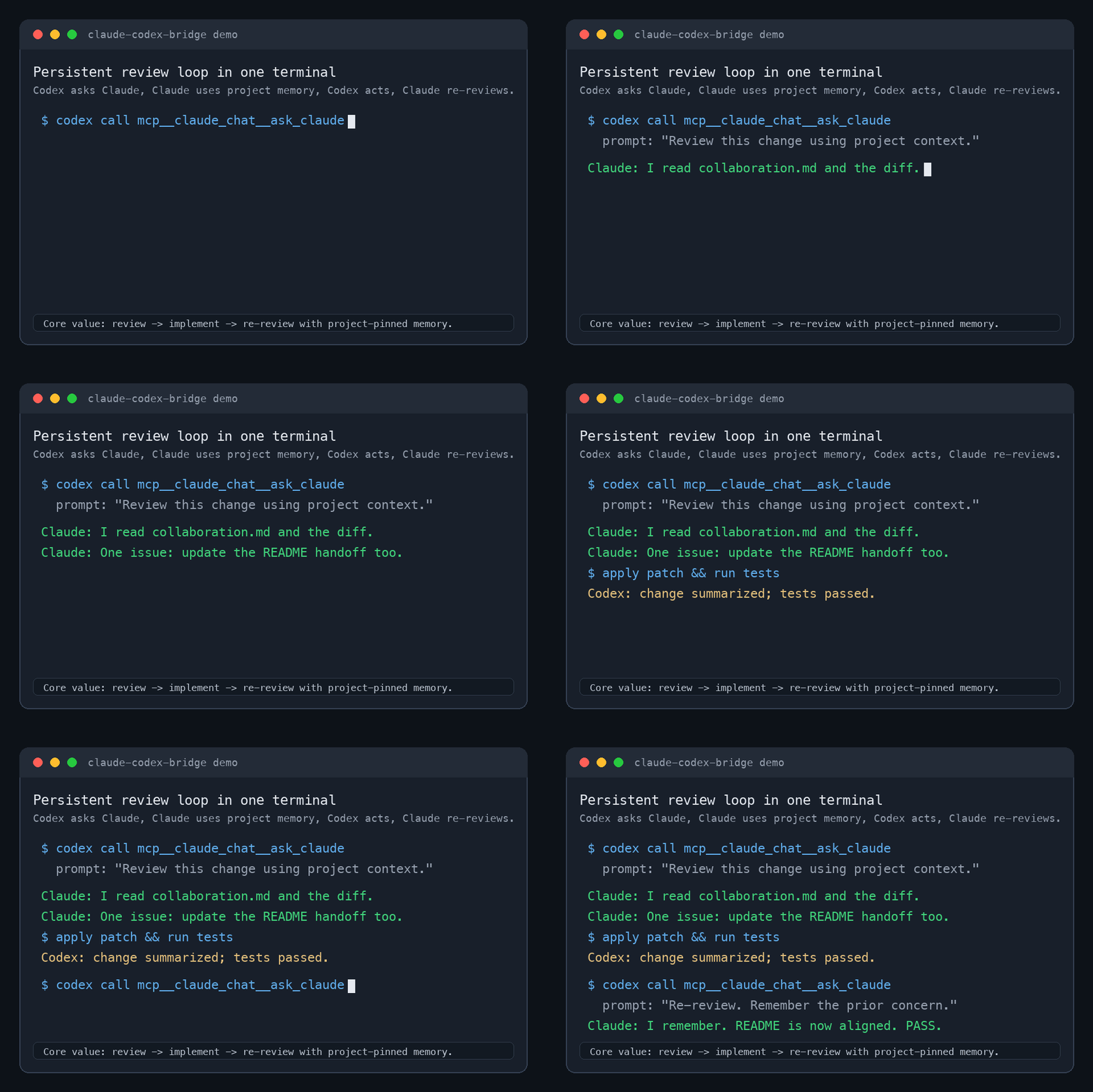
A small, dependency-free bridge over the Model Context
Protocol. Each agent reaches the other with one
tool call; the Claude side keeps per-project memory and reads your shared
collaboration.md so the two agents actually work together.
What you can do with it
- Ask Claude to review Codex's current implementation without leaving Codex.
- Ask Codex to run or inspect a task from Claude Code.
- Keep a persistent Claude colleague per project directory.
- Coordinate two agents through
collaboration.mdand a low-token signal file. - Route Claude Max / Codex Pro style workflows by scarce reasoning vs. bounded execution.
- Run an event-driven collaboration loop with explicit caps and safety checks.
- Promote real reviewer/executor loops that converge to
status=donewithout a human manually poking every turn.
See examples/review-loop.md for a copy-pasteable
workflow that demonstrates the core review → execute → re-review loop.
See examples/autonomous-review-loop.md
for a real bounded autonomous review loop driven by the harness.
See examples/cookbook.md for review, test, docs, and
shared-board handoff prompts.
See docs/resource-aware-routing.md for the
full subscription, billing, context, and permission routing matrix, and
docs/role-presets.md for preset files you can apply
to collaboration_state.json.
   ┌──────────────┐   mcp__codex__codex          ┌──────────────┐
   │  Claude Code │ ───────────────────────────► │    Codex     │
   │    (you)     │      codex mcp-server         │              │
   │              │ ◄─────────────────────────── │              │
   └──────────────┘   mcp__claude_chat__ask_claude└──────────────┘
                                │
                                ▼
                  claude_chat_mcp.py  (claude -p)
                                │
                                ▼
            a Claude colleague that REMEMBERS (per-project session)
            and reads ./collaboration.md before answering
| Direction | Tool the caller uses | What runs under the hood |
|---|---|---|
| Claude → Codex | mcp__codex__codex / mcp__codex__codex-reply | codex mcp-server (Codex's built-in MCP mode) |
| Codex → Claude | mcp__claude_chat__ask_claude | claude_chat_mcp.py → claude -p |
Why a wrapper for the Claude side?
Codex ships an MCP server mode (codex mcp-server) that exposes a single "run a
Codex session" tool — perfect for Claude→Codex. Claude Code's built-in
claude mcp serve, however, exposes Claude's individual tools (Read, Bash,
Edit, …), not a "chat with Claude" endpoint, and its Agent tool has no
sub-agents registered in headless serve mode (Available agents: is empty). So
to let Codex talk to a reasoning Claude, this project wraps claude -p
(headless print mode) in a tiny MCP server. That wrapper is the mirror image of
codex mcp-server.
The persistent "colleague" behavior
ask_claude(prompt, session_id?, new_session?):
- Memory, auto-pinned per directory. The first call in a working directory
creates a Claude session with a fixed id and stores it under
~/.claude-codex-bridge/sessions/. Every later call from that directory auto---resumes it, so the same Claude accumulates context — Codex never has to manage a session id. Passsession_idto target a specific one, ornew_session: trueto reset. - Project grounding. Each call appends a system prompt telling Claude it is
the project's collaborator and to read
./collaboration.mdif it exists. - Powers: read + write, no shell. Runs with
--allowedTools Read Grep Glob Edit Write TodoWriteand--permission-mode acceptEdits. NoBash. No MCP servers are loaded inside the spawned Claude (--strict-mcp-config --mcp-config '{"mcpServers":{}}'), which keeps startup fast and prevents it from recursing back into Codex.
What it is not: a literal always-on process that sees messages typed into your interactive Claude window in real time. CLI agent sessions can't be injected into from outside. Persistent session + shared
collaboration.md+ on-demand reach gives you ~90% of "online colleague" without that.
Prerequisites
- Claude Code CLI (
claude) — logged in - Codex CLI (
codex) — logged in python3(standard library only; no pip installs)
Install
⚠️ Security, up front. By default the Claude colleague can read and edit/write files in whatever directory Codex calls it from, using your Claude credentials — i.e. Codex can drive file changes on your machine through Claude. Install read-only with
BRIDGE_READONLY=1 ./install.sh, or scope it later viaCLAUDE_CHAT_ALLOWED_TOOLS. There is noBashaccess in either mode. Seedocs/read-only-setup.mdfor the safest evaluation setup and a redacted config check.
git clone https://github.com/jackcongmac/claude-codex-bridge.git
cd claude-codex-bridge
./install.sh                    # read + write colleague (default)
# BRIDGE_READONLY=1 ./install.sh  # read-only colleague
The installer is idempotent. It:
- Detects
python3,claude, andcodex(override the Claude path withCLAUDE_BIN=/path/to/claude ./install.sh). - Copies the wrapper to
~/.claude-codex-bridge/. - Adds
[mcp_servers.claude_chat]to~/.codex/config.toml(backing up first), pinning the detectedclaudepath viaCLAUDE_BIN. - Registers Codex as a user-scope Claude MCP server (all projects), using the
detected absolute
codexpath:claude mcp add codex -s user -- "$CODEX_BIN" mcp-server.
Then restart Codex so it loads the new server.
Usage
In Codex:
call mcp__claude_chat__ask_claude with prompt:
"Read collaboration.md and give me your QA verdict on the current draft."
In Claude Code:
call mcp__codex__codex with prompt:
"Run the test suite and report failures."
# continue with mcp__codex__codex-reply using the returned threadId
Both directions are global after install — every project gets them, no per-project setup.
Coordination layer (the part that makes them collaborate)
The two MCP servers are the transport — the "phone line." They let each agent call the other, but a phone line alone isn't teamwork. The coordination layer is a simple, durable convention that turns two agents into colleagues:
collaboration.md— a shared board in your project root: roles, operating rules, each agent's outbox, file locks, open questions, a decision log. Both agents read it before acting and write findings back to it. It's the shared memory; theask_claudecolleague is already told to read it automatically.collaboration_signal.json— a tiny low-token signal file. Instead of re-reading the whole board on every poll, an agent reads this first and only re-readscollaboration.mdwhenupdate_idchanges. Cheap polling.
Drop both into a project (idempotent, never overwrites existing files):
scripts/init-collaboration.sh           # into the current directory
scripts/init-collaboration.sh /path/to/project
The loop:
- Each agent reads
collaboration_signal.json; re-readscollaboration.mdonly whenupdate_idchanged. - Each writes status / findings to its own outbox in
collaboration.md, then bumpscollaboration_signal.json(update_id+ one-linesummary). - Use the MCP bridge to poke the other agent to take a turn.
Transport (global, installed once) vs. coordination (per-project files you drop in). The bridge gives you both halves; the board is what makes a review → execute → re-review loop actually work.
Autonomous mode (event-driven, no manual poke)
Manual mode needs a human to invoke each turn. Autonomous mode runs the loop itself: a lightweight watcher fires a headless agent turn whenever the other agent commits. Idle cost is ~0 (a file watcher / mtime poll — no tokens until there's real work).
# one per side (two shells / two machines); read-only by default
scripts/watch-collaboration.sh --as claude --project .
scripts/watch-collaboration.sh --as codex  --project .   # add --allow-write to let it edit files
collaboration_state.json is the authoritative control state (ships paused).
To start the loop, set status:"active" and next_actor to whichever agent
moves first, then bump collaboration_signal.json. Watch it live:
scripts/bridge-status.py --project . --watch  # state, routing, caps, recent events
tail -f collaboration_auto.log                # raw JSONL events
How a turn is made safe (all in _auto_turn.py, not left to the model):
- Whose turn: a turn runs only if
next_actor == self, the signal'supdate_idis newer than this watcher's high-water mark, andstatus=="active". - Draft → commit-under-lock: the model only returns a JSON draft; the harness
takes a global lock, re-checks
update_id(CAS), then writes the board, state, and signal (signal last = commit marker). Two agents can't write concurrently. - Bounded & safe:
max_turnscaps the loop; any anomaly (timeout, CAS conflict, corrupt JSON, bad draft) halts toawaiting_humanand notifies — it never silently drops or loops away your budget.
Caps & safety knobs (in collaboration_state.json, or --max-turns/--max-cost
on the watcher):
| Knob | Effect |
|---|---|
status | active runs; paused/done/awaiting_human stop the loop |
max_turns | hard cap on total turns (governs both sides) |
max_cost_usd | USD cap — Claude side only; codex exec cost isn't parsed, so the Codex side is governed by max_turns |
--allow-write | lets that side edit project files (default: read-only, no Bash) |
Kill switch: Ctrl-C the watcher, or set status:"paused"/"done".
Resource-aware routing
Autonomous mode is not meant to alternate turns blindly. The default templates
include resource_profiles for a max-claude-pro-codex style split:
- Claude Max handles high-leverage reasoning, architecture, strict review, test strategy, and final QA.
- Codex Pro handles bounded implementation, search, small fixes, test iteration, and mechanical docs updates.
scripts/bridge-status.py --project . displays the current roles, resource
profiles, turn caps, cost cap, last signal, recent events, and halt reason. See
docs/resource-aware-routing.md for the
routing rules.
Apply an opinionated role preset when you want the state file to reflect that split explicitly:
scripts/apply-role-preset.py --project . --preset max-claude-pro-codex
scripts/apply-role-preset.py --project . --preset reviewer-implementer
Presets reuse the existing roles and resource_profiles fields; they do not
grant extra write permissions. Apply them while the loop is paused; the command
refuses status:"active" or an existing collaboration.lock unless --force
is passed. See docs/role-presets.md.
Configuration (env vars on the Codex claude_chat server)
| Variable | Default | Purpose |
|---|---|---|
CLAUDE_BIN | auto-detected | path to the claude CLI |
CLAUDE_CHAT_SESSION_DIR | ~/.claude-codex-bridge/sessions | pinned-session store |
CLAUDE_CHAT_TIMEOUT | 900 | per-call timeout (seconds) |
CLAUDE_CHAT_ALLOWED_TOOLS | Read Grep Glob Edit Write TodoWrite | tool allowlist for the colleague |
To make the colleague read-only, set
CLAUDE_CHAT_ALLOWED_TOOLS="Read Grep Glob". To give it shell access, add
Bash (understand the risk: Codex could then drive arbitrary commands on your
machine through Claude).
See docs/read-only-setup.md for a safe setup guide.
Gotcha that will bite you if you reimplement this
An MCP stdio server must not read its input with for line in sys.stdin.
On a pipe, Python block-buffers that iterator (it waits to fill ~8 KB before
yielding a line), so a lone initialize message never reaches your handler and
the MCP client hangs forever. It looks like it works when you feed several
messages at once in a test, then mysteriously hangs against a real client that
sends one message and waits. Use while True: line = sys.stdin.readline()
instead — it returns as soon as a newline arrives.
Security notes
- The spawned Claude runs with your Claude Code credentials and can read (and
by default edit) files in the working directory. Scope
CLAUDE_CHAT_ALLOWED_TOOLSto your comfort level. - Never commit your real
~/.codex/config.toml— it may contain API keys for other MCP servers. This repo only ships a config template via the installer.
License
MIT — see LICENSE.