
multica local-workdir
j3k0/multica-local-workdir
Execute agentes multica com contexto completo do projeto
Ver no GitHubMCP server que permite agentes multica trabalhar dentro do diretório do seu projeto local, carregando configurações project-scoped (skills, comandos, MCP servers, settings) sem modificar o próprio multica. Resolve o problema de agentes rodarem em workspace isolado e perderem acesso a arquivos de configuração críticos.
Instalação
npx convez-ai j3k0/multica-local-workdir1 comando no terminal: detecta o formato do repositório (marketplace ou plugin avulso) e instala via Claude Code. Requer Node 18+ e o Claude Code instalado.
Métricas
Casos de uso
- Agentes Claude acessarem configurações project-scoped (.claude/, .opencode/)
- Manter instruções personalizadas do workspace enquanto trabalha no projeto
- DevOps em monorepos complexos com setup pesado
- Integrar esforço dinâmico por agente via variáveis de ambiente
Veredito

Solução prática que fecha um gap real do multica: permitir que agentes acessem config project-scoped mantendo instruções do workspace. Implementação via shell wrappers é elegante e não-invasiva. Recomendado para times usando multica em projetos com setup complexo.
README
A tradução para o português deste README ainda está na fila.
multica-local-workdir
Thin shell wrappers that let multica agents work directly inside your local project directory — so project-scoped skills, slash commands, MCP servers, and settings actually load — without patching multica itself.
The problem
multica creates a per-session workspace directory (e.g. ~/multica_workspaces/<uuid>/.../workdir) and runs the agent CLI from there. As a result:
- Project-scoped configuration isn't loaded. Skills, slash commands, subagents, MCP servers, settings, hooks — everything that lives under
<project>/.claude/or<project>/.opencode/— is keyed strictly off the agent's CWD. Running from the workspace means none of it loads. - The workspace's instructions file is the only one that loads. multica writes a
CLAUDE.md(orAGENTS.md) into the workspace with agent-specific behaviour instructions. If youcdinto the project to fix #1, you lose those. - Dev agents working on large monorepos or heavy setup projects need to go fresh for every session.
These wrappers fix those: they cd into the project so project-scoped config loads, then re-inject the workspace's instructions file into the agent's system prompt.
Install
git clone https://github.com/j3k0/multica-local-workdir.git
cd multica-local-workdir
cp .env.example .env   # then edit — set MULTICA_SERVER_URL
./multica-daemon
Telling the wrapper which project to use
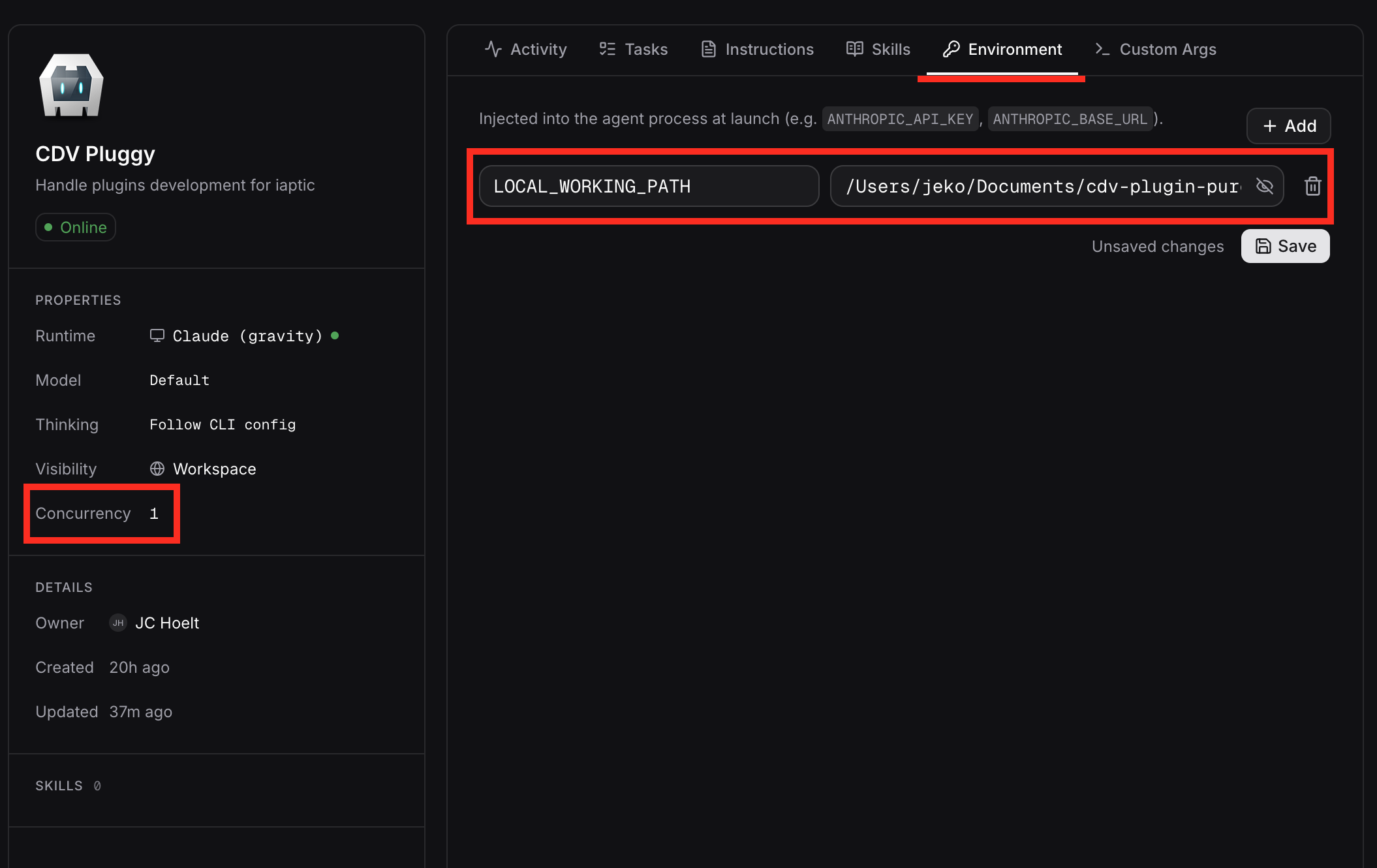
Set LOCAL_WORKING_PATH=/abs/path/to/project in the environment multica launches agents under. (Alternatively, append --working-directory <path> to the agent's extra args in multica's per-agent configuration.)
Set agent concurrency to 1
In each agent's multica configuration, set concurrency: 1. Two sessions of the same agent running concurrently would share the same project directory — lock files, git state, and edits would step on each other.
Example agent configuration
Setting the effort level (claude)
Set LWD_EFFORT=<level> and the claude wrapper injects --effort <level> (unless the caller already passed --effort). Valid levels are low, medium, high, xhigh, max; an unknown value fails loud rather than letting claude reject the flag mid-session.
Because env vars can be set per agent in multica, a per-agent LWD_EFFORT is effectively dynamic effort classification: give each agent the effort its job warrants — max for an orchestrator or code reviewer, low for a trivial-chore agent — without the wrapper inspecting the (streamed) prompt. Set it globally in .env as a default, or per-agent in multica; ambient values win over the .env default, and a provider file may pin its own effort (priority: ambient env > provider file > .env). For per-task effort, see below.
Per-task settings from issue labels (claude)
For effort (and a few other knobs) that vary per task rather than per agent, the claude wrapper reads settings from the issue's labels. multica writes the task's multica issue get <id> command into the workspace CLAUDE.md, so the wrapper can pull the issue ID, fetch the issue, and apply its labels — all without reading the (streamed) prompt.
Add labels named key: value to the issue, e.g.:
effort: high
model: claude-opus-4-8
provider: deepseek
path: /abs/path/to/project
Each label maps to the matching env knob (effort→LWD_EFFORT, model→LWD_MODEL, provider→LWD_PROVIDER, path→LOCAL_WORKING_PATH); add only the ones you want, and effort: … alone is the common case. Any other label (no colon, or another key like area: billing) is ignored by the wrapper — labels keep working as regular labels.
Parsing is forgiving: the name is split on the first colon (so model: qwen3:32b keeps its colon), the key is case-insensitive, the value is whitespace-trimmed, and one pair of surrounding double quotes is dropped (path: "/x y" works).
Labels are configuration, not instructions, so when settings labels are present the wrapper appends a note to the agent's system prompt saying they're wrapper config and not part of the task. (Settings used to live in a # Task Settings block in the issue description; such a block is still detected — the agent is told to ignore it — but no longer parsed. Migrate old blocks to labels.)
Task settings take the highest priority — above per-agent (custom args / ambient env) and global (.env). Notes:
- Only the assigned agent gets them. The labels describe how the task's assigned work should run, so the wrapper applies them only when the running agent is the work's owner: the issue is assigned to this agent (
assignee_type: agent), or to a squad this agent leads. Any other agent invoked on the same issue (a different agent, a squad member who isn't leader, a human/memberassignee, or an unassigned issue) runs with its own config and ignores the labels. The wrapper learns its own agent id from theYou are: … (ID: …)line in the workspaceCLAUDE.md; if it can't determine that or the assignee, it errs toward not applying. - Needs
jqonPATH; without it, task settings are silently skipped. - Invalid values are ignored with a line in
claude.log(never abort) — e.g. an effort outsidelow|medium|high|xhigh|max, an unknown provider, or a non-existent path. modelresolves per backend: on the native Anthropic backend the wrapper injects--model(unless the caller already passed one); with a provider active the provider file consumesLWD_MODELas before. Either way amodel:label works.- It runs a
multica issue geton every launch (~0.3s). Opt out withLWD_TASK_SETTINGS=0. providerandpathlet issue authors source a provider script / relocate the working dir; fine for self-hosted with trusted issue authors, otherwise opt out.
Allowing project MCP servers (claude)
multica injects --strict-mcp-config into the claude CLI, which makes claude ignore any MCP servers configured in the project (.claude/settings.json) or in the user's claude config. That's a sensible default for multica's hosted SaaS, but on a self-hosted setup the operator owns the project and usually wants those servers to load (see multica#2532).
Set LWD_ALLOW_MCP=1 in .env (or per-agent in multica) and the claude wrapper strips the flag before exec'ing the CLI. Default is off — only opt in if you trust every MCP server the project can reach. The env var can also be set per agent in multica.
Routing claude through a different provider
Set LWD_PROVIDER=<name> and the claude wrapper sources claude-providers/<name>.sh before exec'ing the CLI. The provider file is just a bash file that exports ANTHROPIC_BASE_URL, ANTHROPIC_AUTH_TOKEN, model defaults, etc. — claude itself does the rest.
Four providers ship as examples:
deepseek— DeepSeek's Anthropic-compatible API. RequiresDEEPSEEK_API_KEYin.env.ollama— local Ollama daemon. Use any model the daemon can run (e.g. self-hostedqwen3.6:35b), or an Ollama Cloud model likeglm-5.1:cloud(requiresollama signin). No separate key in either case.openrouter— OpenRouter's Anthropic-compatible API. RequiresOPENROUTER_API_KEYin.env; pick a model withLWD_MODEL(defaults toqwen/qwen3.7-max).opencode-go— OpenCode Go's open-weight models (GLM, Kimi, DeepSeek, Qwen, …) via the localoc-go-cctranslating proxy, which must already be running (OpenCode Go has no Anthropic-compatible endpoint; the subscription key lives in the proxy's environment). Model routing is the proxy's job, soLWD_MODELis intentionally unused — see the header ofclaude-providers/opencode-go.sh.
Add your own by dropping a claude-providers/<name>.sh file alongside them. Provider files may honour LWD_MODEL to let you switch models without editing the file. Set LWD_PROVIDER and LWD_MODEL in .env as project defaults, or per-agent in multica; values already in the environment (e.g. set per-agent in multica) take precedence over the global default.
Unknown provider names fail loud rather than silently falling back to Anthropic (which would burn real credits on a typo).
Switching providers from the CLI
set-provider edits the active LWD_PROVIDER / LWD_MODEL lines in .env for you, so you don't have to hand-edit the file to flip the global default. It only touches uncommented assignments — the commented examples stay as documentation — and validates the provider against claude-providers/ before writing.
./set-provider                                # show current values + available providers
./set-provider deepseek                       # set LWD_PROVIDER
./set-provider deepseek 'deepseek-v4-pro[1m]' # set provider + model
./set-provider -m glm-5.1:cloud               # set LWD_MODEL only
./set-provider --clear-model                  # drop the model override
./set-provider none                           # clear both — back to real Anthropic
An unknown provider fails loud and lists the valid names. Per-agent overrides in multica still win over whatever this writes to .env.