
Burnguard — Gateway de API com Controle de Gastos em IA
Itshimcules/Burnguard
Intercepte gastos de IA localmente, antes da fatura
Ver no GitHubGateway local que funciona como intermediário entre agentes de IA e provedores de API, monitorando gastos com LLMs, impondo orçamentos por chave virtual e inspecionando sessões antes da fatura chegar. Ideal para equipes que compartilham contas de modelo e precisam de visibilidade sobre quem gastou quanto em quê.
Instalação
npx convez-ai Itshimcules/Burnguard1 comando no terminal: detecta o formato do repositório (marketplace ou plugin avulso) e instala via Claude Code. Requer Node 18+ e o Claude Code instalado.
Métricas
Casos de uso
- Controlar spend de agentes de código que compartilham chaves de API
- Detectar loops e comportamentos de risco em sessões de IA
- Impor orçamentos por projeto, usuário ou modelo antes de forward às APIs
- Dashboards de burn-down de gastos e alertas em tempo real
- Integrar com Slack/Discord para notificações de gastos anormais
Veredito

Solução prática e local-first para equipes experimentando com agentes compartilhados. MVP estável com dashboard, alertas e mock mode; recomendado para exploração e controle de custos em ambientes de dev/demo, não ainda para produção crítica.
README
A tradução para o português deste README ainda está na fila.
Burnguard


Meter shared LLM API usage before coding agents turn curiosity into invoices.
Coding agents are useful until one loops against a shared provider key and the bill only says "API usage." Burnguard gives teams a local gateway that shows which key, project, model, session, and request pattern drove the spend.
Point Hermes Agent, OpenClaw, or any OpenAI-compatible client at Burnguard. It issues virtual keys, checks budgets before forwarding, records request/session cost, and flags risky behavior like repeated prompts, large context, expensive models, and possible agent loops.
The public project name is Burnguard. The internal Python package, CLI module, environment-variable prefix, and compatibility headers still use the original token_governor namespace while the MVP stabilizes.
Working prototype: Burnguard is intentionally small and local-first. Treat it as an MVP for exploration, demos, and feedback rather than production infrastructure. See Security Policy before using it with sensitive data or shared keys.
Local demo data includes 3 virtual keys, 16 metered requests, a runaway session, and a blocked request.
Built with FastAPI, SQLite, Jinja, OpenAI-compatible routing, Anthropic Messages routing, Docker, Prometheus-style metrics, Slack/Discord webhooks, CSV/JSON exports, and a React-powered burn dashboard.
What is this
Burnguard is a local AI API gateway for teams experimenting with coding agents and shared model accounts. Instead of handing every tool the real provider key, you hand it a Burnguard virtual key:
You get a practical control plane before the provider invoice arrives:
| Feature | Why it matters |
|---|---|
| Virtual API keys | Give each user, project, or agent its own local key. |
| Budget checks | Block requests that exceed daily, monthly, or max-request limits. |
| Session tracking | Group spend by agent run with X-Token-Governor-Session. |
| Risk flags | Surface repeated prompts, possible loops, large context, expensive models, high-cost requests, and test failure loops. |
| Burn dashboard | See team-wide daily/monthly spend, project/key burn meters, forecasts, flags, live alerts, and drill-down drawers. |
| Mock mode | Demo the full flow without spending money on a real provider. |
| Proxy mode | Forward approved requests to OpenAI-compatible or Anthropic-compatible upstreams. |
| Exports and metrics | Pull CSV/JSON reports and Prometheus-style metrics for lightweight ops workflows. |
Quick start
Start Burnguard before asking an agent to configure itself. Mock mode is enabled by default, so the demo records usage without calling a paid provider.
python -m venv .venv
source .venv/bin/activate
pip install -e ".[dev]"
cp .env.example .env
python -m token_governor seed-demo
uvicorn token_governor.main:app --reload
Open the dashboard:
http://localhost:8000/
Send one metered request:
curl http://localhost:8000/v1/chat/completions \
  -H "Authorization: Bearer tg_sk_demo" \
  -H "Content-Type: application/json" \
  -H "X-Token-Governor-Session: demo-session-1" \
  -d '{
    "model": "gpt-4o-mini",
    "messages": [
      {"role": "user", "content": "Write a Python function that adds two numbers."}
    ]
  }'
Then check http://localhost:8000/requests.
Hermes Agent with a spending brake
Hermes Agent can keep its usual workflow while Burnguard sits in front of the model endpoint, meters each request, and shows which run is driving spend. Start Burnguard, then paste this prompt into Hermes Agent:
$ uvicorn token_governor.main:app --reload
Burnguard running at http://localhost:8000

$ paste into Hermes Agent
Configure Hermes Agent to send OpenAI-compatible model requests through Burnguard.

Use:
- API base URL: http://localhost:8000/v1
- API key: tg_sk_demo
- Default model: gpt-4o-mini

Set Hermes to use its custom OpenAI-compatible endpoint or provider option. Keep the current model if it is already allowed by the Burnguard virtual key; otherwise use gpt-4o-mini. Do not store the real upstream provider key in Hermes. If Hermes supports custom headers, add X-Token-Governor-Session with a stable value for this project run. Streaming can stay enabled; Burnguard meters streamed responses.

After the change, send one small chat request, confirm Burnguard records it at http://localhost:8000/requests, and report the final base URL, model, session header status, and smoke-test result.
Manual setup details: Hermes Agent integration.
OpenClaw with cost visibility
OpenClaw can route through Burnguard the same way it would use any OpenAI-compatible gateway. The result is a local audit trail before long coding sessions become surprise provider bills. Start Burnguard, then paste this prompt into OpenClaw:
$ uvicorn token_governor.main:app --reload
Burnguard running at http://localhost:8000

$ paste into OpenClaw
Configure OpenClaw to send OpenAI-compatible model requests through Burnguard.

Use:
- API base URL: http://localhost:8000/v1
- API key: tg_sk_demo
- Default model: gpt-4o-mini

Use OpenClaw's custom or OpenAI-compatible API provider path, not a Codex/OAuth subscription runtime path. Keep the current model if it is already allowed by the Burnguard virtual key; otherwise use gpt-4o-mini. Do not store the real upstream provider key in OpenClaw. If OpenClaw supports custom headers, add X-Token-Governor-Session with a stable value for this project run. Streaming can stay enabled; Burnguard meters streamed responses.

After the change, send one small chat or responses request, confirm Burnguard records it at http://localhost:8000/requests, and report the final base URL, model, session header status, and smoke-test result.
Manual setup details: OpenClaw integration.
Why this exists
Coding agents are useful, but they can burn tokens in loops. Shared API accounts make the problem harder because a single provider key often hides which person, project, tool, or session caused the spend.
Burnguard sits between clients and an OpenAI-compatible provider:
Client / Script / Coding Agent
        |
        v
Burnguard Gateway
        |
        v
Provider API
It gives teams a local MVP for visibility, simple budgets, and session-level inspection without building an enterprise platform.
What the MVP does
- Accepts OpenAI-compatible
POST /v1/chat/completionsandPOST /v1/responsesrequests, plus basic Anthropic-compatiblePOST /v1/messagesrequests. - Validates local virtual API keys such as
tg_sk_demo. - Enforces daily, monthly, max-single-request budgets and optional per-key requests-per-minute limits before a request is forwarded. Estimated spend is reserved atomically so parallel bursts cannot all slip past a budget check.
- Streams responses (SSE) for Chat Completions, Responses, and Anthropic Messages, metering usage from the stream.
- Runs in mock mode by default so demos do not spend real API money.
- Can forward to one OpenAI-compatible provider and one Anthropic Messages provider when configured.
- Logs usage metadata to SQLite: owner, project, key, model, session, tokens, cost, status, route, latency, user-agent, category, and warning flags.
- Tracks sessions using
X-Token-Governor-Sessionor generates a session id automatically. - Classifies requests with local heuristics only. No extra LLM is used.
- Detects basic risk flags: repeated prompts, possible loops, large context, expensive models, budget-near-limit, high-cost requests, and test failure loops.
- Shows a React-powered daily budget burn dashboard at
/with team-wide spend, project/key meters, end-of-day forecasts, live alerts, dark mode, adjustable alert thresholds, and drill-down drawers for sessions and recent requests. The classic FastAPI/Jinja operational pages remain available at/keys,/sessions,/sessions/{session_id}, and/requests. - Provides
python -m token_governor seed-demofor fake data that makes the dashboard useful immediately. - Includes setup guidance for routing Hermes Agent, OpenClaw, and other OpenAI-compatible agents through Burnguard.
What it does not do
This is an MVP/prototype. It does not provide:
- multi-user login
- SaaS billing
- Kubernetes deployment
- full enterprise RBAC
- hosted/team frontend features beyond the local dashboard
- LLM-powered classification
- raw prompt storage by default
- production-grade security claims
- perfect token accounting
- perfect support for every provider
Demo API request
Mock mode is enabled by default in .env.example, so this does not call a paid provider:
curl http://localhost:8000/v1/chat/completions \
  -H "Authorization: Bearer tg_sk_demo" \
  -H "Content-Type: application/json" \
  -H "X-Token-Governor-Session: demo-session-1" \
  -d '{
    "model": "gpt-4o-mini",
    "messages": [
      {"role": "user", "content": "Write a Python function that adds two numbers."}
    ]
  }'
The gateway returns an OpenAI-compatible response and records the request.
Demo Responses API request
Burnguard also accepts OpenAI Responses API requests (streaming and non-streaming):
curl http://localhost:8000/v1/responses \
  -H "Authorization: Bearer tg_sk_demo" \
  -H "Content-Type: application/json" \
  -H "X-Token-Governor-Session: demo-responses-session-1" \
  -d '{
    "model": "gpt-4o-mini",
    "input": "Write a Python function that adds two numbers.",
    "max_output_tokens": 128
  }'
The gateway returns an OpenAI Responses-shaped response in mock mode and records the request with the same budget and session controls as Chat Completions. Add "stream": true to receive SSE.
Demo Anthropic Messages request
Burnguard also accepts Anthropic Messages API requests (streaming and non-streaming). The local virtual key can be passed with Anthropic-style x-api-key or as an Authorization bearer token:
curl http://localhost:8000/v1/messages \
  -H "x-api-key: tg_sk_demo" \
  -H "Content-Type: application/json" \
  -H "X-Token-Governor-Session: demo-anthropic-session-1" \
  -d '{
    "model": "claude-sonnet",
    "max_tokens": 128,
    "messages": [
      {"role": "user", "content": "Write a Python function that adds two numbers."}
    ]
  }'
In mock mode, the gateway returns an Anthropic Messages-shaped response and records the request with the same budget, privacy, warning flag, and session controls as the OpenAI-compatible routes. Add "stream": true to receive Anthropic-style SSE events.
Create a virtual key
python -m token_governor create-key \
  --owner "alex" \
  --project "demo" \
  --daily-budget 5 \
  --monthly-budget 100 \
  --max-request 1
You can also provide --key tg_sk_my_key, --allowed-models gpt-4o-mini,gpt-4.1,claude-sonnet, --rpm 30 for a requests-per-minute cap, and --provider anthropic for keys intended for Anthropic Messages routes.
Budget behavior
Burnguard uses HTTP 402 Payment Required when a request is blocked by policy.
Example response:
{
  "error": {
    "message": "Request blocked by Burnguard budget policy.",
    "type": "budget_exceeded",
    "details": {
      "daily_budget_usd": 5.0,
      "daily_spend_usd": 4.99,
      "projected_daily_spend_usd": 7.99,
      "estimated_request_cost_usd": 3.0
    }
  }
}
Budgets are intentionally simple:
daily_budget_usdmonthly_budget_usdmax_single_request_usd
Keys can also set --rpm (requests per minute); requests over the cap get HTTP 429 with an OpenAI-style rate_limit_error body.
Before forwarding a request, Burnguard estimates input and expected output cost, reserves that estimate inside a single SQLite transaction, and blocks requests that would push the key over its daily or monthly budget. After a provider response (or the end of a stream), the reservation is updated with the final estimated cost from returned usage when available.
Pricing notes
Model pricing lives in token_governor/pricing.py and includes entries for common OpenAI and Anthropic models. Prices drift — verify them against provider pricing pages before relying on budget math, and override or extend them without forking by pointing MODEL_PRICING_FILE at a JSON file:
{
  "gpt-4o-mini": {"input_per_1m": 0.15, "output_per_1m": 0.60},
  "my-internal-model": {"input_per_1m": 0.50, "output_per_1m": 1.00}
}
Requests for models with no pricing entry fall back to a conservative default and are tagged with the unknown_model_pricing warning flag.
Privacy and security notes
See Security Policy for the current prototype security model, key-handling guidance, and recommended hardening work before any production-style deployment.
Release notes are tracked in CHANGELOG.md, and the maintainer release checklist lives in docs/release-checklist.md. Soft-launch post drafts are available in docs/launch-posts.md.
By default, Burnguard does not store full prompts or full responses.
It stores:
- prompt hash
- response hash
- short redacted previews capped at 200 characters
- category labels
- usage metadata
Raw message storage is controlled by:
STORE_RAW_MESSAGES=false
If this is false, raw prompt and response bodies are not persisted. Previews are still only lightweight heuristics: common API keys, bearer tokens, passwords, secrets, and email addresses are redacted, but teams should treat previews as operational metadata rather than a security boundary.
Configuration
Copy .env.example to .env and edit as needed:
TOKEN_GOVERNOR_MODE=mock
DATABASE_URL=sqlite:///./token_governor.db
OPENAI_COMPATIBLE_BASE_URL=https://api.openai.com/v1
OPENAI_COMPATIBLE_API_KEY=replace_me
ANTHROPIC_BASE_URL=https://api.anthropic.com/v1
ANTHROPIC_API_KEY=replace_me
ANTHROPIC_VERSION=2023-06-01
STORE_RAW_MESSAGES=false
DEFAULT_DAILY_BUDGET_USD=5
DEFAULT_MONTHLY_BUDGET_USD=100
DEFAULT_MAX_SINGLE_REQUEST_USD=1
LARGE_CONTEXT_TOKEN_THRESHOLD=50000
LOOP_REQUEST_COUNT=10
LOOP_WINDOW_MINUTES=15
ADMIN_TOKEN=
MODEL_PRICING_FILE=
DEFAULT_REQUESTS_PER_MINUTE=0
SLACK_WEBHOOK_URL=
DISCORD_WEBHOOK_URL=
Set ADMIN_TOKEN to require HTTP Basic auth (any username, password = token) on the dashboard, exports, reports, and metrics. Leave it empty for the open local-first default. /healthz is always open.
To call real providers, set the matching upstream credentials for the route you expose:
TOKEN_GOVERNOR_MODE=proxy
OPENAI_COMPATIBLE_BASE_URL=https://api.openai.com/v1
OPENAI_COMPATIBLE_API_KEY=your_real_openai_compatible_key
ANTHROPIC_BASE_URL=https://api.anthropic.com/v1
ANTHROPIC_API_KEY=your_real_anthropic_key
ANTHROPIC_VERSION=2023-06-01
For LiteLLM, point Burnguard at the LiteLLM OpenAI-compatible proxy:
TOKEN_GOVERNOR_MODE=proxy
OPENAI_COMPATIBLE_BASE_URL=http://localhost:4000/v1
OPENAI_COMPATIBLE_API_KEY=your_litellm_proxy_key
Optional Slack and Discord webhook URLs send alerts for blocked requests by default. Set ALERT_ON_WARNING_FLAGS=true to also alert when Burnguard records warning flags.
Deployment
Run locally with Docker Compose:
cp .env.example .env
docker compose up --build
Burnguard listens on http://localhost:8000/ and stores SQLite data in the burnguard-data volume.
Dashboard pages
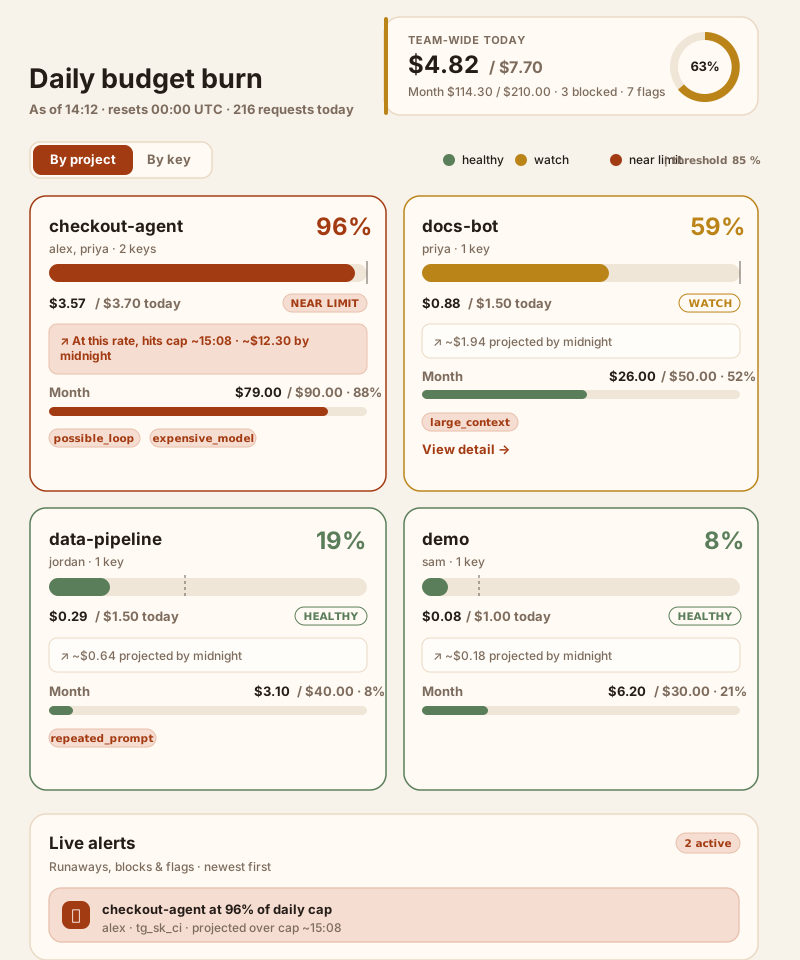
/— daily budget burn dashboard with team-wide daily/monthly totals, a reset timer, request counts, blocked-request counts, and a circular utilization ring/— project and key burn meters with healthy/watch/near-limit bands, daily and monthly gauges, end-of-day projections, cap-hit estimates, and warning flag chips/— live alert rail for budget pressure, possible loops, large contexts, and recently blocked requests; alerts can be snoozed, muted, or used to disable a virtual key/— click any project or key card to open a detail drawer with session spend, recent requests, flags, and a key disable/re-enable action for key cards/— local UI tweaks for dark mode and alert-threshold tuning/keys— virtual keys, budgets, rate limits, and an enable/disable kill switch per key/sessions— session list with spend totals/sessions/{session_id}— session detail, repeated prompts, category breakdown, flags, timeline/requests— recent request log/reports/pull-requests— JSON spend report grouped by GitHub PR correlation headers/exports/usage.jsonand/exports/usage.csv— usage export endpoints/metrics— Prometheus-style text metrics/healthz— health check (always unauthenticated)
Development
pytest
python -m token_governor seed-demo
uvicorn token_governor.main:app --reload
Roadmap
Shipped:
- Streaming (SSE) for Chat Completions, Responses, and Anthropic Messages, with usage metered from the stream.
- OpenAI Responses API:
POST /v1/responseswith tool metadata extraction for metering. - Anthropic Messages API:
POST /v1/messageswith tool-use metadata extraction for metering. - Hermes Agent and OpenClaw gateway setup, documented for OpenAI-compatible routing.
- LiteLLM integration through the OpenAI-compatible proxy base URL.
- Slack/Discord webhook alerts for blocked requests and optional warning flags.
- GitHub PR/session correlation via
X-Token-Governor-GitHub-RepoandX-Token-Governor-GitHub-PRrequest headers. - MCP/tool-call cost attribution: tool names and tool-call counts are recorded when present in request or response payloads.
- Repeated file/context detection: repeated file-context fingerprints can raise
repeated_context. - Cost-per-PR reports:
/reports/pull-requestsgroups spend by PR correlation headers. - Docker Compose deployment:
docker compose up --build. - CSV/JSON exports at
/exports/usage.csvand/exports/usage.json. - Prometheus-style metrics at
/metrics. - React burn dashboard with project/key meters, forecasts, alert rail, detail drawers, dark mode, and adjustable alert thresholds.
- Key kill switch (enable/disable) from the dashboard.
- Per-key requests-per-minute rate limits.
- Optional
ADMIN_TOKENauth for the dashboard and exports. - Editable model pricing via
MODEL_PRICING_FILE. - Upstream error passthrough in proxy mode (429/400 bodies reach the client).
/healthzendpoint.
Planned:
- per-team approval workflows
- hosted dashboard mode
- OpenTelemetry support
License
MIT