
LinkedIn Smart Formatter
IreneYe08/linkedin-smart-formatter
Converta rascunhos LinkedIn em posts formatados, pronto para colar
Ver no GitHubSkill de formatação inteligente de posts LinkedIn que transforma rascunhos brutos em conteúdo pronto para colar, com hooks, negrito, listas, espaçamento mobile e hashtags automáticas. Funciona localmente em Cursor, Claude Code, Cortex Workspace e CLI, sem APIs externas.
Instalação
npx convez-ai IreneYe08/linkedin-smart-formatter1 comando no terminal: detecta o formato do repositório (marketplace ou plugin avulso) e instala via Claude Code. Requer Node 18+ e o Claude Code instalado.
Métricas
Casos de uso
- Polir posts LinkedIn direto no agent de IA durante escrita
- Aplicar formatação Unicode (bold/italic) e layout mobile automaticamente
- Gerar hashtags relevantes e destacar teses principais em posts de conteúdo profissional
Veredito

Ferramenta prática e bem executada para quem escreve no LinkedIn via agents de IA. Resolve um pain point real (formatação + layout) com uma abordagem local e reproduzível, sem dependências de API. Útil para creators e profissionais que querem agilizar o fluxo de publicação.
README
A tradução para o português deste README ainda está na fila.
LinkedIn Smart Formatter
Turn rough LinkedIn drafts into paste-ready posts — inside Cursor, Claude Code, Cortex Workspace, or any CLI agent.
Same Python engine, thin skill adapters per platform. No browser tab. No API keys. Runs locally.


Before & After
Real post from a rough draft — smart hook promotion, spacing, bold thesis, bullet list, plain-text report title, auto hashtags.
| Before (wall of text) | After (paste-ready) |
|---|---|
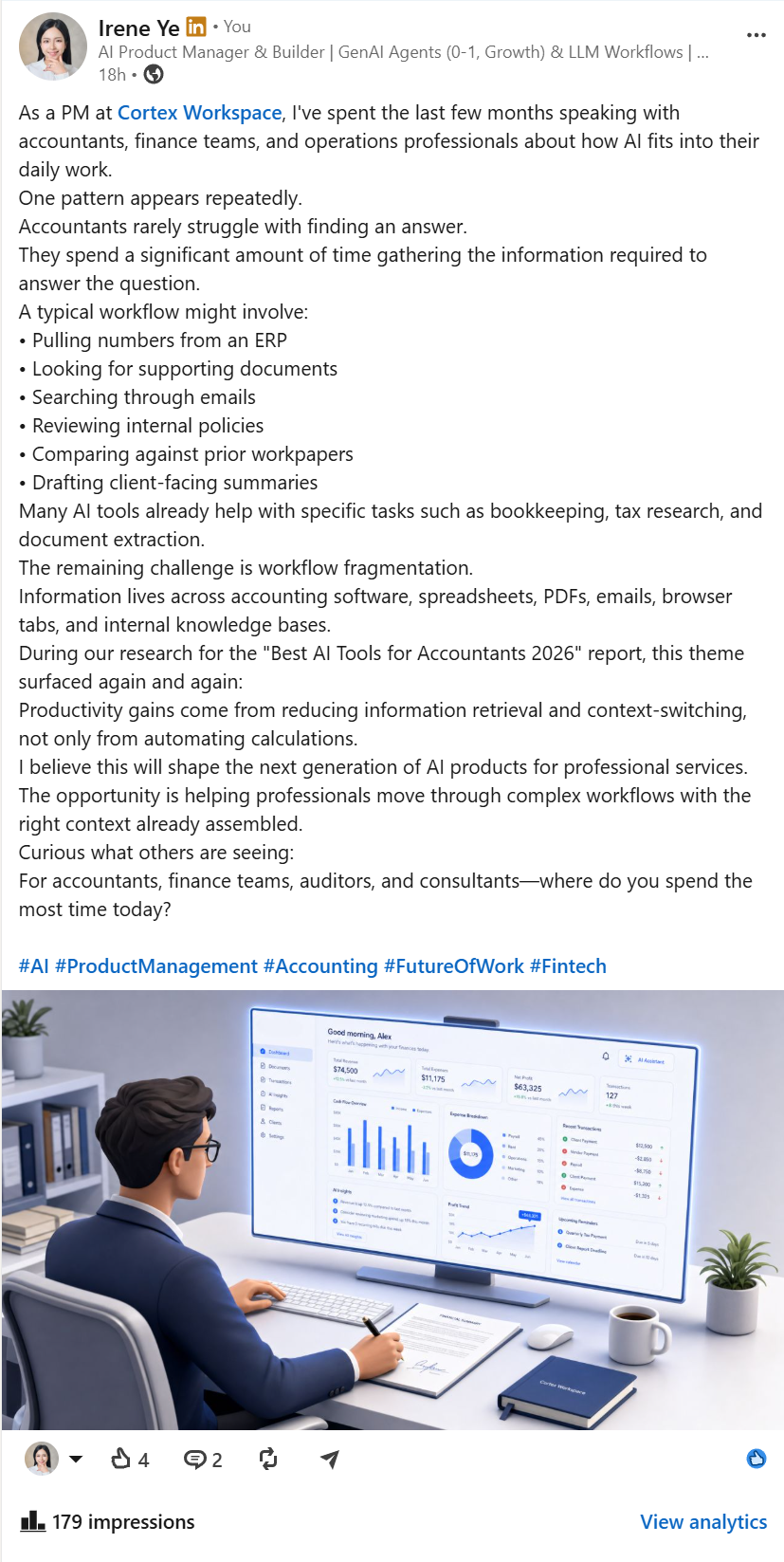 | 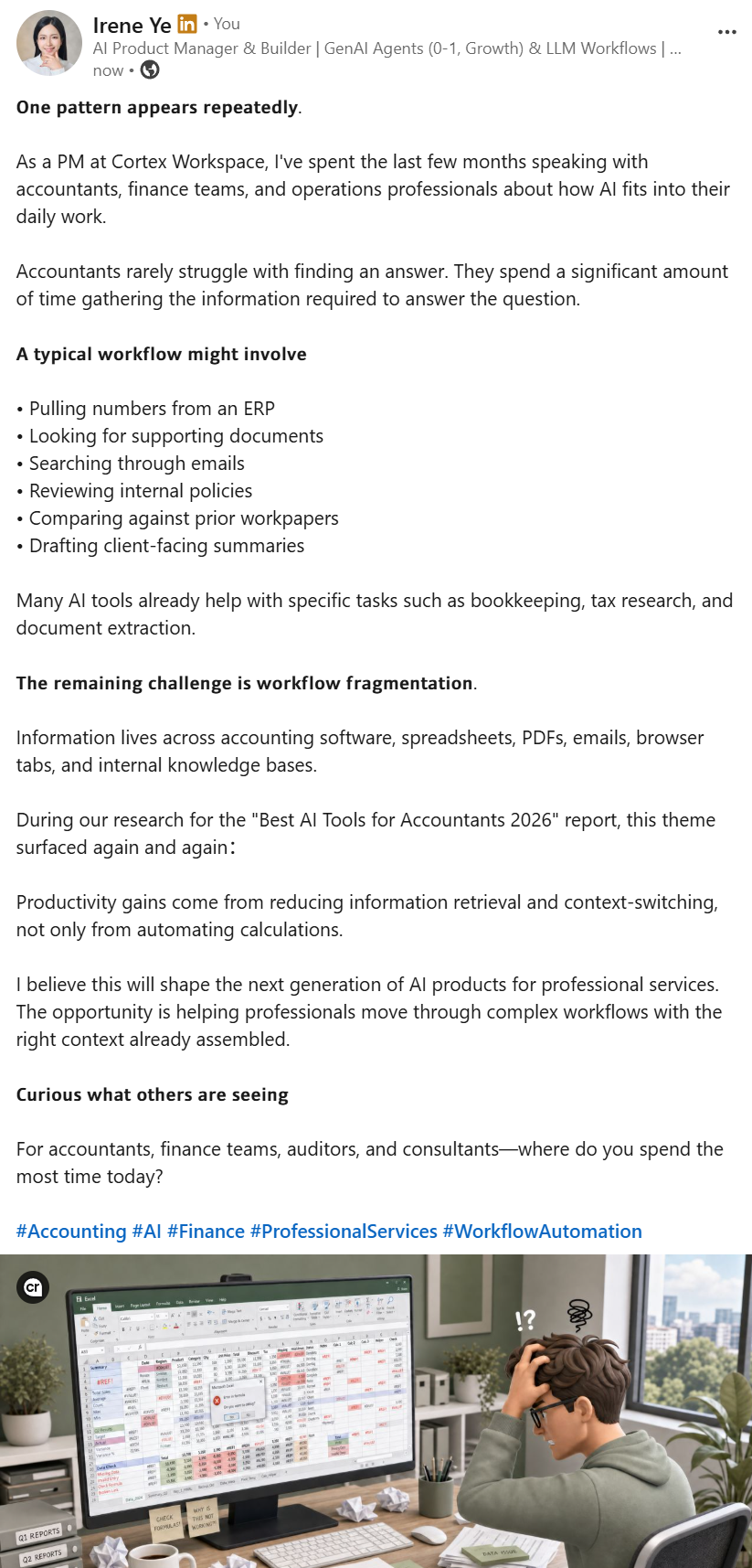 |
What changed: punchy hook moved to top · The remaining challenge is workflow fragmentation bolded · workflow steps as bullets · blank lines for mobile · engagement question preserved · #Accounting #AI #Finance … auto-added · report title "Best AI Tools for Accountants 2026" kept plain ASCII (no broken Unicode italic).
Why this exists
LinkedIn has no native bold/italic in feed posts. Tools like Typegrow use Unicode character mapping — this project does the same, plus smart layout:
- Promote a punchy hook above a long opener
- Bold thesis lines (
The challenge is …) - Bullet lists, stat emphasis, engagement questions
- Auto-suggest hashtags (plain ASCII, footer)
- Keep report titles
"Best Tools 2026"in plain text (fixes editor cursor bugs)
Built for AI coding players who write posts in Agent chat and want copy-paste output.
Quick start (CLI)
git clone https://github.com/IreneYe08/linkedin-smart-formatter.git
cd linkedin-smart-formatter

python scripts/linkedin_post.py --self-test
python scripts/linkedin_post.py --file examples/draft-accounting-ai.txt --count --explain
Copy stdout → LinkedIn composer.
Install for your Agent
One repo, multiple platforms:
| Platform | Install path | Skill location |
|---|---|---|
| Cursor | ./install.sh or install.ps1 | ~/.cursor/skills/linkedin-text-formatter |
| Claude Code | same | ~/.claude/skills/linkedin-text-formatter |
| Cortex Workspace | dedicated repo (recommended) or cortex/ in this repo | ~/.cortex/skills/linkedin-text-formatter |
| Codex / CLI agents | paste snippet | skills/codex/AGENTS.snippet.md → your AGENTS.md |
macOS / Linux
git clone https://github.com/IreneYe08/linkedin-smart-formatter.git ~/linkedin-smart-formatter
cd ~/linkedin-smart-formatter
./install.sh
Windows (PowerShell)
git clone https://github.com/IreneYe08/linkedin-smart-formatter.git $env:USERPROFILE\linkedin-smart-formatter
cd $env:USERPROFILE\linkedin-smart-formatter
.\install.ps1
py -3 scripts\linkedin_post.py --self-test
Install writes ~/.linkedin-formatter-home so agents resolve the CLI path automatically.
Cortex Workspace (full edition)
Recommended: use the dedicated Cortex repo — clone straight into your skills folder:
git clone https://github.com/IreneYe08/linkedin-text-formatter-cortex.git $env:USERPROFILE\.cortex\skills\linkedin-text-formatter
Includes scripts + 8-block post guidelines + anti-AI writing rules.
Alternatively, copy cortex/ from this monorepo (kept in sync for convenience).
Details: cortex/README.md · linkedin-text-formatter-cortex
Agent workflow
User pastes draft
    → Agent saves to temp file
    → python scripts/linkedin_post.py --file draft.txt --count --explain
    → Agent returns formatted post + layout summary
See skills/_shared/workflow.md.
What smart layout does
| Signal | Action |
|---|---|
| Long line 1 + short punchy line 2 | Move hook to top |
Hook / thesis / Title: headers | Unicode bold (sans) |
- items / 1. / [ ] | Lists |
40%, 3x, $10k | Bold metric (+ Unicode digits) |
Closing where do you…? | Italic |
"Report 2026" report | Plain ASCII quotes |
| Keywords in body | Auto hashtags (max 5, footer) |
Full rules: docs/layout-rules.md
CLI flags
--count --explain          Show char count + layout log
--less-bold                Hook only — skip section headers
--no-hashtags              Disable auto hashtags
--hashtags 3               Limit footer tags
--no-promote-hook          Keep original line order
--self-test                Run regression tests
Project layout
linkedin-smart-formatter/
├── scripts/           # Python engine (stdlib only)
│   └── linkedin_post.py   ← entry point
├── skills/
│   ├── cursor/        # Cursor Agent Skill
│   ├── claude-code/   # Claude Code Skill
│   ├── cortex/        # Cortex Workspace Skill
│   └── codex/         # AGENTS.md snippet
├── docs/
├── examples/
├── install.sh
└── install.ps1
Important limitations
| Topic | Detail |
|---|---|
| Not official | Not affiliated with LinkedIn, Typegrow, Cursor, Anthropic, or Cortex |
| Search | Unicode 𝗯𝗼𝗹𝗱 ≠ searchable bold — don't bold keywords |
| Accessibility | Screen readers struggle with Unicode styled letters |
| Char limit | Styled chars count ~2× toward LinkedIn's ~3000 limit |
| Privacy | 100% local — drafts never leave your machine |
Details: docs/reference.md
Extend
- Hashtags: edit
scripts/hashtags.py— add(regex, "#Tag", priority)rules - Layout heuristics: edit
scripts/smart_layout.py - New platform: copy
skills/cursor/SKILL.md→skills/your-platform/
Contributing
PRs welcome. Run python scripts/linkedin_post.py --self-test before submitting.
License
MIT — see LICENSE
Made for AI builder workflows · Cortex Workspace friendly