
PokéAgent-Safari
Hwiyeon/poke-agent-safari
Dashboard RPG para monitorar agentes Claude com coleção de Pokémon e rastreamento de tokens
Ver no GitHubDashboard local em tempo real para Claude Code e Codex que transforma agentes em Pokémon, mostrando status de sessão, uso de tokens e progresso no Pokedex. Inclui modo coleção com treinamento, evolução de Pokémon e widget Electron flutuante para monitoramento contínuo.
Instalação
npx convez-ai Hwiyeon/poke-agent-safari1 comando no terminal: detecta o formato do repositório (marketplace ou plugin avulso) e instala via Claude Code. Requer Node 18+ e o Claude Code instalado.
Métricas
Casos de uso
- Monitorar múltiplos agentes Claude/Codex simultaneamente
- Rastrear consumo de tokens por projeto e sessão
- Gamificar e visualizar histórico de atividade de código
Veredito

Ferramenta criativa e funcional para developers que usam Claude Code/Codex intensivamente. O Dashboard RPG+coleção é leve e monitoramento de tokens é genuinamente útil; Electron sticker sempre-visível agrega valor em workflows de desenvolvimento contínuo. Recomendado para quem quer observabilidade com gamificação.
README
A tradução para o português deste README ainda está na fila.
PokéAgent-Safari
v0.2.0 - Collection & Sticker Release
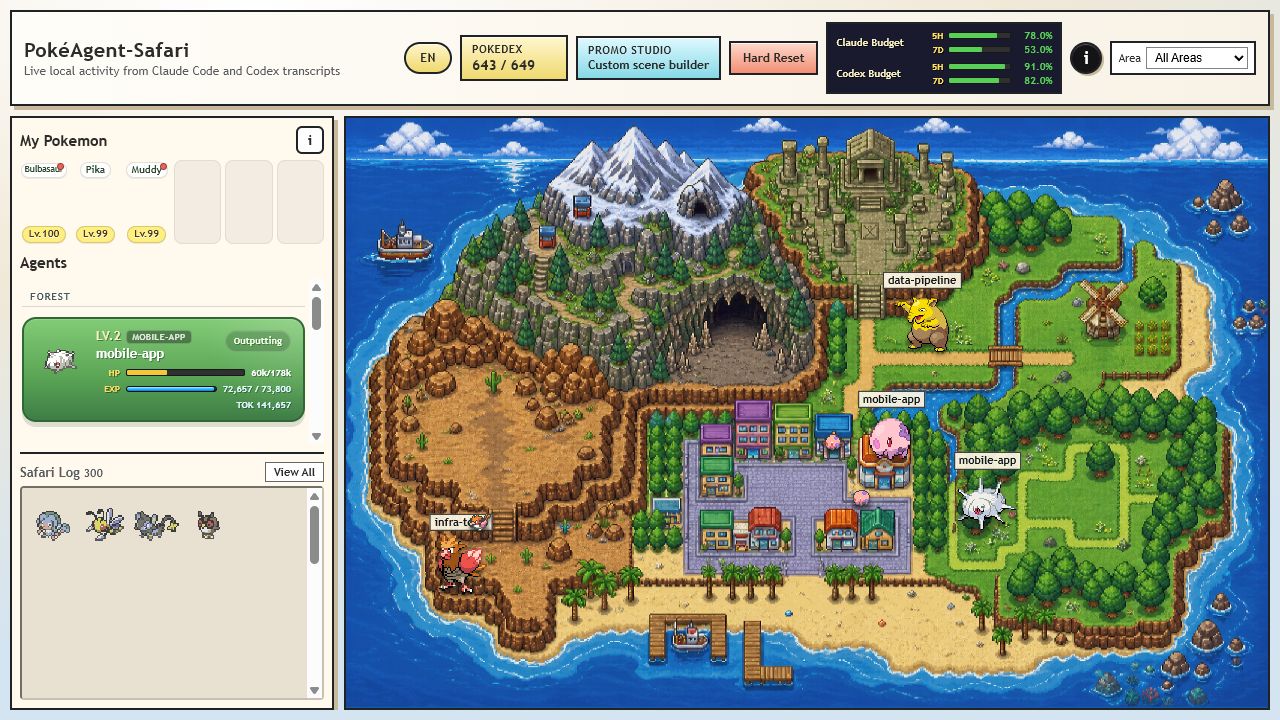
poke-agent-safari is a local activity dashboard for Claude Code and Codex. It watches transcript activity, turns each live agent into a Pokemon, and shows context, token usage, status, project, and session history as a small RPG-style safari.
v0.2.0 turns the dashboard into a collection loop. You can recruit Pokemon into My Pokemon, train them with real project token usage, collect evolution items, evolve them with generated Gen 1-5 rules, and keep an always-on-top Electron sticker open while you work.
Release Highlights
- Claude + Codex together:
--source allis now the default, with--source claudeand--source codexstill available. - Installable CLI:
npm installregisters thepoke-ascommand for your user account, andpoke-asopens the Electron sticker by default. - My Pokemon: recruit encountered or discovered Pokemon, manage a 6-slot party, box owned Pokemon, rename them, release them, and assign them to projects.
- Training: owned Pokemon gain EXP from actual token usage. Pokemon assigned to a matching project receive higher training weight.
- Evolution items: token usage earns item points, random draws produce evolution items, target tickets can claim a chosen item, and item evolutions consume the required item.
- Gen 1-5 Pokedex: generated Pokemon metadata now covers
#1-#649, including habitat, rarity, evolution paths, Korean names, and evolution rules. - Area-aware island: habitat-weighted spawns, area filters, detailed map assets, and an outside-area rail make the island more readable.
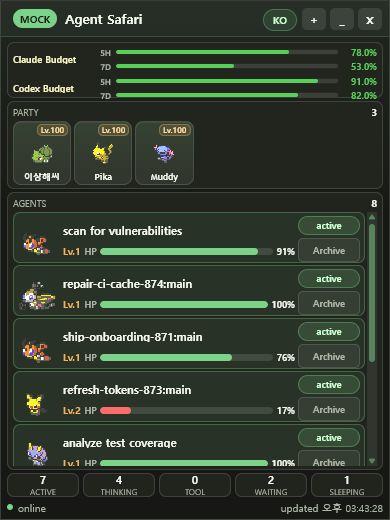
- Electron sticker: compact desktop monitor for budgets, party Pokemon, active agents, and status counts.
- Promo Studio: mock mode can compose custom scenes and export PNGs for screenshots or release images.
- VS Code extension refresh: watch Claude, Codex, all providers, or mock mode from the same shared UI.
- Unified persistence: live state is stored under
data/runtime/allwith Claude/Codex compatibility mirrors.
Product Tour
Live Dashboard
The main dashboard shows active agents on a habitat-aware island, live provider budgets, Pokedex progress, My Pokemon, and the Safari Log.
My Pokemon And Evolution Items
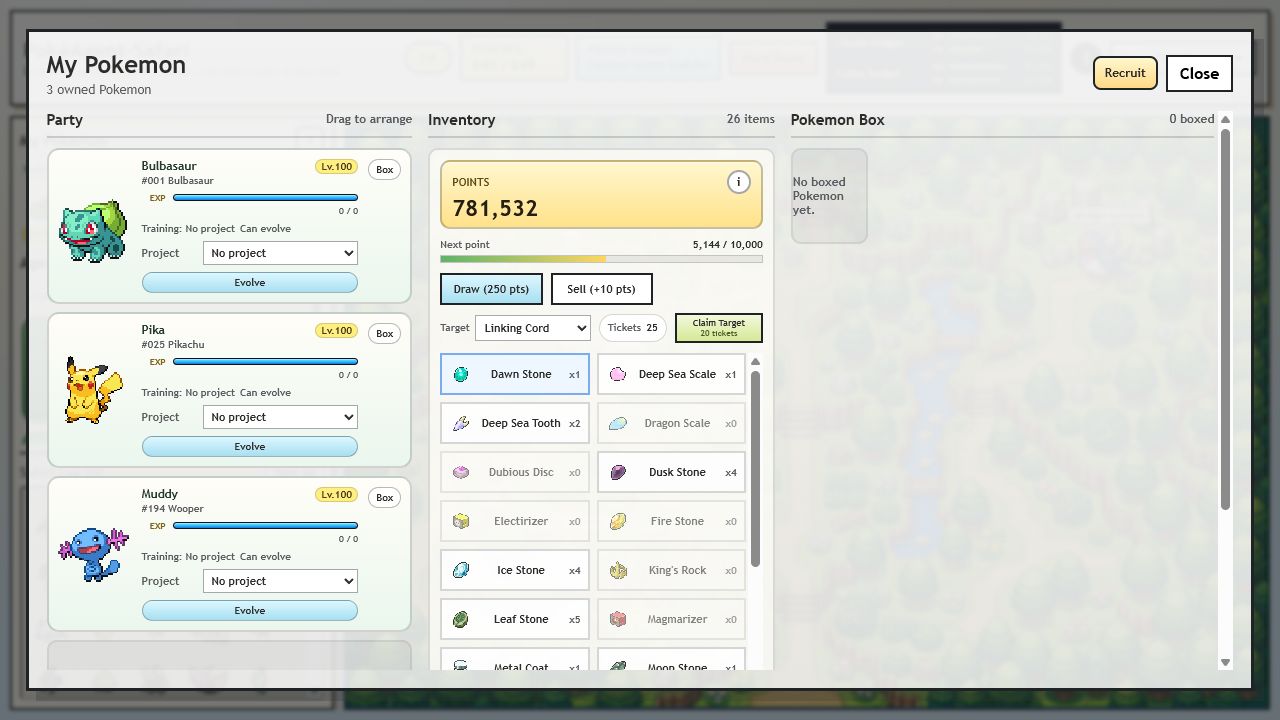
Owned Pokemon have party slots, levels, EXP bars, project assignments, evolution state, and box controls. The inventory panel tracks item points, random draws, target tickets, item sprites, selling, and target claims.
Pokedex
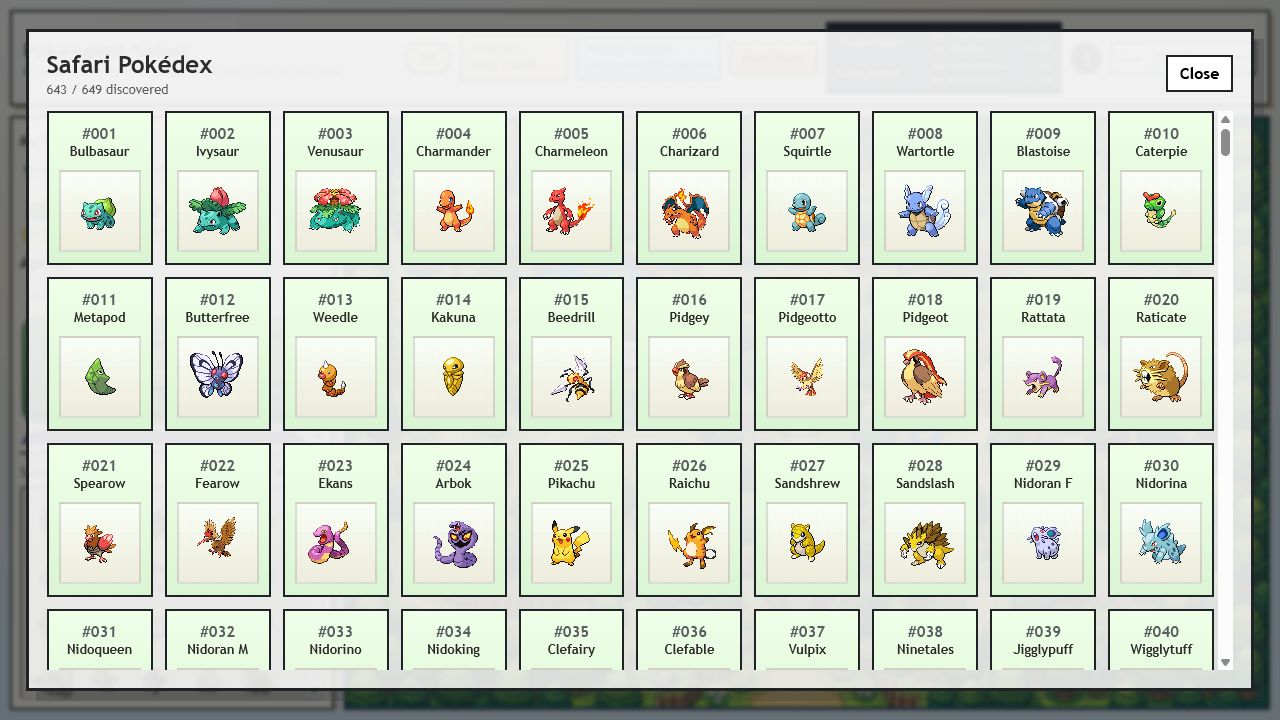
Every discovered Pokemon is registered with first-discovery metadata. The current Pokedex range is #1-#649.
Promo Studio
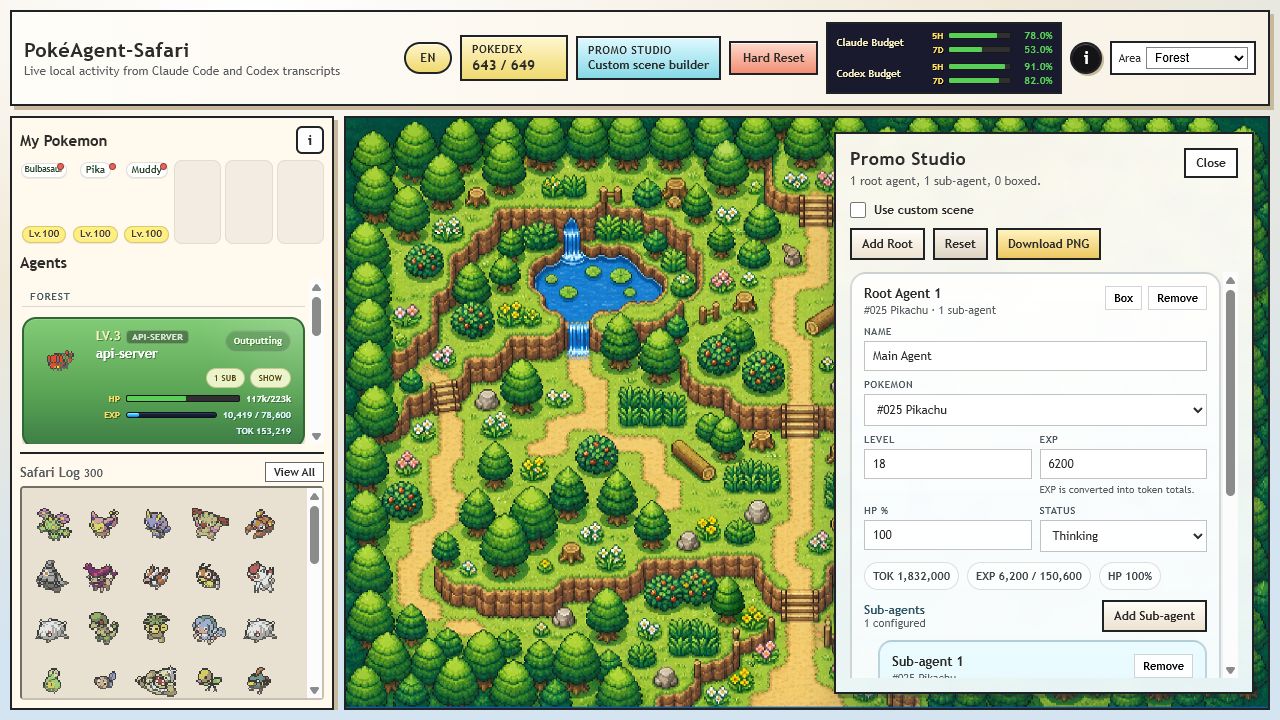
Mock mode unlocks Promo Studio: build a custom scene, pick Pokemon, tune level/EXP/HP/status, add subagents, box/unbox custom roots, and download the scene as a PNG.
Electron Sticker
The sticker is a compact always-on-top view for day-to-day monitoring. It uses the same runtime and snapshot payload as the full dashboard.
Installation
Requirements:
- Node.js
>=18 - npm
- git
Clone and install:
git clone git@github.com:Hwiyeon/poke-agent-safari.git
cd poke-agent-safari
npm install
npm run setup
npm install runs a best-effort CLI registration automatically. npm run setup repairs local Claude/Codex runtime path permissions, refreshes that poke-as command, creates or updates a sparse PokeAPI sprite checkout under public/vendor/pokeapi-sprites, copies required item sprites into public/item-sprites, and validates required map assets under data/map_assets.
If shell permissions prevented command registration during install, rerun:
npm run setup:cli
To rerun only the Claude/Codex runtime permission repair:
npm run setup:permissions
On Ubuntu 22.04, Electron may also need the standard desktop runtime libraries:
sudo apt update
sudo apt install -y libnss3 libatk-bridge2.0-0 libgtk-3-0 libxss1 libasound2 libgbm1
Quick Start
Open the Electron sticker:
poke-as
Use the + button in the sticker to expand into the full dashboard.
Provider-specific sticker modes:
poke-as --source all
poke-as --source claude
poke-as --source codex
Mock sticker:
poke-as --mock
Web dashboard:
poke-as web
Then open:
http://127.0.0.1:8123
Web mock mode:
poke-as web --mock
Remote Electron viewer over SSH:
# Remote server. On headless Linux, plain `poke-as` falls back to this web mode.
poke-as --host 127.0.0.1 --port 8123 --source all
# Local machine
ssh -N -L 8123:127.0.0.1:8123 user@server
poke-as viewer
viewer does not watch local transcripts or start a local dashboard server. It only opens the remote dashboard in an always-on-top Electron sticker. With the tunnel above, poke-as viewer can omit --url because it defaults to http://127.0.0.1:8123. If the remote server has a GUI and you want to force web-only mode, use poke-as web --host 127.0.0.1 --port 8123 --source all.
Legacy web aliases still work:
poke-as watch
npm run watch
npm run mock
CLI Reference
poke-as [--source claude|codex|all] [--port 8123] [--path ~/.claude/projects] [--codex-path ~/.codex/sessions] [--no-pokeapi]
poke-as --mock [--port 8123] [--no-pokeapi]
poke-as sticker [--source claude|codex|all] [--port 8123]
poke-as viewer [--url http://127.0.0.1:8123] [--host 127.0.0.1 --port 8123]
poke-as web [watch|mock] [--source claude|codex|all] [--port 8123]
poke-as watch [--source claude|codex|all] [--port 8123]
poke-as hard-reset [watch|mock] [--source claude|codex|all]
poke-as help
Config precedence:
defaults < config.json < environment variables < CLI flags
Environment variables:
PORT
HOST
AGENT_SAFARI_SOURCE
CLAUDE_PROJECTS_PATH
CODEX_SESSIONS_PATH
ACTIVE_TIMEOUT_SEC
STALE_TIMEOUT_SEC
ENABLE_POKEAPI_SPRITES
How It Works
Agents
HPrepresents remaining context window.EXPandLVrepresent token usage.Statusshows thinking, tool-running, outputting, waiting, or sleeping.- Root agents render at full size.
- Subagents render nearby as smaller Pokemon in the same evolution line when possible.
- Quiet root agents become
Sleepingafter10 minutesin watch mode. - Stale root agents move into the Safari Log after
8 hours.
My Pokemon
- Recruit from active encounters or discovered Pokedex entries.
- Manage a 6-slot party and a Pokemon Box.
- Rename, release, box, unbox, and reorder party members.
- Assign Pokemon to projects so matching project activity trains them faster.
- Hold evolution when you want to delay it.
Training rules:
20agent tokens become1owned Pokemon EXP before allocation.- Project-assigned Pokemon receive allocation weight
5for matching project activity. - Unassigned Pokemon can share general training.
- Training events are persisted and included in dashboard snapshots.
Evolution Items
10,000total tokens earn1item point.- A random draw costs
250item points. - Draw success rate is
30%. - A target item receives a
2.5xdraw weight multiplier. - If a successful targeted draw misses the target, you gain
1target ticket. 20target tickets can claim the selected target item.- Selling an item gives
10item points. - Point buying is disabled.
The item pool contains Gen 1-5 evolution items plus linking-cord for trade-style evolutions. Evolution rules are generated into data/evolution_rules.json.
Island Areas
Pokemon assignment is habitat-aware. Selecting an exploration area changes the root-agent spawn pool when area data is available.
Supported areas:
mountaincaveforestruinrough_terraingrasslandurbanwaters_edgesea
Persistence
Live watch state uses a unified source of truth:
data/runtime/all/state.json
data/runtime/all/pokedex.json
Compatibility mirrors are also written:
data/runtime/claude/state.json
data/runtime/claude/pokedex.json
data/runtime/codex/state.json
data/runtime/codex/pokedex.json
Mock data uses:
data/runtime/mock/state.json
data/runtime/mock/pokedex.json
Legacy data/state.json and provider runtime files are migrated into the unified store when possible.
Hard Reset
Available from the dashboard or CLI:
poke-as hard-reset [watch|mock] [--source claude|codex|all]
Hard reset clears persisted state, Safari Log records, My Pokemon, evolution items, and Pokedex progress. In watch mode it also writes a reset flag so the next watcher start skips historical transcript tail replay.
VS Code Extension
The VS Code extension reuses the same watcher, parser, state model, and public UI.
Commands:
Agent Safari: Open (Watch)Agent Safari: Open (Watch Codex)Agent Safari: Open (Watch All)Agent Safari: Open (Mock)Agent Safari: Hard ResetAgent Safari: Download Sprite Assets
Sprite assets are downloaded into VS Code global storage on demand.
Development
Useful scripts:
npm run dev:pokemon-cache
npm run dev:pokemon-data:preview
npm run dev:pokemon-data
npm run dev:evolution-rules
npm run dev:map
npm run dev:area-mask
npm run dev:spawn-viz
npm run dev:mask-editor
npm test
The dev/ folder contains generation tools for Pokemon metadata, rarity calibration, evolution rules, map assets, and area masks. Runtime files that ship with the app live in data/, public/, and the explicit package.json files list.
Notes
- Claude Code transcripts are watched under
~/.claude/projectsby default. - Codex sessions are watched under
~/.codex/sessionsby default. - Pokemon sprites and metadata come from PokeAPI-compatible public resources. Pokemon IP belongs to its respective owners.