
MCP Server Hostsmith
hostsmith/mcp-server
Publique sites estáticos gerados por IA direto do Claude com uma chamada MCP
Ver no GitHubServidor MCP oficial da plataforma Hostsmith que permite agents e modelos IA publicarem arquivos como sites estáticos com HTTPS em segundos, sem repositório ou CI. Suporta domínios customizados, sites privados e residência de dados em EU ou US.
Instalação
npx convez-ai hostsmith/mcp-server1 comando no terminal: detecta o formato do repositório (marketplace ou plugin avulso) e instala via Claude Code. Requer Node 18+ e o Claude Code instalado.
Métricas
Casos de uso
- Publicar relatórios HTML gerados pelo Claude Code como URLs públicas
- Demonstrações e previews rápidos de conteúdo gerado por agents
- Deploy de one-pagers e landing pages sem configuração de build
- Compartilhar artefatos de IA com URLs HTTPS customizadas
Veredito

Ferramenta bem pensada para o workflow de agents, eliminando fricção entre geração de artefatos e publicação. Implementação clean com OAuth, suporte a múltiplos transports (Desktop, stdio, HTTP) e excelente documentação. Preenche uma lacuna real no ecossistema MCP para hosting ephemeral.
README
A tradução para o português deste README ainda está na fila.
@hostsmith/mcp-server



Official Model Context Protocol server for the Hostsmith hosting platform.
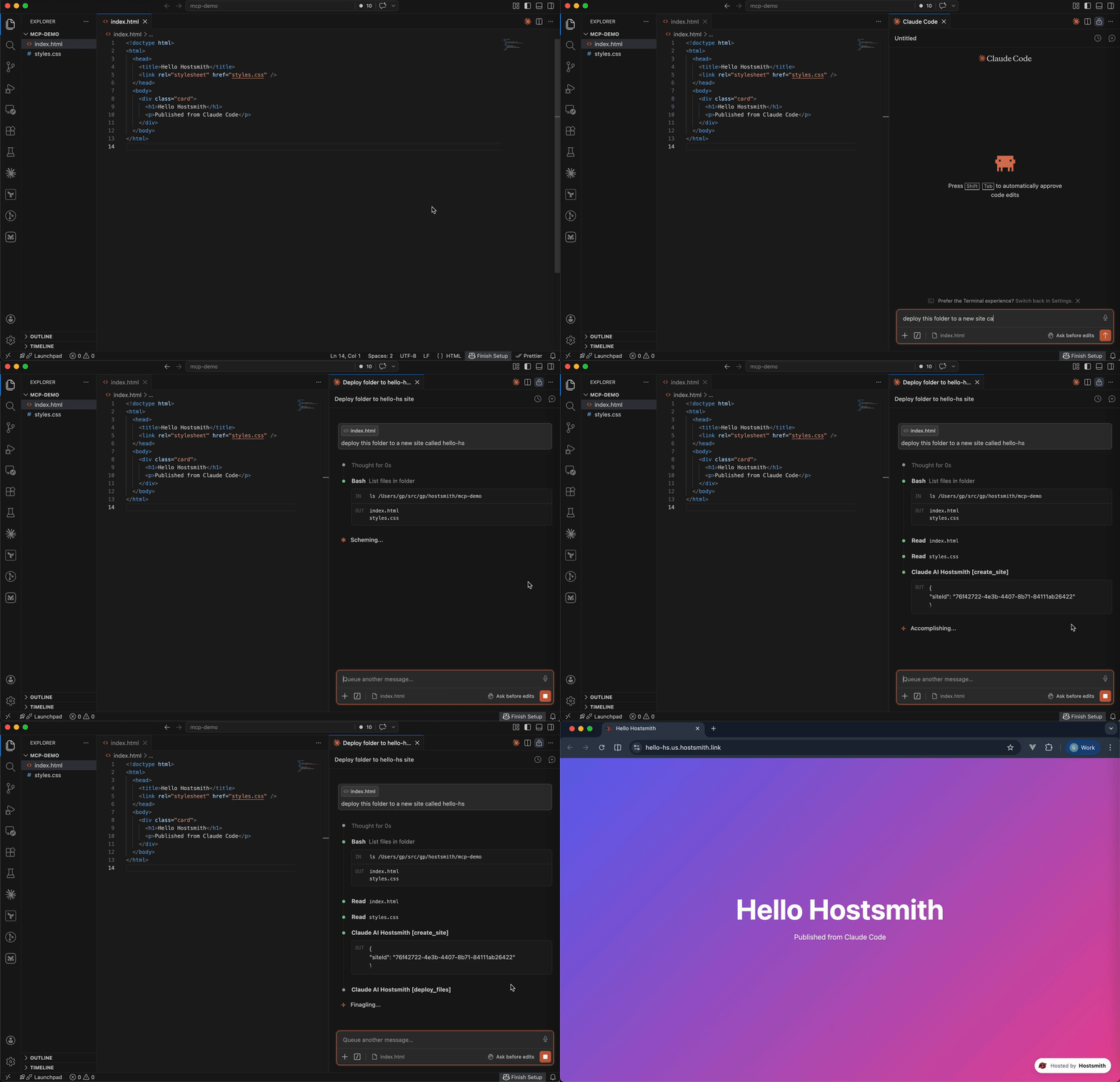
Static hosting for agents - give it a file, get a live URL. Claude Code shipping an HTML report. Cursor previewing a generated demo. Claude Desktop publishing a one-pager. One MCP call → public HTTPS URL in seconds. No repo, no CI, no build step. Custom domains, private sites, EU or US data residency.
Why Hostsmith
- Artifact-first. No repo, no build config - drop a file (or have the agent generate one), get a URL.
- Built for agents. MCP-native, OAuth-scoped, structured tool descriptions agents can chain.
- EU or US data residency. Pick where the user's data lives, architecturally - not via a checkbox.
Tools
| Tool | Description |
|---|---|
list_sites | List all sites in your account for a given data partition |
get_site | Get details of a specific site |
create_site | Create a new site |
delete_site | Delete a site |
list_domains | List available domains (shared and custom) |
get_account | Get account info, subscription plan, and usage |
deploy_files | Deploy inline file contents to a site |
deploy_create_upload | Start a direct upload for binaries / large files |
deploy_finalize | Commit a deploy started with deploy_create_upload |
Usage
Authentication is via OAuth 2.0. Static access tokens are not supported.
Claude Desktop
Open Settings → Connectors → Add custom connector and enter:
https://mcp.hostsmith.net/mcp
Claude Desktop runs the OAuth flow in your browser to authorize the connector against your Hostsmith account.
Stdio (Claude Code, Cursor, Cline, Windsurf, Zed)
Add this entry to your MCP client's config:
{
  "mcpServers": {
    "hostsmith": {
      "command": "npx",
      "args": ["-y", "@hostsmith/mcp-server"]
    }
  }
}
The first tool call triggers an OAuth flow in your browser to authorize the server against your Hostsmith account.
Remote URL (other clients)
Any MCP client that supports remote Streamable HTTP transport can point directly at the hosted server:
{
  "mcpServers": {
    "hostsmith": {
      "url": "https://mcp.hostsmith.net/mcp"
    }
  }
}
The client handles the OAuth flow automatically - you'll be redirected to Hostsmith to authorize access.
Cursor (one-click install)

Click the badge to add the remote Hostsmith server (https://mcp.hostsmith.net/mcp) to Cursor. The first tool call triggers OAuth in your browser.
Local HTTP (self-hosted)
Run the server in HTTP mode and have your MCP client perform OAuth against it:
npx @hostsmith/mcp-server http
{
  "mcpServers": {
    "hostsmith": {
      "url": "http://localhost:3100/mcp"
    }
  }
}
Environment variables
| Variable | Default | Description |
|---|---|---|
HOSTSMITH_URL | https://hostsmith.net | Hostsmith app URL (OAuth endpoints). |
HOSTSMITH_API_DOMAIN | - | Override the upstream API domain across both partitions. The server prepends us.api. and eu.api. to the value you set. Example: HOSTSMITH_API_DOMAIN=staging.example.com routes calls to https://us.api.staging.example.com and https://eu.api.staging.example.com. Use this to point at a staging or proxied API host. |
HOSTSMITH_BASE_URL | - | Override the API base URL with a single fixed value, bypassing partition selection entirely. |
PORT | 3100 | HTTP server port. |
MCP_BASE_URL | http://localhost:$PORT | Public URL of the MCP server, used in OAuth metadata. |
Network access
The MCP transport and OAuth flow run in your client's app process and need no agent-sandbox configuration - if your MCP client connected, those paths are working.
The one place sandboxed agents commonly fail is the upload PUT during deploy_create_upload + deploy_finalize: the bytes go from the agent's shell to the partition API host. From the agent terminal, allow outbound HTTPS (port 443) to:
us.api.hostsmith.net(for sites in theuspartition)eu.api.hostsmith.net(for sites in theeupartition)
Sandbox-specific snippets (Cursor sandbox.json, Claude Code settings.json, Codex config.toml, generic firewall guidance) live in the Network access docs.
Troubleshooting
- Tool calls return 401: the OAuth session expired. Reconnect from your MCP client to re-authorize.
- OAuth redirect loops: confirm
MCP_BASE_URLmatches the URL your MCP client uses to reach the server. - Wrong partition: tool calls accept an explicit
partitionarg; if you omit it, the partition is inferred from your access token. - Upload PUT fails (DNS, refused, proxy, timeout): the agent's shell can't reach the partition API host. See Network access.
- Inspect the install:
npx @modelcontextprotocol/inspector npx -y @hostsmith/mcp-server httpto browse tools interactively.
Documentation
Deeper material lives at hostsmith.net/docs/mcp.
Contributing
See CONTRIBUTING.md (including the Releases section for the version-stamping flow). Security issues: see SECURITY.md.