
Claude Device Sync
hmennen90/claude-device-sync
Sincronize sessões Claude entre dispositivos com Git + criptografia E2E
Ver no GitHubPlugin de sincronização de sessões entre dispositivos com suporte a memória compartilhada, lembretes criptografados e modo em equipe. Usa Git como backend de armazenamento, sincroniza automaticamente contexto do Claude Code e oferece 5 skills integrados além de CLI standalone.
Instalação
npx convez-ai hmennen90/claude-device-sync1 comando no terminal: detecta o formato do repositório (marketplace ou plugin avulso) e instala via Claude Code. Requer Node 18+ e o Claude Code instalado.
Métricas
Casos de uso
- Continuar trabalhos do Claude em outro dispositivo sem perder contexto
- Compartilhar sesões e memória entre membros de equipe de forma segura
- Configurar lembretes com parsing natural de tempo (português/inglês)
- Manter histórico de sessões sincronizado em repositório privado
Veredito

Solução robusta e bem arquitetada para times que usam Claude Code e precisam de continuidade entre dispositivos. Implementação de segurança (Argon2id + ChaCha20-Poly1305) é profissional, mas requer compreensão técnica de Git e Node.js 20+.
README
A tradução para o português deste README ainda está na fila.
claude-device-sync
The first Claude Code Plugin with encrypted cross-device session sync, shared memory, native reminders, and team mode. Installs as a plugin, includes 5 skills, works standalone as a CLI.


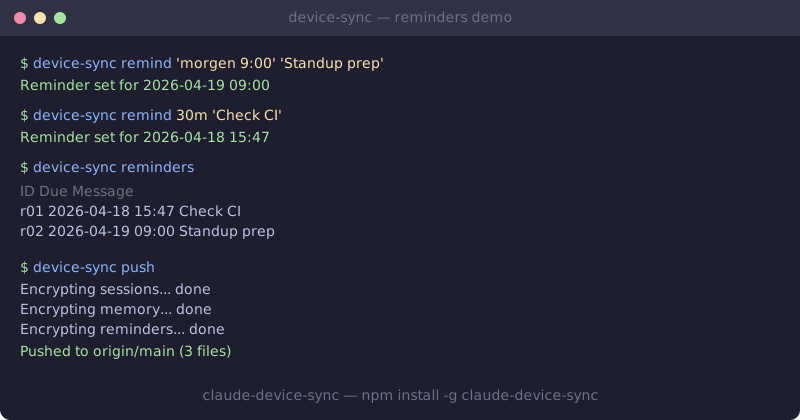
What You Get
- Native Claude Code Plugin — 5 skills (
/remind,/resume,/setup,/status,/sync) + auto-sync session hook - Git-backed session sync — use any private repo (GitHub / GitLab / Gitea / self-hosted)
- Shared memory — sync
~/.claude/memory files across devices - Reminders with DE/EN time parser —
"morgen 9:00",30m,2h,1d, optional webhooks - Team mode — per-user namespace, resume teammates' sessions
- End-to-end encrypted — Argon2id key derivation + ChaCha20-Poly1305
Install
npm install -g claude-device-sync
Requirements: Node.js 20+, Git, a private Git repository (GitHub, GitLab, etc.)
Quick Start
# 1. Initialize with your private repo
device-sync init git@github.com:you/your-sync-repo.git

# 2. Install auto-sync hooks into Claude Code
device-sync hooks install

# 3. Done! Sessions and memory sync automatically.
Skills
When installed as a Claude Code plugin, the following skills become available as slash commands:
/setup — Initialize device-sync
Guides you through connecting a private Git repo, choosing personal or team mode, setting a passphrase, and installing hooks.
/sync — Push & pull sessions
Push or pull sessions, memory, and reminders. Supports --memory-only and --session-only flags.
/resume — Continue from another device
Pulls the latest sync state, finds the most recent session, decrypts it and loads the context so you can pick up where you left off.
/remind — Cross-device reminders
Set reminders with natural language time parsing (DE/EN). Supports relative (30m, 2h) and absolute ("morgen 9:00", "tomorrow 14:30") times. Optional --webhook for Slack/Teams notifications.
/status — Configuration & hooks
Shows sync config, registered devices, hook status, and team members. Manage hooks and team settings from here.
CLI Reference
Session Sync
# Push current session + memory
device-sync push

# Pull latest from remote
device-sync pull

# Resume the latest session (from any device)
device-sync resume

# List all synced sessions
device-sync sessions

# Resume a specific user's session (team mode)
device-sync resume --user colleague
Reminders
# Set a reminder
device-sync remind 30m "Check deploy status"
device-sync remind 2h "Review PR"
device-sync remind "morgen 9:00" "Standup prep"
device-sync remind 1d "Release notes" --webhook https://hooks.slack.com/...

# View reminders
device-sync reminders
device-sync reminders --due
device-sync reminders --dismiss
Team Mode
# Initialize in team mode
device-sync init git@github.com:team/shared-sync.git --mode team --username alice

# On another device / team member
device-sync init git@github.com:team/shared-sync.git --mode team --username bob

# Add a team member
device-sync team add charlie

# All sessions and memory are visible to all team members
device-sync sessions --user bob
device-sync resume --user alice
Hooks (Auto-Sync)
# Install hooks into Claude Code settings
device-sync hooks install

# Check hook status
device-sync hooks status

# Remove hooks
device-sync hooks uninstall
Installed hooks:
| Event | Trigger | Action |
|---|---|---|
| SessionStart | Always | device-sync pull |
| SessionEnd | Always | device-sync push |
| PostToolUse | Write/Edit | device-sync push --memory-only |
| PreToolUse | Always | device-sync pull --memory-only |
Reminder Daemon
# Install background checker (fires webhooks for due reminders)
device-sync daemon start

# Check status
device-sync daemon status

# View logs
device-sync daemon log

# Stop daemon
device-sync daemon stop
Maintenance
# View sync status
device-sync status

# Purge old sessions (default: >30 days)
device-sync purge
device-sync purge --days 14
device-sync purge --dry-run

# Purge old reminders
device-sync reminders --dismiss
Encryption
All data is encrypted before being committed to Git. No plaintext ever touches the repo.
| Parameter | Value |
|---|---|
| Cipher | ChaCha20-Poly1305 |
| KDF | Argon2id (64 MB memory, 3 iterations) |
| Key storage | OS keychain (macOS Keychain, Linux libsecret, Windows Credential Vault) |
| Fingerprint | Truncated SHA-256 stored in repo for password verification on new devices |
What's encrypted: session data, memory files, reminders — all stored as .enc blobs.
What's not encrypted: config.json (sync mode, device list, team member names), Git metadata.
Your Password
    → Argon2id + salt (stored in repo)
256-bit Key (stored in OS keychain)
    → ChaCha20-Poly1305
Encrypted .enc files → committed to private Git repo
Repo structure:
device-sync-repo/
├── config.json              # Sync config (mode, devices, team members)
├── sessions/
│   ├── latest.enc           # Pointer to most recent session
│   └── {user}/{device}/     # Encrypted session files
├── memory/
│   ├── {user}/{project}/    # Personal memory files
│   └── shared/{project}/    # Team-shared memory (team mode)
└── reminders/
    └── pending.enc          # Encrypted reminder list
Platform Support
| Platform | Status | Notes |
|---|---|---|
| macOS | Full support | Keychain + launchd daemon |
| Linux | Full support | libsecret + crontab daemon |
| Windows | Full support | Credential Vault + Task Scheduler daemon |
Troubleshooting
GitConstructError: Cannot use simple-git on a directory that does not exist
Fixed in 0.2.1. Upgrade with npm install -g claude-device-sync@latest.
No memory directory found on Windows
Fixed in 0.2.2. The project-directory lookup did not strip the drive-letter colon. Upgrade to 0.2.2+.
Marketplace
This plugin will be submitted to the Claude Code Plugin Marketplace once the marketplace is publicly available. In the meantime, install it globally via npm and the plugin is automatically discovered by Claude Code.
License
MIT