
MCP Audit
himanshuskukla/mcp-audit
npm audit para a era dos agentes de IA — detecta 11 classes de vulnerabilidades MCP
Ver no GitHubScanner de segurança para configurações de servidores MCP que identifica vulnerabilidades como secrets hardcoded, comandos perigosos, falta de TLS e problemas de sandboxing. Executa offline em segundos, cobrindo 8 das 10 categorias OWASP MCP, e oferece modo live para inspeção profunda de schemas de ferramentas.
Instalação
npx convez-ai himanshuskukla/mcp-audit1 comando no terminal: detecta o formato do repositório (marketplace ou plugin avulso) e instala via Claude Code. Requer Node 18+ e o Claude Code instalado.
Métricas
Casos de uso
- Auditar configurações de MCP clients (Claude Desktop, Cursor, VS Code, etc)
- Identificar secrets expostos e credenciais hardcoded antes do deploy
- Validar segurança de schemas de ferramentas em modo live
- Integrar verificações de segurança em pipelines CI/CD via GitHub Action
Veredito

Ferramenta essencial e pronta para produção. Preenche um gap crítico de segurança no ecossistema MCP com cobertura sólida de vulnerabilidades comuns (secrets, SSRF, Docker, TLS) e zero dependências cloud — roda 100% offline com performance otimizada.
README
A tradução para o português deste README ainda está na fila.
mcp-audit
Security scanner for MCP configurations
npm audit for the AI agent era


11 security rules | 12 MCP clients | 8/10 OWASP categories | Zero dependencies on cloud
Quick Start | What It Checks | Live Scan | Security Score | GitHub Action
Only 8.5% of MCP servers use OAuth. 53% rely on static API keys. 36.7% are vulnerable to SSRF. mcp-audit finds these issues before attackers do.
Quick start
npx mcp-audit-cli
Scans all MCP clients on your machine in under 2 seconds. No API keys. No accounts. No cloud calls. Runs entirely offline.
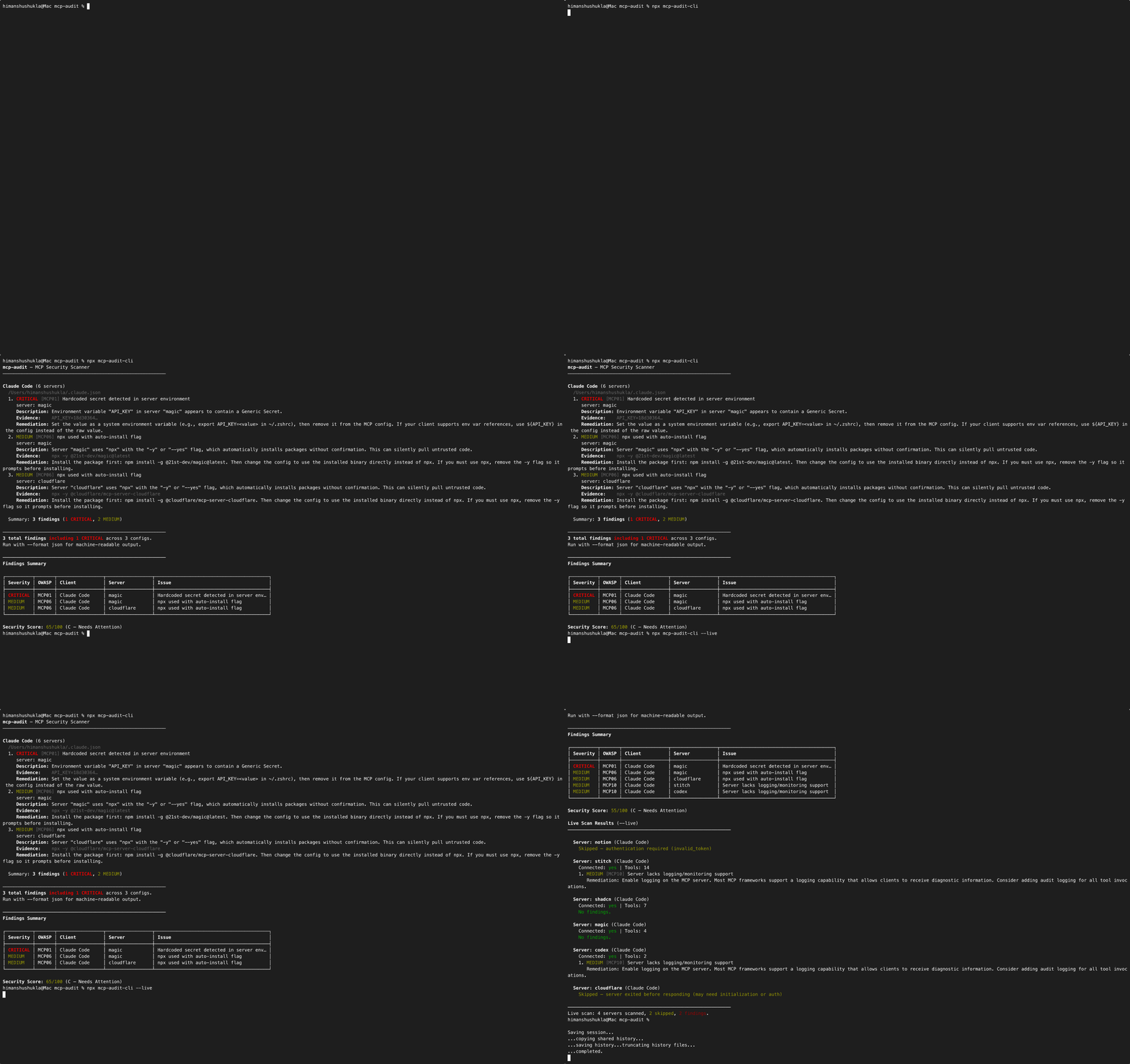
npx mcp-audit-cli --live
Deep scan — also connects to your running MCP servers and inspects tool schemas for poisoning and missing logging.
What it checks
Static rules (config analysis — instant)
| Rule | OWASP | Severity | What it detects |
|---|---|---|---|
hardcoded-secrets | MCP01 | CRITICAL | 11 secret patterns in env blocks (OpenAI, Anthropic, GitHub, AWS, Slack, Stripe, DB URLs, Google, Notion, generic) |
dangerous-commands | MCP05 | HIGH | Shell interpreters (bash, sh, zsh, cmd, powershell) as commands + shell metacharacters in args |
missing-tls | MCP07 | HIGH | HTTP URLs for remote MCP servers (localhost is allowed) |
docker-sandboxing | MCP02 | HIGH | --privileged, missing --read-only, dangerous volume mounts, missing network isolation |
sensitive-paths | MCP02 | HIGH | ~/.ssh, ~/.aws, ~/.kube, ~/.gnupg, .env files in server args |
npx-auto-install | MCP06 | MEDIUM | npx -y auto-installs packages without verification |
excessive-permissions | MCP02 | MEDIUM | Root /, home directory, or system paths in server args |
env-leakage | MCP01 | MEDIUM | No env block (inherits full process environment) + sensitive variable passthrough |
shadow-servers | MCP09 | MEDIUM | Same server name across multiple MCP clients (cross-config) |
Live rules (--live — connects to servers)
| Rule | OWASP | Severity | What it detects |
|---|---|---|---|
tool-poisoning | MCP03 | CRITICAL | Hidden instructions, data exfiltration hints, excessive scope claims, suspicious Unicode in tool descriptions |
logging-check | MCP10 | MEDIUM | Servers with no logging or audit capability |
Supported clients (12)
Claude Desktop, Claude Code, Cursor, VS Code, Windsurf, Gemini CLI, LM Studio, VS Code RooCode, VS Code Augment, Zed, Amazon Q Developer, Cline
Run mcp-audit clients to see all config paths for your OS.
CLI usage
mcp-audit [options] [command]

Options:
  -V, --version          Show version
  -f, --format <format>  Output format: terminal (default) or json
  -c, --config <path>    Scan a specific config file
  --client <name>        Client name when using --config
  --live                 Connect to MCP servers and inspect tool schemas
  --no-color             Disable colored output
  --strict               Exit with code 1 if any findings (CI mode)
  -h, --help             Show help

Commands:
  clients                List all supported MCP clients and their config paths
Examples
# Scan all detected clients on your machine
npx mcp-audit-cli

# Deep scan — connect to servers, inspect tool schemas for poisoning
npx mcp-audit-cli --live

# Scan a specific config file
npx mcp-audit-cli --config ~/.cursor/mcp.json

# JSON output for CI pipelines
npx mcp-audit-cli --format json

# Fail CI if any findings
npx mcp-audit-cli --strict

# List supported clients and their config paths for your OS
npx mcp-audit-cli clients
Try the demo
The repo includes a deliberately insecure config file that triggers all 9 static rules — 20 findings across 5 servers, scored 0/100 (F). Clone the repo and run:
git clone https://github.com/himanshuskukla/mcp-audit.git
cd mcp-audit && npm ci && npm run build
node dist/index.js --config tests/fixtures/configs/nightmare-config.json
This is a real scan — not canned output. mcp-audit parses the config, runs every rule, and produces live findings including hardcoded secrets, shell injection, privileged Docker containers, exposed SSH/AWS credential paths, environment leakage, and npx auto-install risks.
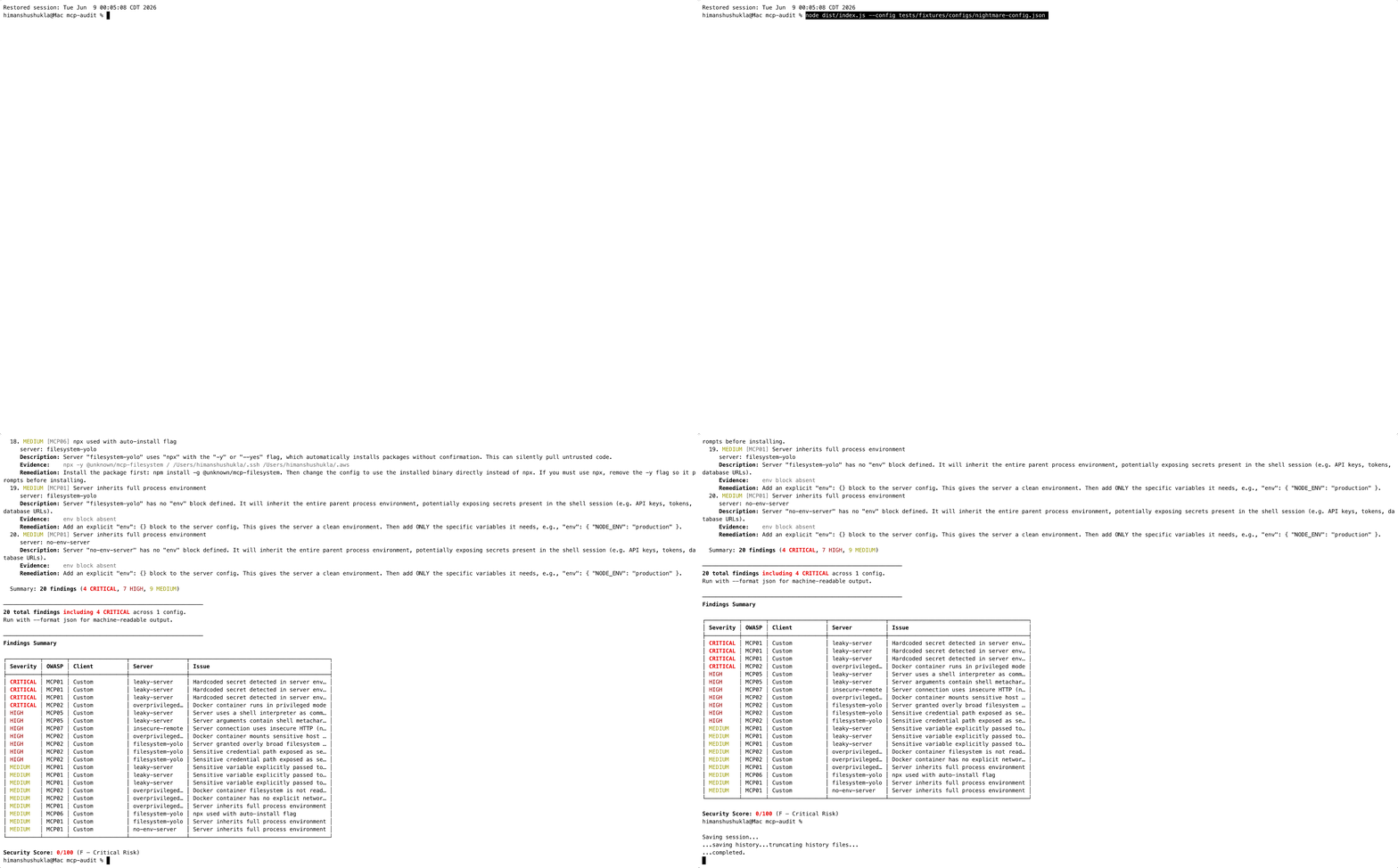
Example output
mcp-audit — MCP Security Scanner
────────────────────────────────────────────────────────────

Claude Code (6 servers)
  ~/.claude.json
  1. CRITICAL [MCP01] Hardcoded secret detected in server environment
     server: magic
     Description: Environment variable "API_KEY" in server "magic" appears to contain a Generic Secret.
     Evidence:    API_KEY=18d30364…
     Remediation: Set the value as a system environment variable (e.g., export API_KEY=<value>
                  in ~/.zshrc), then remove it from the MCP config.
  2. MEDIUM [MCP06] npx used with auto-install flag
     server: magic
     Description: Server "magic" uses "npx" with the "-y" flag, which automatically installs
                  packages without confirmation.
     Remediation: Install the package first: npm install -g @21st-dev/magic@latest.

  Summary: 2 findings (1 CRITICAL, 1 MEDIUM)

────────────────────────────────────────────────────────────
Findings Summary

┌──────────┬───────┬─────────────────┬─────────────────┬──────────────────────────────────────────┐
│ Severity │ OWASP │ Client          │ Server          │ Issue                                    │
├──────────┼───────┼─────────────────┼─────────────────┼──────────────────────────────────────────┤
│ CRITICAL │ MCP01 │ Claude Code     │ magic           │ Hardcoded secret detected in server env… │
│ MEDIUM   │ MCP06 │ Claude Code     │ magic           │ npx used with auto-install flag          │
└──────────┴───────┴─────────────────┴─────────────────┴──────────────────────────────────────────┘

Security Score: 70/100 (C — Needs Attention)
Security score
Every scan produces a security score from 0-100 with a letter grade:
| Score | Grade | Meaning |
|---|---|---|
| 90-100 | A | Excellent |
| 75-89 | B | Good |
| 50-74 | C | Needs Attention |
| 25-49 | D | Poor |
| 0-24 | F | Critical Risk |
Scoring: CRITICAL = -25, HIGH = -15, MEDIUM = -5, LOW = -2. The score gives teams a single number to track security posture over time.
GitHub Action
- name: Audit MCP configuration
  uses: himanshuskukla/mcp-audit@v1
  with:
    strict: true
Inputs
| Input | Default | Description |
|---|---|---|
config | (auto-detect) | Path to a specific MCP config file |
format | terminal | Output format: terminal or json |
strict | true | Fail the workflow if any findings |
OWASP MCP Top 10 coverage
| OWASP | Category | Covered | Rule |
|---|---|---|---|
| MCP01 | Token Mismanagement | Yes | hardcoded-secrets, env-leakage |
| MCP02 | Scope Creep | Yes | excessive-permissions, docker-sandboxing, sensitive-paths |
| MCP03 | Tool Poisoning | Yes | tool-poisoning (--live) |
| MCP04 | Intent Flow Subversion | - | Requires runtime proxy |
| MCP05 | Command Injection | Yes | dangerous-commands |
| MCP06 | Insecure Dependencies | Yes | npx-auto-install |
| MCP07 | Insufficient Auth | Yes | missing-tls |
| MCP08 | Context Over-Sharing | - | Requires runtime proxy |
| MCP09 | Shadow Servers | Yes | shadow-servers |
| MCP10 | Insufficient Logging | Yes | logging-check (--live) |
8 of 10 categories covered. MCP04 and MCP08 require a persistent runtime proxy — planned for a future release.
Telemetry
mcp-audit collects anonymous, aggregate scan statistics to track ecosystem-wide MCP security trends. On first run, you'll be asked whether to share.
What's shared: finding counts by rule/severity, client names, security score, OS NOT shared: server names, file paths, environment variables, secrets, IP addresses
Your choice is saved to ~/.config/mcp-audit/config.json. Override anytime:
npx mcp-audit-cli --share       # share this run
npx mcp-audit-cli --no-share    # skip this run
In CI (non-interactive), telemetry is off unless you pass --share explicitly.
View aggregate community stats: GET /v1/stats
Contributing
- Fork the repository.
- Run
npm ci && npm testto verify the baseline (152 tests). - Add or update a rule in
src/rules/orsrc/live/, with a matching test. - Open a pull request — CI must pass.
Bug reports and rule suggestions are welcome via GitHub Issues.
License
MIT