
AUB — Blueprints de UI para Agentes de Código
HenryLau1103/AUB
Modifique UI existente com agentes de código de forma segura e verificável
Ver no GitHubAUB é um workbench local para agentes de código atuarem em aplicações reais. Escaneia rotas existentes, converte-as em Blueprints editáveis, mapeia componentes customizados e entrega um contrato verificável que agentes como Claude Code, GitHub Copilot ou Codex podem implementar e validar sem reconstruir componentes do zero.
Instalação
npx convez-ai HenryLau1103/AUB1 comando no terminal: detecta o formato do repositório (marketplace ou plugin avulso) e instala via Claude Code. Requer Node 18+ e o Claude Code instalado.
Métricas
Casos de uso
- Entregar contracts verificáveis para agentes modificarem dashboards e forms
- Reutilizar componentes de design system em vez de criar lookalikes
- Validar implementações de agentes contra blueprints de UI
- Converter telas Angular em Blueprints reutilizáveis
Veredito

AUB resolve um problema real de agentes de código: entregar instruções estruturadas e verificáveis para modificar UI sem driftar da intenção de design. Ferramenta madura com schema claro, editor visual integrado e GitHub Action para enforcement — excelente para times que usam agentes em produção.
README
A tradução para o português deste README ainda está na fila.
AUB — Safe Existing UI Changes for Coding Agents
Let coding agents safely modify existing product UI without rebuilding your components from scratch.




English · 繁體中文 · 简体中文 · 日本語 · 한국어
Workspace loop guide · 10-minute demo · AUB vs app builders · No AUB vs AUB demo · GitHub agent workflow · Security and data safety · Canonical example
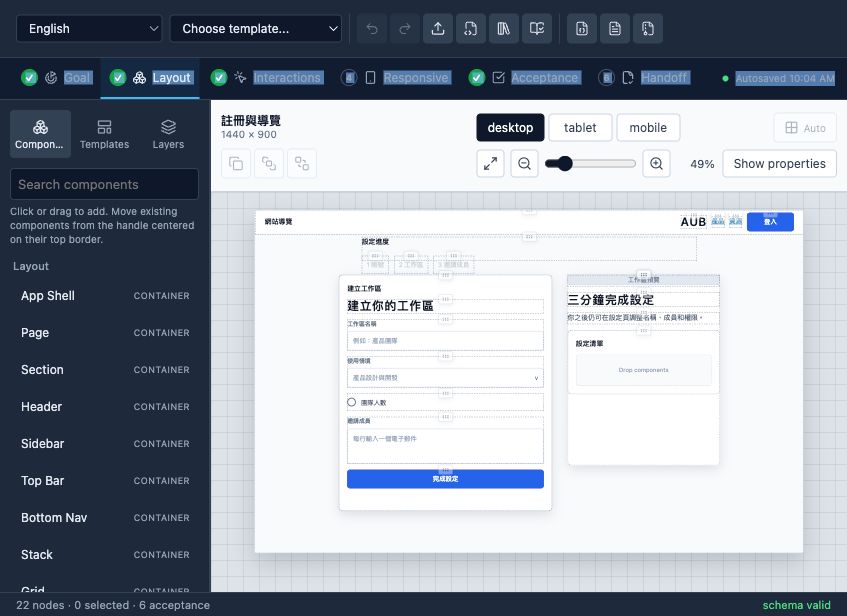
AUB is the local-first workbench for coding agents working on real apps. Scan an existing route, turn it into an editable Blueprint, review custom component candidates, then hand Codex, Claude Code, GitHub Copilot, or another coding agent a contract it can implement and prove.
Live demo: henrylau1103.github.io/AUB — the editor runs entirely in your browser.
How it works
flowchart LR
  A["1. Run npx aub-workspace init<br/>inside an existing app"] --> B["2. Scan a route and generate<br/>a candidate template"]
  B --> C["3. Review mappings,<br/>edit, and save the Blueprint"]
  C --> D["4. Hand the instruction to<br/>Copilot, Codex, or another agent"]
  D --> E["5. Gate the PR<br/>on implementation evidence"]
- Start in your app — run
npx aub-workspace init, thennpx aub-workspacefrom the existing project root; no AUB clone is required. - Scan and template — detect routes, components, layout hints, and custom component candidates.
- Review the contract — open the candidate template, approve mappings, and adjust the Blueprint.
- Hand off to an agent — copy one instruction with the active Blueprint, route, preview URL, and MCP tools.
- Verify the implementation — require node mappings and evidence for every acceptance id, then enforce them with the bundled GitHub Action.
Who AUB is for
- Product designers and developers who want coding agents to modify existing app screens without drifting from product intent.
- Teams using coding agents to implement dashboards, forms, content products, commerce flows, and application shells in real repositories.
- Agent and tooling developers who need a schema-valid, testable UI interchange format.
- Design-system teams that want agents to reuse production components instead of creating lookalikes.
- Teams converting existing Angular screens into reusable UI Blueprints.
Fastest path for an existing project
If you already have an app and want AUB to scan, template, edit, and preview it through MCP, run this from that app's root directory:
cd /path/to/your-existing-app
npx aub-workspace init
npx aub-workspace
This starts the local AUB MCP server, opens the bundled editor, and connects the editor to your workspace automatically. You do not need to clone the AUB repo for this path.
init installs the AUB CI config, .aubignore, AGENTS.md, GitHub issue templates, Copilot instructions, and PR workflow. In the editor, follow the workspace loop: Scan project → Generate template → Review component candidates → Save Blueprint/session → Copy agent instruction. Paste that instruction into Copilot, Codex, or another coding agent so it can implement the real app change and report evidence.
For a terminal-only handoff prompt, run:
pnpm agent:instructions -- --target codex
To see the full safety loop without using a real project, run:
npx aub-workspace demo
This creates a synthetic workspace with .aub/scan-report.json, a generated candidate template, a Blueprint, one failing implementation report, one passing report, and fail/pass PR safety comments. It is the fastest way to see the PR gate reject low-evidence agent work and then approve evidence-backed work for review.
The problem AUB solves
Prompts such as "build a dashboard like Stripe" or "make this responsive like Notion" leave critical decisions unstated. A screenshot shows appearance but not component intent, interaction outcomes, breakpoints, accessibility requirements, or the acceptance bar.
AUB turns those decisions into an explicit contract:
- Registered semantic component types instead of anonymous rectangles.
- Hierarchy and layout rules instead of inferred grouping.
- Desktop, tablet, and mobile behavior instead of "make it responsive."
- Declared interactions and states instead of guessed behavior.
- Testable acceptance ids instead of subjective approval.
See failure cases for concrete examples.
Local quick start
Use this path only when developing AUB itself. Requirements: Node.js 24+ and pnpm.
git clone https://github.com/HenryLau1103/AUB.git
cd AUB
pnpm install
(cd apps/editor && pnpm install && pnpm dev)
Open the local URL printed by Vite, normally http://127.0.0.1:5173/.
In the editor:
- Choose a template.
- Drag components from their top-center handle or add components from the palette.
- Complete Goal, Layout, Interactions, Responsive, Acceptance, and Handoff.
- Export the AI handoff package.
Give a Blueprint to an agent
Export an .aub.zip, place it in the target code repository, and tell the agent:
Read AGENT-README.md in this AUB handoff package.
Explain the package to me in my language, inspect this repository,
implement the Blueprint, run the relevant checks, and report every acceptance id with evidence.
Every handoff package contains:
AGENT-README.md
AGENT-README.zh-Hant.md
<screen>.ui.json
<screen>.ui.md
<screen>.agent.md
<screen>.codex.md
implementation-report.template.json
implementation-report.schema.json
screenshots/
  desktop.png
  tablet.png
  mobile.png
manifest.json
<screen>.ui.json is the source of truth. Markdown and screenshots are supporting evidence. The agent must inspect the target repository's own instructions before editing and must not redesign or weaken acceptance criteria.
Read the full Agent handoff guide.
Agent support
| Agent | Support | Entry point |
|---|---|---|
| Codex | Dedicated adapter | <screen>.codex.md and repository AGENTS.md |
| Claude Code | Dedicated adapter | Generate with --adapter claude-code; reads CLAUDE.md |
| GitHub Copilot | Dedicated adapter | Generate with --adapter copilot; reads .github/copilot-instructions.md + AGENTS.md |
| Other coding agents | Generic handoff | AGENT-README.md and <screen>.agent.md |
The core Blueprint is agent-neutral. Adapters change execution instructions, not schema, layout semantics, interactions, or acceptance criteria.
Generate a prompt directly:
pnpm prompt examples/dashboard.ui.json dashboard.agent.md --adapter generic --task implement
pnpm prompt examples/dashboard.ui.json dashboard.codex.md --adapter codex --task implement
pnpm prompt examples/dashboard.ui.json dashboard.claude.md --adapter claude-code --task review
pnpm prompt examples/dashboard.ui.json dashboard.copilot.md --adapter copilot --task implement
Supported tasks are author, plan, implement, and review.
MCP server
Instead of copying files into the target repository, agents that speak the Model Context Protocol can call AUB tools directly over stdio or Streamable HTTP. The 23 tools cover Blueprint/project discovery, Figma/Penpot bridge import, validated writes, handoff packaging, validation, scaffolding, component resolution, prompt export, diff, migration, locking, workspace sessions, app scanning, template generation, component candidate review, and implementation-report submission.
For most users, start inside the existing app you want AUB to work on:
cd /path/to/existing-app
npx aub-workspace init
npx aub-workspace
This starts the local MCP HTTP server, serves the bundled AUB editor, connects
the editor to the workspace, and opens the browser. No AUB clone is required for
this path. init creates AUB config, GitHub issue templates, Copilot
instructions, and a pull-request workflow without editing app source files.
For AUB repo development, run from the AUB repo root:
pnpm workspace:start -- --workspace /path/to/existing-app
Manual MCP server startup remains available for agent/client configuration:
(cd apps/mcp-server && pnpm install && pnpm build)
node apps/mcp-server/dist/index.js /path/to/your/repo
# Or expose the same tools over Streamable HTTP
node apps/mcp-server/dist/http.js --workspace /path/to/your/repo --port 3100
Register it with Claude Code, Codex, or any MCP client. See
apps/mcp-server/README.md for configuration snippets. The
server wraps the same libraries as the CLI, so schema, layout semantics, interactions, and
acceptance criteria are unchanged.
Workspace-connected editor loop
For an existing app, the one-command path is:
cd /path/to/existing-app
npx aub-workspace init
npx aub-workspace
The command opens the editor already connected to the local MCP endpoint. The
editor uses the same server process to load and save Blueprints, update
.aub/session.json, review .aub/templates/*.aub.template.json, approve
.aub/component-candidates.json, and preview the app's local dev route. Coding
agents continue to use MCP tools such as get_aub_session, get_blueprint,
resolve_component, and write_blueprint.
Read the full Workspace Loop user manual.
Agents can bootstrap the loop from existing code:
scan_project_ui
generate_template_from_source { "sourcePath": "app/settings/page.tsx" }
export_template_authoring_prompt
Scanner output is candidate-first: custom components go to
.aub/component-candidates.json and only become aub.registry.json extension
types after user approval.
What the Blueprint describes
- A tree of registered semantic UI nodes.
- Auto layout with flex/grid contracts or freeform per-viewport placements.
- Component content, design tokens, bindings, states, and constraints.
- User interactions and observable outcomes.
- Responsive overrides for named viewports.
- At least five acceptance criteria spanning layout, interaction, responsive behavior, and accessibility.
- Optional provenance for imported source files and diagnostics.
Primary formats:
| Format | Use |
|---|---|
.ui.json | Machine validation and source of truth |
.ui.yaml | Human editing |
.ui.md | Generated agent and reviewer context |
.ui.lock.json | Frozen acceptance snapshot |
.aub.zip | Complete agent handoff |
Custom component types
The 62 core component types are curated and closed so every type has a meaning agents can resolve. Projects that need bespoke components declare namespaced extension types in an aub.registry.json at the project root, using a team:component namespace (e.g. acme:insight_card). They are validated, resolvable, and bundled into handoffs — never free-guessed.
Extension entries can also map the semantic type to production implementations:
{
  "name": "acme:insight_card",
  "isContainer": true,
  "implementations": [{
    "id": "react",
    "framework": "react",
    "module": "@acme/analytics-ui",
    "export": "InsightCard",
    "sourcePath": "packages/analytics-ui/src/InsightCard.tsx",
    "storybookUrl": "https://storybook.example.com/?path=/story/insight-card--default",
    "props": {
      "title": { "from": "content.title", "required": true }
    }
  }]
}
Agents can call MCP resolve_component to retrieve the exact mapping before implementation.
# Auto-discovers aub.registry.json from the file's directory upward
pnpm validate examples/extensions/analytics-insights.ui.json

# Or point at a specific registry
pnpm validate path/to/screen.ui.json --registry ./aub.registry.json
See custom component types and the worked example in examples/extensions/.
Existing-screen and AI authoring workflows
Import an Angular HTML/SCSS/TS component bundle:
pnpm import:angular path/to/component-directory \
  --entry app-example \
  --output example.ui.json
Import an explicitly mapped Figma or Penpot Design Bridge:
pnpm import:design -- \
  examples/design-bridge/figma-hero.aub.bridge.json \
  --output marketing-hero.ui.json
Create a portable kit that teaches an AI to author valid AUB files:
pnpm authoring:kit aub-authoring-kit.zip
The kit includes the current schema, 62-component registry, canonical example, validation guide, and authoring prompt. See Angular import, the Figma/Penpot Design Bridge, and the adapter interface.
Validate and review
# Validate a Blueprint
pnpm validate examples/dashboard.ui.json

# Migrate v0.1/v0.2 to v0.3
pnpm migrate old.ui.json migrated.ui.json

# Compare Blueprint revisions
pnpm diff before.ui.json after.ui.json

# Create and verify an implementation report
pnpm report:init examples/dashboard.ui.json implementation-report.json
pnpm report:verify examples/dashboard.ui.json implementation-report.json

# Capture preview screenshots, overflow checks, and report evidence
pnpm report:capture -- --workspace /path/to/app --blueprint screens/settings.ui.json --url http://localhost:3000/settings
pnpm report:verify screens/settings.ui.json .aub/reports/workspace.settings.implementation-report.json --require-evidence
pnpm report:score screens/settings.ui.json .aub/reports/workspace.settings.implementation-report.json
pnpm report:playwright -- --workspace /path/to/app --blueprint screens/settings.ui.json --url http://localhost:3000/settings --output tests/aub-ui.spec.ts
Scaffold spec sections
Deterministically derive the spec sections that are easy to leave empty —
interactions, responsive, and acceptance — from the existing node tree and
viewports. Scaffolding is non-destructive: it only appends missing items
(and tops acceptance up to the required five criteria with layout / interaction /
responsive / a11y coverage), never overwriting or reordering your content. Run it
twice and the second pass changes nothing.
# Preview to stdout
pnpm scaffold examples/dashboard.ui.json --stdout

# Write the scaffolded sections back into the file
pnpm scaffold path/to/screen.ui.json --write

# Only scaffold specific sections, and localize generated statements
pnpm scaffold path/to/screen.ui.json --sections acceptance,responsive --language zh-Hant --write
In the editor, each spec list (Interactions, Responsive, Acceptance) has a
Suggest from layout button that runs the same logic. Agents over MCP can call
the scaffold_blueprint tool to get a fully specced blueprint before handing it
off for implementation.
Multi-screen projects
A single .ui.json is one screen. To compose several screens into a navigable
product, AUB uses a reference-based project document (*.aub.project.json)
that lists member Blueprint files by path, declares a navigation graph, names an
entry screen, and optionally carries a shared design system. Member screens stay
fully valid standalone Blueprints, and the Blueprint schema is unchanged.
# Validate a project (schema + project semantics + every member screen)
pnpm project validate examples/project/app.aub.project.json

# Wrap existing single screens into a new project (entry = first)
pnpm project init app.aub.project.json dashboard.ui.json settings.ui.json

# Emit a project overview .md plus per-screen agent context
pnpm project export-md examples/project/app.aub.project.json ./out
The editor can open a project, switch between screens, add/remove/rename screens,
set the entry screen, edit the navigation graph, and save the whole project as a
.zip. Agents over MCP get list_projects / get_project / validate_project.
See multi-screen projects.
Canvas resolution
Each viewport's resolution is configurable in the editor: pick a common preset
(1440×900, 1920×1080, iPad, iPhone, Android, …) or type any custom width × height
(clamped to the schema's 320–7680 × 320–4320 range). Resolutions are stored on the
Blueprint's viewports, so they travel with the file.
AUB includes deterministic agent-readability and browser-based implementation benchmarks. The current local reference checks cover hierarchy, geometry, layout mode, responsive overflow, interactions, accessibility states, screenshots, and report completeness.
See agent readability and implementation benchmark.
Pull-request acceptance gate
Add .aub/ci.json to the implementation repository, then use the bundled GitHub Action:
- uses: HenryLau1103/AUB@main
  with:
    config: .aub/ci.json
    require-reports: "true"
The check validates Blueprints, projects, extension registries, node mappings, acceptance evidence, and unresolved work. Run the same verification locally with:
pnpm ci:verify -- --workspace /path/to/target/repo --require-reports
See GitHub CI acceptance gate.
Editor / IDE integration
Blueprint files are backed by the JSON Schema at schema/ui-blueprint.schema.json, so editors can validate and autocomplete them as you type.
-
VS Code: this repo ships
.vscode/settings.json, which maps*.ui.jsonand*.ui.yamlto the schema automatically. Install the recommended YAML extension for.ui.yamlsupport. -
Standalone files / other editors: add a
$schemakey pointing at the schema, as the canonical examples do:{ "$schema": "../schema/ui-blueprint.schema.json", "version": "0.3.0" }For YAML, use the YAML language server directive:
# yaml-language-server: $schema=../schema/ui-blueprint.schema.json
The $schema key is optional and ignored by AUB tooling — it only drives editor validation.
Project status
- Product/package release:
0.4.0focused on the workspace safety demo, PR evidence review, scanner trust breakdown, and demo-mode separation. The Blueprint format remains0.3.0. - Blueprint schema and semantic validation: implemented.
- WYSIWYG editor with freeform/auto layout, drag, resize, multi-select, zoom, localization, and templates: implemented.
- JSON, Markdown, screenshots, hashes, and
.aub.ziphandoff: implemented. - Codex, Claude Code, and GitHub Copilot adapters: implemented.
- Angular import, Figma/Penpot semantic bridge, personal templates, and AI authoring kit: implemented.
- Blueprint diff and implementation report verification: implemented.
- MCP server (stdio + Streamable HTTP) exposing 23 tools including Design Bridge import, validated writes, handoff packaging, discovery, validation, component resolution, scaffolding, diff, migration, locks, workspace sessions, app scanning, template generation, candidate review, and reports: implemented.
- Workspace-connected editor loop for local MCP HTTP, session state, scanner-generated templates, component candidate review, direct Blueprint save, and implementation preview: implemented.
- One-command workspace initialization (
aub-workspace init) and evidence capture (pnpm report:capture): implemented. - Production component mappings in
aub.registry.json: implemented. - GitHub Action and local CI verifier for contracts plus implementation evidence, PR Safety Score comments, and evidence matrix output: implemented.
- Multi-screen projects (reference-based
.aub.project.json, CLI, MCP tools, editor screen switcher + navigation): implemented. - Configurable canvas resolution (presets + custom width/height): implemented.
- Localized GitHub Pages and README files in English, Traditional Chinese, Simplified Chinese, Japanese, and Korean: implemented.
- YAML editing in the UI and editor-side lock generation: backlog.
The current format version is 0.3.0. See schema versioning and capability matrix.
Repository map
schema/          JSON Schema, TypeScript types, component registry, CI contract
scripts/         Validation, migration, export, import, diff, and report tools
examples/        Canonical JSON, YAML, Markdown, and lock fixtures
apps/editor/     Vite + React visual editor
apps/mcp-server/ Model Context Protocol server (stdio + Streamable HTTP)
adapters/        Agent-specific prompt adapters
benchmarks/      Agent readability and implementation verification
docs/            Product decisions, guides, audits, and acceptance constraints
tests/           Node test suites for all contracts
The component registry is the single source of truth for component types. schema/registry/components.json drives the schema enums and schema/types.ts; run pnpm gen after editing it and pnpm gen:check verifies they are in sync (CI enforces this).
Contributing
Before opening a PR:
pnpm test
pnpm typecheck
pnpm gen:check
(cd apps/editor && pnpm typecheck)
(cd apps/editor && pnpm build)
pnpm validate examples/dashboard.ui.json
pnpm ci:verify -- --config examples/ci/aub.ci.json
To add a core component type, edit schema/registry/components.json and run pnpm gen — the schema enums and TypeScript unions regenerate from it. To add a project-specific component without forking core, declare a namespaced extension type in aub.registry.json (see custom component types).
Keep changes scoped, preserve round-trip integrity, and do not invent unregistered semantic component types — every type must be either a core type or a declared project extension.
Deployment (GitHub Pages)
The landing page (site/) and the editor demo are published to
henrylau1103.github.io/AUB by
.github/workflows/pages.yml on every push to main. The
workflow builds the editor with VITE_BASE=/AUB/editor/ and serves it under /AUB/editor/.
One-time repository setup (cannot be configured from code): Settings → Pages → Build and deployment → Source = GitHub Actions.
English is served at /AUB/; Traditional Chinese, Simplified Chinese, Japanese, and Korean
are served at /zh-hant/, /zh-hans/, /ja/, and /ko/. All five landing pages are generated
from scripts/generate-site-locales.mjs; run pnpm site:locales after changing localized copy.
Build the published site locally:
pnpm site:locales:check
(cd apps/editor && VITE_BASE=/AUB/editor/ pnpm build)
mkdir -p _site/editor && cp -r site/. _site/ && cp -r apps/editor/dist/. _site/editor/
npx serve _site   # then open http://localhost:3000/AUB/  (paths assume the /AUB/ base)
License
Licensed under the Apache License 2.0.