
Hecate - Console de Operações IA Local
hecatehq/hecate
Gateway e console local para coordenar, rotear e revisar trabalho com agentes IA
Ver no GitHubMCP server que funciona como console de operações para trabalho supervisionado com agentes IA. Combina gateway de modelos, workspace de chat, runtime de tarefas, orquestração de projetos, aprovações e rastreamento OpenTelemetry em uma única superfície de operador local.
Instalação
npx convez-ai hecatehq/hecate1 comando no terminal: detecta o formato do repositório (marketplace ou plugin avulso) e instala via Claude Code. Requer Node 18+ e o Claude Code instalado.
Métricas
Casos de uso
- Rotear requisições entre múltiplos provedores de modelos IA
- Supervisionar e aprovar execuções de agentes de codificação
- Orquestrar fluxos de trabalho com agentes externos e interno
- Rastrear uso, observabilidade e artefatos gerados por agentes
- Gerenciar contexto de projeto e memória compartilhada entre IA e equipe
Veredito

Hecate é uma solução madura em alpha que endereça um problema real: coordenação local de agentes IA com supervisão humana. Ideal para equipes que precisam de gateway, observabilidade e aprovações em um único ponto, mas ainda não é production-ready conforme alertado pelos autores.
README
A tradução para o português deste README ainda está na fila.





Status: public alpha. Hecate is useful today for model-provider routing, Hecate Chat, External Agent sessions, project-scoped work, approvals, artifacts, usage, and observability. It is not production-stable infrastructure yet: workflow runbooks, richer agent profiles, browser QA, and sandbox hardening are still design or early-alpha work. Read known limitations before depending on it.
Contents
- What Hecate Is
- System Shape
- Current Capabilities
- Quick Start
- Use The Console
- Project, Context, And Memory Flow
- Architecture And Docs
- Status And Roadmap
- Contributing
- License
What Hecate Is
Hecate is a local AI operations console for running, supervising, and coordinating AI work. It combines a model gateway, chat workspace, task runtime, external-agent console, project orchestration, project context and memory, approval gates, artifacts, usage, and OpenTelemetry traces into one operator surface.
Hecate is local-first in the operational sense: the runtime and UI run on your machine, Hecate-owned state is stored locally, and the gateway binds to loopback by default. It is not local-only: you can route to cloud providers and supervise external coding-agent CLIs that use their own accounts.
The short version:
- Gateway: one local API for OpenAI-compatible Chat Completions, Anthropic-shaped Messages, model discovery, failover, rate limits, provider health, and usage visibility.
- Console: a React operator UI for Chats, Connections, Tasks, Projects, Usage, Observability, and Settings.
- Runtime: queued task runs, tool-calling
agent_loop, approvals, per-call sandbox policy, artifacts, retries, resumes, and event streams. - External Agent supervision: long-lived local ACP sessions for coding-agent CLIs, with readiness checks, approvals, adapter diagnostics, and Git diff review.
- Project orchestration: durable project identity, roles, work records, assignments, handoffs, activity health, project-scoped memory, context packet snapshots, project skill metadata, and explicit memory promotion.
- Evidence: traces, route reports, task artifacts, diffs, logs, screenshots where available, and final run output close to the decision that produced it.
The product goal is not just to make model calls. It is to give the operator a single place to coordinate project-scoped agent work and understand what is happening, what context it used, what it changed, what it cost, what needs approval, and where the evidence lives.
System Shape
flowchart LR
    Operator["Operator"] --> Console["Browser / desktop console<br/>served by Hecate"]
    APIClients["Compatible API clients<br/>SDKs · tools · local apps"]

    subgraph HecateProcess["Local Hecate runtime process"]
        direction LR
        HTTP["Loopback HTTP server<br/>embedded UI assets<br/>/v1 · /hecate/v1"]
        Gateway["Model gateway<br/>routing · failover · usage"]
        TaskRuntime["Hecate task runtime<br/>queue · agent_loop<br/>retry/resume"]
        AgentSupervisor["External Agent supervisor<br/>ACP sessions · diagnostics"]
        State["Local state<br/>chats · projects · memory<br/>tasks · settings"]
        Evidence["Evidence + observability<br/>approvals · artifacts · events<br/>route reports · trace export"]

        HTTP --> Gateway
        HTTP --> TaskRuntime
        HTTP --> AgentSupervisor
        HTTP --> State
        Gateway --> Evidence
        TaskRuntime --> Evidence
        AgentSupervisor --> Evidence
        State --> Evidence
    end

    Providers["Cloud + local model providers"]
    Tools["Sandboxed workspace tools<br/>WorkspaceFS · ProcessRunner · GitRunner"]
    ExternalCLIs["External Agent CLIs<br/>own accounts · own runtime"]

    Console --> HTTP
    APIClients --> HTTP
    Gateway --> Providers
    TaskRuntime --> Tools
    AgentSupervisor --> ExternalCLIs
The runtime is deliberately boring in the good way: request handling, routing, task execution, approvals, artifacts, and telemetry are all ordinary local subsystems with memory and SQLite storage parity where persistence matters.
Current Capabilities
| Surface | What works today |
|---|---|
| Model gateway | OpenAI-compatible Chat Completions, Anthropic-shaped Messages, streaming, vision, model discovery, provider health, failover, retry, usage events, and custom OpenAI-compatible endpoints. |
| Connections | Cloud presets plus Ollama, LM Studio, LocalAI, llama.cpp-compatible servers, local discovery, health checks, credentials, external-agent readiness, and durable approval grants. |
| Chats | Direct model turns, tools-on task-backed turns, queued prompts, task/run/trace links, inline approvals, inline MCP Apps views, context packet snapshots, project-aware history, and workspace changes with rich per-file diffs. |
| Projects | Durable project identity, roots, context-source metadata, project activity, work items, assignments, handoffs, project memory entries, and memory candidates that require explicit operator promotion. |
| Tasks | Native agent_loop runs, queue/lease execution, blocking approvals, streamed activity, artifacts, retry/resume, stale-run recovery, MCP tool/App integration, MCP probe, and MCP registry discovery. |
| External Agent | Supervised local ACP sessions for Codex, Claude Code, Cursor Agent, and Grok Build, including readiness/version checks, prompt-first approvals, adapter diagnostics, cancellation, and Git diff inspect/revert. External agents keep their own accounts/billing. |
| Observability | OpenTelemetry traces/metrics/logs, response trace headers, local trace view, route reports, runtime stats, timing, token usage, and provider-reported cost where available. |
| Desktop app | Native bundles run the Hecate runtime as a sidecar. macOS Apple Silicon is launch-tested; Linux and Windows bundles are CI-built but still experimental. |
| Sandbox policy | WorkspaceFS boundaries, ProcessRunner/GitRunner seams, env sanitisation, output caps, timeouts, and bwrap / sandbox-exec wrappers where available. This is not container-level isolation. |
Design direction that is not yet a runtime contract:
- Named workflow modes such as
review,investigate,qa,ship,security-audit, anddesign-review. - Browser-backed QA evidence and design review.
- Richer agent profiles and preset workflows.
- Broader context-window management and external memory provider selection.
- A first-class workflow/runbook API if the v0 experiments prove valuable.
Quick Start
Choose the path that matches how you want to run Hecate.
| Path | Best for |
|---|---|
| Desktop app | macOS personal use on your laptop. No terminal, no Docker. Linux/Windows bundles are experimental. |
| Docker | Local container, scripted local deploys, and the safer Linux/Windows alpha path today. |
| From source | Contributors and local development. |
Desktop app
Download the current alpha from hecate.sh or from the versioned GitHub Release assets below:
| Platform | Bundle |
|---|---|
| macOS (Apple Silicon) | Hecate_0.1.0-alpha.45_aarch64.dmg |
| Linux x86_64 | Hecate_0.1.0-alpha.45_amd64.deb or Hecate_0.1.0-alpha.45_amd64.AppImage |
| Windows x86_64 | Hecate_0.1.0-alpha.45_x64_en-US.msi |
Open the bundle and launch Hecate. The app starts the bundled runtime on a private loopback port, waits for it to become healthy, and opens the operator UI automatically. State lives in the platform data dir:
- macOS:
~/Library/Application Support/sh.hecate.app/ - Windows:
%APPDATA%\sh.hecate.app\ - Linux:
~/.local/share/sh.hecate.app/
macOS release bundles are signed and notarized. Linux and Windows bundles are published by CI but have not yet had the same manual launch coverage. The desktop status, updater behavior, signing notes, and footguns live in Desktop app.
Docker
docker run --rm -p 127.0.0.1:8765:8765 -v hecate-data:/data \
  ghcr.io/hecatehq/hecate:0.1.0-alpha.45
Open http://127.0.0.1:8765.
The container intentionally publishes only on 127.0.0.1. If you bind it
beyond loopback, put your own access control, firewall, or reverse proxy in
front. See Security for the current threat model.
Pinned image tags, binary tarballs, checksums, compose examples, storage notes, and lost-token recovery live in Deployment.
From source
just dev
Local development requires Go, Bun, and the repo toolchain described in
Development. First-run environment knobs live
in .env.example.
Use The Console
Add a provider
On first boot, Chats is available immediately. If Hecate detects a local runtime such as Ollama or LM Studio, the first-run card can add it in one click. For manual setup, open Connections -> Add provider.
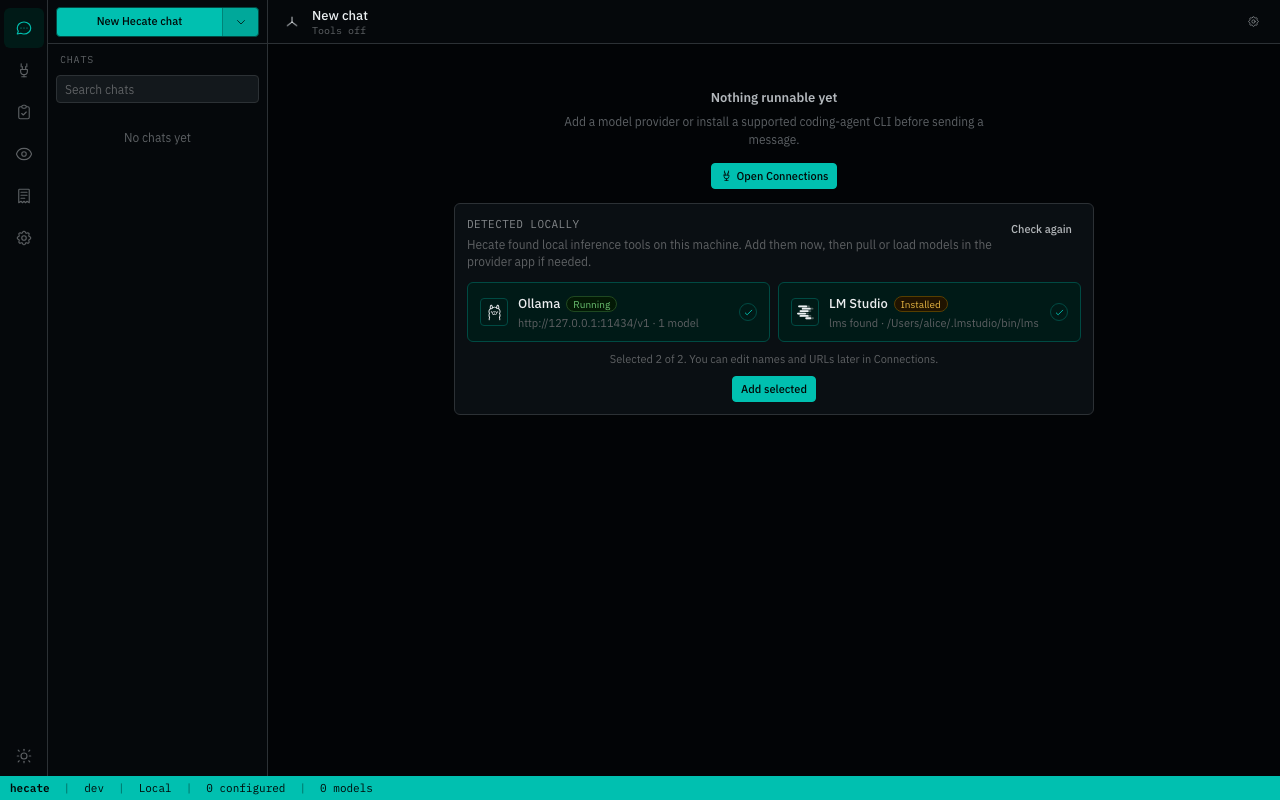
Cloud providers need an API key. Local providers need a running local server URL, usually the preset default. Custom OpenAI-compatible endpoints can be added from the same modal when the preset catalog is not enough.
After a provider is saved, Hecate discovers models and the Chats picker becomes routable. The full provider catalog, env bootstrapping, custom-endpoint walk-through, and credential rotation live in Providers.
Chat with or without tools
Hecate Chat keeps direct model turns and tools-on task-backed turns in one transcript. Tools off sends through the gateway. Tools on uses the task runtime with approvals, artifacts, sandbox policy, and traces.
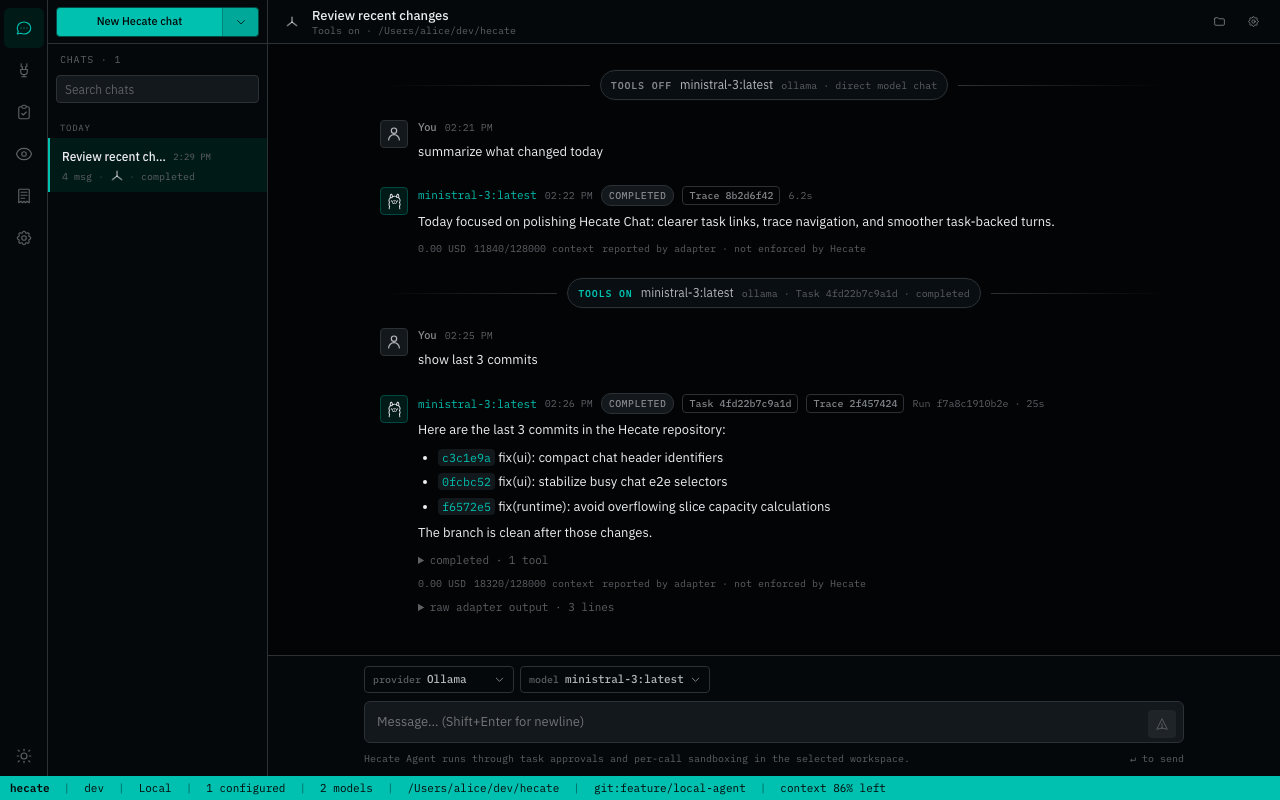
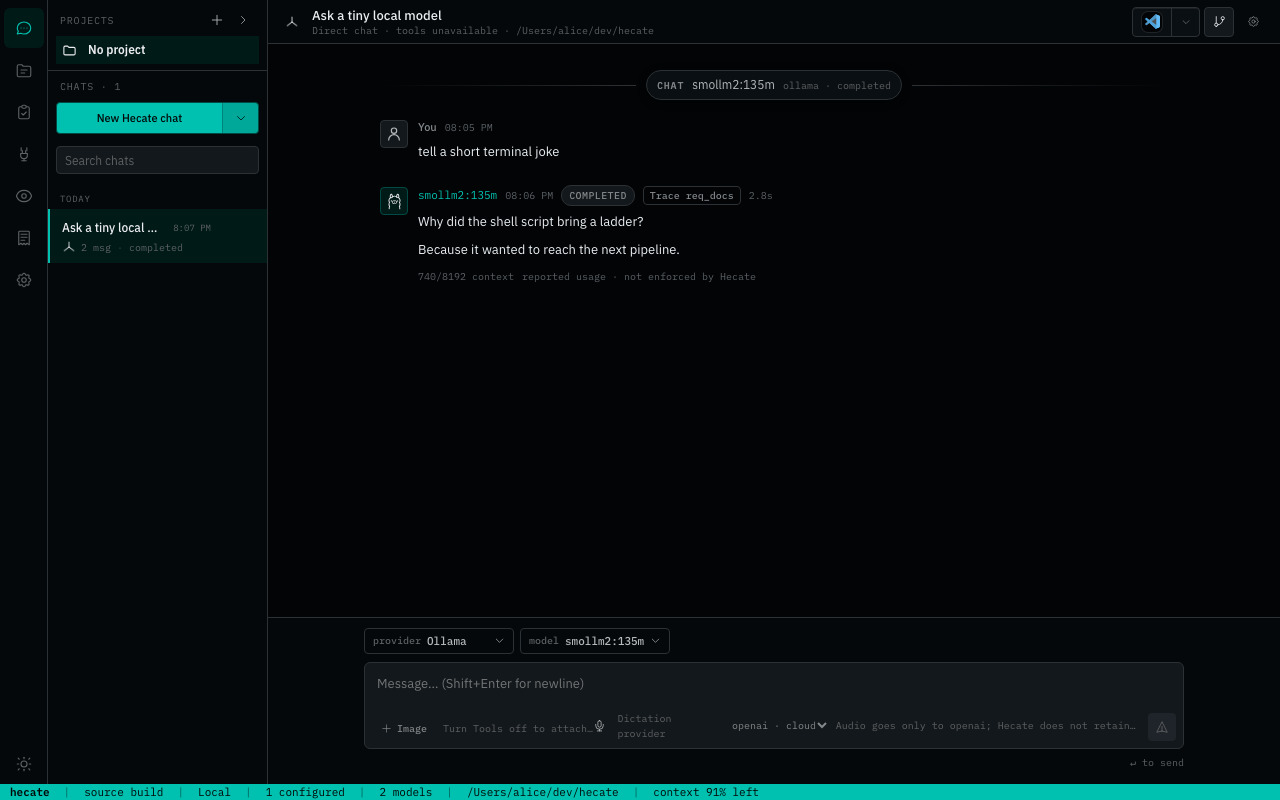
If the selected model cannot call tools, Hecate keeps the chat usable as direct model chat and makes the tools-unavailable state visible.
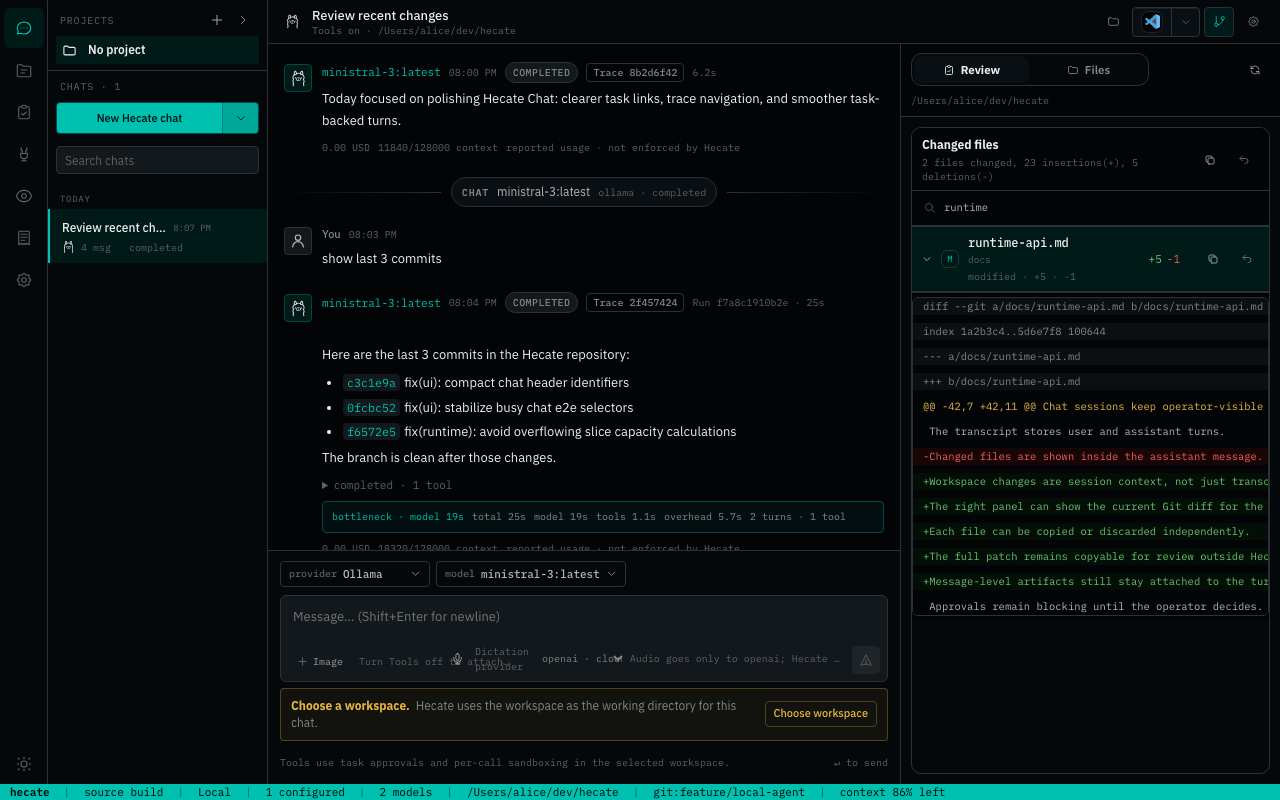
Review workspace changes
Workspace changes sit beside the chat as session context. You can inspect the current Git diff, filter changed files, copy patches, and discard selected files without digging through transcript noise.
Supervise External Agents
External Agent sessions run through local ACP-compatible CLIs. Hecate supervises the session but does not proxy or pool those vendors' credentials.
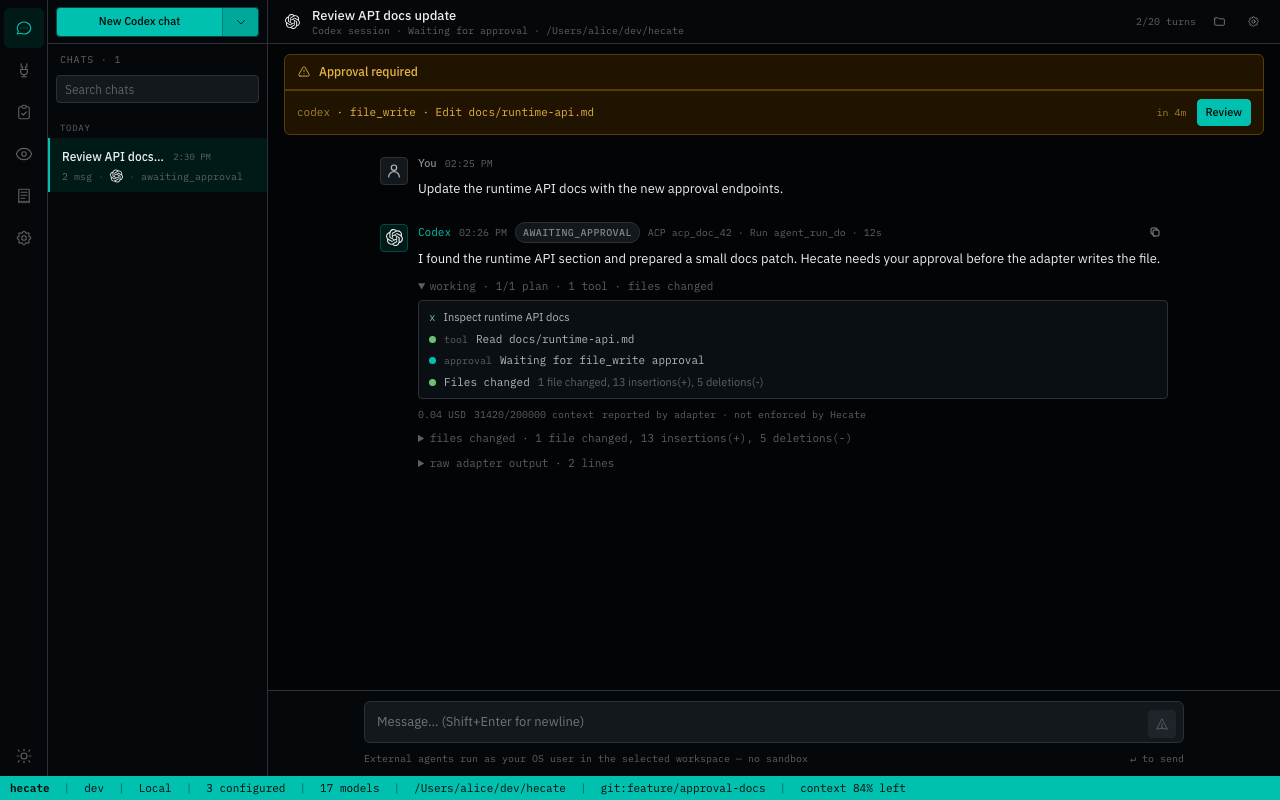
Approvals surface as blocking operator prompts before gated actions can proceed.
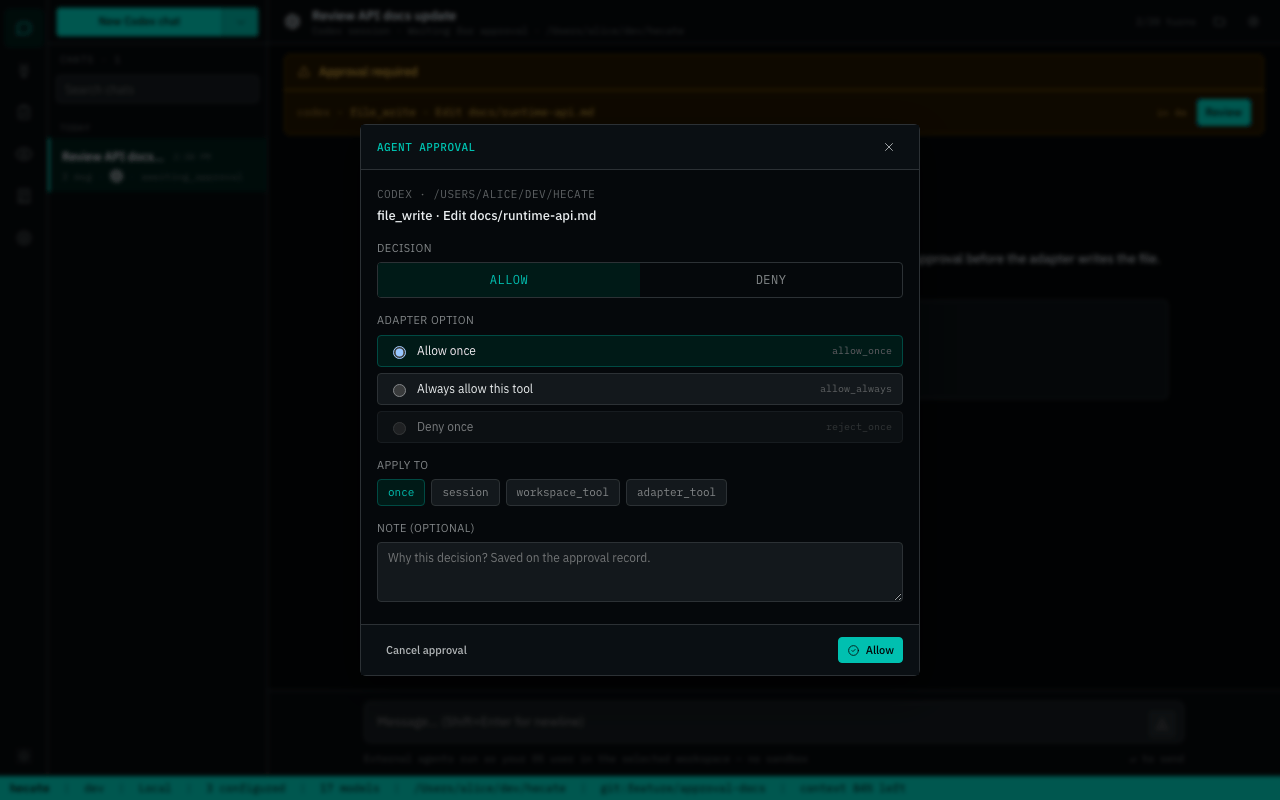
See Chat sessions, Agent runtime, and External Agents for the deeper contracts.
Project, Context, And Memory Flow
The newer Hecate shape starts with projects. A project is the durable local identity for a codebase or work area. A workspace is the concrete filesystem root used by a chat, task, or external-agent session.
flowchart LR
    Project["Project<br/>stable local identity"] --> Roots["Workspace roots"]
    Project --> Sources["Context sources<br/>repo guidance · selected docs"]
    Project --> Memory["Project memory<br/>operator-approved entries"]
    Project --> Work["Work items · assignments · handoffs"]

    Roots --> Session["Chat · task · external-agent session"]
    Sources --> Packet["Context packet snapshot"]
    Memory --> Packet
    Work --> Packet
    Session --> Packet
    Packet --> Call["Model or adapter call"]

    Session --> Artifacts["Artifacts · diffs · traces · reports"]
    Artifacts --> Candidates["Memory candidates"]
    Candidates --> Approval["Operator review"]
    Approval --> Memory
Important boundaries:
- Context packets snapshot what Hecate assembled for a call. They are audit evidence, not durable memory by themselves.
- Project memory is explicit operator-approved context. Hecate does not write memory automatically.
- Memory candidates can be proposed by chats, tasks, handoffs, or future workflows. They stay out of context until the operator promotes them.
- External-agent private memory stays outside Hecate unless the operator imports or writes Hecate memory explicitly.
Read the implemented contract in Runtime API, then the design records for Projects, Context assembly, Agent memory, and Workflow runbooks v0.
Architecture And Docs
The full docs index lives at docs/README.md. Start with the bucket that matches your job.
| You are... | Start here |
|---|---|
| Running Hecate locally | Desktop app, Deployment, Security, Providers |
| Calling Hecate from a client | Runtime API, Chat sessions, Agent runtime, Events |
| Building coding-agent integrations | External Agents, MCP integration, Events |
| Changing the codebase | Architecture, Development, Release, docs-ai |
| Planning future runtime behavior | Design records, especially the proposal/accepted/candidate bucket before implementation starts. |
Runtime references:
- Runtime API - Hecate-native endpoints, task lifecycle, approvals, streaming, projects, memory, work items, and handoffs.
- Agent runtime -
agent_loop, tools, costs, retry-from-turn, stdout/stderr, and system prompt layers. - Chat sessions - transcript segments, direct turns, task-backed turns, queued prompts, context packets, and External Agent chats.
- Events - run-event names, payloads, and SSE replay.
- Telemetry - OpenTelemetry spans, metrics, logs, trace headers, local trace view, and retention.
- Sandbox - subprocess boundaries, policy validation, env sanitisation, output caps, timeouts, and OS wrappers.
Operator guides:
- Providers - provider presets, custom endpoints, credentials, model discovery, health, and circuit breaking.
- Security - local-first threat model, workspace safety, approvals, secrets, and advisory handling.
- Known limitations - the plain-language alpha boundary.
Status And Roadmap
Hecate is public-alpha software. The fastest-moving areas are project-scoped work, memory/context visibility, External Agent ergonomics, desktop packaging, workflow runbook experiments, and sandbox hardening.
Near-term design direction:
- Keep projects, context packets, memory, artifacts, approvals, and traces as the shared substrate for all agent work.
- Prototype one report-only
qaworkflow using existing task runs before adding a standalone workflow engine. - Start browser support with conservative evidence capture and explicit state isolation.
- Promote successful workflow lessons only as memory candidates with provenance and operator approval.
The broader alpha-to-beta gate lives in Beta roadmap. Proposed, accepted, candidate, implemented, and parked design records live in Design records.
Contributing
See CONTRIBUTING.md. If you work with an AI assistant, start with AGENTS.md; the provider-neutral guidance layer lives in docs-ai.
License
MIT. See LICENSE.