
Track Coach
happysasha18/track-coach
Diagnóstico técnico de produção musical via medições reais, não especulações
Ver no GitHubCoach compositivo para produção de música eletrônica que funciona como skill do Claude Code. Analisa faixas de áudio usando librosa e Demucs, gerando diagnósticos precisos de mascaramento de frequências, evolução dinâmica, separação de stems e intenção vs resultado. Produz um widget HTML interativo com player sincronizado e feedback técnico baseado em medições reais.
Instalação
npx convez-ai happysasha18/track-coach1 comando no terminal: detecta o formato do repositório (marketplace ou plugin avulso) e instala via Claude Code. Requer Node 18+ e o Claude Code instalado.
Métricas
Casos de uso
- Identificar quais stems mascararam quais frequências em seções específicas
- Analisar evolução de energia, brilho e densidade ao longo da faixa
- Comparar intenção (automação Ableton) contra resultado real do áudio
- Avaliar separação de stems e consistência rítmica por instrumento
Veredito

Ferramenta sólida e determinística para produtores eletrônicos que preferem evidência mensurável a feedback vago. Instalação e fluxo de trabalho bem pensados como skill Claude Code, mas em estágio instável (v0.5.19) e dependente de macOS.
README
A tradução para o português deste README ainda está na fila.
track-coach
A full-stack compositional coach for music producers — a Claude Code skill.
⚡ It's a Claude Code skill, not a standalone app. Drop the folder into
~/.claude/skills/track-coach/, run./setup.shonce (details ↓), then just talk to Claude about your track — "why does this sound stuck?", "analyse this project".
Give it a track (and optionally your Ableton project), and it runs the complete analysis pipeline, then builds one offline, self-contained HTML widget with a synced multi-stem player, the real arrangement on a timeline, masking and rhythm diagnostics, and concrete, specific feedback — not "energy is low," but "bass masks the mids in 250–500 Hz during bars 8–24" and "the cutoff automation ends at 2:45 but brightness keeps rising to 3:10."
Status: early / unstable (
v0.5.19). macOS-first. Built and refined hands-on.
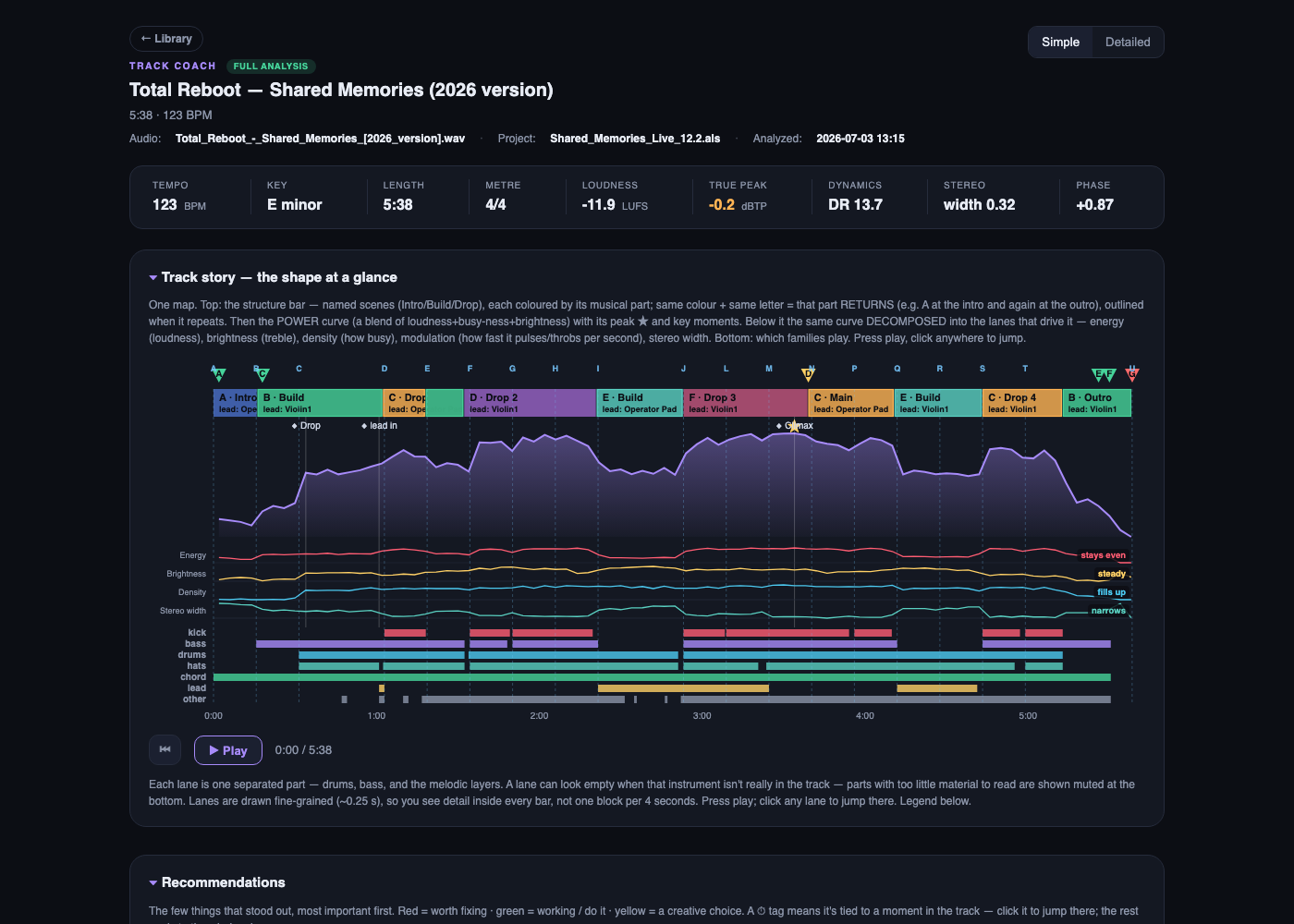
Two views, one toggle. It opens calm in Simple — a one-line verdict, the vitals spec-sheet, and a colour-coded form map (repeated sections share a colour) over the power curve broken into its driving lanes: energy, brightness, density, modulation, stereo width. Flip to Detailed for the synced stem player, the full Producer's read, and the evidence behind every call.
Why it exists
It started when another AI flat-out hallucinated about one of my tracks — wrong duration, an arc that didn't exist, made-up gear — and the real measurements proved it wrong. So I built a tool that can't lie: it reports only what librosa and Demucs actually measure. The orchestration just conducts; all the real work lives in deterministic scripts, so the same track gives the same answer every time instead of being re-improvised on a whim.
The output is split into three honest layers, and it never crosses the line between them:
measured → what it means → up to you
Measured — exact numbers only. What it means — specific, concrete interpretation (not "energy is low," but "bass dominates 250–500 Hz for the first two minutes, mids are present but buried"). Up to you — patterns observed, never directives. The author decides.
Built for my own music as Total Reboot. More about me: github.com/happysasha18.
What it does
Everything runs by default — no need to ask for "deep mode":
- Development-arc analysis — energy, brightness, loudness (LUFS), and how the track evolves over time
- Stem separation (Demucs) — drums / bass / vocals / other, with a synced player (play / seek / mute / solo, playhead linked to every chart)
- Frequency masking — which stem buries which, in which band, during which bars
- Per-stem rhythm + separation quality — groove consistency and how cleanly each stem was isolated
- Drum-hit breakdown — kick / snare / hat detection and timing
- Note transcription — basic-pitch on the melodic content
- Ableton
.alsparsing — tracks, MIDI + audio clips, automation envelopes, locators - Intention vs. result — overlays your automation against what actually happened in the audio
- Demucs-stem ↔ real-track map — connects separated stems back to your project's tracks
A look at the output
| The stem player (Detailed view) | What to change, ranked |
|---|---|
 |  |
Left — the song decomposed: the form map and power curve over its driving lanes, then every stem on its own lane under one transport (play / seek / mute / solo, playhead linked to every chart). Right — concrete feedback: the few things that stood out, most important first — red = worth fixing, green = working, yellow = a creative choice. Specific and timestamped, never "energy is low."
It reads your project, not just the audio
Point it at your Ableton set and it stops guessing. The arrangement and automation come straight from the .als — the ground truth that stem separation can only approximate.
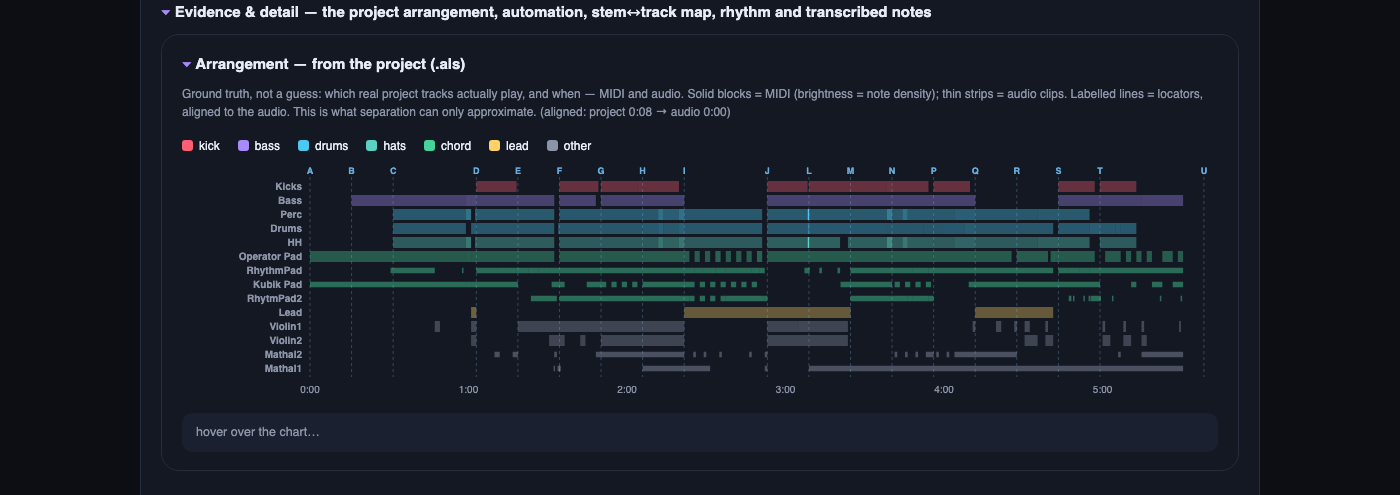
Arrangement, from the project: which real tracks actually play, and when. Solid blocks = MIDI (brightness = note density), thin strips = audio clips, labelled lines = locators — all aligned to the rendered audio.

Intention vs. result: your real automation curves (filter, gain, pitch, sends…), each scaled to its own range. Read them against the energy/brightness arc — where a curve flattens but the sound keeps moving, or moves while the sound sits still, your intention and the result disagree.
Evidence & detail
Collapsed by default at the bottom of the Detailed view, one drawer holds everything it measured — the receipts behind every call above:

The full drawer: the mix's average spectrum (tonal balance), the real arrangement from the .als, the stem ↔ track map (does separation match the project?), per-stem rhythm & separation quality, and the transcribed notes. Nothing interpreted here — just the measurements the read is built on.
Install
macOS (v1). Requires Python 3.11, ffmpeg, and the deps in requirements.txt.
./setup.sh
setup.sh is a short, readable bash script — skim it before you run it. It installs Homebrew (only if missing), ffmpeg, and uv, then the pinned Python deps. The single password prompt is Homebrew's own (your Mac login), and only fires if Homebrew isn't already there.
Prefer not to run it? Already have ffmpeg and a Python 3.11 env? Install the deps from requirements.txt yourself and skip the script entirely.
See references/install_troubleshooting.md if anything fails.
Usage
This is a Claude Code skill — drop the folder into ~/.claude/skills/track-coach/ and just talk to Claude about your track:
"why does my track sound stuck?" · "analyse this project" · "compare these two versions"
Claude grabs the audio (and .als if available), runs the pipeline, and opens the widget. You can also point it at a whole project folder and it'll find the latest render and .als itself.
What's new
v0.5.19 (latest) — the Producer's read is rebuilt for scanning (calm body, clear section
headers and dividers, real bullet lists, full width); the header now leads with the track
name; analyses get self-identifying, versioned filenames (no more invented versions); the
widget always opens in the calm Simple view; a missing-stem-player bug in deep runs is fixed;
and every pipeline step now goes through a shell-agnostic runner (scripts/tc_uv.sh) so it
works the same under bash or zsh.
→ Full history in CHANGELOG.md.
How it's built
SKILL.md | Orchestration — how Claude runs the pipeline and writes the read-out |
scripts/ | The analysis engine (Python): analyze_core, masking, separate, parse_als, build_widget, … plus tc_uv.sh, the shell-agnostic dependency-pinned runner every step goes through |
references/ | methodology.md (the conceptual framework), interpretation.md (numeric ranges), troubleshooting |
docs/ | Screenshots |
setup.sh · requirements.txt | Environment setup, pinned deps |
License
MIT © Alexander Abramovich — covers this repository's own orchestration and analysis code. Deep mode pulls in Demucs and PyTorch, which carry their own licenses; check those before any commercial or redistributive use.