
AI Data Access Gateway
HanZephyr/AI-Data-Access-Gateway
Gateway seguro para acesso a dados em agentes IA via MCP
Ver no GitHubGateway seguro de acesso a dados para agentes IA através do protocolo MCP. Funciona como intermediário entre agentes IA e fontes de dados reais, aplicando controles de segurança, validação SQL, políticas em nível de campo, mascaramento de dados e auditoria em tempo de execução.
Instalação
npx convez-ai HanZephyr/AI-Data-Access-Gateway1 comando no terminal: detecta o formato do repositório (marketplace ou plugin avulso) e instala via Claude Code. Requer Node 18+ e o Claude Code instalado.
Métricas
Casos de uso
- Controlar acesso seguro de agentes IA a bancos de dados
- Implementar políticas de segurança em nível de campo e mascaramento de dados sensíveis
- Auditar e monitorar consultas iniciadas por IA
- Gerenciar múltiplas fontes de dados com governança centralizada
Veredito

Solução robusta e bem-arquitetada para segurança de dados em ambientes com agentes IA. Exige expertise em DevOps e segurança para deployment e configuração efetiva, mas oferece controles granulares essenciais para produção.
README
A tradução para o português deste README ainda está na fila.
AI Data Access Gateway
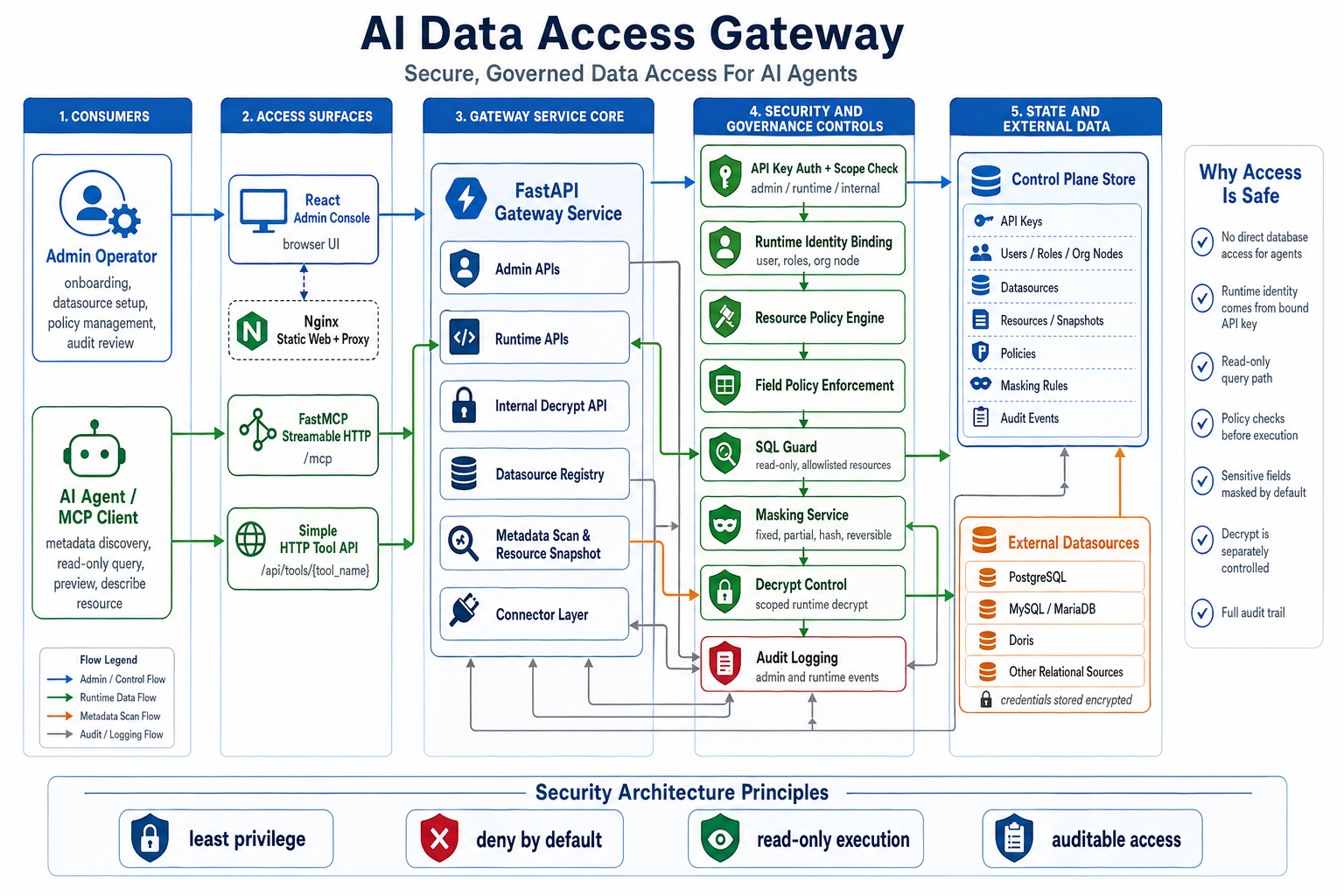
AI Data Access Gateway is an open-source secure data access gateway for AI agents. It provides database safety access services to AI agents through the MCP protocol. It sits between AI agents and real data sources, exposes governed metadata discovery and read-only data access, and enforces authorization, SQL safety checks, field-level policies, masking, data decrypt controls, and audit logging during AI-initiated data queries.
Architecture Overview
The project consists of a data security access layer and an admin console.
The runtime data access layer uses SQL Guard, resource policies, and field policies to constrain queries to controlled read-only paths. It exposes both a FastMCP Streamable HTTP /mcp endpoint and a simpler /api/tools/{tool_name} HTTP tool API.
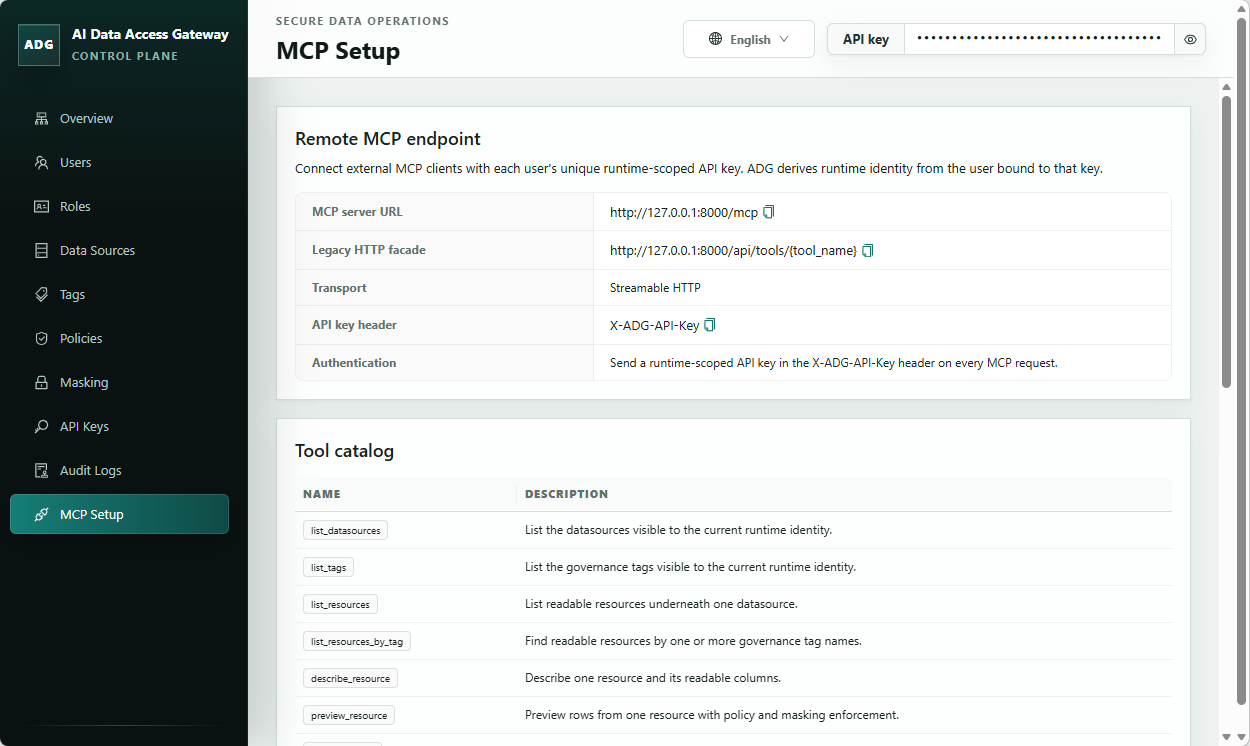
The admin console serves a single-admin trust model. It covers data source maintenance, resource governance, and audit review, and manages data source registration, directory identity mapping, resource metadata, field policies, masking configuration, API Key management, and enterprise organization structure management.
The repository also includes demo data initialization, Docker Compose startup, and minimal runtime HTTP call examples.
Admin UI Example
Repository Layout
src/adg/: backend application code, control plane, runtime, connectors, and security capabilitiestests/: backend unit and integration coverageweb/: React + Vite admin consoleexamples/: demo seed data and example client flowsdocs/: internal planning, design, acceptance, and repository memory docs
Quickstart
Prefer Docker Compose for a production-style runtime stack. If you run directly on the host, use non-development dependencies, keep reload disabled, and set production environment variables explicitly.
Backend
uv sync --frozen --no-dev --extra all
$env:ADG_ENV="production"
$env:ADG_CONTROL_PLANE_DATABASE_URL="sqlite:///./data/adg-control-plane.db"
$env:ADG_SECRET_KEY="<generate-a-long-random-secret>"
$env:ADG_CREDENTIAL_ENCRYPTION_KEY="<generate-a-second-long-random-secret>"
uv run --no-dev --extra all alembic upgrade head
uv run --no-dev --extra all init-admin --database-url sqlite:///./data/adg-control-plane.db
uv run --no-dev --extra all uvicorn adg.app.main:create_app --factory --host 0.0.0.0 --port 8000
init-admin prints a one-time admin API key for console onboarding and admin setup. Save it immediately and use it in the console. Runtime HTTP examples require a separate runtime-scoped API key bound to a directory user; create or reset that key after initialization.
Frontend
Set-Location web
npm ci
npm run build
The production build is written to web/dist. The Docker Compose path serves this static frontend with Nginx and exposes the web console at http://127.0.0.1:8080.
Docker Compose
Copy-Item docker-compose.example.yml docker-compose.yml
$env:ADG_SECRET_KEY="<generate-a-long-random-secret>"
$env:ADG_CREDENTIAL_ENCRYPTION_KEY="<generate-a-second-long-random-secret>"
docker compose up --build
docker compose exec backend init-admin
docker-compose.example.yml is the tracked template. Copy it to docker-compose.yml for local deployment changes, then edit the copied file for ports, volumes, or environment-specific settings. To build with package mirrors, set PYPI_INDEX_URL and/or NPM_REGISTRY_URL in .env; if they are omitted, the Docker build uses https://pypi.org/simple and https://registry.npmjs.org/. The Compose stack starts production backend and static frontend containers. The web console is published at http://127.0.0.1:8080 by default; set ADG_WEB_PORT in .env if that host port is already allocated. Set ADG_BACKEND_PORT only when you need to change the backend container's internal listen port.
Contributor Verification
uv sync --extra dev --extra all
uv run --extra dev pytest
uv run --extra dev ruff check .
uv run --extra dev mypy src tests
Set-Location web
npm test
npm run build
npm run audit:prod
Set-Location ..
uv export --frozen --extra dev --extra all --no-editable --no-hashes --no-emit-project --format requirements-txt --output-file .tmp-audit-requirements.txt
uv tool run --from pip-audit pip-audit -r .tmp-audit-requirements.txt --no-deps --vulnerability-service osv --progress-spinner off
Remove-Item .tmp-audit-requirements.txt
Documentation
License
This project is licensed under Apache 2.0. See LICENSE.