
kong-mcp-oauth2
go-authgate/kong-mcp-oauth2
MCP OAuth2 plugin secures Model Context Protocol (MCP) traffic on AI Gateway using OAuth 2.0 specification for MCP servers
Instalação
npx convez-ai go-authgate/kong-mcp-oauth21 comando no terminal: detecta o formato do repositório (marketplace ou plugin avulso) e instala via Claude Code. Requer Node 18+ e o Claude Code instalado.
Métricas
README
A tradução para o português deste README ainda está na fila.
kong-mcp-oauth2 — Unified MCP OAuth front door (Kong + AuthGate)


繁體中文版本請見 README.zh-TW.md
Hands-on macOS walkthrough against a real AuthGate: HANDS-ON.zh-TW.md (繁體中文)
mcp-oauth2 is a Kong go-pdk plugin — built
following Kong's Develop Go plugins
guide — that puts one OAuth front door in front of every MCP server. Internal MCP services already sit
behind Kong; this plugin makes them stop
accepting hand-written PATs and instead require an AuthGate-issued OAuth access
token — validated locally with RS256 + JWKS, then forwarded to the MCP
backend.
Architecture at a glance
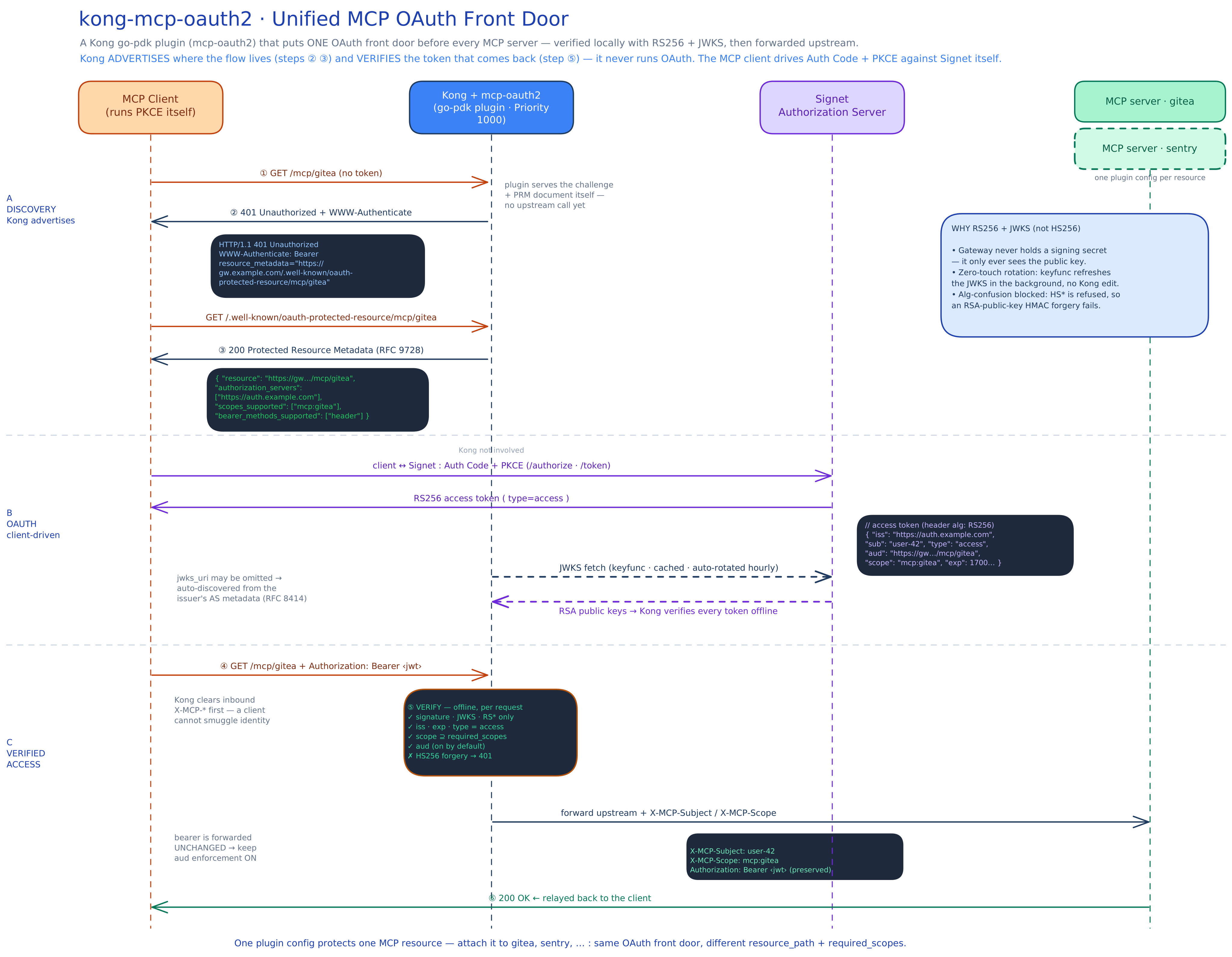
The diagram above walks the whole handshake end to end: A · Discovery (Kong
advertises the flow — steps ② ③), B · OAuth (the client drives Auth Code +
PKCE against AuthGate while Kong fetches the JWKS), and C · Verified access
(Kong verifies the RS256 token offline at step ⑤, then forwards upstream with
X-MCP-Subject / X-MCP-Scope). Editable source:
architecture.excalidraw — open it at
excalidraw.com to tweak. The two Mermaid diagrams
below are the lightweight, GitHub-rendered version of the same flow.
graph LR
    client["MCP client<br/>(runs PKCE itself)"]
    kong["Kong<br/>+ mcp-oauth2 plugin"]
    authgate["AuthGate<br/>Authorization Server"]
    mcp["MCP server(s)<br/>gitea / sentry"]

    client <-->|"MCP requests<br/>+ 401 challenge / PRM"| kong
    kong -->|"forward + X-MCP-Subject / X-MCP-Scope"| mcp
    client -->|"Auth Code + PKCE<br/>/authorize · /token"| authgate
    kong -.->|"JWKS fetch<br/>(cached, auto-rotated)"| authgate
Kong does not run the OAuth flow. It only advertises where the flow is
(steps ②③) and verifies the token that comes back (step ⑤). The MCP client
runs Auth Code + PKCE against AuthGate by itself. One plugin config covers all MCP
servers — attach it to each service with a different resource_path.
The handshake
This is the MCP authorization handshake (the 2025-06 MCP spec on top of RFC 9728
Protected Resource Metadata and RFC 6750 bearer tokens). The numbers map to the
main.go comments:
sequenceDiagram
    participant C as MCP client
    participant K as Kong + mcp-oauth2
    participant A as AuthGate
    participant M as MCP server

    C->>K: GET /mcp/server (no token)
    K-->>C: ② 401 + WWW-Authenticate:<br/>Bearer resource_metadata="‹PRM URL›"
    C->>K: GET /.well-known/oauth-protected-resource/mcp/server
    K-->>C: ③ 200 Protected Resource Metadata<br/>(authorization_servers, scopes)
    C->>A: Auth Code + PKCE (/authorize, /token)
    A-->>C: RS256 access token
    K-)A: fetch JWKS (cached / auto-rotated)
    C->>K: GET /mcp/server + Bearer ‹jwt›
    Note over K: ⑤ verify sig(JWKS) + iss + exp + type=access<br/>+ scope (+ aud when require_audience)
    K->>M: forward + X-MCP-Subject / X-MCP-Scope
    M-->>K: 200
    K-->>C: 200
| Step | Who | What happens |
|---|---|---|
| ② | Kong → client | Request with no/invalid token → 401 + WWW-Authenticate: Bearer resource_metadata="<PRM URL>" |
| ③ | Kong → client | Client fetches <PRM URL> → plugin serves Protected Resource Metadata (which AuthGate, which scopes) |
| — | client ↔ AuthGate | Client discovers AuthGate from the metadata and runs Auth Code + PKCE to get an access token |
| ⑤ | Kong | Client retries with Authorization: Bearer <jwt> → plugin verifies sig (JWKS) + iss + exp + type=access + scope (and aud only when require_audience is on) → forwards upstream |
Why RS256 + JWKS (not HS256)
- No shared secret on the gateway. With HS256 the gateway would have to hold AuthGate's signing secret — putting a forge-anything key on the edge. With RS256 + JWKS, Kong only ever sees the public key.
- Zero-touch key rotation. Rotate keys in AuthGate's JWKS; Kong picks them up automatically (keyfunc background refresh). No Kong config change.
- Alg-confusion is blocked. The plugin pins accepted algorithms to
RS256/RS384/RS512and refusesHS*. This defeats the classic forgery where an attacker signs HS256 using the RSA public key as the HMAC secret. (Validation matrix row 5, last item, tests exactly this.)
The verification engine is MicahParks/keyfunc,
which handles JWKS fetch, in-memory cache, background rotation, and rate-limited
refetch on an unknown kid — the parts that are easy to get wrong by hand in Lua.
Configuration reference
One plugin instance per MCP resource. See kong.yml for full examples.
| Field | Required | Description |
|---|---|---|
issuer | ✅ | AuthGate base URL. Must equal the token's iss claim byte-for-byte. |
gateway_origin | ✅ | Externally reachable Kong origin, e.g. https://gw.example.com. Used to build the PRM URL. |
resource_path | ✅ | This resource's path, e.g. /mcp/server. |
jwks_uri | AuthGate JWKS endpoint (RS256). Accepted algs are always pinned to the RS family. Leave empty to auto-discover it from the issuer's AS metadata (RFC 8414 /.well-known/oauth-authorization-server, falling back to OIDC discovery; cached 1h, the metadata's issuer must match). Set it explicitly when Kong reaches AuthGate on a different host than clients do — e.g. host.docker.internal in the compose demos. | |
required_scopes | All listed scopes must be present in the token's scope, else 403 insufficient_scope. | |
audience | Expected aud for token validation only. Defaults to gateway_origin + resource_path. The PRM resource always stays the canonical URL (RFC 9728 §3.3), so set this only when AuthGate emits a fixed non-URL aud. | |
require_audience | Enforce aud only when true. All shipped configs enable it (the schema default is false only because go-pdk booleans default to false). AuthGate emits a per-resource aud via RFC 8707: the client sends resource=<gateway_origin + resource_path> on the token request, and that URL must be on the client's allowed_resources allowlist. The expected value is an exact, scheme/slash-sensitive match — a token minted without the matching aud gets 401. Set false only temporarily while debugging token issuance (see the replay warning below). | |
leeway_seconds | Clock-skew tolerance for exp/nbf. Recommend 60. Must be ≥ 0. |
Only tokens with type=access are accepted; AuthGate refresh tokens (same key,
iss, aud, and scope, differing only by type and a longer exp) are
rejected with 401 invalid_token.
go-pdk schemas can't mark fields required, so the three required fields are validated on the first request instead — a missing one fails every request with
500 server_errorand a critical log line, not a silent misbehavior.Routing gotcha. Each Kong route must match both
resource_pathand its PRM path (/.well-known/oauth-protected-resource+resource_path). Otherwise Kong has no route to hand the client's step ③ lookup to and the plugin never serves the metadata. See thepaths:lists inkong.yml.Cross-resource replay warning (if you disable
require_audience). Withrequire_audience: false,audis not checked, so the only thing distinguishing one MCP resource from another isscope. A token minted with multiple scopes (e.g.mcp:gitea mcp:sentry) is accepted at every resource whose scope it carries, and because the raw bearer is forwarded upstream unchanged, a backend that receives it can replay it against a sibling resource. This is why every shipped config enablesrequire_audience; if you turn it off to debug token issuance, turn it back on before treating resources as isolated.
1. Build the plugin
go-pdk plugins are ordinary executables that speak the pluginserver RPC protocol
— no cgo, no .so. A full go build needs network access for the go-pdk
protobuf transitive deps; run it from the repo root:
go mod tidy && go build -o mcp-oauth2 .
2. Wire it into Kong
Register the plugin and point the pluginserver at the binary (env vars, shown in
docker-compose.yml):
KONG_PLUGINS=bundled,mcp-oauth2
KONG_PLUGINSERVER_NAMES=mcp-oauth2
KONG_PLUGINSERVER_MCP_OAUTH2_START_CMD=/usr/local/bin/mcp-oauth2
KONG_PLUGINSERVER_MCP_OAUTH2_QUERY_CMD=/usr/local/bin/mcp-oauth2 -dump
3. Run the demo stack
docker compose up --build
This starts DB-less Kong (proxy on :8000; the unauthenticated admin API is
bound to container-loopback and not published — see docker-compose.yml) with
two stub MCP upstreams. Edit kong.yml so issuer / gateway_origin /
jwks_uri point at your real AuthGate before expecting tokens to validate.
4. Validation matrix
After docker compose up, exercise the handshake. Replace $GW with
http://localhost:8000 for the demo (or your gateway_origin).
Rows 1–2 work against the stub demo as shipped. Rows 3–5b need real tokens: point
issuer/jwks_uriinkong.ymlat an AuthGate first (with the placeholder config they fail with503 temporarily_unavailable, sinceauth.example.comhas no JWKS to fetch). Because the shipped configs enforceaud, the tokens for rows 3–5a must be bound to the resource — request them withresource=<gateway_origin + resource_path>(RFC 8707). Row 5c is the exception — an HS256 forgery is rejected with401 invalid_tokenbefore any JWKS fetch (the alg is pinned first), so it returns401even against the placeholder config.
| # | Test | Command | Expect |
|---|---|---|---|
| 1 | Unauthenticated → challenge | curl -i $GW/mcp/server | 401 + WWW-Authenticate: Bearer resource_metadata="…" |
| 2 | PRM document served | curl -s $GW/.well-known/oauth-protected-resource/mcp/server | JSON with resource, authorization_servers, scopes_supported |
| 3 | Valid token → forwarded | curl -i $GW/mcp/server -H "Authorization: Bearer $GOOD" | 200 from the MCP upstream |
| 4 | Expired token | curl -i $GW/mcp/server -H "Authorization: Bearer $EXPIRED" | 401 invalid_token |
| 5a | Missing scope | token without required_scopes → curl -i $GW/mcp/server -H "Authorization: Bearer $X" | 403 insufficient_scope |
| 5b | Cross-audience | token issued for a different resource, with require_audience: true | 401 invalid_token (aud mismatch) |
| 5c | HS256 forgery (key bits) | forge an HS256 token using the RSA public key as the HMAC secret | 401 invalid_token — must be rejected (alg confusion) |
Rows 5b and 5c are the security-critical ones — run them before going live.
AuthGate-side preflight
Before this works end-to-end, confirm three things on AuthGate (decode a real
access token, not just the id_token):
- JWKS resolves.
GET <issuer>/.well-known/openid-configuration→ itsjwks_urireturns a non-emptykeysarray. - Access tokens are RS256. Decode an actual access token; its header
algisRS256(notHS256) and itskidmatches a key in the JWKS. AuthGate's default is oftenJWT_SECRET(HS256) — make sure you've moved access tokens (not onlyid_token) to asymmetric signing. - Issuer matches. The token's
issequals the plugin'sissuerconfig, byte-for-byte (mind the trailing slash). audbinds to the resource. The shipped configs enforceaud, so every token must be requested with RFC 8707 resource binding: add<gateway_origin + resource_path>(e.g.https://gw.example.com/mcp/server) to the OAuth client'sallowed_resourcesin AuthGate (an empty allowlist is deny-all and the token endpoint answersinvalid_target), then sendresource=<that URL>on the token request. Decode the token and confirmaudequals the plugin's expected value exactly.
Operational notes
- Auto-discovery adds the metadata endpoint to the availability chain. With
jwks_uriempty, the first token (and one refresh per hour) also depends on the issuer's AS metadata endpoint; a cold-cache discovery failure is answered503and retried on the next request, while a failed hourly refresh keeps serving the last discoveredjwks_uri. - JWKS endpoint must be highly available. If the initial fetch fails,
token requests get
503 temporarily_unavailable(not401, so clients don't re-run OAuth) and it is retried on the next request — a failed initial fetch is never cached. Fetch waits are capped at 10s and run under a per-URI lock, so a slow AuthGate can't stall traffic for other resources. Caveat: once keys are cached, a token whosekidis unknown returns401 invalid_token(offline validation can't tell "key rotated in mid-outage" from "forged kid"), and an hourly refresh that pulls a JWKS containing one malformed key can drop the cached keys until a clean refresh. Keep the JWKS valid and overlap keys generously during rotation. - Browser-based MCP clients need CORS. A CORS preflight (
OPTIONS, noAuthorization) is answered with the401challenge; put Kong'scorsplugin on the route if web-hosted clients must reach the gateway. - Overlap keys during rotation. Keep the old and new keys in the JWKS together for a window so in-flight tokens aren't killed mid-rotation.
- Keep access-token TTLs short. Like any offline validation, a revoked token
stays valid until its
exp— minutes, not hours. - The bearer token is forwarded upstream unchanged. Kong adds the
X-MCP-*identity headers (Subject/Scope/Issuer/Audience/Client/Token-Id/Expires) but does not strip or exchange theAuthorizationheader, so each MCP backend receives a live, replayable token. Trust your MCP backends accordingly, and keeprequire_audienceenabled (the shipped default in every example config) so a backend can't reuse a token against a sibling resource — it can still replay it against the same resource untilexp.