
Canvas Forge
glowElephant/canvas-forge
Quadro colaborativo infinito + Claude lê, planeja e constrói via MCP
Ver no GitHubServidor MCP que integra um quadro colaborativo infinito (estilo tldraw) com Claude. Equipes planejam livremente em um canvas compartilhado; Claude lê áreas marcadas, estrutura o plano e constrói a solução. Suporta texto, imagens, desenhos, PDFs, vídeos e comentários em tempo real.
Instalação
npx convez-ai glowElephant/canvas-forge1 comando no terminal: detecta o formato do repositório (marketplace ou plugin avulso) e instala via Claude Code. Requer Node 18+ e o Claude Code instalado.
Métricas
Casos de uso
- Planejamento visual colaborativo em tempo real com múltiplos participantes
- Prototipagem rápida: esboçar ideias e Claude gerar código/estrutura
- Análise de artefatos complexos (PDFs, vídeos com timestamps, screenshots) via IA
Veredito

Ferramenta sólida que une planejamento visual colaborativo com capacidades de IA via MCP, eliminando o gap entre ideação e execução. Excelente para equipes distribuídas que querem manter contexto visual rico e deixar Claude ler/agir sobre designs e planos reais.
README
A tradução para o português deste README ainda está na fila.
canvas-forge
English · 한국어
An infinite-canvas board where a team plans together — and when you attach Claude, the plan gets built.
People sketch ideas freely on an endless canvas with text, images, and drawings. The host marks one area and calls Claude; Claude reads that area, turns it into a structured plan ("Is this right?"), and on approval actually builds it. Without Claude it's a planning tool; attach Claude and it's a planning + building tool.
- Serverless / host-invited / non-commercial — the host opens the board on their own machine and invites people; data stays local to the host.
- Claude attaches over MCP.
Quick start
npm install
npm run build          # build the front end (the tldraw board) into dist/
npm run host           # start the single host process (default port 4317, override with PORT)
- Open
http://localhost:4317in a browser → enter a name and the infinite canvas appears. The top badge shows sync status, and the board auto-reconnects if you restart the host. Use the EN / 한 toggle (top-right) to switch the interface language. - Invite: the host console prints a real invite link (e.g.
http://192.168.0.95:4317). You can also use the "Copy invite link" button at the top of the board. Anyone on the same network opens that link, types a name, and edits the same board live (with multi-cursors and name tags). ※ If the first connection fails, check that Windows Firewall allows it. - Register the MCP server with Claude Code:
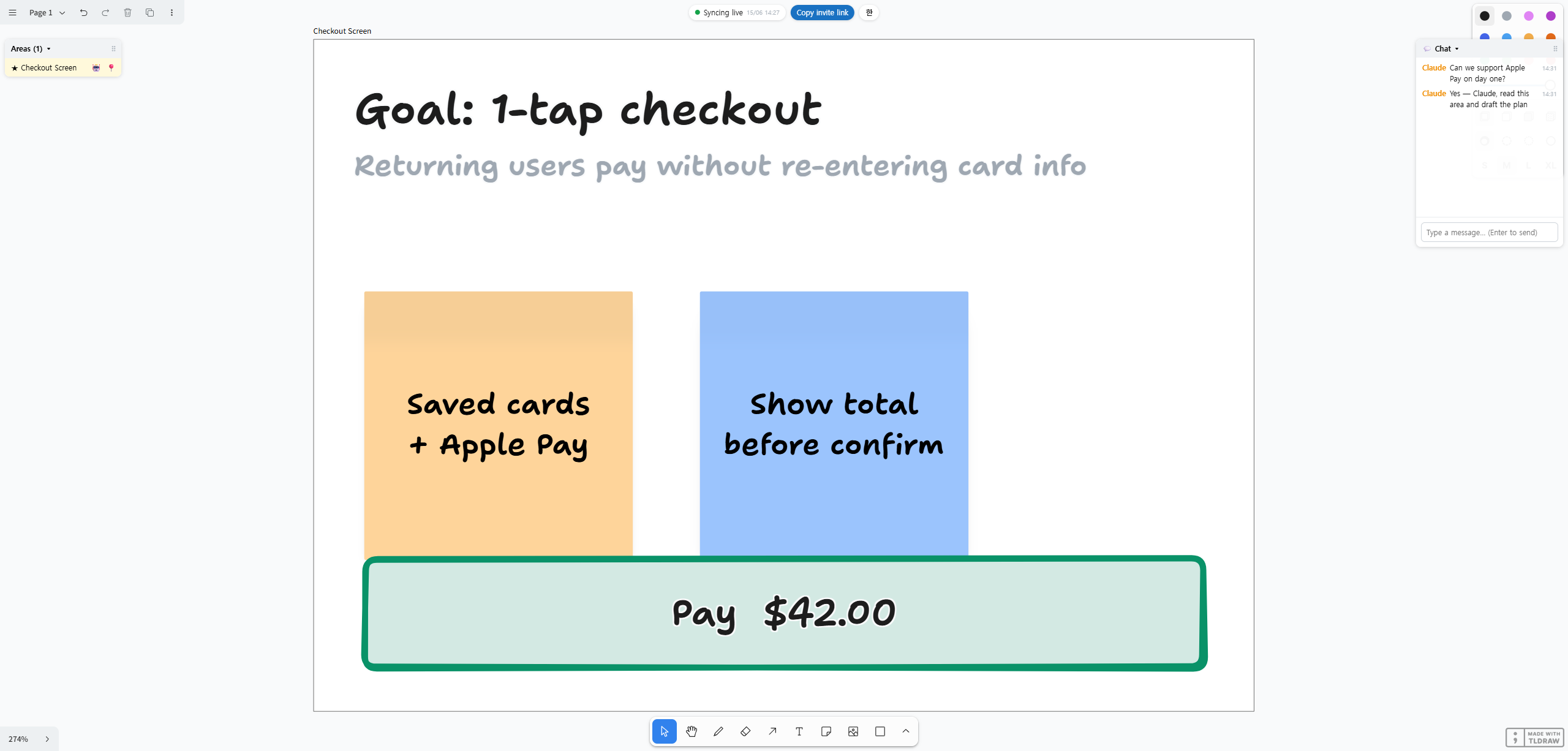
claude mcp add --transport http canvas-forge http://localhost:4317/mcp - Draw a frame on the board and give it a title (= one area, shortcut F). Place text and drawings inside the frame. In the Areas panel (draggable) you can click to jump to an area, drop a 📍 location pin, and use the 🤖 button to mark an area as "for Claude to read" (★).
- Drop anything into a frame — text and drawings, of course, but also images (png/jpg/gif/webp/svg), text files and PDFs (→ 📄 file card), pasted URLs (bookmarks with auto title/thumbnail), embedded web pages as iframes via the Insert Embed menu (if a site blocks framing you'll get a blank frame — use a bookmark instead), and videos (mp4/webm). Claude reads all of it.
- Curate videos with comments — select a video and the comment panel appears. Turn on "⏱ Tag current playback time" and add a comment (like a
1:23timestamp in a YouTube comment); Claude then pulls just that frame + the comment context for analysis. Click a time chip to seek there. Comments are shared with all participants in real time. - Chat — send a message from the 💬 chat panel (right side) and ① it accumulates in the panel (the server keeps it in
.board/chat.json, so late-joiners still see the history) and ② a speech bubble appears above the sender's cursor and fades after a few seconds. The panel can collapse/expand (showing an unread count while collapsed) and be dragged around. - Call it from a Claude Code session: "look at the board" (★-marked areas first) or "read the 'Checkout Screen' area" →
read_areareads the area as multimodal content (text in chronological order with[14:05 guest]labels + a screenshot + original images + file contents + PDFs + link bodies + tagged video frames) →post_cardposts an "is this right?" card that shows up live for every participant → once the host approves, Claude builds it with Claude Code's own tools. Claude understands the discussion as a timeline (when a later opinion overrides an earlier one, the latest wins).
Data lives in the host's local .board/ (board.json + exports + uploads) and is restored after you close and reopen. Posting cards (post_card) and reading area text work even with no browser tab open.
Development
npm run dev:web        # vite dev server (front end only, HMR) — note: MCP/persistence run under `npm run host`
npm test               # server tests (vitest): board persistence / area extraction / MCP e2e
Status
✅ MVP1 working — the Claude bridge loop (mark area → read_area → post_card → approve → build). Verified end-to-end in a real browser.
✅ MVP2 working — real-time collaboration: N concurrent users, multi-cursors, host-hub sync (@tldraw/sync). Verified with two real browser tabs (host + guest).
✅ MVP3a working — multimodal reading: individual original images, text file cards, link unfurl + body reading.
✅ MVP3b working — PDF text extraction, web-page iframe embeds, area panel / location pins, and MCP server instructions (usage rules delivered automatically to the attaching Claude).
✅ MVP3c (video) working — video comments + time-tag curation: Claude analyzes only the moments people flagged via comments, as frame + context (no ffmpeg — captured in the browser). Headless verification: tagged-moment frame pixels confirmed.
✅ Collaboration UX — chat panel (accumulating, persisted history, cursor bubbles), area ★-marking (Claude prioritizes them), chronological reading ([HH:MM author] — understanding the flow of discussion), draggable panels. Interface available in English and Korean (EN / 한 toggle).
Roadmap: MVP1 → MVP2 → MVP3a → MVP3b → MVP3c (video) → remaining: cross-project bookmarks.
Spec: docs/spec.md · Design: docs/superpowers/specs/2026-06-09-canvas-forge-design.md, MVP2
Architecture
- Front end: React + tldraw + Vite. Infinite canvas, text/image/drawing objects, frames, and area selection all come from tldraw.
- Host local server: Node. Persists board state (
.board/board.json), exports images, and exposes the MCP server. A browser alone can't reach local files or Claude Code, so this server is the bridge. - MCP server (the interface Claude attaches to):
list_areas/read_area(area_id)(multimodal: text + screenshot) /post_card(area_id, markdown). - Area = a tldraw frame. The host draws a frame and titles it — that's one area. There is no separate partitioning system.
Operating model
Serverless / host-invited / non-commercial. No central server, no auth, no billing — the host opens a board on their own machine and invites people. Data stays on the host's machine.
Intended limitation (not a bug): with no auth and a
0.0.0.0bind, anyone invited on the LAN can connect (by design — non-commercial, host-invited). Static serving and uploads only block path traversal. Remote (over-the-internet) access requires the host to set up their own tunnel / port forwarding.