MCP WebSocket Demo
getsimpletool/mcp-ws-example
Exemplos de implementação MCP com WebSocket e comunicação JSON-RPC
Ver no GitHubDemonstração prática do Model Context Protocol (MCP) da Anthropic com suporte a WebSocket. Implementa comunicação bidirecional JSON-RPC entre clientes e servidores, incluindo exemplos de stream em memória e conexões via rede. Útil para entender como construir integrações MCP robustas.
Instalação
npx convez-ai getsimpletool/mcp-ws-example1 comando no terminal: detecta o formato do repositório (marketplace ou plugin avulso) e instala via Claude Code. Requer Node 18+ e o Claude Code instalado.
Métricas
Casos de uso
- Aprender implementação prática do Model Context Protocol
- Integrar APIs externas (como National Weather Service) com Claude via MCP
- Construir servidores MCP com suporte a conexões de rede
Veredito

Recurso educacional sólido da Anthropic para dominar MCP em produção. Código bem estruturado com exemplos claros de stream local e WebSocket, ideal para quem precisa integrar dados custom com Claude de forma segura e bidirecional.
README
A tradução para o português deste README ainda está na fila.
Message Communication Protocol (MCP) Implementations
This repository demonstrates two implementations of the Model Context Protocol (MCP) by Anthropic AI, a JSON-RPC based protocol for bi-directional communication that enables developers to build secure, two-way connections between their data sources and AI-powered tools.
1. Memory Stream Implementation (run on same host)
Overview
The Memory Stream implementation demonstrates local client-server communication using in-memory channels. Both client and server operate within the same host.
Protocol Flow
Client                          Server
   |                              |
   |------ initialize() --------->|  (sends capabilities)
   |<---- InitializeResult -------|  (confirms connection)
   |                              |
   |------ list_tools() --------->|
   |<----- tool list -------------|
   |                              |
   |------ call_tool() ---------->|
   |<----- tool result -----------|
Key Components
- Memory Streams: Uses
MemoryObjectSendStreamandMemoryObjectReceiveStreamfor message passing - JSON-RPC Messages: Implements standard JSON-RPC 2.0 message format
- Type Safety: Utilizes Pydantic models for request/response validation
2. WebSocket Implementation
Overview
The WebSocket implementation extends MCP over network connections using WebSocket protocol. In this demo, it provides weather information services using the National Weather Service API encapsulated via network in WebSocket messages.
Protocol Flow
Client                          Server
   |                              |
   |------ WebSocket Open ------->|
   |<---- Connection Accept ------|
   |                              |
   |------ initialize() --------->|
   |<---- InitializeResult -------|
   |                              |
   |------ list_tools() --------->|
   |<----- weather tools ---------|
Components
- Server (
websocket/server_ws.py)
@weather_server.list_tools()
async def handle_list_tools():
    return [
        Tool(
            name="get-alerts",
            description="Get active weather alerts for a US state",
            inputSchema={
                "type": "object",
                "required": ["state"],
                "properties": {
                    "state": {
                        "type": "string",
                        "description": "Two-letter state code (e.g. CA, NY)"
                    }
                }
            }
        ),
        Tool(
            name="get-forecast",
            description="Get weather forecast for a location",
            inputSchema={
                "type": "object",
                "required": ["latitude", "longitude"],
                "properties": {
                    "latitude": {
                        "type": "number",
                        "description": "Latitude of the location"
                    },
                    "longitude": {
                        "type": "number",
                        "description": "Longitude of the location"
                    }
                }
            }
        )
    ]
- Client (
websocket/client_ws.py)
client = WebSocketClient("ws://localhost:8000/ws")
await client.connect()
tools = await client.list_tools()
forecast = await client.call_tool("get-forecast",
    {"latitude": 37.7749, "longitude": -122.4194})
Available Weather Tools
- get-alerts: Get active weather alerts for a US state (requires two-letter state code)
- get-forecast: Get detailed weather forecast for a location (requires latitude and longitude)
Setup
Memory Stream Run (same host via MemoryStream)
pip install -r requirements.txt
cd memory_stream
python test.py
Websocket Run (client and server on different hosts)
pip install -r requirements.txt
cd websocket
python test_ws.py
Test execution process:
- Server is started in a separate process
- System waits 2 seconds to ensure server initialization
- Client connects and executes test requests via FastAPI WebSocket port 8000
- Server process is gracefully terminated after tests
To run server client on two machins, you can use run_server.py and run_client.py script.
Additional Resources
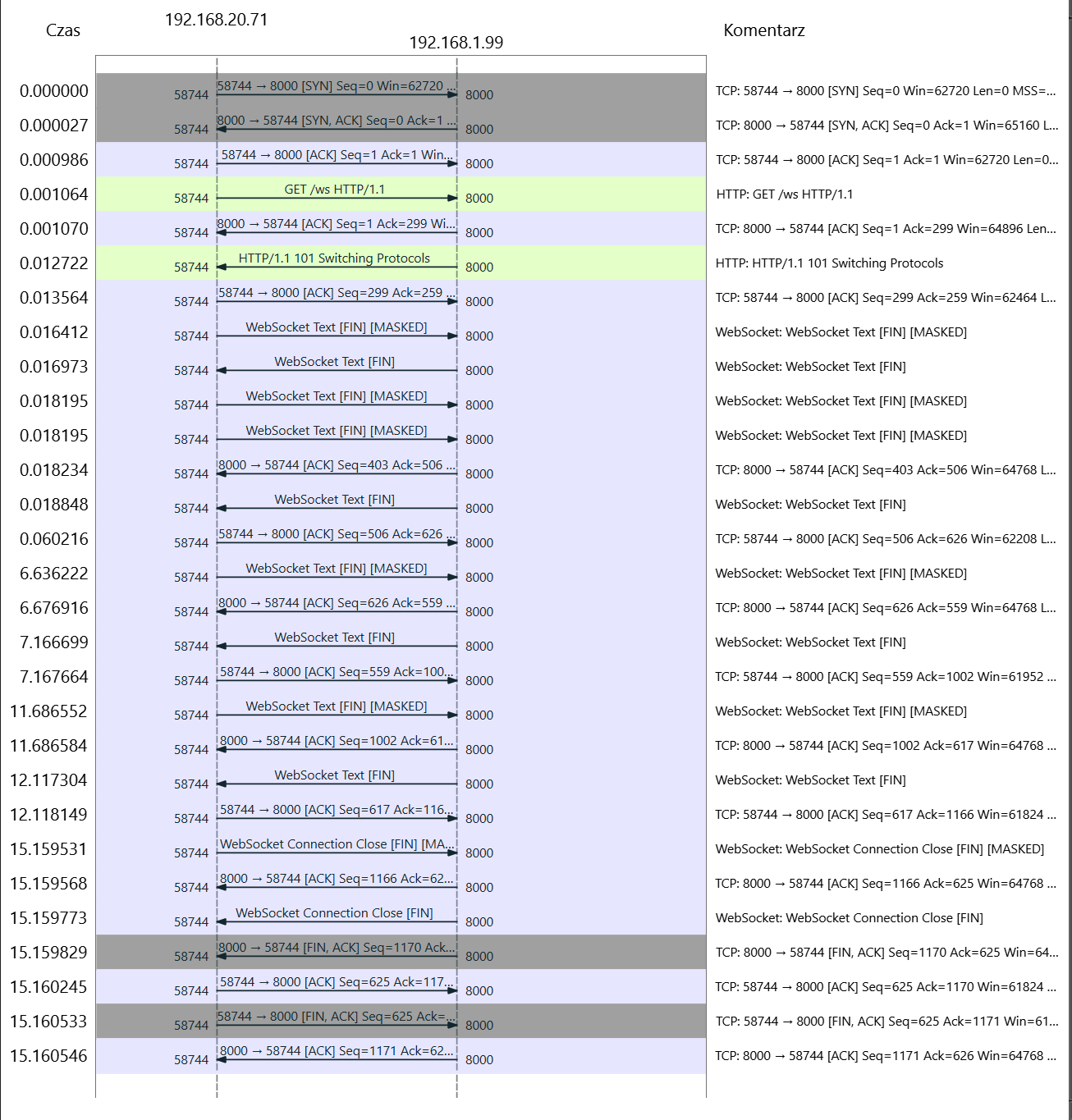
For a detailed analysis of the client-server communication [port 8000], a PCAP (Packet Capture) file is available in the repository. This capture contains the complete WebSocket conversation between client and server components. This implementation is not encrypted, so the data is transmitted in plain text. The PCAP file can be opened using Wireshark, a popular network protocol analyzer. It provides a comprehensive view of the communication, including the request headers and their content.