
Claude Nomad
funkadelic/claude-nomad
Sincronize seu setup do Claude Code em qualquer máquina com histórico e segurança
Ver no GitHubPlugin que sincroniza sua configuração do Claude Code entre múltiplas máquinas, com remapeamento de caminhos e sobrescrita por host. Mantém histórico de sessões, agentes customizados e segredos sincronizados através de um repositório Git privado sob seu controle, com scan de segredos e visualização prévia de alterações.
Instalação
npx convez-ai funkadelic/claude-nomad1 comando no terminal: detecta o formato do repositório (marketplace ou plugin avulso) e instala via Claude Code. Requer Node 18+ e o Claude Code instalado.
Métricas
Casos de uso
- Manter sessões e configurações do Claude Code sincronizadas entre desktop, laptop e outros hosts
- Compartilhar agentes, skills e slash commands com sobrescrita de configurações por máquina
- Sincronizar histórico de conversas com remapeamento automático de caminhos diferentes entre hosts
- Escanear secrets antes de sincronizar e prevenir vazamento de credenciais entre máquinas
Veredito

Ferramenta robusta e bem pensada para desenvolvedores multi-máquina que usam Claude Code. Implementa sincronização stateful com segurança como prioridade, incluindo verificações de integridade e recuperação de falhas. Solução madura com testes, cobertura de código e documentação completa.
README
A tradução para o português deste README ainda está na fila.
claude-nomad





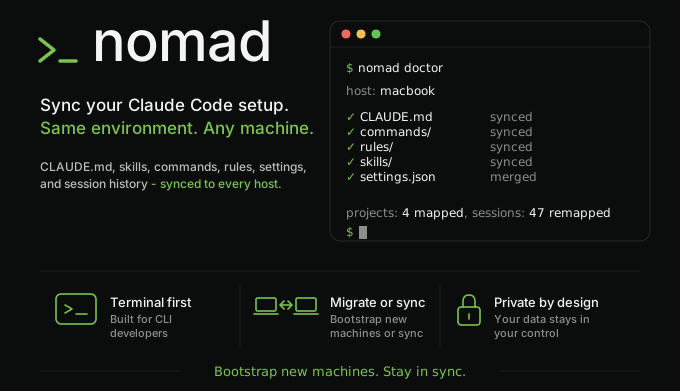
Your entire Claude Code setup, on every machine. History included, every push secret-scanned.
Open Claude Code on a second machine and it is a blank slate: none of your custom agents, slash
commands, tuned settings, or past conversations. claude-nomad keeps all of it in sync through a
private Git repo you control. nomad push on one machine, nomad pull on the next, and everything
is there, conversations included.
Not dotfiles, not rsync. claude-nomad understands Claude Code's state, so your session history survives different file paths and your secrets never ride along.
Full documentation: https://funkadelic.github.io/claude-nomad/
Features
- Sessions follow you across machines. Start a conversation on your desktop, run
claude --resumeon your laptop, and it is there. claude-nomad rewrites the machine-specific file paths Claude Code embeds in every transcript, so history survives projects living at different paths on different hosts. - One shared setup, per-machine exceptions. Agents, skills, slash commands, rules, hooks, and
your
CLAUDE.mdlive in one place and follow you everywhere. Settings merge a shared base with a per-host override, so one machine can run a different model or MCP URL without forking the rest. - Every push is secret-scanned. Only an explicit allow-list of paths ever leaves the machine, credentials never sync, and gitleaks scans the exact files about to be published. The push aborts on any hit, with an interactive menu to redact, allow, or drop the finding.
- Preview before you trust it.
nomad diffshows offline what a pull would change, and--dry-runon pull and push prints the plan without writing anything. - One command tells you what is wrong.
nomad doctoris a read-only health check: wedged sync repo, broken hook references, hooks that would crash on session start because of a missing--preserve-symlinks-mainflag, version drift, oversized backup cache, and settings drift (warns when~/.claude/settings.jsonno longer matches the base+host merge nomad would write, the silent-clobber case, withnomad pullas the fix), each with a fix hint. - Self-healing sync. Every overwrite is backed up first, and
nomad pull --force-remoterecovers a sync repo stuck mid-rebase while parking your stranded work on a branch, refusing entirely if shared config is at risk. - Easy off.
nomad ejectreplaces every managed~/.claude/symlink with a real copy in one step, so your setup keeps working after you delete the sync checkout and uninstall the CLI.
See the full feature tour for the rest: opt-in per-project sync, transcript redaction, backup pruning, and more.
Quickstart
First host (once, ever):
# 1. Install the CLI.
$ npm i -g claude-nomad

# 2. Create your private sync repo and scaffold it.
$ nomad init                   # prompts for a repo name (default: claude-nomad-config)
$ nomad init --repo my-config  # non-interactive

# 3. Add a stable host label to ~/.zshrc or ~/.bashrc, then reload.
export NOMAD_HOST=<your-host-label>

# 4. Publish the scaffold to your private repo.
$ nomad push
Each additional host:
$ npm i -g claude-nomad
$ gh repo clone <your-username>/claude-nomad-config ~/claude-nomad
export NOMAD_HOST=<your-host-label>   # add to ~/.zshrc or ~/.bashrc
$ nomad pull
Everyday loop on any host:
$ nomad doctor   # confirm setup
$ nomad pull     # apply config to ~/.claude/
$ nomad push     # publish local changes (sessions, settings)
During nomad push and nomad pull, long-running steps (rebase, secret scan, git push, session
sync) show an animated progress indicator on an interactive terminal so the CLI does not look hung.
In CI and when output is piped, only plain text lines are printed, with no ANSI control codes, so
log output remains grep-stable.
When nomad push detects a potential secret, it drops into an interactive menu (TTY) or aborts with
a recovery hint (non-TTY/CI). Three non-interactive recovery paths are available without the menu:
nomad push --redact-all-- scrub every finding from the local transcript in place, then push.nomad push --allow <rule>-- record findings matching one gitleaks rule id as false positives (appends their fingerprints to.gitleaksignore), then re-scan and push.nomad push --allow-all-- record every current finding as a false positive, then re-scan and push.nomad allow <fingerprint>...-- pre-record specific fingerprints in.gitleaksignorewithout going through a push cycle.
All allow paths always re-scan after writing the allowlist; a surviving finding still aborts the push. See Recovery flows for the full decision tree.
If a previous nomad pull left the sync repo stuck mid-rebase or mid-merge, run
nomad pull --force-remote to auto-recover. It aborts the in-progress operation, parks stranded
commits on a nomad/stranded-<ts> branch, and resets to origin/main, then re-pulls. It refuses if
any stranded or dirty tracked changes touch synced config (shared/, hosts/, path-map.json), so
config you care about is never silently discarded.
Requirements
- Node.js 22.22.1 or newer (24 LTS recommended)
- Git
gitleaks(required fornomad push)gh(GitHub CLI), required bynomad init
Optional: curl or wget for the
version-staleness check and nomad doctor --check-schema. The CLI works without them.
Learn more
- How it works -- path remapping, settings merge, what syncs and what doesn't
- Setup and migration -- full setup
walkthrough, migrating an existing
~/.claude/ - Commands reference -- all CLI flags
- Recovery flows -- backups, drop-session, redact, gitleaks allowlist, non-interactive allow
- FAQ -- common questions, like the right push/pull order when both sides have changes
- Contributing
- Security policy