
Token Saver
formin/token-saver
Reduz 60–95% de tokens e reporta economias em cada resposta
Ver no GitHubSkill de orquestração multi-agente que minimiza tokens através de compressão de saídas shell (RTK) e contexto (Headroom), reportando economias reais a cada resposta. Integra ferramentas de execução distribuída (omo, UltraWork, lazycodex, Superpowers) para otimizar fluxos de trabalho complexos em Claude, Codex, Antigravity e hermes-agent.
Instalação
npx convez-ai formin/token-saver1 comando no terminal: detecta o formato do repositório (marketplace ou plugin avulso) e instala via Claude Code. Requer Node 18+ e o Claude Code instalado.
Métricas
Casos de uso
- Minimizar consumo de tokens em agentes de longa duração
- Comprimir saídas shell e contextos antes de enviar ao LLM
- Orquestrar tarefas multi-agente com distribuição inteligente
- Rastrear economias de tokens via relatórios semanais
Veredito

Ferramenta robusta para quem trabalha com agentes de IA em escala e precisa controlar custos de tokens. Separa claramente compressão (RTK/Headroom, com medição) de orquestração (omo/UltraWork/lazycodex), mantendo transparência nos números. Recomendado para pipelines complexos e pesquisa de longa duração.
README
A tradução para o português deste README ainda está na fila.
🪙 token-saver





토큰 절감은 RTK(셸 출력 압축) · Headroom(컨텍스트 압축) 두 가지로만 수행하고, 응답 끝마다 RTK·Headroom이 절약한 토큰을 각각 실측 보고하는 크로스 에이전트(Agent Skill) 스킬입니다. 여기에 omo · UltraWork · lazycodex · Superpowers 를 함께 묶지만, 이 넷은 토큰 절감 도구가 아니라 작업을 잘 수행하기 위한 오케스트레이션 · 코드 탐색 · 개발 방법론 도구입니다.
Claude Code · OpenAI Codex CLI · Google Antigravity · hermes-agent 어디서나 동일하게 동작합니다. (Agent Skills 오픈 표준 = SKILL.md 폴더)
영어 요약은 맨 아래 English 참고.
🎬 데모
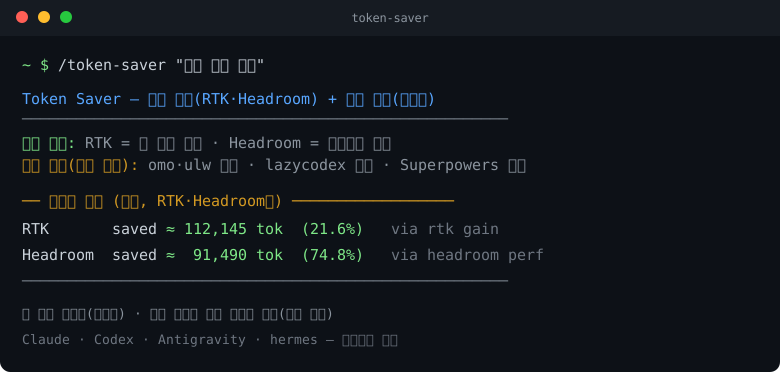
실측 예: RTK 누적 112,145 tok 절감(21.6%) · Headroom 한 요청에서 ~91,490 tok 압축(74.8%). 수치는
rtk gain/headroom perf실측이며, 데이터가 없으면used=no로 정직하게 표시합니다. 이 수치는 RTK·Headroom만 대상입니다.
✨ 한눈에 — 두 가지를 분리하세요
이 스킬의 핵심은 "토큰 절감"과 "작업 수행"을 섞지 않는 것입니다.
| 구분 | 도구 | 하는 일 | 절감 보고 |
|---|---|---|---|
| ① 토큰 절감 코어 | RTK, Headroom | 셸 출력 / 컨텍스트를 LLM에 넣기 전 압축 | ✅ 푸터·주간 리포트에 수치 보고 |
| ② 작업 보조 (절감 아님) | omo, ulw(UltraWork), lazycodex, Superpowers | 멀티에이전트 분배 · 코드 탐색 · 개발 방법론 | ❌ 절감 수치 없음 — 사용 여부만 표기 |
즉 token-saver = (RTK·Headroom 으로 토큰을 줄여 보고) + (나머지 넷으로 작업을 잘 수행). 토큰을 줄이는 것은 RTK·Headroom 뿐입니다.
여기에 ③ 상태 외재화 패턴(Harness-1) 을 작업 방식으로 함께 적용합니다 — 장기 탐색·리서치 작업의 상태(후보·증거·검증 기록)를 파일로 외재화해 컨텍스트를 예산 안에서 가볍고 복구 가능하게 유지합니다(pat-jj/harness-1 · arXiv:2606.02373, 절감 수치 보고 대상 아님).
🎯 핵심 기능 2가지
- 응답마다 절약 토큰 푸터 — 모든 응답 맨 끝에 RTK·Headroom이 각각 절약한 토큰을 실측 보고.
- 세션 기반 주간 리포트 — 매주 월요일 첫 실행 1회, 지난 한 주의 RTK·Headroom 절감 합계를 정리(OS 스케줄러 불필요).
① 토큰 절감 코어 (유일한 절감 수단)
| 도구 | 절감 방식 | 공식 저장소 | 활성 / 측정 |
|---|---|---|---|
| RTK (Rust Token Killer) | 셸 명령 출력을 실행 시점에 필터·압축 (60~90%↓) | https://github.com/rtk-ai/rtk | rtk init -g --codex · 측정 rtk gain --format json |
| Headroom | 컨텍스트·도구 출력·로그·파일·RAG를 LLM 투입 전 압축 (60~95%↓) | https://github.com/chopratejas/headroom | headroom proxy / headroom mcp install · 측정 headroom perf |
- RTK:
rtk read|grep|find|git|test|err|log ...로 셸 출력을 압축. (Bash hook이 있으면 자동 재작성) - Headroom: 큰 컨텍스트를 프록시/MCP로 압축, 필요 시 원본 복원. 최신 출력은 보존하고 과거(stale) 출력을 압축. 비밀값은 압축 대상에서 제외.
- 이 둘만 절감량을 측정·보고합니다.
② 작업 보조 도구 (토큰 절감과 무관)
아래 넷은 토큰을 줄이지 않습니다. 작업을 분배·탐색·계획하는 데 쓰며, 푸터에는 "사용 여부"만 적습니다.
| 도구 | 실제 용도(무엇인가) | token-saver에서의 사용 방식 | 공식 저장소 |
|---|---|---|---|
| omo (oh-my-openagent) | 멀티에이전트 실행 하네스 — 리서치/구현/검증을 병렬 서브에이전트로, 모델 라우팅·LSP/AST 코드 지능 | 복잡한 다단계 작업의 실행 계층(무거운 작업을 전문 서브에이전트에 위임) | https://github.com/code-yeongyu/oh-my-openagent |
| ulw (UltraWork) | /ulw 한 명령으로 작업을 전문 에이전트 계층에 자동 분배하는 디스패처 | 독립 작업 묶음을 /ulw <task> 로 분배·실행하는 오케스트레이션 진입점 | npm ultrawork-sanguo |
| lazycodex | omo의 Codex 에디션 — LSP/AST 코드 탐색, 프로젝트 메모리, 계획, 검증된 완료 | Codex에서 코드베이스를 정밀 탐색·진행하는 코드 지능 계층 | https://github.com/code-yeongyu/lazycodex |
| Superpowers | 개발 방법론·스킬 프레임워크 — brainstorm→plan→execute, TDD, 체계적 디버깅 | 큰 작업의 계획·실행·검증 방법론 계층(추측 대신 구조화된 절차) | https://github.com/obra/superpowers |
이들이 만든 출력도 결국 셸/컨텍스트를 거치므로, 그 출력을 ①의 RTK/Headroom으로 압축해서 토큰을 절감합니다. 절감은 언제나 ①이, 작업 수행은 ②가 담당합니다.
🚀 빠른 설치
git clone https://github.com/formin/token-saver.git
cd token-saver
./install/install.ps1        # Windows (PowerShell)
bash ./install/install.sh    # macOS / Linux
설치 스크립트는 SKILL.md + scripts/weekly_report.py 를 4개 에이전트 위치에 복사하고, Codex용 agents/openai.yaml · Antigravity용 commands/token_saver.toml 도 배치합니다(추가 설치, 기존 설정 비파괴).
| 에이전트 | 위치 |
|---|---|
| Claude Code | ~/.claude/skills/token-saver/SKILL.md |
| Codex CLI | ~/.codex/skills/token-saver/SKILL.md (+ agents/openai.yaml) |
| Antigravity | ~/.gemini/antigravity/skills/token-saver/SKILL.md (+ ~/.gemini/commands/token_saver.toml) |
| hermes-agent | ~/.hermes/skills/software-development/token-saver/SKILL.md |
🛠️ 사용법
| 에이전트 | 호출 |
|---|---|
| Claude Code | /token-saver |
| Codex CLI | $token-saver |
| Antigravity | /token_saver |
| hermes-agent | token-saver |
📊 출력 예시
응답마다 붙는 푸터 (절감은 RTK·Headroom만):
🪙 Token Saver 리포트 (절약된 토큰)
- RTK:      used=yes — saved ≈ 112,145 tok (21.6%)   via rtk gain
- Headroom: used=yes — saved ≈  91,490 tok (74.8%)   via headroom perf
- 작업 도구(토큰 절감과 무관, 사용 여부만): ulw/omo=used, lazycodex=used, superpowers=used
주간 리포트 (매주 월요일 첫 실행 1회, RTK·Headroom만):
📅 주간 토큰 절약 리포트 — 2026-W23 (지난 한 주 누적)
- RTK: 2026-06-01~2026-06-07 · saved ≈ 112,145 tok (21.6%) · via rtk gain --weekly
- Headroom: saved ≈ … tok · via headroom perf --hours 168
수동 확인: python scripts/weekly_report.py --force / --check.
⚙️ RTK · Headroom 활성화
# RTK (셸 출력 압축)
rtk init -g --codex            # Codex 연동
rtk gain --format json         # 절감 측정

# Headroom (컨텍스트 압축)
pip install headroom-ai
headroom proxy                 # 프록시(127.0.0.1:8787) → 에이전트를 라우팅
#   Claude:  ANTHROPIC_BASE_URL=http://127.0.0.1:8787 claude
#   Codex 등: OPENAI_BASE_URL=http://127.0.0.1:8787/v1 <tool>
headroom perf --hours 168      # 절감 측정
Headroom은 트래픽이 흐를 때만
~/.headroom/logs에 절감을 기록하며 과거(stale) 도구 출력을 압축합니다. 라우팅 전에는 푸터에used=no.Windows + WSL 사용 시:
headroom이 WSL을 통해 실행되면~/.wslconfig에[wsl2]\nnetworkingMode=mirrored추가 후wsl --shutdown으로 재시작해야 Windows 에이전트가127.0.0.1:8787로 닿습니다.
🔒 안전 · 정직성 원칙
- 비밀값 비노출: API 키·토큰·서비스계정 JSON·GPS 원문은 출력/압축/푸터 어디에도 원문으로 넣지 않습니다.
- 추정 금지: 절감량은
rtk gain/headroom perf실측만(RTK·Headroom). 없으면used=no. - 혼동 금지: omo/ulw/lazycodex/Superpowers의 효과를 "토큰 절감"으로 보고하지 않습니다(사용 여부만).
- 폴백: 도구 미설치/실행 불가 시 멈추지 않고 발췌·요약으로 진행하고, 푸터에 한 줄 사유.
📁 디렉터리 구조
token-saver/
├── README.md · LICENSE
├── SKILL.md                  # 스킬 본문(① 토큰 절감 / ② 작업 보조 구분)
├── agents/openai.yaml        # Codex interface
├── commands/token_saver.toml # Antigravity/Gemini 슬래시 커맨드
├── scripts/weekly_report.py  # 세션 기반 주간 리포트(RTK·Headroom만)
├── assets/demo.svg
└── install/{install.ps1, install.sh}
🙏 크레딧
- 토큰 절감: RTK · Headroom
- 작업 보조(절감 아님): oh-my-openagent · lazycodex · UltraWork(ultrawork-sanguo) · Superpowers
각 도구의 라이선스/문서를 따르세요.
📜 License
MIT — see LICENSE.
English
token-saver is a cross-agent Agent Skill where token reduction is done by exactly two tools — RTK (shell output) and Headroom (context) — and every response ends with a footer reporting how many tokens RTK and Headroom each saved (measured, never estimated), plus a weekly Monday summary.
It also bundles omo, UltraWork (ulw), lazycodex, and Superpowers — but these are NOT token-savers. They are workflow tools: multi-agent orchestration (omo, ulw), code navigation (lazycodex), and development methodology (Superpowers). token-saver uses them to do the work well; their effect is never reported as token savings (the footer only notes whether they were used). Any output they produce still flows through RTK/Headroom, which is where the actual token reduction happens.
Works identically in Claude Code, OpenAI Codex CLI, Google Antigravity, and hermes-agent. Install: git clone https://github.com/formin/token-saver && cd token-saver then ./install/install.ps1 (Windows) or bash ./install/install.sh. Savings come only from rtk gain (RTK) and headroom perf (Headroom); when a tool isn't active the footer says used=no. Secrets are never compressed or printed. MIT.