
PM Server — Gerenciador de Projetos para Claude Code & Codex CLI
flc-design/pm-server
Gestão de projetos multiplataforma via linguagem natural para assistentes IA
Ver no GitHubMCP server que integra rastreamento de tarefas, visualização de progresso e registro de decisões diretamente no Claude Code e Codex CLI. Funciona em múltiplos hosts de IA, sincroniza regras de projeto automaticamente e oferece dashboard HTML, mecanismo de workflow, busca semântica em memória e pesquisa estruturada com agentes especializados.
Instalação
npx convez-ai flc-design/pm-server1 comando no terminal: detecta o formato do repositório (marketplace ou plugin avulso) e instala via Claude Code. Requer Node 18+ e o Claude Code instalado.
Métricas
Casos de uso
- Rastreamento de progresso e velocidade de desenvolvimento em tempo real
- Documentação de decisões arquiteturais (ADRs) e achados de pesquisa estruturados
- Coordenação de workflows complexos com loops e gates em projetos de IA
- Busca de conhecimento cross-project com memória persistente e full-text search
- Sincronização de regras e contexto entre Claude Code e Codex CLI
Veredito

Ferramenta madura e bem pensada para quem trabalha com IA em projetos reais. A abordagem multi-host, integração natural com linguagem e dashboard visual resolvem problemas concretos de organização em ambientes híbridos. Recomendado para times que usam Claude Code ou Codex CLI e precisam gerenciar contexto complexo.
README
A tradução para o português deste README ainda está na fila.
pm-server





PM Server for Claude Code + Codex CLI — a project management MCP server that works across multiple AI coding assistants.
Track tasks, visualize progress, record decisions — through natural language in your Claude Code or Codex CLI session. One PM substrate, multiple hosts.
> 進捗は?
✓ Phase 1 "Backend API": 60% complete (12/20 tasks)
  - 3 tasks in progress, 1 blocked
  - Velocity: 8 tasks/week (↑ trending up)

> 次にやること
1. [P0] MYAPP-014: Add user authentication endpoint
2. [P1] MYAPP-015: Implement rate limiting
3. [P1] MYAPP-018: Write integration tests

> MYAPP-014 に着手
✓ MYAPP-014 → in_progress
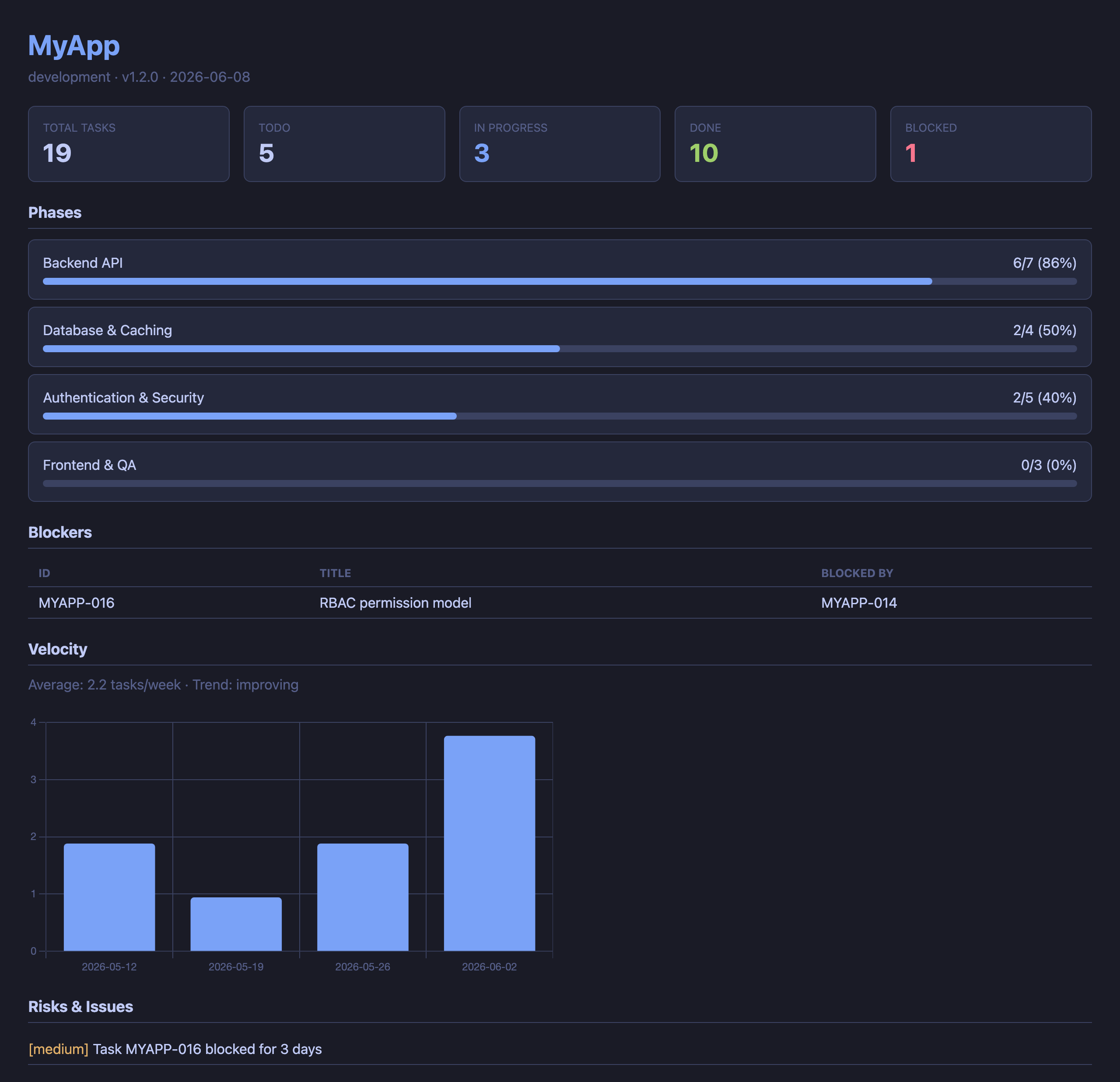
HTML dashboard (pm_dashboard) — phase progress, velocity, blockers, and risks at a glance:
Features
- 🔌 Multi-host first — registers in Claude Code AND Codex CLI with one command (
pm-server install --target=auto). Project rules sync to bothCLAUDE.mdandAGENTS.mdautomatically (ADR-008). Switch hosts mid-project without losing context — same.pm/data, same workflows - 42 MCP tools — task CRUD, child issues, status, blockers, velocity, dashboard, ADR, session memory, workflows, knowledge records, multi-host rules injection, cross-host outbox bridge, build-in-public X drafts, and more
- Workflow engine — template-based development workflows with loops, user gates, and chaining (Discovery → Development)
- Knowledge records — structured findings between casual memory and formal ADR (research, tradeoff, spec, etc.)
- Super Research skill — 3 parallel agents (Domain Expert, Critical Analyst, Lateral Thinker) + Depth Check (6 dimensions) + Fact Check + Cross-Check
- Session memory — SQLite + FTS5 full-text search. Memories persist across sessions and link to tasks/decisions
- Cross-project search — search memories across all projects via a global index
- Natural language — say "進捗は?" or "what's next?" instead of memorizing commands
- Zero configuration —
pip install+pm-server install, then just say "PM初期化して" - Multi-project — manage all your projects from a global registry with cross-project dashboards
- Git-friendly — plain YAML files in
.pm/directory, trackable withgit diff - Non-invasive — adds only a
.pm/directory to your project.rm -rf .pm/to remove completely
Quick Start
Install (once)
pip install pm-server
pm-server install       # Registers MCP server in Claude Code
# Restart Claude Code
Update
pip install --upgrade pm-server
# Restart Claude Code
Note:
pip install pm-serverwithout--upgradewill NOT update an existing installation. Always use--upgrade(or-U) to get the latest version.
After upgrading, the CLAUDE.md auto-action rules in each project are automatically updated:
- On the next session start,
pm_statusdetects the template version mismatch - Claude Code runs
pm_update_rulesto update the rules section (covers both CLAUDE.md and AGENTS.md when applicable) - New features (e.g., child issue workflow) become active immediately
You can also update manually:
> CLAUDE.md を更新して # or: pm_update_rules
The legacy
pm_update_claudemdtool is still available as a back-compat alias (CLAUDE.md only). It emits aDeprecationWarningsince v0.6.0 and is slated for removal in v1.0.0 (PMSERV-055).
Initialize a project
# In Claude Code, cd to your project directory
> PM初期化して
✓ .pm/ created
✓ Registered in global registry
✓ Detected: name=my-app, version=1.2.0 (from package.json)
pm-server automatically detects project info from package.json, pyproject.toml, Cargo.toml, .git/config, and README.md.
Use it
| You say | What happens |
|---|---|
進捗は? / status | Show project progress summary |
次にやること / what's next | Recommend next tasks by priority & dependencies |
タスク追加:○○を実装 | Add a new task (auto-numbered) |
MYAPP-003 完了 | Mark task as done |
MYAPP-003 に課題がある | Add child issue to task (auto-inherits phase) |
ブロッカーある? | List blocked tasks |
ダッシュボード見せて | Generate HTML dashboard (Chart.js, dark theme) |
この設計にした理由を記録 | Record an Architecture Decision Record (ADR) |
全プロジェクトの状態 | Cross-project portfolio view |
Multi-Host Support (Claude Code + Codex CLI)
pm-server v0.5.0 supports two MCP hosts — Claude Code (~/.claude/) and
Codex CLI (~/.codex/config.toml) — as registration targets. The two hosts
keep MCP configuration in completely separate stores, so a single install
must reach both when needed.
--target flag
pm-server install and pm-server uninstall accept a --target (alias -t)
flag. The default is conservative on purpose: existing scripts and
documentation that say pm-server install continue to register only
Claude Code, exactly as in v0.4.x.
--target | Behavior |
|---|---|
claude-code | (default) Register in Claude Code only. ~/.codex/config.toml is never opened. |
codex | Register in Codex CLI only. ~/.claude/ is never touched. |
auto | Detect via filesystem (~/.codex/config.toml exists?) — register in detected hosts only. |
all | Force every known host. Creates ~/.codex/config.toml if absent. |
The companion command pm-server update-rules (introduced in v0.5.0 alongside
this feature) defaults to --target auto because it is a brand-new command
with no v0.4.x baseline to preserve.
Safety properties
- Idempotent: running
installtwice is a no-op on the second call. - Backed up:
~/.codex/config.tomlis copied to a timestamped backup before each write. (Claude Code usesclaude mcp add, which has its own internal handling.) - Comment-preserving: edits to
config.tomlgo throughtomlkit, so user-written comments, key order, and blank lines survive verbatim. - Dry-run:
--dry-runprints the planned actions per host without writing anything. The output prefixes each line with[dry-run]. - Per-host isolation: a failure in one host (e.g. Codex CLI not
installed when
--target=all) does not abort the other host; the outcome is reported per host with statusinstalled/already_registered/skipped/failed.
Quick examples
# Default (back-compat) — Claude Code only
pm-server install

# Add pm-server to whichever host(s) are detected on this machine
pm-server install --target auto

# Force registration in both, creating ~/.codex/config.toml if needed
pm-server install --target all

# Preview what would happen, don't touch any files
pm-server install --target auto --dry-run

# Symmetric removal (same --target semantics)
pm-server uninstall --target auto
See docs/design.md §5.2 and ADR-007 for the detailed
rationale (detect-then-patch, backup, dry-run, absolute-path embedding).
Project rules injection (CLAUDE.md / AGENTS.md)
pm_init and pm_update_rules keep PM Server's auto-action rules synced
into the appropriate per-host instruction file:
| Host | Instruction file |
|---|---|
| Claude Code | CLAUDE.md |
| Codex CLI | AGENTS.md |
The rules section is bracketed by <!-- pm-server:begin v=N --> /
<!-- pm-server:end --> markers and updated in place — user content
outside the markers is never touched.
pm_update_rules (and its CLI sibling pm-server update-rules) defaults
to --target auto: it detects which host(s) are present on this machine
and updates only those instruction files. Detection runs four signals
(filesystem, marker, CLAUDECODE env, fallback) — see ADR-008 amendment
A3 in docs/design.md §6.4.
| Action | Tool |
|---|---|
| MCP (in-session) | pm_update_rules(target="auto", dry_run=False) |
| CLI (this project) | pm-server update-rules --target auto |
| CLI (every registered project) | pm-server update-rules --target auto --all |
| Legacy CLAUDE.md only | pm_update_claudemd / pm-server update-claudemd |
AGENTS.md is backed up to AGENTS.md.bak.<timestamp> before each write.
CLAUDE.md backup symmetry is still pending in PMSERV-058 (originally targeted for v0.6.0).
See docs/design.md §6 and ADR-008 for the multi-host
rules-injection design (claudemd → rules module rename, marker convention,
dataclasses, atomic-write helpers).
MCP Tools (42 tools)
Project Management
| Tool | Description |
|---|---|
pm_init | Create .pm/, register in global registry, auto-detect project info |
pm_status | Phase progress, task summary, blockers, velocity, active tasks, hook auto-setup |
pm_tasks | List tasks with filters (status / phase / priority / tag) |
pm_add_task | Add task with auto-numbered ID (e.g., MYAPP-001) |
pm_update_task | Update status, priority, notes, blocked_by |
pm_next | Recommend next tasks (excludes blocked / unmet dependencies) |
pm_blockers | List blocked tasks across projects |
pm_add_issue | Add child issue to a task (phase auto-inherited, parent auto-reverted to review) |
Records
| Tool | Description |
|---|---|
pm_log | Daily log entry with auto task linking (progress / decision / blocker / note / milestone) |
pm_add_decision | Add ADR with context, decision, and consequences |
Analysis
| Tool | Description |
|---|---|
pm_velocity | Weekly velocity + trend (up / down / flat) |
pm_risks | Auto-detect risks: overdue, stale, long-blocked tasks |
Visualization
| Tool | Description |
|---|---|
pm_dashboard | HTML dashboard with workflow progress + knowledge map (single project or portfolio) |
Discovery
| Tool | Description |
|---|---|
pm_discover | Scan directories for .pm/ projects and auto-register |
pm_cleanup | Remove invalid paths from registry |
pm_list | List all registered projects |
Memory (Session Continuity)
| Tool | Description |
|---|---|
pm_remember | Save a memory with auto task linking (observation / insight / lesson) |
pm_recall | Recall memories — FTS5 search, by task, or cross-project |
pm_session_summary | Save / get / list session summaries for continuity |
pm_memory_search | Advanced search with type, tag, and task filters |
pm_memory_stats | Memory DB statistics (total, by type, DB size) |
pm_memory_cleanup | Clean up old memories (dry-run supported) |
Knowledge Records
| Tool | Description |
|---|---|
pm_record | Record structured knowledge (research / market / spike / tradeoff / spec / api_design) |
pm_knowledge | Query, filter, update, and summarize knowledge records |
pm_knowledge_query | Read-only knowledge query — list / filter / summarize records (ADR-018) |
Workflow Engine
| Tool | Description |
|---|---|
pm_workflow_start | Start a workflow from a template (development / discovery / super-research / brainstorming / content-pipeline) |
pm_workflow_status | View current step, progress, and guidance for active workflow |
pm_workflow_advance | Advance to next step with artifacts and notes; supports loops and skip |
pm_workflow_abandon | Abandon a workflow (transition to ABANDONED, preserves step history) |
pm_workflow_list | List all workflow instances with status filter |
pm_workflow_templates | List available workflow templates (built-in + custom) |
X Content Pipeline (Build-in-Public, ADR-024)
| Tool | Description |
|---|---|
pm_draft_x | Stage a build-in-public X draft from a .pm signal — raw content stays internal (PMSERV-113) |
pm_redact_draft | Layer-1 deterministic redaction prefilter — scrubs hook + each body segment, count-only report |
pm_x_drafts_pending | Review queue for staged drafts — exposes ONLY redacted / safe fields |
pm_reject_draft | Discard a staged draft with a mandatory, auditable reason |
Outbox (Cross-Host Bridge)
| Tool | Description |
|---|---|
pm_outbox_remember | Capture a memory / lesson from Claude Desktop into the cross-host outbox |
pm_outbox_log | Capture a daily-log entry from Claude Desktop into the cross-host outbox |
pm_outbox_pending | List pending entries in the Desktop outbox (~/.pm/desktop/desktop.db) |
pm_outbox_merge | Promote pending outbox entries into the target project's main store |
pm_outbox_reject | Reject pending outbox entries with an auditable reason |
Maintenance
| Tool | Description |
|---|---|
pm_update_rules | Update PM Server rules section in CLAUDE.md and/or AGENTS.md (multi-host, ADR-008). Default target=auto detects installed hosts |
pm_update_claudemd | Legacy alias of pm_update_rules(target="claude-code") — deprecated since v0.6.0, removal in v1.0.0 |
Parallel Work Lines (Branch-Aware Continuity)
Running several streams of work in one repo — e.g. a mainline, a paper, and teaching material? pm-server gives each line its own session-continuity context. Two topologies are supported (ADR-028).
Recommended: one git worktree per line (zero config)
pm-server scopes everything — tasks, memories, and session summaries — to the directory that contains .pm/. Because .pm/memory.db is git-ignored, every git worktree gets its own independent store automatically:
git worktree add ../myproj-paper  paper   # 論文 line
git worktree add ../myproj-edu    edu     # 教材 line
# the original checkout stays the mainline (本流)
Now cd ../myproj-paper and pm_recall returns the paper line's last session — no flags, no schema, no branch detection. Three lines = three editor windows, no stash dance, no merge conflict on switch.
Alternative: one directory, branch-aware track
Prefer a single directory and git checkout between lines? Pass the branch as a track:
pm_recall(track="paper") # last session recorded while on the `paper` branch
- The branch is recorded automatically when
pm_session_summary(action="save")runs. It is read from.git/HEADas text — pm-server never shells out togit, so a hostile.git/configcan't execute code (CVE-2026-45033 / git config-exec class). - Under the bundled plugin, the SessionStart hook surfaces the current branch so the model can pass
track=on its first recall; re-pass it after anygit checkout. - If a line has no recorded summary yet (e.g. an existing DB from before this feature),
pm_recall(track=...)gracefully falls back to the overall-latest and setstrack_matched: false— so it never breaks on day one.
Logical track labels (.pm/tracks.yaml)
A work line is a concept; branches are implementation detail that get renamed and split. Map a logical label to one or more branch globs so continuity follows the line, not the branch name:
# .pm/tracks.yaml
tracks:
  本流: [main]
  論文: [feat/p3-*, research/wave-scattering-*]
  教材: [edu/*]
pm_recall(track="論文") # latest session across ANY branch matching the 論文 globs
- Resolution is at query time, so renaming or adding a branch within a line never breaks history (rename-resistant).
trackaccepts a logical label OR a raw branch name — labels resolve first; anything else is matched as a raw branch.- Backward compatible: with no
tracks.yaml, everytrackis a raw branch (the v1 behavior). - When matched, the response includes
track_branch(which actual branch the context came from); a malformedtracks.yamldegrades to raw-branch matching and surfaces awarnings[]entry.
See ADR-028 (design) and ADR-035 on the SynapticLedger side (unified .pm/ + track=).
Data Structure
pm-server stores task data as plain YAML and memories in SQLite:
your-project/
└── .pm/
    ├── project.yaml        # Project metadata
    ├── tasks.yaml          # Tasks with status, priority, dependencies
    ├── decisions.yaml      # Architecture Decision Records (ADR)
    ├── knowledge.yaml      # Structured knowledge records
    ├── workflows.yaml      # Workflow instances and state
    ├── milestones.yaml     # Milestone definitions
    ├── risks.yaml          # Risks and blockers
    ├── memory.db           # Session memories (SQLite + FTS5)
    ├── workflow_templates/  # Custom workflow templates (optional)
    └── daily/
        └── 2026-04-08.yaml # Auto-generated daily log

~/.pm/
├── registry.yaml           # Global project index
└── memory.db               # Cross-project memory index
YAML files are human-readable and hand-editable. Memory DB is the source of truth for session data; the global index at ~/.pm/memory.db enables cross-project search.
CLAUDE.md Integration
Add this to your project's CLAUDE.md for automatic PM behavior (or run pm-server update-rules):
## PM Server 自動行動ルール(必ず従うこと)

### セッション開始時(最初の応答の前に必ず実行)
1. pm_status を MCP ツールとして実行し、現在の進捗を表示する
2. pm_next で次に着手すべきタスクを3件表示する
3. pm_recall で前回セッションの文脈を取得する
4. ブロッカーや期限超過があれば警告する
5. pm_status の claudemd.other_rule_sections に他のルールセクションが報告された場合、この CLAUDE.md 内の該当セクションのルールも全て実行する

### タスクに着手する前
1. 該当タスクを pm_update_task で in_progress に変更する

### 作業中に重要な発見・判断があった時
1. pm_remember で記憶を保存する(関連タスクIDがあれば task_id で紐付け)

### コンテキスト保全(Compaction / Clear 対策)
Claude Code はセッションが長くなるとコンテキストを自動圧縮(compaction)する。
圧縮のタイミングは予測できないため、重要な情報は随時保存すること。
1. 重要な発見・技術的判断は発生時点で即座に pm_remember で保存する(セッション終了を待たない)
2. 複雑な議論や設計検討の後は、結論を pm_remember でまとめて保存する
3. 3往復以上のやり取りで未記録の知見があれば、チェックポイントとして pm_remember で保存する
4. ユーザーが /clear する前は必ず pm_session_summary を実行する
5. Compaction 後にコンテキストが失われていると感じたら pm_recall で復元する

### タスク完了時(コードが動作確認できたら)
1. pm_update_task で done に変更する
2. all_issues_resolved フラグが返された場合、親タスクの完了もユーザーに提案する
3. pm_log に完了内容を記録する
4. 次の推薦タスクを pm_next で表示する
5. アトミックコミットを作成する

### タスク完了確認中にイシュー(課題)が見つかった時
1. pm_add_issue で親タスクに紐づくイシュー(子タスク)を作成する
   - phase は親タスクから自動継承される
   - 親タスクが done だった場合、自動で review に戻される
2. イシューを解消したら pm_update_task で done に変更する
3. 全イシューが解消されると all_issues_resolved フラグが返される
4. 親タスクの完了をユーザーに提案する

### 設計上の意思決定が発生した時
1. ユーザーに「ADRとして記録しますか?」と確認する
2. 承認されたら pm_add_decision で保存する

### コーディングセッション終了時
1. 進行中のタスクの状態を確認し、必要に応じて更新する
2. pm_log にセッションの成果を記録する
3. pm_session_summary で要約を保存する
4. 未コミットの変更があればコミットする
Tips: Getting the Most out of pm-server
Recommended Workflow
1. Install & register      →  pip install pm-server && pm-server install
2. Start Claude Code       →  (restart after install)
3. Initialize project      →  "PM初期化して" or "Initialize PM"
4. Add tasks               →  "Add task: implement user auth"
5. Work on tasks            →  "Start MYAPP-001"
6. Complete tasks           →  "MYAPP-001 done"
7. Issues found in review   →  "MYAPP-001 has an issue: ..." (creates child issue)
8. End session              →  "Session wrap-up" (triggers summary + log)
Protecting Context from Compaction
Claude Code automatically compresses (compacts) conversation context when sessions get long. This means detailed information from earlier exchanges can be lost. pm-server's memory tools protect against this:
| Situation | What to do |
|---|---|
| Made an important discovery | pm_remember immediately — don't wait for session end |
| Finished a design discussion | Summarize the conclusion with pm_remember |
About to run /clear | Run pm_session_summary first |
| Resuming after compaction | pm_recall restores previous context |
| Starting a new session | pm_recall + pm_status (auto if CLAUDE.md rules are set) |
Key principle: Save early, save often. Compaction timing is unpredictable — if a finding is worth keeping, record it now.
Session Continuity
pm-server's memory layer ensures nothing is lost between sessions:
Session 1                          Session 2
  │                                  │
  ├─ pm_remember (findings)          ├─ pm_recall ← restores context
  ├─ pm_remember (decisions)         ├─ pm_status ← current state
  ├─ pm_session_summary              │
  └─ (session ends)                  └─ (continues seamlessly)
Automatic Hooks (Lifecycle Enforcement)
pm-server automatically installs Claude Code hooks at first session start (pm_status). After a git commit, a PostToolUse hook injects a reminder into the conversation, prompting Claude to call pm_log, pm_update_task, and pm_next.
- Hooks are installed globally in
~/.claude/settings.json - Existing user hooks are preserved (pm-server hooks are appended, not replaced)
- No manual setup needed — hooks are auto-installed on upgrade
- To manage manually:
pm-server install-hooks/pm-server uninstall-hooks
Multi-Project Management
> "Discover projects under ~/projects"    # Auto-scan & register
> "Show all projects"                     # Portfolio overview
> "Search memories for 'auth' globally"   # Cross-project search
> "Show dashboard for all projects"       # Portfolio HTML dashboard
CLI Commands
pm-server install          # Register MCP server (default: Claude Code only — back-compat).
                           # Pass --target {auto,all,claude-code,codex} for multi-host.
                           # Pass --dry-run to preview without writing. See "Multi-Host Support" below.
pm-server uninstall        # Symmetric to install (same --target / --dry-run semantics).
pm-server serve            # Start MCP server (called by Claude Code automatically)
pm-server discover .       # Scan for projects with .pm/ directories
pm-server status           # Show project status from terminal
pm-server context-inject   # Print session context to stdout (for hook integration)
pm-server migrate          # Migrate from pm-agent (rename transition)
pm-server update-rules     # Inject PM Server rules into CLAUDE.md and/or AGENTS.md (ADR-008).
                           # --target {auto,all,claude-code,codex} (default: auto)
                           # --dry-run / --all (apply to every registered project)
pm-server update-claudemd  # Legacy alias of `update-rules --target=claude-code`. Deprecated since v0.6.0.
pm-server install-hooks    # Manually install Claude Code hooks (auto-installed via pm_status)
pm-server uninstall-hooks  # Remove PM Server hooks from Claude Code settings
Architecture
For a graphical overview (module map, MCP tool catalog with Lens RO_ALLOWLIST,
Lens mode flow, workflow state machines, task/issue lifecycle, data layout,
and distribution channels), see docs/architecture.html.
Open it directly in a browser — it is a single self-contained static file
(no external dependencies).
Claude Code Session
  │
  ├── CLAUDE.md auto-action rules
  ├── PostToolUse hooks (auto-installed)
  ├── Skills (super-research, etc.)
  │
  └── MCP Server (stdio)
        └── pm-server serve
              │
              ├── server.py    → 42 MCP tools (FastMCP)
              ├── models.py    → Pydantic v2 data models (17 models, 15 enums)
              ├── storage.py   → YAML read/write
              ├── workflow.py  → Workflow engine (state machine)
              ├── memory.py    → SQLite memory store + FTS5 search
              ├── recall.py    → Session context builder (token-budgeted)
              ├── hooks.py     → Claude Code hook handler + installer
              ├── context.py   → CLI context injection
              ├── velocity.py  → Velocity calculation & risk detection
              ├── dashboard.py → HTML/text dashboard (Jinja2) + workflow progress + knowledge map
              ├── discovery.py → Auto-detect project info
              └── installer.py → Multi-host MCP registration (ADR-007)
                                   ├─ install_claude_code() → claude mcp add (subprocess)
                                   ├─ install_codex()       → ~/.codex/config.toml (tomlkit)
                                   └─ install(target=...)   → orchestrator + InstallSummary

Data layer (operated on through pm-server serve):
  ├── project-A/.pm/ (YAML + workflows + knowledge + memory.db)
  ├── project-B/.pm/ (YAML + workflows + knowledge + memory.db)
  └── ~/.pm/registry.yaml + memory.db
Migrating from pm-agent
If you were using the earlier pm-agent package:
pip uninstall pm-agent
pip install pm-server
pm-server migrate       # Switches MCP registration from pm-agent to pm-server
# Restart Claude Code
The migrate command will:
- Remove the old
pm-agentMCP registration - Register
pm-serveras the new MCP server - Verify
~/.pm/registry.yamlintegrity - Warn about any
CLAUDE.mdfiles that referencepm-agent
Your .pm/ data directories are unchanged — no data migration needed.
Requirements
- Python 3.11+
- Claude Code (with MCP support)
Dependencies
- FastMCP — MCP server framework
- Pydantic v2 — data validation
- PyYAML — data persistence
- Click — CLI framework
- Jinja2 — dashboard templates
Development
git clone https://github.com/flc-design/pm-server.git
cd pm-server
pip install -e ".[dev]"
pytest                  # 1,000+ tests
pytest --cov            # with coverage (branch coverage, show missing)
ruff check src/         # Lint
ruff format src/        # Format
Design Principles
- Zero Configuration —
pip install+ one command, done - Auto-everything — detection, registration, and inference are fully automatic
- Git-friendly — plain text YAML, trackable with
git diff - Human-readable — safe to hand-edit, won't break
- AI-native — formats that Claude Code can naturally read and write
- Non-invasive — only adds
.pm/, never modifies your project
Trademark notice
"PM Server" is a generic project-management server designation, used here as the
display name of this Python package distributed on PyPI as pm-server.
This project is not affiliated with, endorsed by, or sponsored by:
- Microsoft Project Server / Project Online / Project for the web (Microsoft Corporation)
- Percona Monitoring and Management (PMM Server) (Percona LLC)
- Apple Carbon Print Manager (
PMServeropaque type in the deprecated ApplicationServices framework) (Apple Inc.) - Informatica PowerCenter (
pmserver.exeIntegration Service daemon) (Informatica LLC) - Any other product, vendor, or service that may use similar terminology.
All trademarks are the property of their respective owners.
License
MIT — Shinichi Nakazato / FLC design co., ltd.