
Claude Workflow Composer
fayzan123/claude-workflow-composer
Editor visual drag-and-drop para orquestrar workflows multi-agente no Claude
Ver no GitHubAplicação desktop visual para compor workflows multi-agente no Claude Code. Arraste agentes, conecte handoffs, adicione skills e MCPs, e exporte para .claude/ sem escrever YAML manualmente. Funciona como n8n para workflows de coding com IA.
Instalação
npx convez-ai fayzan123/claude-workflow-composer1 comando no terminal: detecta o formato do repositório (marketplace ou plugin avulso) e instala via Claude Code. Requer Node 18+ e o Claude Code instalado.
Métricas
Casos de uso
- Compor pipelines complexos com múltiplos agentes Claude sem YAML
- Visualizar e debugar fluxos de handoff entre agentes antes de executar
- Compartilhar workflows completos e funcionais entre desenvolvedores
- Prototipar rapidamente sistemas multi-agente com interface gráfica
Veredito

Ferramenta sólida que reduz drasticamente a fricção de authoring em workflows multi-agente, eliminando YAML manual. Preenche uma lacuna real no ecossistema Claude para quem precisa orquestração visual sem código.
README
A tradução para o português deste README ainda está na fila.
Claude Workflow Composer

n8n for coding agent workflows. A visual desktop app for composing multi-agent Claude Code workflows — drag agents onto a canvas, wire handoffs, attach skills, and export a working workflow directly into your Claude installation. No YAML editing required.
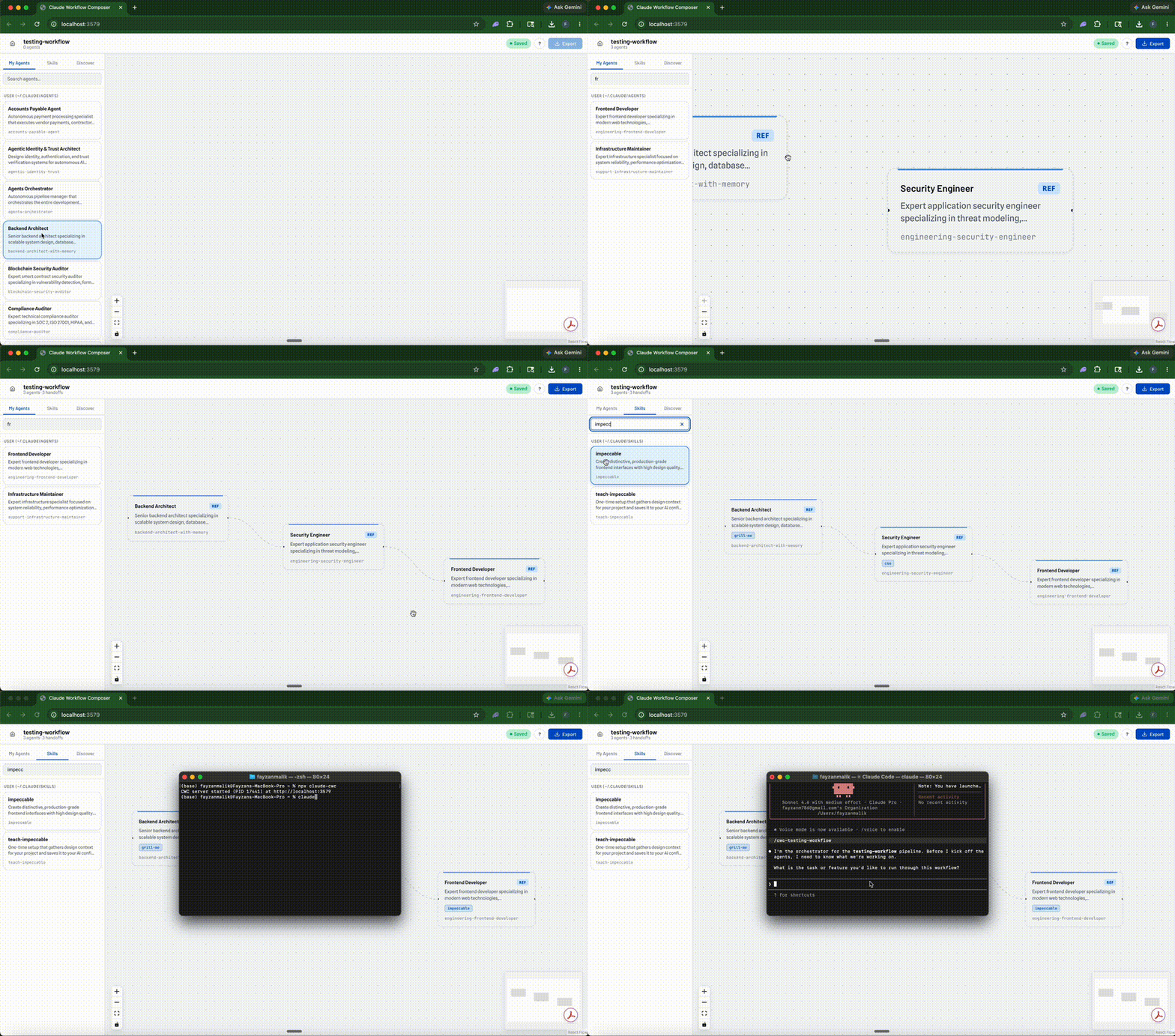
The Problem
Building multi-agent workflows in Claude Code today means:
- Hand-writing agent
.mdfiles with YAML frontmatter - Manually authoring orchestrator skills with
disable-model-invocation: trueand sequenced handoff prose - No visual representation of the pipeline before running it
- No way to share a complete, working workflow with someone else
- No way to discover what good pipelines look like
The authoring experience is entirely text-based. You can't see what you're building until you run it.
Quick Start
npx claude-cwc
Opens a browser at http://localhost:3579. No code signing, no Gatekeeper friction — paste it in a terminal and you're in.
npx claude-cwc stop # Stop the server
Or from source:
npm run build && npm start
How It Works
Drag agents onto a canvas
  → Connect them with handoff arrows (author trigger conditions)
  → Edit each agent's system prompt, tools, skills, and completion criteria
  → Preview every file that will be written before exporting
  → Export → writes agent .md files + orchestrator SKILL.md to ~/.claude/
  → Invoke the workflow by name in Claude Code
The exporter writes directly to ~/.claude/ (user-scoped) or .claude/ inside any project directory (project-scoped, version-controllable). Conflict detection ensures it never touches files it doesn't own.
Build
Drag an existing agent from the sidebar (~/.claude/agents/) onto the canvas to create a reference node — it points to that agent file by slug rather than duplicating it. Drag from "New / Blank Agent" to create a bespoke node — the exporter generates a new agent file for it.
Connect nodes by dragging between handles. Each connection becomes a handoff with a trigger description and optional context artifacts (files, text, JSON) passed between agents. Mark any node as a terminal (Complete, Escalated, or Aborted) to define workflow end states.
Edit any node's completion criteria, tool access, skills, and system prompt in the Node Panel. The first node can also have a start trigger describing what initiates the workflow.
Real-time validation surfaces duplicate slugs, empty names, disconnected nodes, and missing completion criteria immediately in the top bar — before you export.
Export
Click Export in the top bar. Choose a target directory (~/.claude/ or any project's .claude/). Review a preview of every file that will be written. Confirm to write.
The exporter:
- Bespoke nodes → writes an agent
.mdfile with frontmatter (name, description, color, model, tools), system prompt, completion criteria, skill references, and an ownership comment. - Reference nodes → writes nothing — the
exportedSlugis set to the existing agent's slug so the orchestrator routes to it directly. - Workflow skill → generates an orchestrator skill at
.claude/skills/<workflow-slug>/SKILL.mdwithdisable-model-invocation: true. The orchestrator body is produced by BFS-traversing the node/edge graph into natural-language steps. - Rename handling → if a node was renamed, the old owned file is deleted and the new one is written.
- Conflict detection → every file carries an ownership HTML comment. Before overwriting or deleting, the exporter verifies ownership — it never touches files created by other workflows or by hand.
Run
From any Claude Code session, invoke the workflow by its skill name:
/workflow-name
The orchestrator skill delegates every implementation step to sub-agents via the Agent tool. Each step references an agent by name; Claude Code resolves it to the agent's .md file and loads its system prompt, tools, and completion criteria.
Delete
POST /api/export/delete scans every exported file, checks its ownership comment, and only removes files owned by the current workflow. Reference nodes have nothing to delete — they didn't write any files.
Features
- Visual canvas — React Flow with background grid, minimap, zoom controls, and drag-to-connect
- Left sidebar — My Agents (searchable, draggable from
~/.claude/agents/) and Skills (searchable, draggable onto selected nodes) - Right panels — Node Editor (name, description, criteria, tools, skills, system prompt, terminal type) and Edge Editor (trigger, label, context artifacts)
- Export modal — target selection, full file preview, warning display before writing anything
- Auto-save — 500ms debounced save to
~/.cwc/workflows/, no manual saving needed - Recent files — home screen shows last 10 workflows, persisted to
~/.cwc/recents.json - Markdown preview — click any agent or skill card to view its source file
- Open in editor — view any agent or skill file in your system editor
- Claude Code detection — warns on startup if
~/.claude/is missing - ▶ Test Run — launch an exported workflow headlessly from the UI (
--permission-mode acceptEdits, user-chosen working directory) and stop it mid-run - Live run view — the active node pulses on the canvas, completed nodes get a check, and events stream into a timeline panel
- Run history — every run of every exported workflow (started from CWC or any terminal) persists to
~/.cwc/runs/with status, duration, source, and cost
Architecture
Client (React + React Flow)       Server (Express :3579)
┌─────────────────────────┐       ┌─────────────────────┐
│ TemplatePicker           │ ──►  │ /api/workflows      │
│ TopBar                   │ ◄──  │ /api/recents        │
│ Sidebar (Agents/Skills)  │ ──►  │ /api/agents         │
│ Canvas (React Flow)      │ ──►  │ /api/skills         │
│ NodePanel / EdgePanel    │ ──►  │ /api/export         │
│ ExportFlow (modal)       │ ──►  │ /api/export/preview │
│ RunModal / RunPanel      │ ──►  │ /api/export/delete  │
│ useWorkflow (reducer)    │      │ /api/runs (+SSE)    │
│ useAutoSave (debounced)  │      │ /api/health         │
│ useRunEvents (SSE)       │ ◄──  │                     │
└─────────────────────────┘       └─────────────────────┘
                                          │
                                          ▼
Core Library                     ┌─────────────────────┐
                                  │ bfs.ts               │
                                  │ conflict-detector.ts │
                                  │ exporter.ts          │
                                  │ file-writer.ts       │
                                  │ prose-generator.ts   │
                                  │ skill-resolver.ts    │
                                  │ slugify.ts           │
                                  └─────────────────────┘

Storage:
  ~/.cwc/
    recents.json          Recent file paths (max 10)
    workflows/            Saved .cwc workflow files
    runs/<workflowId>/    Run event logs (one .jsonl per run)
    server.pid            PID of running server
  ~/.claude/
    agents/*.md           Agent definitions (read + written)
    skills/*/SKILL.md     User skills (read by sidebar)
    plugins/cache/...     Plugin skills (read by sidebar)
Key Concepts
| Concept | Description |
|---|---|
| CwcFile | JSON file format (.cwc) representing a full workflow: metadata, nodes, edges |
| Bespoke node | A node whose agent definition is authored in the UI — exporter writes a new .md file |
| Reference node | A node with an agentRef slug pointing to an existing agent on disk — exporter writes nothing |
| Handoff | A directed edge with a trigger description and optional context artifacts |
| Terminal edge | An edge with no target node — marks a workflow end state (complete/escalated/aborted) |
| Ownership comment | HTML comment appended to every exported file: <!-- cwc:node:<id>:workflow:<id> --> |
| Orchestrator skill | The workflow skill generated on export — a Claude Code skill that delegates via Agent tool |
| Conflict detection | Reads the ownership comment from a file on disk to determine if this workflow can safely overwrite/delete it |
Why Open Source
This tool has filesystem access to ~/.claude/. Open source is the trust model — no data leaves your machine, no cloud dependency. The local Node.js server is the entire backend. You can read every line of code that touches your files.
Development
npm run dev:server          # Watch-mode server compilation
npm run dev:client          # Vite dev server with HMR (port 5173, proxies /api to :3579)
npm test                    # Run all tests (Vitest)
npm run typecheck           # Type-check server + client
npm run build               # Production build (server + client)
Tests
195 tests across 25 files (run npm test for the current count) covering:
- BFS traversal: linear chains, back-edges, fan-out, multi-root, terminal edges
- Prose generation: start triggers, bold wrapping, context artifacts, Oxford comma, back-edge ordering
- File writer: frontmatter, skills block, ownership comments, workflow skill generation
- Exporter: full integration with real temp filesystem, rename cleanup, skill resolution, re-export, conflict warnings
- Validation: empty workflows, missing names, duplicate slugs, disconnected nodes
- Graph layout: horizontal spacing, fan-out vertical spacing, back-edge stability
- HTTP endpoints: all 12 API routes tested with real server instances
- Slugify: special chars, truncation, hyphen collapse, empty input
- Conflict detection: owned, foreign, absent, malformed states
- Skill resolution: namespaced (plugin) and non-namespaced (user) skill lookup
- Claude runner: binary resolution (incl. Windows shims), stdin prompt delivery, timeout/error envelopes
- Undo history: coalescing, redo-stack clearing, edge cascade on node delete, history cap
Contributing
PRs welcome. The codebase is TypeScript end-to-end (client + server + core library). Run npm test and npm run typecheck before submitting.
If you build a workflow you're proud of, share the .cwc file — that's how the community library grows.
License
MIT