
Universal Database MCP Server
Fashad-Ahmed/universal-mcp
Acesso seguro a bancos de dados via MCP com 8 camadas anti-injeção
Ver no GitHubServidor MCP seguro e agnóstico para acesso a bancos de dados (PostgreSQL, MySQL, SQLite, DuckDB) com foco em prevenção de injeção SQL. Implementa 8 camadas de defesa contra manipulação de entrada LLM, bloqueio de operações destrutivas por padrão e validação de esquema aware. Funciona sem infraestrutura externa — SQLite e DuckDB rodam em-processo.
Instalação
npx convez-ai Fashad-Ahmed/universal-mcp1 comando no terminal: detecta o formato do repositório (marketplace ou plugin avulso) e instala via Claude Code. Requer Node 18+ e o Claude Code instalado.
Métricas
Casos de uso
- Conectar Claude a bases de dados empresariais sem risco de SQL injection
- Análise de dados local com DuckDB em arquivos Parquet
- Prototipagem segura com SQLite sem infraestrutura externa
- Auditoria de integridade de dados com validação de schema
Veredito

Solução madura e bem pensada para o problema real de dar acesso seguro a bancos de dados para agentes LLM. A abordagem defense-in-depth com 8 camadas é robusta; zero setup com SQLite/DuckDB reduz fricção. Recomendado para qualquer aplicação que precise expor dados a Claude sem aceitar risco de injections.
README
A tradução para o português deste README ainda está na fila.
Universal Database MCP Server
The security-first, Python-native MCP server for database access from AI agents.


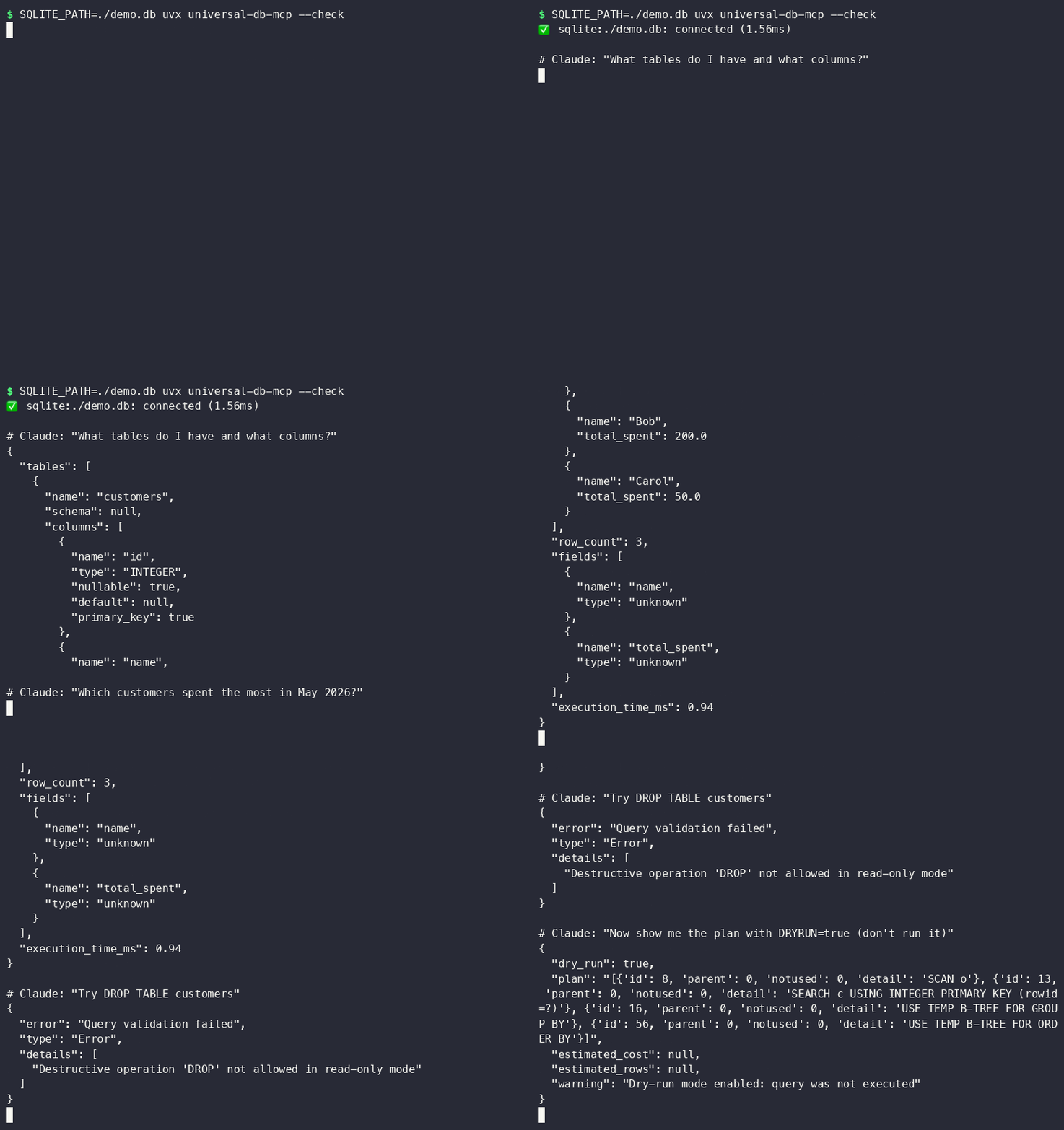
Why This Exists
Most database MCP servers give AI agents raw SQL access and hope for the best. This server assumes the LLM is untrusted input and applies 8 layers of injection prevention before any query reaches your database — including blocking UNION attacks, stacked statements, time-based injection, and comment bypasses.
Supports: PostgreSQL · SQLite · MySQL · DuckDB (columnar analytics)
Zero Setup: Works on Your Laptop Right Now
No Docker. No cloud account. No database server to install. DuckDB and SQLite run in-process:
# Query a local SQLite database — one command, zero infra
SQLITE_PATH=./myapp.db uvx universal-db-mcp

# Query a local DuckDB file or parquet files
DUCKDB_PATH=./analytics.duckdb uvx universal-db-mcp

# In-memory DuckDB for throwaway analysis
DUCKDB_PATH=:memory: uvx universal-db-mcp
Add to Claude Code in ~/.claude/mcp_servers.json, or to Claude Desktop in
~/Library/Application Support/Claude/claude_desktop_config.json (macOS) /
%APPDATA%\Claude\claude_desktop_config.json (Windows):
{
  "mcpServers": {
    "mydb": {
      "command": "uvx",
      "args": ["universal-db-mcp"],
      "env": {
        "SQLITE_PATH": "/Users/you/projects/myapp/db.sqlite3",
        "ALLOW_DESTRUCTIVE": "false"
      }
    }
  }
}
Restart Claude Desktop / Claude Code after saving — that's it.
That's it. Claude Code discovers the tools automatically.
More client configs (Claude Desktop, Cursor, Windsurf, Docker) in
examples/.
Security Model: 8 Layers
Read-only by default. Defense-in-depth. Every query validated before it touches the driver.
| Layer | What it does |
|---|---|
| 1 | Driver-level read-only — PostgreSQL session flag, SQLite mode=ro URI, DuckDB read_only=True. Write rejected before SQL parsing. |
| 2 | Keyword blocking — DROP, DELETE, TRUNCATE, ALTER, INSERT, UPDATE, GRANT, EXEC blocked in read-only mode |
| 3 | Injection pattern detection — UNION SELECT, stacked statements, SQL comments (--, /*), xp_, SLEEP(), WAITFOR, BENCHMARK() |
| 4 | Multiple statement rejection — ; separating statements always blocked |
| 5 | Parameter type enforcement — only str, int, float, bool, null accepted as parameters |
| 6 | Result size limits — truncated at MAX_RESULT_ROWS (default 1000) to prevent memory exhaustion |
| 7 | Identifier sanitization — table/column names stripped of metacharacters in internally-generated SQL |
| 8 | DuckDB filesystem blocklist — read_csv(), read_parquet(), glob(), LOAD, INSTALL, httpfs, COPY blocked at adapter level; read_only=True only blocks writes, not file reads |
Full threat model: docs/SECURITY.md
DuckDB: Analytics Without Infrastructure
DuckDB runs in-process (no server) and reads Parquet, CSV, JSON natively. Connect AI agents to your analytics data without spinning up a warehouse:
# Query parquet files directly
DUCKDB_PATH=:memory: uvx universal-db-mcp
Then in Claude Code:
You: "Load sales.parquet and show me monthly revenue by region"
Claude: [uses query tool → SELECT region, strftime('%Y-%m', date) AS month, SUM(revenue) ...]
Natural Language → SQL
No separate NL-to-SQL tool needed — Claude already does this. Give it the
schema tool and ask in plain English:
You: "Which customers placed more than 5 orders last month?"
Claude: [calls schema() to see table structure, then query() with the
         generated SQL — every query still passes through all 8 security
         layers before touching your database]
Pair with dry_run: true (DRYRUN=true) while prototyping — Claude gets the
query plan back without anything executing.
Docker
docker build -t universal-db-mcp .
docker run -i --rm \
  -e POSTGRES_URI=postgresql://readonly:pass@host.docker.internal:5432/mydb \
  -e ALLOW_DESTRUCTIVE=false \
  universal-db-mcp
See examples/docker_mcp_config.json for
wiring this into an MCP client.
All Databases
# PostgreSQL
POSTGRES_URI=postgresql://readonly:pass@localhost/mydb uvx universal-db-mcp

# SQLite (local file, zero infra)
SQLITE_PATH=./db.sqlite3 uvx universal-db-mcp

# MySQL
MYSQL_URI=mysql://readonly:pass@localhost/mydb uvx universal-db-mcp

# DuckDB (columnar, in-process analytics)
DUCKDB_PATH=./analytics.duckdb uvx universal-db-mcp

# Multiple databases simultaneously
POSTGRES_URI=... SQLITE_PATH=... uvx universal-db-mcp
MCP Tools
| Tool | Description |
|---|---|
query | Execute SQL — read-only by default, all 8 security layers apply |
schema | Inspect tables and columns — no config needed |
explain | Get query execution plan without running the query |
health | Check connection status, DB version, and pool metrics |
list_databases | Show all configured databases and connection state |
query_history | Inspect the last 100 executed queries |
snapshot_schema | Capture current schema for drift detection |
schema_diff | Compare current schema against the last snapshot |
v1.1.0: dry-run mode (DRYRUN=true), table allowlists (WHITELISTED_TABLES), query
complexity warnings, structured audit logs, and a --check CLI flag for connectivity
validation. See CHANGELOG.md.
Configuration
# ── PostgreSQL ─────────────────────────────────────
POSTGRES_URI=postgresql://user:pass@host:5432/db
POSTGRES_READONLY=true          # default: true

# ── SQLite ─────────────────────────────────────────
SQLITE_PATH=/path/to/database.db
SQLITE_READONLY=true            # default: true

# ── MySQL ──────────────────────────────────────────
MYSQL_URI=mysql://user:pass@host:3306/db
MYSQL_READONLY=true             # default: true

# ── DuckDB ─────────────────────────────────────────
DUCKDB_PATH=/path/to/analytics.duckdb   # or :memory:
DUCKDB_READONLY=true            # default: true

# ── Security ───────────────────────────────────────
ALLOW_DESTRUCTIVE=false         # default: false — blocks INSERT/UPDATE/DELETE/DROP
MAX_RESULT_ROWS=1000            # truncate large results
ENABLE_LOGGING=true             # log queries to stderr
QUERY_TIMEOUT=30                # seconds
RATE_LIMIT_RPM=60               # requests per minute
Secure Database Users
Always use a dedicated read-only account. Never give the MCP server credentials that can modify data.
PostgreSQL:
CREATE USER mcp_agent WITH PASSWORD 'strong_random_password';
GRANT CONNECT ON DATABASE mydb TO mcp_agent;
GRANT USAGE ON SCHEMA public TO mcp_agent;
GRANT SELECT ON ALL TABLES IN SCHEMA public TO mcp_agent;
MySQL:
CREATE USER 'mcp_agent'@'localhost' IDENTIFIED BY 'strong_random_password';
GRANT SELECT ON mydb.* TO 'mcp_agent'@'localhost';
FLUSH PRIVILEGES;
Development
git clone <repo-url>
cd universal-db-mcp
python -m venv .venv && source .venv/bin/activate
pip install -e ".[dev]"

# Run tests (67+ passing, no external DB required for SQLite + DuckDB)
pytest

# Security tests only
pytest tests/test_security.py -v

# With coverage
pytest --cov=src/universal_db_mcp --cov-report=term-missing
Architecture
src/universal_db_mcp/
├── server.py          # FastMCP server — 5 tools
├── config.py          # Env-var config via Pydantic
├── adapters/
│   ├── base.py        # Abstract adapter + result dataclasses
│   ├── postgresql.py  # asyncpg, connection pool, read-only via init callback
│   ├── sqlite.py      # aiosqlite, read-only via file URI mode=ro
│   ├── mysql.py       # aiomysql, DictCursor
│   └── duckdb.py      # duckdb, thread-pool executor, lock-guarded
└── security/
    └── sanitizer.py   # SQLSanitizer — 8-layer injection prevention

docs/
└── SECURITY.md        # Full security architecture and threat model
vs. Google MCP Toolbox
| This project | Google MCP Toolbox | |
|---|---|---|
| Runtime | Python — pip install / uvx | Go binary / Docker |
| Local DBs | SQLite + DuckDB zero-infra | No SQLite |
| Analytics | DuckDB in-process | No columnar adapter |
| Auth model | Read-only by default + env vars | IAM / GCP-native |
| SQL injection | 8-layer sanitizer + parameterized | Auth-focused |
| Extend | Python ecosystem, any pip package | Go plugins |
| Vendor | Neutral | Google Cloud funnel |
Different tools for different jobs. Use this when you want Python-native, local-first, security-hardened access without cloud dependencies.
License
MIT — LICENSE
Security Notice: This server provides AI agents with database access. Always
use read-only credentials, review docs/SECURITY.md before
production deployment, and never commit .env files.