
Across Context
fantasyce/across-context
Memória compartilhada durável entre agentes de código, sem dependências externas
Ver no GitHubMCP server que cria uma camada de memória compartilhada local-first para agentes de código (Claude, Cursor, Hermes, etc.). Armazena preferências, decisões de projeto, comandos reutilizáveis e resumos de sessão em um vault local, com controle de políticas e integração automática nos agentes suportados.
Instalação
npx convez-ai fantasyce/across-context1 comando no terminal: detecta o formato do repositório (marketplace ou plugin avulso) e instala via Claude Code. Requer Node 18+ e o Claude Code instalado.
Métricas
Casos de uso
- Compartilhar preferências e padrões de trabalho entre múltiplos agentes de IA
- Preservar decisões de arquitetura e configurações de projeto entre sessões
- Manter histórico de comandos e workflows seguros e reutilizáveis
- Coordenar handoffs entre agentes em orquestrações complexas
Veredito

Solução robusta para o problema real de fragmentação de memória entre agentes. O design local-first com policy engine é maduro; excelente para equipes que usam múltiplos agentes e precisam de continuidade entre contextos. Requer setup inicial mas resolve um gargalo legítimo de produtividade.
README
A tradução para o português deste README ainda está na fila.
Across Context


One local-first memory layer for every coding agent.

Across Context is a zero-runtime-dependency CLI and MCP server that gives Codex, Claude Code, Cursor, Hermes, OpenClaw, and future coding agents one shared local source of truth. It stores durable preferences, project decisions, reusable commands, and compact session summaries in a local vault, then teaches agents when to read and write that memory.
English
Why It Exists
Modern coding agents are powerful, but their memory is fragmented. A useful preference learned by one agent often stays trapped in one chat, one IDE, or one tool-specific history. Across Context makes that memory portable across agents without sending it to a hosted service.
Use it when you want agents to remember:
- how you like work to be done
- how a repository is built, tested, and released
- which project decisions were already made
- which commands are safe and repeatable
- what the last agent learned during a complex task
What It Does
- Creates a local vault at
~/.across/data/across-context - Runs a stdio MCP server with memory tools
- Detects supported local agents
- Registers MCP integrations where each agent supports it
- Generates
AGENTS.md,CLAUDE.md, and Cursor rules - Adds behavior rules so agents know when to read and write memory
- Protects the vault with a memory policy engine
- Provides a local dashboard, explainable hybrid search, pending approval, lifecycle controls, MCP resources and prompts, team export, and deterministic hooks
How It Works
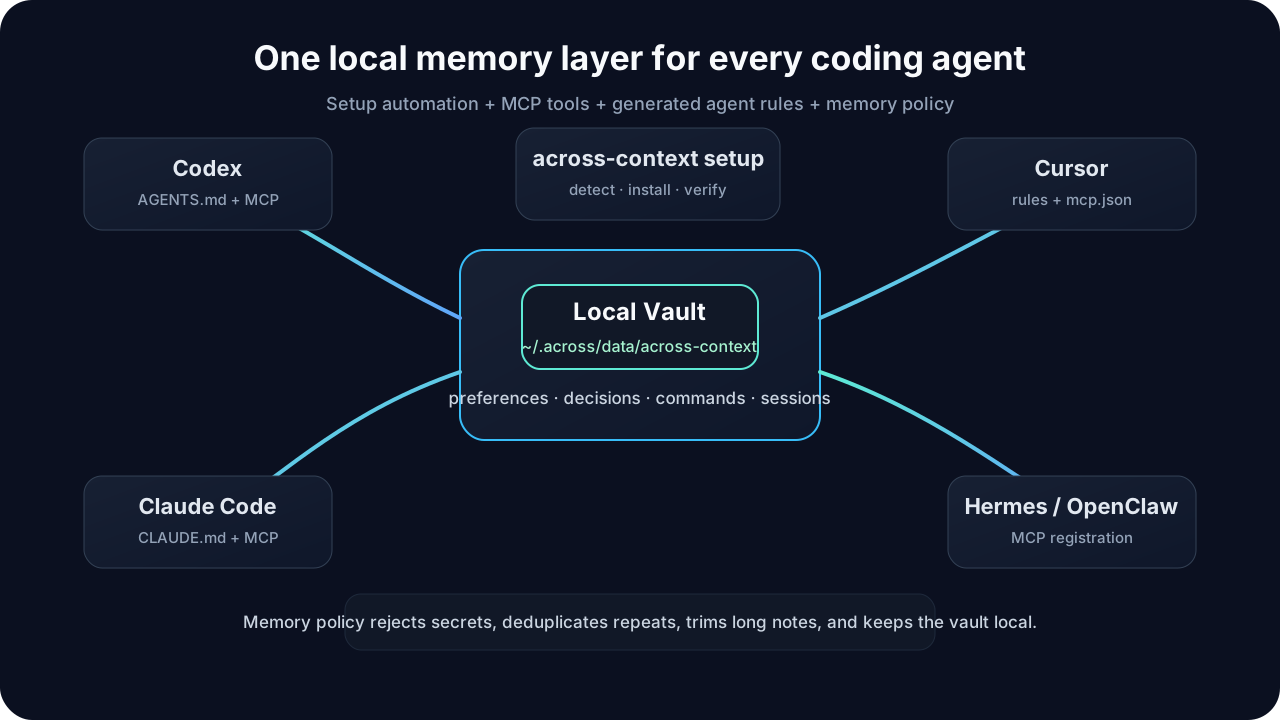
Across Context has three layers:
- MCP tools, resources, and prompts give agents the ability to search, write, inspect, and reuse memory workflows.
- Generated rules teach agents when to use those capabilities.
- Memory policy rejects unsafe or low-value writes before they reach disk.
This is the important product idea: MCP alone is not enough. Agents also need operating instructions, and automatic memory needs guardrails.
New in v0.6
- Agent-loop memory hook policy for durable orchestration runtimes
- MCP resource, prompt, and tool surfaces for loop memory governance
- CLI command
loop-memory-policy --jsonso host apps can inspect the memory lifecycle without reading vault internals
New in v0.5
- Host-friendly plugin lifecycle metadata with install, repair, upgrade, and uninstall actions that preserve user memory data
- JSON memory lifecycle commands for host apps:
remember --json,list --status --json,approve --json,archive --json, andforget --json - Unified Across ecosystem paths under
~/.across, including~/.across/plugins/across-contextfor runtime code and~/.across/data/across-contextfor durable memory
New in v0.3
- MCP resources and prompts for discoverable memory context and repeatable agent workflows
- Explainable hybrid search:
across-context search "agent handoff" --mode hybrid --json --explain - Dashboard review actions for approving, archiving, expiring, forgetting, searching, and filtering memories
- Batch lifecycle updates:
across-context update-status active <memory-id...> - A2A-ready Agent Card metadata:
across-context agent-card --json - Team-safe project export:
across-context team export --project . - Deterministic hooks:
hook task-startandhook task-end
Install
This first open-source release is GitHub-first. The npm package metadata is ready, but the package does not need runtime dependencies.
Install from source:
git clone https://github.com/fantasyce/across-context.git
cd across-context
npm link
Or install from a local release tarball:
npm pack
npm install -g ./across-context-0.6.0.tgz
Verify:
across-context --help
For host apps such as Across Agents Assistant, install a local plugin runtime under the user's hidden plugin directory:
across-context install host-plugin
This copies the Across Context runtime to ~/.across/plugins/across-context,
creates ~/.across/bin/across-context, and writes the plugin manifest at
~/.across/plugins/across-context/manifest.json. Host apps should discover that
wrapper instead of pointing at a source checkout, npm link, or a path under
~/Documents. Hosts can also call plugin-manifest, plugin-status, and
health to verify the installed plugin without reading private project files.
Quick Start
Run this from any project directory:
across-context setup --all --yes
That one command initializes the vault, detects local agents, registers MCP where possible, and writes project instruction files.
If you only want project files and do not want to change user-level agent configuration:
across-context setup --all --yes --no-external
Verify the result:
across-context doctor
across-context status
Agent Support
| Agent | What setup does |
|---|---|
| Codex | Writes AGENTS.md and registers across-context mcp when available. |
| Claude Code | Writes CLAUDE.md and registers a user-level MCP server when available. |
| Cursor | Writes .cursor/mcp.json and .cursor/rules/across-context.mdc. |
| Hermes | Registers across-context mcp when available. |
| OpenClaw | Writes the OpenClaw MCP configuration when available. |
Automatic Memory Behavior
Generated agent rules instruct agents to:
- search relevant memory at task start
- use project context before architecture, release, dependency, test, or documentation decisions
- remember only durable context before final responses
- keep low-confidence automatic notes in pending review
- avoid duplicate memories
- never write secrets, credentials, huge logs, full chat history, temporary errors, private screenshots, or one-off noise
Dashboard
Start the local review dashboard:
across-context dashboard
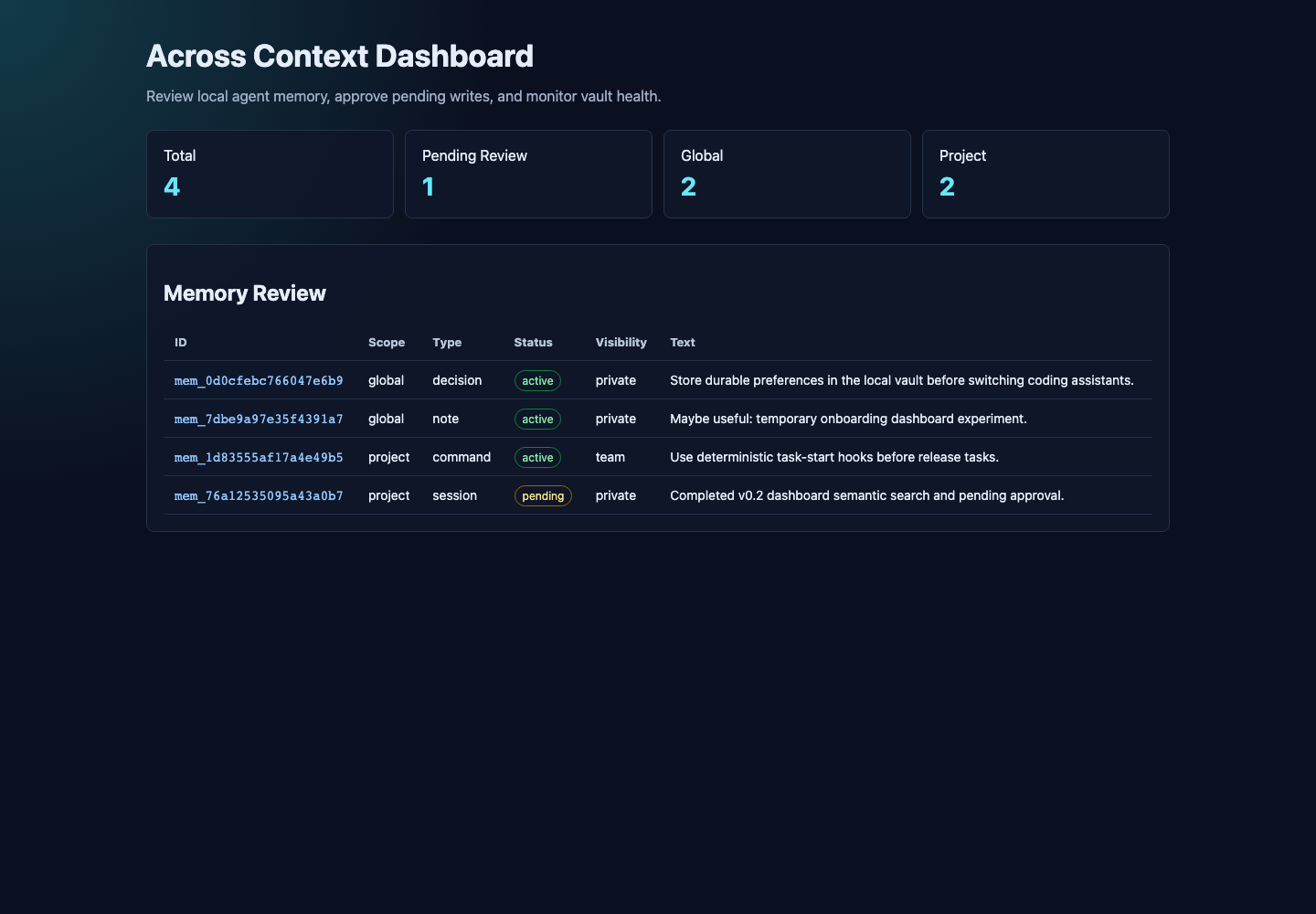
The dashboard runs on 127.0.0.1 by default and shows memory counts, pending
review items, lifecycle status, visibility, stored text, search explanations,
and local lifecycle actions.
Memory Policy
All CLI and MCP writes go through the same policy engine.
Agent-loop runtimes should use Across Context as a memory provider, not as a
task scheduler. The loop-memory-policy command and MCP prompt/resource/tool
describe the supported hooks: pre-loop search, step context attachment, and
post-loop pending summary writes. Automatic loop writes default to pending
until a user or host policy approves them.
Allowed memory types:
preference- stable user preferencesdecision- durable project or architecture decisionscommand- reusable build, test, release, or troubleshooting commandssession- compact handoff summariesnote- short durable context that does not fit the other categories
Controlled writes:
- secret-like content is rejected
- duplicate memories return the existing record instead of appending another line
- long memories are trimmed to a safe default length
- low-confidence automatic notes and session summaries are stored as
pending - approved memories become
active; stale memories can bearchivedorexpired compactremoves duplicates already on diskforget <id>removes a memory by id
CLI Reference
across-context init
across-context setup --all --yes
across-context doctor
across-context status
across-context remember "Prefer small commits with tests." --type preference
across-context remember "Run npm test before final answers." --scope project --project . --type command
across-context search "tests before final" --project .
across-context search "agent handoff context" --mode semantic --project .
across-context search "release verification" --mode hybrid --json --explain
across-context list
across-context pending
across-context approve <memory-id>
across-context archive <memory-id>
across-context expire <memory-id>
across-context update-status active <memory-id...>
across-context stats
across-context compact
across-context forget <memory-id>
across-context dashboard
across-context agent-card --json
across-context team export --project .
across-context hook task-start --query "release workflow" --project .
across-context hook task-end --summary "Implemented dashboard and semantic search." --project .
across-context loop-memory-policy --json
across-context install host-plugin
across-context plugin-manifest --json
across-context plugin-status --json
across-context health --json
across-context mcp
MCP Server
The MCP server exposes tools:
remember_contextsearch_contextreview_pending_memoriesapprove_memoryget_project_contextget_agent_cardexport_agent_instructionsget_agent_loop_memory_policy
It also exposes resources:
across-context://agent-cardacross-context://statsacross-context://memoriesacross-context://project-contextacross-context://agent-loop-memory-policy
And prompts:
task-start-contexttask-end-summarymemory-reviewagent-loop-memory-policy
Start it manually:
across-context mcp
Vault Layout
~/.across/data/across-context/
  global/
    memories.jsonl
  projects/
    <project-id>/
      profile.json
      memories.jsonl
For isolated tests:
ACROSS_CONTEXT_HOME=/tmp/across-context-demo across-context init
Privacy
- The vault is local-first.
- This package does not sync memory to a hosted service.
- Public exports never include absolute project paths.
- Generated files should be reviewed before committing.
- Secrets, tokens, credentials, cookies, private screenshots, and large logs should not be stored.
Development
npm test
bash scripts/check.sh
npm pack --dry-run
Community and Feedback
- Bug reports: GitHub Issues
- Product ideas: Discussions Ideas
- Setup questions: Discussions Q&A
中文
这个项目是什么
Across Context 是一个本地优先的跨 Agent 共享记忆层。它让 Codex、Claude Code、Cursor、Hermes、OpenClaw 以及未来更多 coding agent 使用同一个本地记忆库。
它不是单纯的 MCP Server。完整产品由三部分组成:
- MCP 工具:让 Agent 有能力读取和写入记忆。
- 自动生成的 Agent 规则:告诉 Agent 什么时候应该读、什么时候应该写。
- 记忆治理策略:防止 Agent 乱写、重复写、写入密钥或写爆本地 vault。
为什么需要它
现在每个 Agent 都有自己的上下文和聊天历史。你在 Claude Code 里沉淀的偏好, Codex 不知道;Cursor 里学到的项目命令,Hermes 也不一定知道。Across Context 把这些稳定、可复用的上下文放到一个本地 vault 里,让不同 Agent 都能读到。
适合保存:
- 你的长期偏好
- 项目的构建、测试、发版方式
- 已经做过的架构决策
- 可以复用的命令
- 一次复杂任务结束后的简短交接摘要
一键开始
在任意项目目录下执行:
across-context setup --all --yes
它会自动完成:
- 初始化
~/.across/data/across-context - 检测本机已安装的 Agent
- 注册 MCP 服务
- 生成
AGENTS.md - 生成
CLAUDE.md - 生成 Cursor MCP 配置和规则
- 注入自动读写记忆的行为规则
v0.3 新能力
- MCP resources 和 prompts:让 Agent 可发现地读取上下文并复用标准记忆工作流
- 可解释混合搜索:
across-context search "agent handoff" --mode hybrid --json --explain - Dashboard 审查操作:搜索、过滤、审批、归档、过期和删除记忆
- 批量生命周期更新:
across-context update-status active <memory-id...> - A2A-ready Agent Card 元数据:
across-context agent-card --json - 团队安全导出:
across-context team export --project . - 确定性 hooks:
hook task-start和hook task-end
如果你只想生成项目规则,不想修改用户级 Agent 配置:
across-context setup --all --yes --no-external
验证安装:
across-context doctor
across-context status
如果要把 Across Context 作为 Across Agents Assistant 这类宿主应用的插件 使用,请安装到用户隐藏插件目录:
across-context install host-plugin
这个命令会复制运行时到 ~/.across/plugins/across-context,创建
~/.across/bin/across-context,并写入
~/.across/plugins/across-context/manifest.json。宿主应用应该发现这个
wrapper,而不是指向源码目录、npm link 或 ~/Documents 下的路径。
宿主应用还可以调用 plugin-manifest、plugin-status 和 health 来验证
插件安装状态,而不需要读取私有项目文件。
支持的 Agent
| Agent | setup 会做什么 |
|---|---|
| Codex | 生成 AGENTS.md,并在可用时注册 MCP。 |
| Claude Code | 生成 CLAUDE.md,并在可用时注册用户级 MCP。 |
| Cursor | 生成 .cursor/mcp.json 和 .cursor/rules/across-context.mdc。 |
| Hermes | 在可用时注册 across-context mcp。 |
| OpenClaw | 在可用时写入 OpenClaw MCP 配置。 |
自动读写记忆
生成的 Agent 规则会要求 Agent:
- 任务开始时先搜索相关记忆
- 做架构、依赖、测试、文档、发版决策前读取项目上下文
- 最终回复前只写入稳定、可复用的记忆
- 低置信度自动记忆先进入 pending review
- 避免重复写入
- 不写密钥、token、cookie、大段日志、完整聊天记录、临时错误、私密截图或一次性噪音
本地 Dashboard
启动本地审查面板:
across-context dashboard
它默认运行在 127.0.0.1,可以查看记忆数量、待审批项、生命周期状态、可见性、记忆内容、搜索解释,并执行本地生命周期操作。
记忆治理
所有 CLI 和 MCP 写入都会先经过同一个策略引擎。
Agent Loop 运行时应把 Across Context 当作记忆提供者,而不是任务调度器。
loop-memory-policy 命令和 MCP prompt/resource/tool 会公开可支持的记忆钩子:
loop 前搜索、step 上下文附加、loop 后 pending 摘要写入。自动写入默认进入
pending,由用户或宿主策略审批后再变成长期有效记忆。
支持的记忆类型:
preference:长期用户偏好decision:项目或架构决策command:可复用命令session:简短任务交接摘要note:其他短小稳定上下文
治理规则:
- 疑似密钥会被拒写
- 重复记忆不会再次追加
- 过长记忆会被裁剪
- 低置信度自动 note/session 会进入
pending - 审批后的记忆会变成
active,旧记忆可以归档或过期 compact可以清理历史重复记录forget <id>可以删除指定记忆
常用命令
across-context init
across-context setup --all --yes
across-context doctor
across-context status
across-context remember "Prefer small commits with tests." --type preference
across-context remember "Run npm test before final answers." --scope project --project . --type command
across-context search "tests before final" --project .
across-context search "agent handoff context" --mode semantic --project .
across-context search "release verification" --mode hybrid --json --explain
across-context list
across-context pending
across-context approve <memory-id>
across-context archive <memory-id>
across-context expire <memory-id>
across-context update-status active <memory-id...>
across-context stats
across-context compact
across-context forget <memory-id>
across-context dashboard
across-context agent-card --json
across-context team export --project .
across-context hook task-start --query "release workflow" --project .
across-context hook task-end --summary "Implemented dashboard and semantic search." --project .
across-context loop-memory-policy --json
across-context install host-plugin
across-context plugin-manifest --json
across-context plugin-status --json
across-context health --json
across-context mcp
MCP Server
MCP Server 暴露工具:
remember_contextsearch_contextreview_pending_memoriesapprove_memoryget_project_contextget_agent_cardexport_agent_instructionsget_agent_loop_memory_policy
同时暴露 resources:
across-context://agent-cardacross-context://statsacross-context://memoriesacross-context://project-contextacross-context://agent-loop-memory-policy
以及 prompts:
task-start-contexttask-end-summarymemory-reviewagent-loop-memory-policy
隐私模型
- vault 默认只保存在本机。
- 本包不会把记忆同步到云端服务。
- 公共导出不会包含绝对项目路径。
- 提交生成文件前应该先检查内容。
- 不应该保存密钥、token、凭据、cookie、私密截图或大段日志。
开发
npm test
bash scripts/check.sh
npm pack --dry-run
社区与反馈
- 问题反馈:GitHub Issues
- 产品想法:Discussions Ideas
- 使用问题:Discussions Q&A