
SmartHaus
f2calv/SmartHaus
Agentic-on-the-Edge smart home implementation w/Microsoft Agent Framework & Model Context Protocol
Instalação
npx convez-ai f2calv/SmartHaus1 comando no terminal: detecta o formato do repositório (marketplace ou plugin avulso) e instala via Claude Code. Requer Node 18+ e o Claude Code instalado.
Métricas
README
A tradução para o português deste README ainda está na fila.
SmartHaus — IoT & Agentic Smart Home on the Edge
Early proof-of-concept / first public release. This project is under active development — expect rough edges, breaking changes, and missing documentation. Bugs are expected and the project is fully unsupported. Contributions and feedback are welcome, but please set expectations accordingly.
I started this IoT/home automation project in 2022 and for four years struggled to find the time to get it over the line. In the last two months I switched to agentic development using GitHub Copilot — and this is the end result!
An open-source, .NET 10 IoT smart-home platform designed to run on the edge — from a Raspberry Pi to a full GPU-accelerated workstation. SmartHaus connects real-world devices (solar inverters, heating systems, lighting, security cameras, smart plugs, and more) into a single, event-driven application with AI-powered decision-making via the Microsoft Agent Framework and Model Context Protocol (MCP).
Highlights
- Edge-first architecture — runs on ARM64 (Raspberry Pi 4/5), x64, and ARM via a cross-architecture container image published to GitHub Container Registry
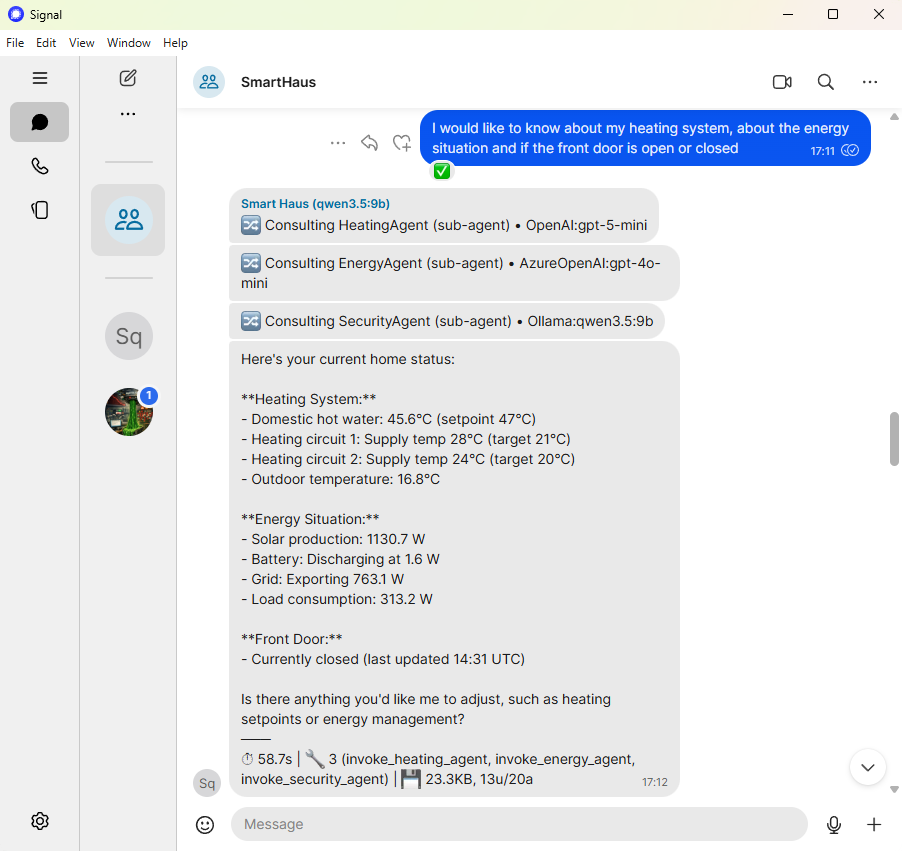
- Agentic AI — 12+ MCP tool services expose device telemetry, control, and automation to LLM agents. Domain-specific agents (CommsAgent, SecurityAgent, HeatingAgent, AudioAgent) orchestrate decisions autonomously — see the CasCap.SmartHaus README for the full agent architecture, MCP tool registry, and Signal messenger integration. Run locally with Ollama or connect to Azure OpenAI
- Feature-flag driven — enable only the integrations you need; each feature is an independent module with its own data pipeline, sinks, and MCP tools
- Azure cloud integration — optional Azure Table Storage and Azure Blob Storage sinks for telemetry persistence, with local Azurite emulation for development
- Azure Key Vault — optional Azure Key Vault integration for secrets management (disabled via
KeyVaultName=skipfor local development) - Standalone NuGet client libraries — device-specific API libraries (Fronius, Buderus, KNX, DoorBird, and more) are designed to be 100% standalone and published as individual NuGet packages — use them independently of SmartHaus in your own projects. Some libraries are not yet published and require further work before release.
- Real-time event streaming — SignalR hub, Redis Streams, and OpenTelemetry metrics for observability
- GitOps-ready — Kubernetes deployment via Helm charts and ArgoCD, with CI/CD through GitHub Actions
Quick Start
Clone the repo and run the self-contained demo — no external hardware or Azure subscription required.
Prerequisites: Docker with an NVIDIA GPU and the NVIDIA Container Toolkit for GPU-accelerated LLM inference. CPU-only mode works by removing the deploy block from the Ollama service in docker-compose.yml.
git clone https://github.com/f2calv/SmartHaus.git
cd KNX
docker compose --profile demo up --build
This builds the application from source and launches EdgeHardware (CPU/GPU telemetry monitoring), Ubiquiti (webhook-based camera events), and Comms (Signal messaging pipeline) with local infrastructure: Redis, Azurite, OpenTelemetry Collector, Ollama, and signal-cli.
Wait for the Ollama model pull to finish:
docker compose --profile demo logs ollama-init -f
Then explore:
- Swagger UI — http://localhost:8080/swagger
- EdgeHardware snapshot —
curl http://localhost:8080/api/v1.0/edgehardware - Ubiquiti test event —
curl -X POST "http://localhost:8080/api/v1.0/ubiquiti/event/smart?type=person&camera_name=FrontDoor&score=0.95" - Redis UI — http://localhost:7843
See the Docker Compose section below for full details, including Signal messaging setup.
Features
Defined as constants in FeatureNames, validated at startup by FeatureConfig.GetEnabledFeatures().
| Name | Description |
|---|---|
Buderus | Buderus heating system integration |
Comms | Single-instance communications service that consumes a Redis Stream of key events and forwards agent-processed decisions |
DDns | Dynamic DNS service |
DoorBird | DoorBird video doorbell integration |
EdgeHardware | Edge hardware monitoring — GPU telemetry via nvidia-smi, CPU temperature, and Raspberry Pi GPIO sensors. CPU monitoring is always enabled; GPU is auto-detected via ILGPU at startup |
Fronius | Fronius solar inverter integration |
Knx | KNX home automation integration |
Miele | Miele appliance integration |
Shelly | Shelly smart plug integration |
Sicce | Sicce aquarium pump integration |
SignalRHub | Consolidated SignalR hub server, providing a single real-time event endpoint for all features. Can run as a standalone pod for separation of responsibility |
Ubiquiti | Ubiquiti network device integration |
Wiz | Wiz smart lighting integration |
Features are configured via CasCap:FeatureConfig:EnabledFeatures as a comma-separated string (e.g. Knx,Fronius,DoorBird).
Multiple application deployment targets;
CasCap.App.Server— Containerized backend services for Kubernetes, runnable locally during development. Visual Studio users should set this as the startup project to run the backend.CasCap.App.Console— Console application for local MCP/AI agent development and testing. Leverages many of the same MCP tools as the backend, providing a client-side console test environment. Visual Studio users should launch this project to interactively test MCP tools and agent behaviour.
Agentic AI Architecture
SmartHaus uses a multi-agent architecture where a central CommsAgent orchestrates domain-specific sub-agents, each with their own MCP tools and instruction prompts. Users interact with the system via Signal Messenger — no custom mobile app required.
For detailed configuration, Redis Stream settings, and implementation specifics, see the CasCap.SmartHaus README.
Agents
| Agent | Role | MCP Tools |
|---|---|---|
| CommsAgent | Gateway orchestrator — routes user messages and system events to sub-agents, relays responses to Signal | 8 direct + 98 via delegation |
| SecurityAgent | Front door intercom, IP cameras, door lighting | 17 |
| HeatingAgent | Heat pump control, KNX heating zones | 11 |
| EnergyAgent | Solar inverter telemetry and battery status | 13 |
| HomeControlAgent | Shutters, outlets, rooms, floors, all lighting | 35 |
| InfraAgent | Edge hardware monitoring (CPU/GPU metrics) | 7 |
| AppliancesAgent | Miele appliance control (disabled — planned) | 15 |
| AudioAgent | Speech-to-text transcription via Whisper | — |
MCP Tool Services
MCP query services expose 70+ tools and 25 prompts to AI agents, conditionally registered based on enabled features.
| Service | Tools | Prompts | Domain |
|---|---|---|---|
SystemMcpQueryService | 3 | — | Date/time, provider list, agent list |
BusSystemMcpQueryService | 19 | 5 | Shutters, HVAC, power outlets, diagnostics |
HeatPumpMcpQueryService | 2 | 5 | Heat pump state and control |
InverterMcpQueryService | 7 | 5 | Solar inverter readings |
FrontDoorMcpQueryService | 8 | 5 | DoorBird intercom — photos, video, unlock |
AppliancesMcpQueryService | 9 | 5 | Miele appliance management |
EdgeHardwareMcpQueryService | 1 | — | GPU/CPU telemetry snapshots |
IpCameraMcpQueryService | 1 | — | UniFi Protect event status |
AquariumMcpQueryService | 2 | — | Sicce water pump control |
SmartPlugMcpQueryService | 3 | — | Shelly smart plug control |
SmartLightingMcpQueryService | 15 | — | KNX ceiling/wall lights and Wiz smart bulbs |
MessagingMcpQueryService | 3 | — | Signal messaging polls |
Service Architecture
flowchart TD
    subgraph FeaturePods["Feature pods (Fronius / KNX / DoorBird / Buderus)"]
        FRONIUS_SINK["FroniusSinkSignalRService"]
        KNX_SINK["KnxSinkSignalRService"]
        DOORBIRD_SINK["DoorBirdSinkSignalRService"]
        BUDERUS_SINK["BuderusSinkSignalRService"]
        FRONIUS_COMMS["FroniusSinkCommsStreamService"]
        KNX_COMMS["KnxSinkCommsStreamService"]
        DOORBIRD_MEDIA["DoorBirdSinkMediaStreamService"]
    end

    subgraph Hub["CasCap.SmartHaus (HausHub @ /hubs/haus)"]
        HAUSHUB["HausHub\n[Authorize]"]
        HUB_CONSOLE["HausHubSinkConsoleService"]
        HUB_METRICS["HausHubSinkMetricsService"]
    end

    subgraph Comms["CasCap.SmartHaus (Comms instance — gateway + media analysis)"]
        COMMS_BG["CommunicationsBgService"]
        COMMS_AGENT(("CommsAgent"))
        AUDIO_AGENT(("AudioAgent\n(Whisper STT)"))
        MEDIA_BG["MediaBgService"]
        SECURITY_AGENT(("SecurityAgent\n(vision)"))
    end

    MEDIA_STREAM[("Redis Stream\nmedia:stream:events")]
    COMMS_STREAM[("Redis Stream\ncomms:stream:events")]
    REDIS_CACHE[("Redis\nimage cache")]
    CLIENTS["SignalR clients\n(MAUI app, browser, etc.)"]
    SIGNALCLI["Signal messenger\n(signal-cli REST API)"]

    %% SignalR path
    FRONIUS_SINK -->|SendFroniusEvent| HAUSHUB
    KNX_SINK -->|SendKnxTelegram| HAUSHUB
    DOORBIRD_SINK -->|SendDoorBirdEvent| HAUSHUB
    BUDERUS_SINK -->|SendBuderusEvent| HAUSHUB
    HAUSHUB -->|ReceiveFroniusEvent etc.| CLIENTS
    HAUSHUB --> HUB_CONSOLE
    HAUSHUB --> HUB_METRICS

    %% Comms stream path (text events)
    FRONIUS_COMMS -->|CommsEvent| COMMS_STREAM
    KNX_COMMS -->|CommsEvent| COMMS_STREAM

    %% Media stream path (binary media)
    DOORBIRD_MEDIA -->|cache bytes| REDIS_CACHE
    DOORBIRD_MEDIA -->|MediaEvent| MEDIA_STREAM
    MEDIA_STREAM --> MEDIA_BG
    MEDIA_BG -->|fetch bytes| REDIS_CACHE
    MEDIA_BG --> SECURITY_AGENT
    SECURITY_AGENT -->|analysis CommsEvent| COMMS_STREAM

    %% CommsAgent gateway
    COMMS_STREAM --> COMMS_BG
    COMMS_BG -->|audio attachment| AUDIO_AGENT
    AUDIO_AGENT -->|transcribed text| COMMS_BG
    COMMS_BG --> COMMS_AGENT
    COMMS_AGENT -->|relay to group| SIGNALCLI
    SIGNALCLI -->|incoming messages| COMMS_BG
Dependency Graph
Direct
ProjectReferencelinks only. External NuGet packages from the CasCap.Common and CasCap.Api.Azure repos are omitted for clarity (consumed asProjectReferencein Debug,PackageReferencein Release).
graph TD
    %% ── Applications ────────────────────────────────────────────────────────
    subgraph apps ["🖥️ Applications"]
        SERVER["CasCap.App.Server<br/><sub>ASP.NET Core · K8s</sub>"]
        CONSOLE["CasCap.App.Console<br/><sub>Spectre.Console · Dev tool</sub>"]
    end

    %% ── Shared App Bootstrap ────────────────────────────────────────────────
    subgraph shared ["📦 Shared App Bootstrap"]
        APP["CasCap.App"]
        EXT2["CasCap.Common.Configuration"]
    end

    %% ── Core Orchestration ──────────────────────────────────────────────────
    subgraph core ["⚙️ Core"]
        HAUS["CasCap.SmartHaus"]
    end

    %% ── Feature Libraries ───────────────────────────────────────────────────
    subgraph features ["🔌 Feature Libraries"]
        subgraph buderus ["Buderus (KM200)"]
            BUD["Api.Buderus"]
            BUD_SINKS["Api.Buderus.Sinks"]
        end
        subgraph doorbird ["DoorBird"]
            DB["Api.DoorBird"]
            DB_SINKS["Api.DoorBird.Sinks"]
        end
        subgraph fronius ["Fronius (Solar)"]
            FRO["Api.Fronius"]
            FRO_SINKS["Api.Fronius.Sinks"]
        end
        subgraph knx ["KNX (Bus)"]
            KNX["Api.Knx"]
            KNX_SINKS["Api.Knx.Sinks"]
        end
        subgraph miele ["Miele"]
            MIE["Api.Miele"]
            MIE_SINKS["Api.Miele.Sinks"]
        end
        subgraph sicce ["Sicce"]
            SIC["Api.Sicce"]
            SIC_SINKS["Api.Sicce.Sinks"]
        end
        subgraph wiz ["Wiz (Lighting)"]
            WIZ["Api.Wiz"]
            WIZ_SINKS["Api.Wiz.Sinks"]
        end
        subgraph shelly ["Shelly (Smart Plugs)"]
            SHEL["Api.Shelly"]
            SHEL_SINKS["Api.Shelly.Sinks"]
        end
        subgraph ubiquiti ["Ubiquiti"]
            UBI["Api.Ubiquiti"]
            UBI_SINKS["Api.Ubiquiti.Sinks"]
        end
        subgraph edgehw ["Edge Hardware"]
            EDGE["Api.EdgeHardware"]
            EDGE_SINKS["Api.EdgeHardware.Sinks"]
        end
        SIGNAL["Api.SignalCli"]
        DDNS["Api.DDns"]
    end

    %% ── AI / MCP ────────────────────────────────────────────────────────────
    subgraph ai ["🤖 AI / MCP"]
        HAUS_AI["CasCap.Common.AI<br/><sub>Consolidated MCP tools & prompts</sub>"]
    end

    %% ── Foundation ──────────────────────────────────────────────────────────
    subgraph foundation ["🧱 Foundation"]
        ABS["CasCap.Common.Abstractions"]
    end

    %% ── Test Projects ───────────────────────────────────────────────────────
    subgraph tests ["🧪 Tests"]
        T_APP["App.Tests"]
        T_BUD["Api.Buderus.Tests"]
        T_DB["Api.DoorBird.Tests"]
        T_FRO["Api.Fronius.Tests"]
        T_KNX["Api.Knx.Tests"]
        T_MIE["Api.Miele.Tests"]
        T_SIG["Api.SignalCli.Tests"]
    end

    %% ── Application edges ───────────────────────────────────────────────────
    SERVER --> APP
    CONSOLE --> APP
    CONSOLE --> HAUS_AI
    CONSOLE --> FRO_SINKS
    CONSOLE --> BUD_SINKS
    CONSOLE --> KNX_SINKS
    CONSOLE --> DB_SINKS
    APP --> HAUS
    APP --> EXT2

    %% ── Core edges ──────────────────────────────────────────────────────────
    HAUS --> SIGNAL
    HAUS --> HAUS_AI
    HAUS --> BUD_SINKS
    HAUS --> DB_SINKS
    HAUS --> FRO_SINKS
    HAUS --> KNX_SINKS
    HAUS --> MIE_SINKS
    HAUS --> SIC_SINKS
    HAUS --> WIZ_SINKS
    HAUS --> SHEL_SINKS
    HAUS --> UBI_SINKS
    HAUS --> EDGE_SINKS
    HAUS --> DDNS

    %% ── AI / MCP edges ─────────────────────────────────────────────────────
    HAUS_AI --> BUD
    HAUS_AI --> DB
    HAUS_AI --> FRO
    HAUS_AI --> KNX
    HAUS_AI --> MIE
    HAUS_AI --> SIC
    HAUS_AI --> WIZ
    HAUS_AI --> SHEL
    HAUS_AI --> UBI
    HAUS_AI --> EDGE
    HAUS_AI --> SIGNAL

    %% ── Feature ↔ Core edges ────────────────────────────────────────────────
    BUD_SINKS --> BUD

    DB_SINKS --> DB

    FRO_SINKS --> FRO

    KNX_SINKS --> KNX
    KNX_SINKS --> SIGNAL

    MIE_SINKS --> MIE

    SIC_SINKS --> SIC

    WIZ_SINKS --> WIZ

    SHEL_SINKS --> SHEL

    UBI_SINKS --> UBI

    EDGE_SINKS --> EDGE

    %% ── Foundation edges ────────────────────────────────────────────────────
    HAUS --> ABS

    %% ── Test edges ──────────────────────────────────────────────────────────
    T_APP --> SERVER & HAUS & KNX & EXT2
    T_BUD --> BUD & EXT2
    T_DB --> DB & EXT2
    T_FRO --> FRO & EXT2
    T_KNX --> KNX & KNX_SINKS & EXT2
    T_MIE --> MIE & EXT2
    T_SIG --> SIGNAL & EXT2

    %% ── Styles ──────────────────────────────────────────────────────────────
    classDef appNode fill:#1565C0,stroke:#0D47A1,color:#fff
    classDef coreNode fill:#6A1B9A,stroke:#4A148C,color:#fff
    classDef featureNode fill:#2E7D32,stroke:#1B5E20,color:#fff
    classDef mcpNode fill:#00695C,stroke:#004D40,color:#fff
    classDef sinkNode fill:#E65100,stroke:#BF360C,color:#fff
    classDef foundationNode fill:#455A64,stroke:#263238,color:#fff
    classDef testNode fill:#78909C,stroke:#546E7A,color:#fff

    class SERVER,CONSOLE appNode
    class APP,EXT2,HAUS coreNode
    class BUD,DB,FRO,KNX,MIE,SIC,WIZ,SHEL,UBI,EDGE,SIGNAL,DDNS featureNode
    class HAUS_AI mcpNode
    class BUD_SINKS,DB_SINKS,FRO_SINKS,KNX_SINKS,MIE_SINKS,SIC_SINKS,WIZ_SINKS,SHEL_SINKS,UBI_SINKS,EDGE_SINKS sinkNode
    class ABS foundationNode
    class T_APP,T_BUD,T_DB,T_FRO,T_KNX,T_MIE,T_SIG testNode
NuGet Packages
Standalone device API libraries published from this repository. Some libraries are not yet published — badges will appear once the first version is pushed to NuGet.
| Library | Package |
|---|---|
| CasCap.Api.Buderus |  |
| CasCap.Api.Buderus.Sinks |  |
| CasCap.Api.DoorBird |  |
| CasCap.Api.DoorBird.Sinks |  |
| CasCap.Api.Fronius |  |
| CasCap.Api.Fronius.Sinks |  |
| CasCap.Api.Knx |  |
| CasCap.Api.Knx.Sinks |  |
Prerequisites
- .NET SDK: 10.0.x stable (see
global.json—allowPrerelease: false) - Docker: Required for local infrastructure (Redis, Azurite, OpenTelemetry Collector)
- NVIDIA GPU + Container Toolkit: Required for GPU-accelerated Ollama inference in the demo profile (CPU-only mode available by removing the
deployblock) - Azure subscription (optional): For cloud sinks (Table Storage, Blob Storage) and Key Vault secrets management. Not required for local development — Azurite emulates Azure Storage locally
Docker Compose
A single docker-compose.yml with profiles for different use cases.
Default — Local Development
Starts infrastructure services only. The application runs from Visual Studio or dotnet run, with appsettings.Development.json pointing to these containers.
# 1. Start infrastructure dependencies
docker compose up

# 2. Restore and build
dotnet restore
dotnet build --no-restore
| Service | Port | Purpose |
|---|---|---|
| Redis | 6379 | Cache, pub/sub, event sinks |
| P3x Redis UI | 7843 | Browser-based Redis inspection |
| OTEL Collector | 4317 / 4318 | OpenTelemetry gRPC and HTTP endpoints |
| Azurite | 10000–10002 | Azure Storage emulator (Blob, Queue, Table) |
demo Profile — Visitor Demo
Self-contained demo for new visitors — see Quick Start above to get running in minutes.
Builds the application from source and launches EdgeHardware + Ubiquiti + Comms features with local AI inference via Ollama. No external hardware or Azure subscription required.
docker compose --profile demo up --build
Additional services started by the demo profile:
| Service | Port | Purpose |
|---|---|---|
| SmartHaus | 8080 | Application with Swagger UI at /swagger |
| signal-cli REST | 8081 | Signal messaging API |
| Ollama | 11434 | Local LLM inference (GPU) |
Signal Messaging Setup
-
Install Signal Messenger on your phone: Android (Google Play) | iOS (App Store)
-
Link signal-cli to your phone — open the QR code link endpoint in your browser:
http://localhost:8081/v1/qrcodelink?device_name=signal-api
Scan the QR code from Signal on your phone: Settings → Linked Devices → Link New Device.
-
Send a test event — this triggers the Comms pipeline which forwards the event via Signal:
curl -X POST "http://localhost:8080/api/v1.0/ubiquiti/event/smart?type=person&camera_name=FrontDoor&score=0.95"Or use the
ubiquiti-demo.httpfile with the VS Code REST Client extension.
Project Configuration
Solution Files
| File | Purpose |
|---|---|
SmartHaus.Debug.slnx | Development — includes cross-repo references to CasCap.Common and CasCap.Api.Azure projects |
SmartHaus.Release.slnx | Release builds — SmartHaus projects only, consumes dependencies as NuGet packages |
Dependency: Debug builds require CasCap.Common and CasCap.Api.Azure cloned at the same directory level.
Key Files
| File | Purpose |
|---|---|
Directory.Build.props | C# 14.0, ImplicitUsings, Nullable: enable, TreatWarningsAsErrors: true, IsPackable: false by default |
Directory.Packages.props | Central package version management (ManagePackageVersionsCentrally: true) |
.editorconfig | Code style rules (4-space indent, LF line endings, full formatting rules) |
global.json | SDK constraint — stable releases only |
docker-compose.yml | Infrastructure services + demo profile for visitor demo |
ubiquiti-demo.http | REST Client test requests for the Ubiquiti demo webhook endpoints |
GitVersion.yml | Semantic versioning configuration (ContinuousDeployment mode) |
Suppressed Warnings
Configured in Directory.Build.props: IDE1006, IDE0079, IDE0042, CS0162, CS1574, S125, NETSDK1233, NU1901, NU1902, NU1903
CI/CD Pipeline
GitHub Actions (.github/workflows/ci.yml)
Triggers: Push (except documentation files), PRs to main, manual dispatch.
Jobs:
- release — Reusable workflow from
f2calv/gha-workflowsfor semantic versioning and GitHub release creation
Additional workflows:
deploy-all.yml— Triggers GitOps Helm manifest updates for Kubernetes deployment_gitops-helm-update.yml— Reusable workflow for updating Helm chart image tags
Making Changes
Adding Code
- Place code in the correct project by functionality
- Follow
.editorconfigstyle rules - Add XML documentation to all public API surface
- Add tests in the corresponding
.Testsproject - Validate:
dotnet build SmartHaus.Debug.slnx --no-restore→ 0 errors
Adding Dependencies
-
Add version to
Directory.Packages.props -
Reference in
.csprojwithout a version attribute:<PackageReference Include="PackageName" /> -
Run
dotnet restore
Creating New Projects
- Library projects inherit
Directory.Build.propsautomatically - Set
<IsPackable>true</IsPackable>explicitly only for NuGet packages - Test projects must not be packable (default)
Validation Checklist
-
dotnet restoresucceeds -
dotnet build SmartHaus.Debug.slnx --no-restorecompletes with 0 errors - Docker dependencies running (
docker compose up) - Public API has XML documentation
- Properties separated by blank lines
-
ServiceProviderinstances are disposed in tests
Contributing
- Fork the repository and create a feature branch
- Follow all conventions documented above
- Run the full validation checklist before submitting a PR
- PRs target the
mainbranch and require CI to pass - Versioning is automated via GitVersion — do not manually edit version numbers