
Pavo: Bancada de Transcrição com Inteligência de Áudio
eidos-agi/pavo
Transcrição auditável com diarização bio-inspirada e roteamento de tarefas
Ver no GitHubMCP server para processamento de áudio com identificação de falantes, diarização bio-inspirada e roteamento inteligente de transcrições. Integra-se ao Plaud CLI e oferece controle granular sobre arquivos de áudio, dicionários customizados por chamada e criação automatizada de tarefas. Ideal para equipes que precisam de registros auditáveis e inteligência de áudio confiável em conversas complexas.
Instalação
npx convez-ai eidos-agi/pavo1 comando no terminal: detecta o formato do repositório (marketplace ou plugin avulso) e instala via Claude Code. Requer Node 18+ e o Claude Code instalado.
Métricas
Casos de uso
- Processamento de gravações de chamadas/reuniões com múltiplos falantes
- Transcrição de áudio com dicionários customizados e roteamento automático
- Identificação de falantes em áudio sobreposto ou de baixa qualidade
- Criação de arquivos duráveis e auditáveis com prova de origem
Veredito

Pavo é uma solução sofisticada para equipes de dados que precisam ir além da transcrição preta-de-caixa. A abordagem bio-inspirada para detecção de falantes e o controle granular sobre áudio e roteamento o tornam valioso para contextos de alto valor (chamadas críticas, entrevistas, investigações), mas exige expertise técnica para configuração e manutenção.
README
A tradução para o português deste README ainda está na fila.
Pavo
Manifest Anything.
Pavo is a data-science-led transcription workbench for teams that need trustworthy records from messy audio. It was inspired by Plaud workflow gaps, but it is not a Plaud-only tool: Pavo gives operators control over real audio files, speaker identification, custom dictionaries per call, intelligent routing, task creation, and durable archives.
Use it when the stock transcript is not enough and the team needs a repeatable way to improve the audio, prove who spoke, preserve the source file, and route the resulting intelligence into real work.
Bio-Inspired Audio Intelligence
Pavo can route captured or imported audio through eidos-transcribe, an
installable audio intelligence package with bio-inspired speaker analysis.
The key idea is simple: instead of trusting one transcript or one speaker label,
eidos-transcribe builds speaker detector banks, checks audio in rolling
windows, and lets those detectors vote on who is speaking. That immune-inspired
bootstrap process can confirm a speaker label, challenge it, or mark a segment
as mixed when the audio looks like more than one voice.
When a segment looks messy, Pavo can send it down a deeper path:
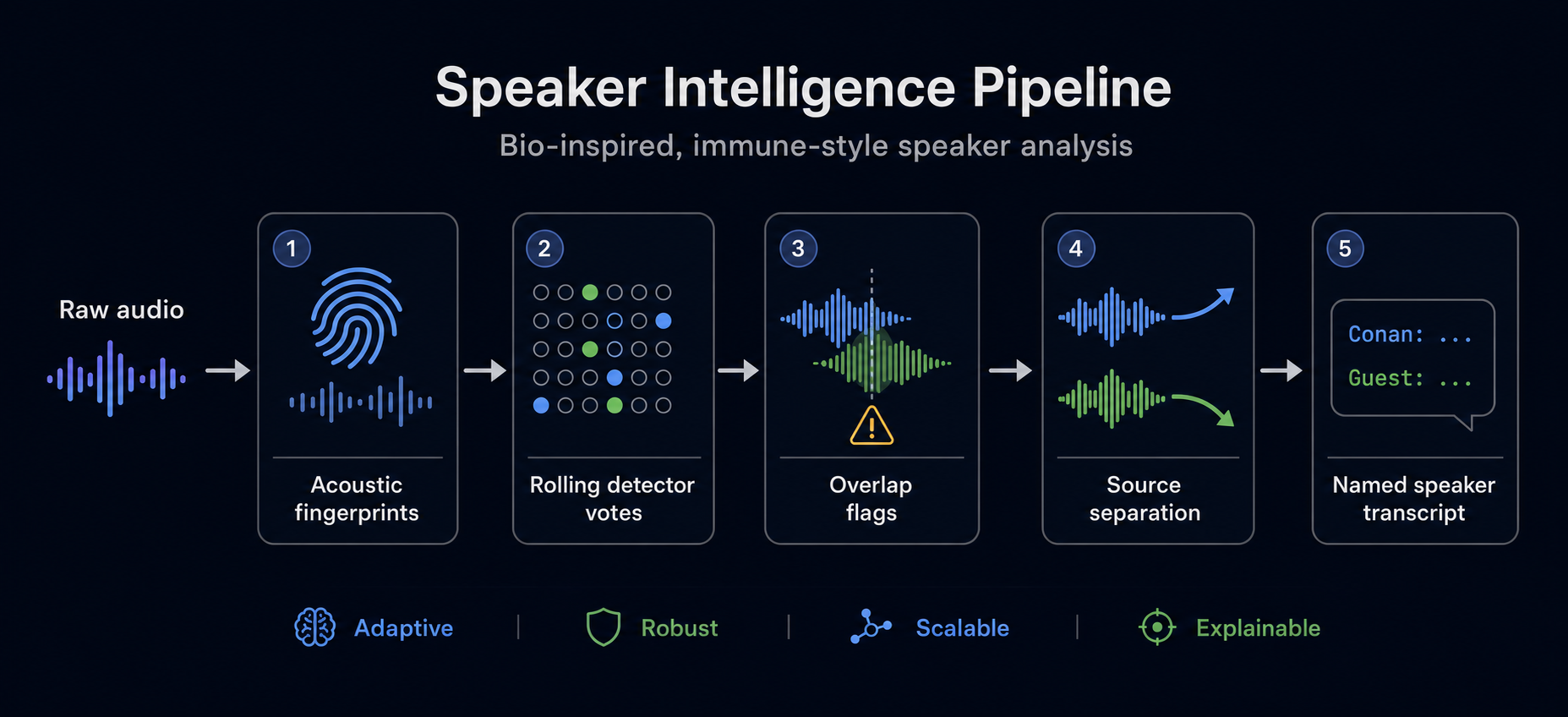
source audio -> speaker fingerprints -> rolling detector votes -> overlap flags -> source-separation analysis
That is not a claim that Pavo currently runs genetic algorithms. The current implementation is better described as bio-inspired audio decomposition: immune-style speaker detectors, rolling acoustic fingerprints, source separation for overlap regions, and proof manifests that show what happened.
See proof for current test results, media fixtures, and a real Plaud audio transcription run.
See media tests for the real Conan overlap fixture and the New Zealand accent/slang fixture.
See proof matrix for the 25-test proof plan and current coverage status.
See diarization direction for the current product principle: detect speaker changes first, then attribute and merge.
Why Pavo Exists
Pavo exists because high-value conversations are rarely clean. Teams capture calls, interviews, meetings, field notes, and voice memos across tools, then get back a transcript that may be convenient but is hard to audit, improve, or route. Plaud was the first pain point: it captured well, but the stock workflow did not give enough control over the underlying audio or the downstream intelligence layer.
The larger product is for any team that wants transcription led by data scientists instead of treated as a black box. A team needs access to the audio itself, control over where it goes, better speaker identification, call-specific vocabulary, source-separation checks for messy regions, and a way to turn the recording into follow-up work.
The target loop is:
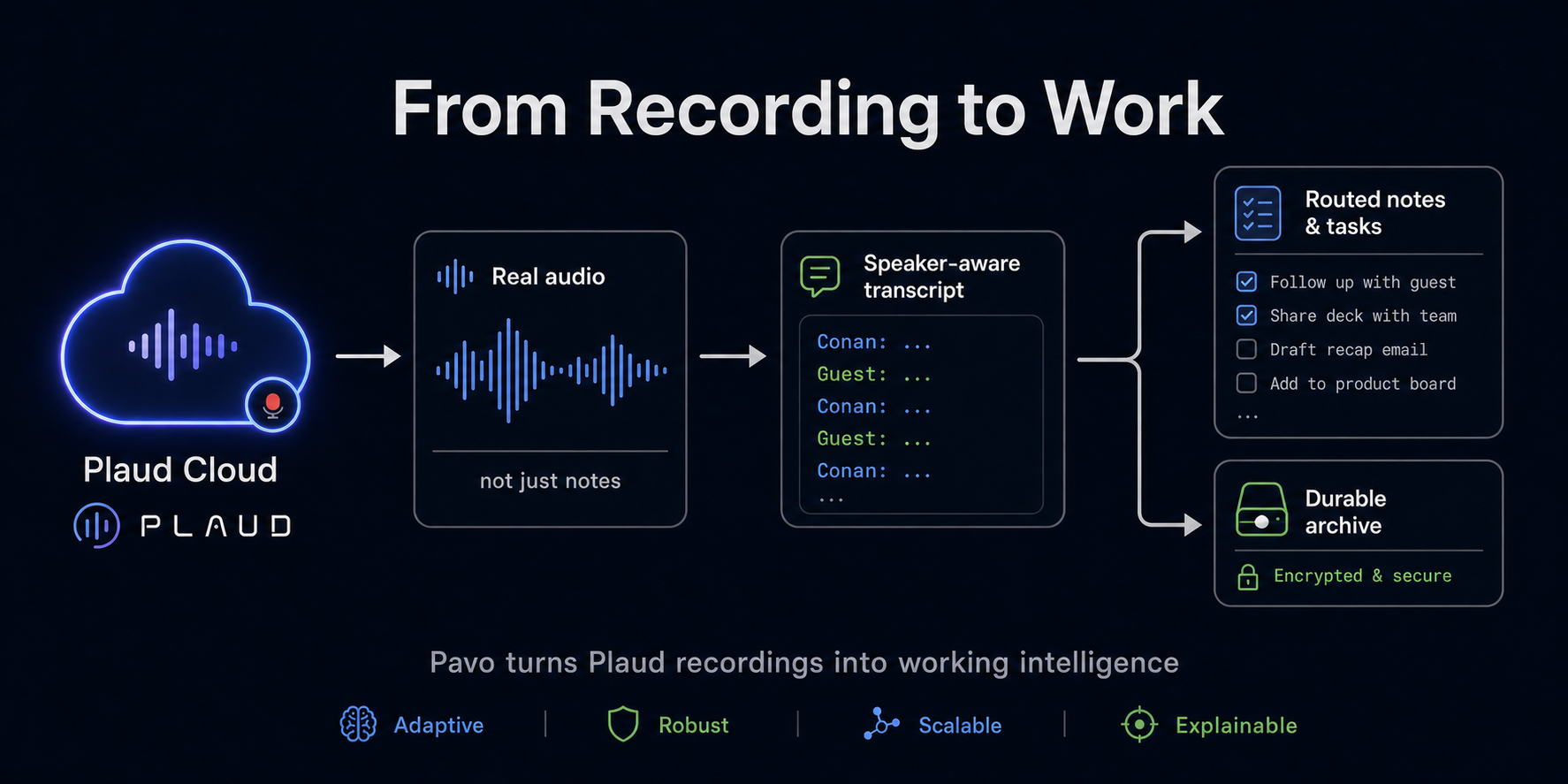
recording source -> real audio -> speaker-aware transcript -> routed notes and tasks -> durable archive
Pavo owns ingestion wrappers, file control, routing, and the archive layer. It
can wrap Plaud CLI/MCP today, and it can also process imported local media. For
the audio intelligence layer, Pavo uses eidos-transcribe as an installable
package that can improve independently.
The problems Pavo is built around:
- The notes were not enough. We needed the real recording, not just a summary. Pavo saves the actual audio so better AI and reviewers can listen again.
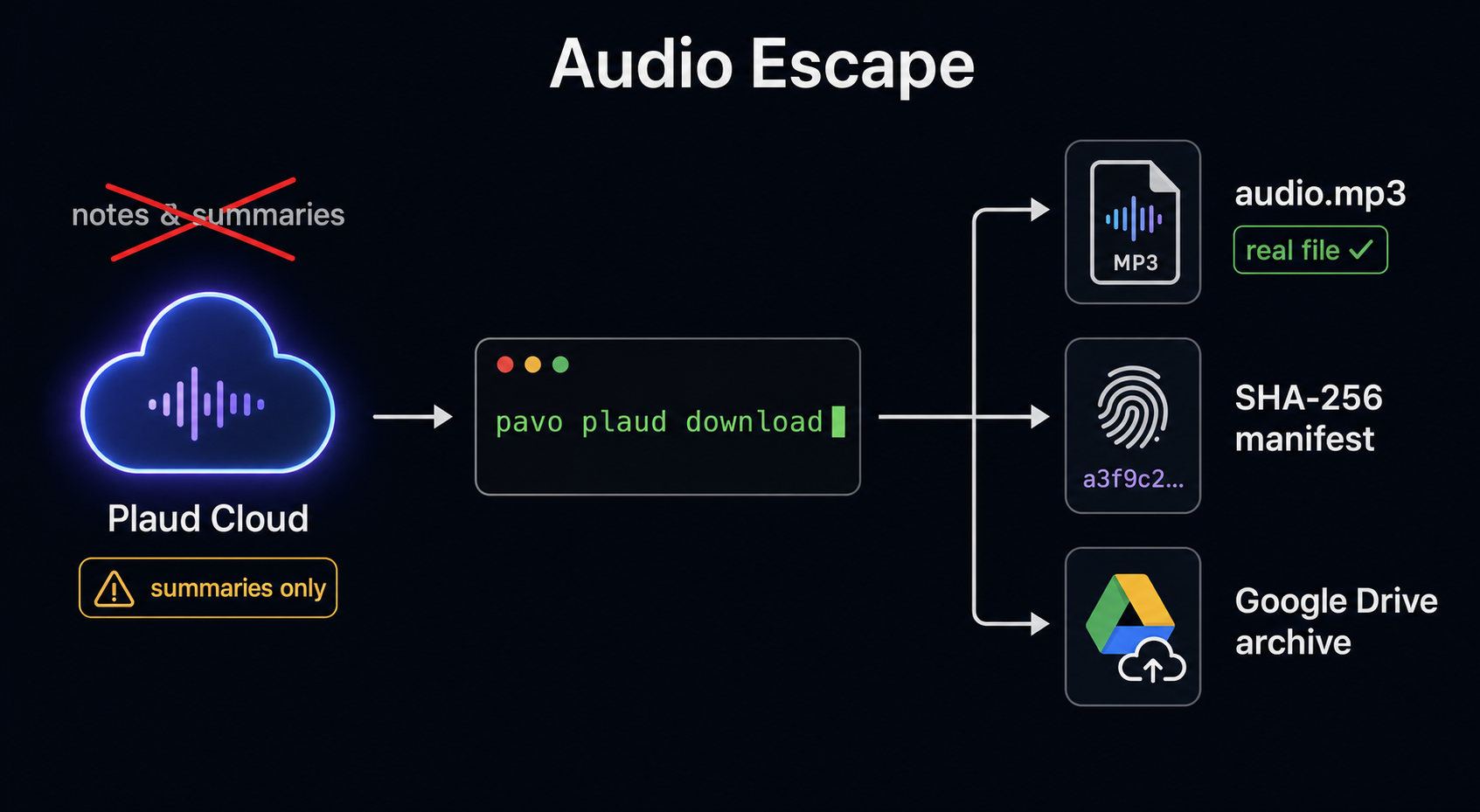
- The audio was hard to control. Recordings can live behind app, cloud, and tool layers. Pavo brings audio onto the computer with hashes and manifests so the source artifact is not lost.
- The account was confusing. The Plaud login did not look like a normal email address. Pavo shows which Plaud account is connected before it downloads anything.
- The AI tool path was flaky. MCP and agent tools are useful, but they should not be the only path. Pavo keeps a simple command-line path that works even when an agent integration is hidden or unavailable.
- Links expired. Temporary audio links should not become the record. Pavo saves the file, the hash, and the manifest instead.
- Secrets needed boundaries. We needed local settings without leaking
tokens or private data. Pavo keeps settings under
~/Eidos/Pavoand leaves secrets in their proper stores. - Recordings needed a home. Local cache is not enough for a durable archive. Pavo is being built to sync audio, notes, and manifests into Google Drive.
- AI misheard important words. Names, companies, product names, and
call-specific terms can sound like other words.
eidos-transcribelets Pavo pass a custom dictionary for each call so transcripts get smarter. - One transcript was too fragile. One AI model can miss things another
model catches.
eidos-transcribecan compare multiple engines and keep the evidence. - Who spoke mattered. Speaker labels are not the same as knowing the
person.
eidos-transcribeuses audio evidence and known speaker mappings to improve attribution. - Messy audio needed help. People interrupt, rooms are noisy, and speech
overlaps.
eidos-transcribecan flag messy regions and analyze them separately. - The system needed to improve over time. Pavo should not be rebuilt every
time transcription gets better. Pavo calls
eidos-transcribeas an installable package that can be upgraded.
Problem -> Solution Visuals
Pavo starts by getting teams out of summary-only workflows and back to the real audio file, with hashes, manifests, and durable archives.
The audio intelligence layer then treats speaker identification as an evidence pipeline: fingerprints, detector votes, overlap flags, source separation, and a named speaker transcript.
The final product loop turns recordings into speaker-aware transcripts, routed notes and tasks, and a durable archive that future models can revisit.
The short version:
- Pavo solves: source wrapping, Plaud CLI/MCP access, real audio download, local file control, recording manifests, Google Drive archiving, routing, task creation, and agent/plugin access.
eidos-transcribesolves: better transcription, speaker identification, custom dictionaries, multi-engine comparison, messy-audio analysis, and future reprocessing as models improve.
Read the full backstory for the longer version.
The original parrot scribe mascot is preserved at
assets/mascot.png.
By default, Pavo stores local non-secret configuration under:
~/Eidos/Pavo/
Secrets do not belong in Pavo config. Plaud OAuth tokens remain owned by the
Plaud CLI under ~/.plaud/, and Google/OpenAI credentials remain in their
normal credential stores.
Install for local development
python3 -m venv .venv
.venv/bin/python -m pip install -e .
ln -sf "$PWD/.venv/bin/pavo" ~/.local/bin/pavo
Install the Plaud CLI separately:
npm install -g @plaud-ai/cli
plaud login
Commands
pavo init
pavo doctor
pavo config show
pavo plaud me
pavo plaud files
pavo plaud audio-url <recording-id>
pavo plaud download <recording-id>
pavo audio doctor
pavo audio process ./clip.mp4 --source-id youtube_<id> --num-speakers 6 \
  --speaker "SPEAKER_00=Conan O'Brien=conan-obrien" \
  --speaker-correction "00:00-00:06=SPEAKER_00"
pavo audio decompose ./clip.mp4 --source-id youtube_<id> --num-speakers 6 \
  --speaker "SPEAKER_00=Conan O'Brien=conan-obrien"
pavo audio decompose ./clip.mp4 --source-id youtube_<id> --include-rejected-stems
pavo audio separate-overlaps youtube_<id> --start 17 --end 21 --min-duration 0.25
pavo review anchors init docs/plaud-c37-speaker1-anchor-review-clips.json
pavo review anchors corrections docs/plaud-c37-speaker1-anchor-review-sheet.json
pavo video render youtube_<id> --title "Reviewed call" --duration 30
pavo transcribe <recording-id> --context-term Plaud
pavo plaud download writes the audio to
~/Eidos/Pavo/cache/plaud/<recording-id>/audio.mp3 by default and prints its
SHA-256 hash.
pavo transcribe reuses that audio file if it already exists, or downloads it
first. It calls eidos-transcribe as a subprocess and writes the transcript
bundle under ~/Eidos/Pavo/cache/plaud/<recording-id>/transcribe/. Pavo records
its own run manifest next to the audio as pavo-transcribe-manifest.json.
pavo audio process runs imported audio or video-derived audio through
eidos-transcribe process-call, including speaker analysis. It writes output to
~/Eidos/Pavo/cache/imports/<source-id>/process-call/ and records a
pavo-process-manifest.json with the source file hash and command.
Pass --speaker only for labels you have reviewed, and use
--speaker-correction for trusted time ranges where a human or video frame has
confirmed the speaker.
pavo audio decompose runs the stronger voiceprint-first orchestration path via
eidos-transcribe decompose-transcribe. It writes output to
~/Eidos/Pavo/cache/imports/<source-id>/decompose-transcribe/ and records a
pavo-decompose-manifest.json. The current flow builds clean speaker anchors,
voiceprints, rolling disputed-region evidence, and separation-on-demand reports.
Accepted separated stems are transcribed into evidence, but they do not
automatically replace the canonical transcript without a reviewed merge policy.
pavo video render burns captions into a video using the best transcript JSON
from a processed source. It prefers rolling/immune or verified named artifacts
when available, falls back to labeled speaker output, and writes
pavo-render-manifest.json next to the processed source so caption rendering
can avoid pretending uncertainty is certainty.
pavo audio separate-overlaps runs the source-separation review path for mixed
speaker regions that the rolling fingerprint marks as suspect. It writes
separated stems, a score report for each stem, and pavo-overlap-manifest.json.
pavo review anchors init creates a pending review sheet from speaker-anchor
clips. After a human marks clean rows as approved, pavo review anchors corrections prints the exact --speaker-correction flags for the corrected
pavo audio decompose rerun.
Tests
python3 -m unittest discover -s tests