
Fleet — Gerenciador de Agentes Claude em Paralelo
edisonshen/fleet
Coordena múltiplos agentes Claude Code em paralelo com handoff automático de contexto
Ver no GitHubConsole de comando que coordena múltiplos agentes Claude Code executando em paralelo, cada um em sua própria branch/worktree. Um coordenador por projeto gerencia a fila de tarefas, divide o trabalho, monitora contexto e orquestra handoffs automáticos entre workers com estado preservado. Interface TUI integrada mantém você como gestor enquanto agentes fazem o trabalho.
Instalação
npx convez-ai edisonshen/fleet1 comando no terminal: detecta o formato do repositório (marketplace ou plugin avulso) e instala via Claude Code. Requer Node 18+ e o Claude Code instalado.
Métricas
Casos de uso
- Paralelizar desenvolvimento de múltiplas features em um repositório
- Gerenciar múltiplas sessões Claude Code com handoff automático ao atingir limites de contexto
- Automatizar planejamento, split de tarefas e PR autopilot com rastreamento centralizado
Veredito

Fleet é uma solução sofisticada para quem quer amplificar a capacidade de agentes Claude Code em projetos grandes. Requer familiaridade com Go, git worktrees e tmux, mas oferece orquestração robusta com preservação de contexto e aprendizagem incremental entre workers — valor real para times que lidam com codebases complexas.
README
A tradução para o português deste README ainda está na fila.
Fleet
Everyone is a manager.
Running many Claude Code sessions across many repos turns you into a human scheduler: which tab is blocked, whose context is hot, which PR needs a rebase. Fleet collapses that surface into one TUI. A per-project coordinator owns the task list and dispatches workers; every worker runs in its own git worktree on its own branch; context handoffs happen automatically with the prior session's state attached. You stay the manager. The agents do the work.
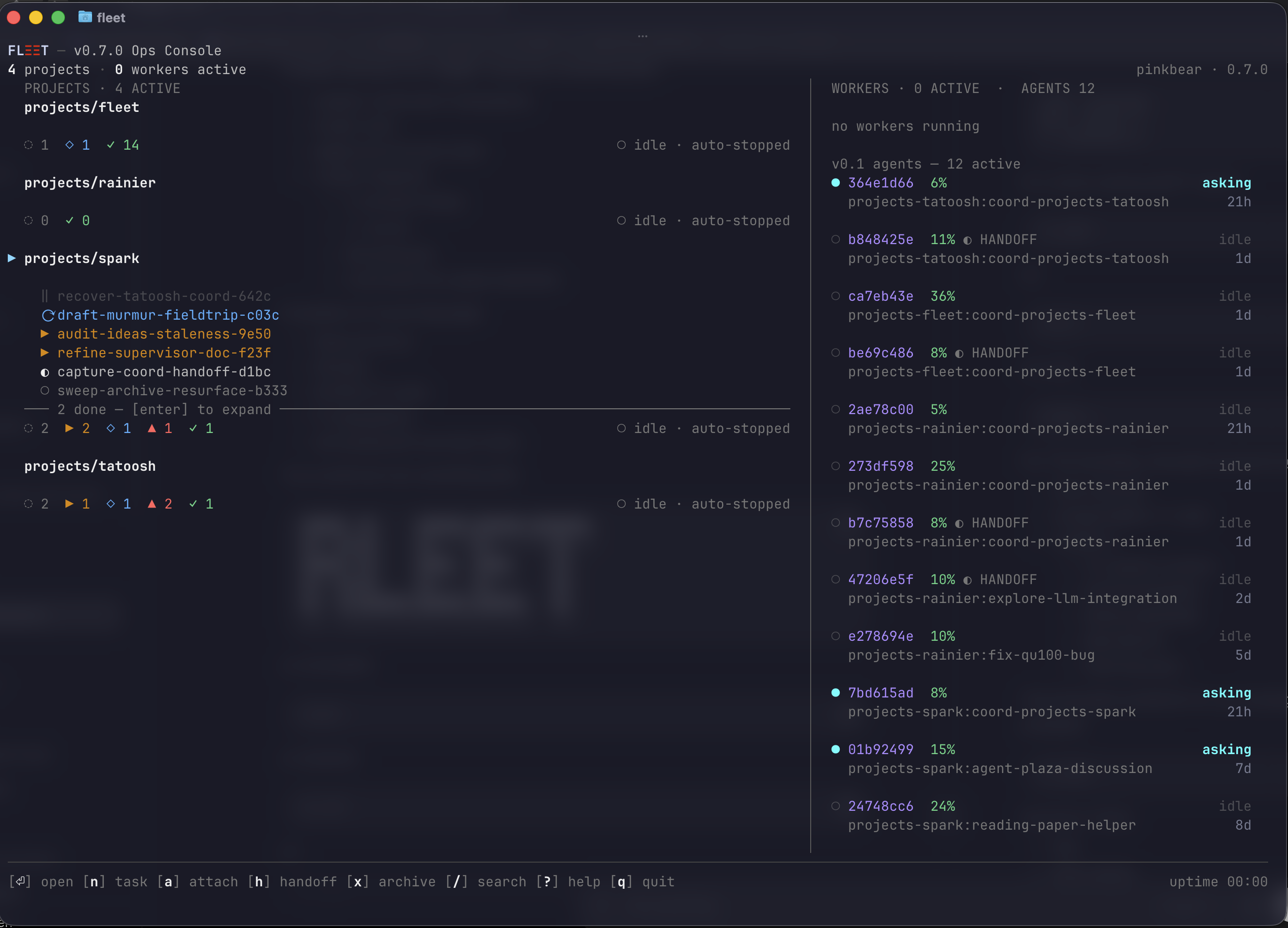
Why Fleet
- 50% context handoff, with context.
fleet-guardwatches every agent's context usage and triggers a handoff at 50% / 70% thresholds. The successor receives a structured doc carrying prior state, decisions made, files modified, and next steps. You don't babysit context. - One coordinator per project. Each project gets a dedicated coord
session that owns
tasks.md, dispatches workers, and shepherds PRs. Your single point of contact per repo. - Coord designs and splits the work. Describe a problem, the coord runs a planning conversation (scope, edge cases, testing plan), then splits it into tasks and dispatches workers — only after you approve. No surprise scope.
- Tasks run in parallel. Above parallelism 1, every worker runs in its own git worktree on its own branch. Multiple PRs open at once, all independently progressing.
- Per-task status tracking.
tasks.mdis the source of truth — status, priority, lifecycle timestamps, PR URL, notes. Visible in the TUI, mutable viafleet tasks. - Workers learn as they work. Each project keeps a
learnings.mdlog that workers append to as they hit gotchas, fixes, or domain conventions. The coordinator injects the top recent learnings into every subsequent dispatch prompt — so the next worker inherits prior workers' hard-won lessons without operator re-onboarding. Project intelligence compounds. - PR autopilot. Each worker watches its own PR. CI fails → retry-fix subagent. PR goes BEHIND or DIRTY → rebase subagent on an isolated worktree. Trivial review comments addressed inline. Substantive Go conflicts raise to the operator.
- Remote control. Mobile claude.ai can pair with running coord and worker sessions via the bundled remote-control daemon. Shepherd work from your phone.
- Clear install. Brew tap, one runtime dep (
tmux), one external CLI (claude), one bootstrap step (fleet init). No hidden config.
Install
brew install edisonshen/tap/fleet
From source (Go 1.25+):
go install github.com/edisonshen/fleet/cmd/fleet@latest
Then bootstrap once:
fleet init
fleet init installs the bundled fleet-guard and coordinator
skills under ~/.claude/skills/ and seeds ~/.fleet/standards.md.
Skill install shape: copy vs symlink
A bundled skill can sit on disk two ways:
| Shape | Source | When a merged skill fix goes live | Best for |
|---|---|---|---|
| copy | embedded binary bytes | after rebuilding the binary and re-running fleet skills sync | brew / binary-only installs |
| symlink | the repo checkout's skills/<name>/ | immediately, on the next coord spawn | developing on Fleet |
fleet init and fleet skills sync install copies — self-contained,
the only safe option when there is no repo checkout (brew). The cost: a
merged skill fix is invisible to a running coord until you rebuild the
binary and re-sync. This gap once silently neutered a merged P0
(#182): the install was a frozen hand-copied snapshot, so the fix never
reached the running coord.
If you are developing on Fleet (you have the repo checked out), use a symlink so fixes go live the moment they land in your checkout:
fleet skills link            # symlink ~/.claude/skills/<name> -> <repo>/skills/<name>
                             # (auto-detects the checkout from registered projects)
fleet skills link --from ~/projects/fleet   # or point at a checkout explicitly
Recommendation: symlink for anyone working on the Fleet repo itself (this is the default for the maintainer); copy for everyone else.
Symlink tradeoff: the linked skill follows your checkout's working
tree. If the checkout sits on a feature branch, the coord runs that
branch's skill code. Keep the linked checkout on main for stable
behavior, or fleet skills sync --force to convert back to a pinned copy.
fleet skills status reports each skill's shape and flags a copy that
has diverged from the repo (a merged fix the running coord can't see),
exiting non-zero so CI/scripts catch the drift — it is the reliable drift
gate today. A coord launched through the fleet coord-run supervisor also
warns to stderr at startup; the default dispatch wrapper does not yet route
through that supervisor, so run fleet skills status to be sure.
Runtime deps: tmux (brew pulls it transitively) and the
Claude Code CLI.
The brew tap path matters on upgrade: a JetBrains IDE is also distributed as a cask named
fleet, sobrew upgrade fleetresolves to the cask. Always upgrade by tap:brew upgrade edisonshen/tap/fleet.
Quickstart
fleet init                              # one-time: install skills + seed standards
cd ~/projects/myrepo
fleet                                   # open the dashboard
From the dashboard:
- Press
[+]to register the current repo (or any cloned repo) as a Fleet project. - Move the cursor to the project row and press
[a]to spawn its coordinator. - In the coord's tmux session, describe a problem in plain English. The coord runs DISCUSS → PLAN-DOC → SPLIT → TASK LIST → TASK-PLAN-DOC with you.
- Approve the plan. The coord saves the approved implementation plan
under the project's
docs/folder, writestasks.md, saves per-task plan docs, then starts the worker/reviewer/finisher flow on its next tick. - Watch progress in the dashboard. Press
[a]on a worker row to peek at its heartbeat; press[h]to force a handoff if context is hot.
Hotkeys
| Key | Action |
|---|---|
j / k | Move cursor (wraps) |
enter | Expand/collapse row, or open detail |
a | Attach: coord (project), tmux (agent), peek (worker) |
d | Dispatch a new agent (opens repo picker) |
+ | Register a cloned repo as a fleet project |
h | Handoff the selected agent to a fresh replacement |
x | Archive the selected agent |
/ | Filter dashboard rows by substring |
? | Help |
q | Quit |
Full surface: fleet --help.
Architecture
A project is a repo Fleet has seen. A coordinator is a
per-project Claude Code session that owns tasks.md (one coord per
project, NB-flocked). A worker is a Claude Code agent in a detached
tmux session running one task in its own worktree. A handoff fires
when an agent's context % gets hot — fleet-guard writes a structured
doc and a fresh agent picks the work up.
See docs/DESIGN.md for the design rationale and docs/COORDINATOR-WORKFLOW.md for the eight-step engagement flow (DISCUSS → PLAN-DOC → SPLIT → TASK LIST → TASK-PLAN-DOC → IMPLEMENT → PR-TRACK → DONE).
More
fleet --help— full CLI surface (dispatch,attach,handoff,drain,tasks,workers,learnings,standards,peek,maintenance).- CHANGELOG.md — release history.
- skills/fleet-guard/SKILL.md — agent-side context watcher and handoff trigger.
- skills/coordinator/SKILL.md — per-project autonomous task driver.
License
MIT — see LICENSE.